Solved Please help re: System Restore encountered an error (0x81000203)

Tara100

New member
Member
Local time
7:58 PM
Messages
52
Location
Devon, UK
Hello

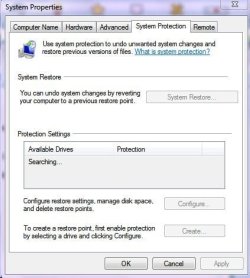
I'm cracking up as I've tried all recommended fixes for the above error message - System restore won't 'enable' and as in the screenshot, most of the options are greyed out.

I've tried registry fixes, and used 'FixWin' - nothing will fix the problem - please help !


Tara
 

Attachments

  • Untitled.jpg
    Untitled.jpg
    13.1 KB · Views: 33
  • Untitled 2.jpg
    Untitled 2.jpg
    28.8 KB · Views: 25

My Computer My Computer

At a glance

Windows 7 Home Premium 64 bitIntel(R) Core(TM) i33.00
Computer Manufacturer/Model Number
Acer Aspire 5742
OS
Windows 7 Home Premium 64 bit
CPU
Intel(R) Core(TM) i3
Memory
3.00
Monitor(s) Displays
Intel(R) HD Graphics [Display adapter]
Hard Drives
235.99 Gigabytes Usable Hard Drive Capacity
198.74 Gigabytes Hard Drive Free Space

MATSHITA DVD-RAM UJ890AS [Optical drive]

Hitachi HTS545025B9A300 [Hard drive] (250.06 GB)
Here are the results of the disk check I ran about a short while ago:


Log Name: Application
Source: Microsoft-Windows-Wininit
Date: 23/09/2011 18:47:49
Event ID: 1001
Task Category: None
Level: Information
Keywords: Classic
User: N/A
Computer: UXB
Description:


Checking file system on C:
The type of the file system is NTFS.
Volume label is Acer.

A disk check has been scheduled.
Windows will now check the disk.

CHKDSK is verifying files (stage 1 of 5)...
177664 file records processed.

File verification completed.
337 large file records processed.

0 bad file records processed.

0 EA records processed.

76 reparse records processed.

CHKDSK is verifying indexes (stage 2 of 5)...
232976 index entries processed.

Index verification completed.
0 unindexed files scanned.

0 unindexed files recovered.

CHKDSK is verifying security descriptors (stage 3 of 5)...
177664 file SDs/SIDs processed.

Cleaning up 279 unused index entries from index $SII of file 0x9.
Cleaning up 279 unused index entries from index $SDH of file 0x9.
Cleaning up 279 unused security descriptors.
Security descriptor verification completed.
27657 data files processed.

CHKDSK is verifying Usn Journal...
37666448 USN bytes processed.

Usn Journal verification completed.
CHKDSK is verifying file data (stage 4 of 5)...
177648 files processed.

File data verification completed.
CHKDSK is verifying free space (stage 5 of 5)...
46122974 free clusters processed.

Free space verification is complete.
Windows has checked the file system and found no problems.

230462463 KB total disk space.
45604964 KB in 128209 files.
76568 KB in 27658 indexes.
0 KB in bad sectors.
289035 KB in use by the system.
65536 KB occupied by the log file.
184491896 KB available on disk.

4096 bytes in each allocation unit.
57615615 total allocation units on disk.
46122974 allocation units available on disk.

Internal Info:
00 b6 02 00 e4 60 02 00 49 4a 04 00 00 00 00 00 .....`..IJ......
29 03 00 00 4c 00 00 00 00 00 00 00 00 00 00 00 )...L...........
00 00 00 00 00 00 00 00 00 00 00 00 00 00 00 00 ................

Windows has finished checking your disk.
Please wait while your computer restarts.

Event Xml:
<Event xmlns="http://schemas.microsoft.com/win/2004/08/events/event">
<System>
<Provider Name="Microsoft-Windows-Wininit" Guid="{206f6dea-d3c5-4d10-bc72-989f03c8b84b}" EventSourceName="Wininit" />
<EventID Qualifiers="16384">1001</EventID>
<Version>0</Version>
<Level>4</Level>
<Task>0</Task>
<Opcode>0</Opcode>
<Keywords>0x80000000000000</Keywords>
<TimeCreated SystemTime="2011-09-23T17:47:49.000000000Z" />
<EventRecordID>17496</EventRecordID>
<Correlation />
<Execution ProcessID="0" ThreadID="0" />
<Channel>Application</Channel>
<Computer>UXB</Computer>
<Security />
</System>
<EventData>
<Data>

Checking file system on C:
The type of the file system is NTFS.
Volume label is Acer.

A disk check has been scheduled.
Windows will now check the disk.

CHKDSK is verifying files (stage 1 of 5)...
177664 file records processed.

File verification completed.
337 large file records processed.

0 bad file records processed.

0 EA records processed.

76 reparse records processed.

CHKDSK is verifying indexes (stage 2 of 5)...
232976 index entries processed.

Index verification completed.
0 unindexed files scanned.

0 unindexed files recovered.

CHKDSK is verifying security descriptors (stage 3 of 5)...
177664 file SDs/SIDs processed.

Cleaning up 279 unused index entries from index $SII of file 0x9.
Cleaning up 279 unused index entries from index $SDH of file 0x9.
Cleaning up 279 unused security descriptors.
Security descriptor verification completed.
27657 data files processed.

CHKDSK is verifying Usn Journal...
37666448 USN bytes processed.

Usn Journal verification completed.
CHKDSK is verifying file data (stage 4 of 5)...
177648 files processed.

File data verification completed.
CHKDSK is verifying free space (stage 5 of 5)...
46122974 free clusters processed.

Free space verification is complete.
Windows has checked the file system and found no problems.

230462463 KB total disk space.
45604964 KB in 128209 files.
76568 KB in 27658 indexes.
0 KB in bad sectors.
289035 KB in use by the system.
65536 KB occupied by the log file.
184491896 KB available on disk.

4096 bytes in each allocation unit.
57615615 total allocation units on disk.
46122974 allocation units available on disk.

Internal Info:
00 b6 02 00 e4 60 02 00 49 4a 04 00 00 00 00 00 .....`..IJ......
29 03 00 00 4c 00 00 00 00 00 00 00 00 00 00 00 )...L...........
00 00 00 00 00 00 00 00 00 00 00 00 00 00 00 00 ................

Windows has finished checking your disk.
Please wait while your computer restarts.
</Data>
</EventData>
</Event>

 

My Computer My Computer

At a glance

Windows 7 Home Premium 64 bitIntel(R) Core(TM) i33.00
Computer Manufacturer/Model Number
Acer Aspire 5742
OS
Windows 7 Home Premium 64 bit
CPU
Intel(R) Core(TM) i3
Memory
3.00
Monitor(s) Displays
Intel(R) HD Graphics [Display adapter]
Hard Drives
235.99 Gigabytes Usable Hard Drive Capacity
198.74 Gigabytes Hard Drive Free Space

MATSHITA DVD-RAM UJ890AS [Optical drive]

Hitachi HTS545025B9A300 [Hard drive] (250.06 GB)
Oh dear, I've sorted it now - it was the 'Turbo Boost' feature in AdvancedSystemCare - as soon as I switched that off, all was well.


Tara
 

My Computer My Computer

At a glance

Windows 7 Home Premium 64 bitIntel(R) Core(TM) i33.00
Computer Manufacturer/Model Number
Acer Aspire 5742
OS
Windows 7 Home Premium 64 bit
CPU
Intel(R) Core(TM) i3
Memory
3.00
Monitor(s) Displays
Intel(R) HD Graphics [Display adapter]
Hard Drives
235.99 Gigabytes Usable Hard Drive Capacity
198.74 Gigabytes Hard Drive Free Space

MATSHITA DVD-RAM UJ890AS [Optical drive]

Hitachi HTS545025B9A300 [Hard drive] (250.06 GB)
Yes Turbo Boost causes troubles sometimes.

You are not alone on this.

Well the important is that problem solved ;)
 

My Computer My Computer

At a glance

Windows 7 Ultimate 64bit SP1Intel Core 2 Quad Q66002X2GB DDR2 PC6400 800MHZ DUAL CHANNELXFX RADEON HD 6850 1GB GDDR5
Computer Manufacturer/Model Number
Custom Built by me.
OS
Windows 7 Ultimate 64bit SP1
CPU
Intel Core 2 Quad Q6600
Motherboard
Gigabyte GA-X38-DS4
Memory
2X2GB DDR2 PC6400 800MHZ DUAL CHANNEL
Graphics Card(s)
XFX RADEON HD 6850 1GB GDDR5
Sound Card
2/4/5.1/7.1-channel Realtek High Definition
Monitor(s) Displays
Samsung LE40A656F1 1080p 100Hz LCD HD TV 50,000:1
Screen Resolution
1366x768 in Desktop,1920x1080p in gaming and video
Hard Drives
C:\WD VelociRaptor 150 GB,10,000 RPM
E:\WESTERN DIGITAL WD15EADS 1.5TB CAVIAR GREEN SATA2 F:\WESTERN DIGITAL WD15EADS 1.5TB CAVIAR GREEN SATA2
PSU
THERMALTAKE W0229 TOUGHPOWER XT 750W
Case
A-Case Twin Engine BB
Cooling
3 x thermaltake smart case fan II + 1 arctic cooling fan
Keyboard
Wireless Logitech LX710
Mouse
Logitech Wireless Gaming Mouse G700
Internet Speed
ADSL 12000 plus
Other Info
Mouse Logitech G700,with 13 buttons who needs keyboard in RPG?

D:\Sony high speed sata Dvd Rewriter
Logitech Cordless Rumblepad 2
Tara

many thanks.

I am using Tunup2012 and have the same problem. Your solution worked perferctly

Many thanks once more

Cameron
 

My Computer My Computer

At a glance

Windows 7
OS
Windows 7
Thank you very much! Been looking around for a while, when I came across this post, I look at Turbo Mode for my TuneUp Utilities Software, and voila, System Protection works now. Thank you very much!
 

My Computer My Computer

At a glance

Windows 7 Ultimate x64AMD V140 Processor 2.30GHz6.00GBATI Mobility Radeon HD 4200 Series
Computer Manufacturer/Model Number
Acer Aspire 5252-V333
OS
Windows 7 Ultimate x64
CPU
AMD V140 Processor 2.30GHz
Memory
6.00GB
Graphics Card(s)
ATI Mobility Radeon HD 4200 Series
Monitor(s) Displays
Sony Playstation 24" LED 3D Monitor
Tuneup 2012-2013 utilities turbo option

I have raised this issue of System restore failure to Tuneup Support. They replied as follows:
You should uncheck following Turbo Mode settings:

- Limit support for digital cameras and scanners

- Rarely used services

- Turn off network communication services

- Error reporting


In fact, in my case even System image backup was failing, which started working once I disabled the Turbo option. Now I will follow the above advice with Turbo option enabled, and try again.
 

My Computer My Computer

At a glance

Windows 7 Home Premium 64biti5 3.1Mhz4GB
Computer Manufacturer/Model Number
DELL OPTIPLEX 990
OS
Windows 7 Home Premium 64bit
CPU
i5 3.1Mhz
Motherboard
Dell
Memory
4GB
Monitor(s) Displays
Samsung SyncMaster 973
Hard Drives
WD Blue 500GB
Case
MT
system restore

type services in your start up search programs menu, open then enable back up and shadow copy volume and any other back up listed in there. Also, if your noticing constant changes made to your pc settings try restoring your firewall to default settings. Just as a precautionary measure.

I hope this helps.

T~
 

My Computer My Computer

At a glance

7
OS
7
Mmmm. I have the same problem. But I think it is caused by a hibernation problem I had earlier.
I cannot find turboboost, or advancedsystemcare. I cannot find gpedit.exe (from a diiferent post). In fact a lot of my software seems corrupted in some way. - no Internet, no Microsoft office function

I need to repair windows somehow. (Although windows works, just all the settings seem to have changed, and software doesn't work)
I don't want to lose all my settings and have to reinstall everything.
Can I look for the various system restore files among my back ups an find one that works?
 

My Computer My Computer

At a glance

Windows 7 Professional 64 bit16gb
Computer type
PC/Desktop
Computer Manufacturer/Model Number
custom build
OS
Windows 7 Professional 64 bit
Motherboard
Asus
Memory
16gb
Screen Resolution
2560 x 1440
Back
Top