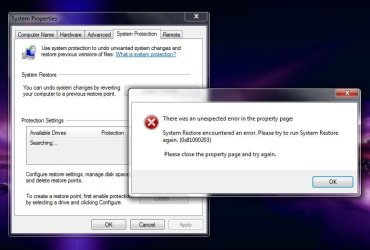
System Restore Not Working Error (0x81000203)

Hookmeup

New member
Local time
11:02 AM
Messages
5
Location
New York
Thank For The Help ,
I Have searched the whole forum and did not find this error ,so decided to ask ,I tried many things like
I have tried:
- SFC /scannow ... no errors
- chkdsk .... no errors
- made sure 'Volume shadow copy service' is running
- turned off firewall/antivirus software ... no joy
- rebuilt Windows Management Instrumentation
- troubleshooting via the MS 'clean boot' procedure
... but nothing helps.

I Have Windows 7 home premium system with Intel i5 ,4 gigs of ram , 640 hard drive,
Hewlett Packard laptop.
 

My Computer My Computer

Computer Manufacturer/Model Number
Hewlett Packard
OS
64
CPU
Intel Pentium i5
Memory
Hewlett Packard 146
Graphics Card(s)
Intel Graphics i5
Thank For The Help ,
I Have searched the whole forum and did not find this error ,so decided to ask ,I tried many things like
I have tried:
- SFC /scannow ... no errors
- chkdsk .... no errors
- made sure 'Volume shadow copy service' is running
- turned off firewall/antivirus software ... no joy
- rebuilt Windows Management Instrumentation
- troubleshooting via the MS 'clean boot' procedure
... but nothing helps.

I Have Windows 7 home premium system with Intel i5 ,4 gigs of ram , 640 hard drive,
Hewlett Packard laptop.


have you looked here System Restore Error Code: 0x81000203


Ken J
 

My Computer My Computer

Computer Manufacturer/Model Number
HP Pavillion dv-7 1005 Tx
OS
Win 8 Release candidate 8400
CPU
[email protected]
Memory
4 gigs
Graphics Card(s)
Nvidia 9600M
Sound Card
HD built-in
Monitor(s) Displays
17" Wxga
Screen Resolution
1440x900
Cooling
none
Internet Speed
45Mb down 5Mb up
Thanks For The Help

I Have Windows 7 Home premium and in the search box ,it does not give the option for
gpedit.msc when I search ,So I have no option to turn it off or on .The system restore that is .
I was also searching and found that in home premium that is not an option in the search box ,only ultimate .thanks
 

My Computer My Computer

Computer Manufacturer/Model Number
Hewlett Packard
OS
64
CPU
Intel Pentium i5
Memory
Hewlett Packard 146
Graphics Card(s)
Intel Graphics i5
Yes, there is no gpedit in Home Premium. What is the exact error, and what steps do you take up to when it occurs? You can try turning System Restore off and back on, but this will clear any current restore points.

Turn System Restore on or off

A Guy
 

My Computer My Computer

Computer type
PC/Desktop
OS
Windows 10 Home x64
CPU
INTEL Core i5-750 Quad-Core 3.37GHz
Motherboard
ASUS P7P55D
Memory
HyperX Fury Black Series 8GB (2 x 4GB) 1866Mhz
Graphics Card(s)
EVGA GeForce GTX 750 Superclocked 1GB 128-Bit GDDR5
Monitor(s) Displays
LG 32MA68HY 32" IPS
Screen Resolution
1920 x 1080
Hard Drives
Samsung 840 Evo 120GB, SEAGATE 500GB Barracuda® 7200.12, SATA 3 Gb/s, 7200 RPM, 16MB cache
PSU
ANTEC TruePower New TP-550, 80 PLUS, 550W
Case
ANTEC Three Hundred Illusion
Cooling
COOLER MASTER Hyper 212 Plus, 4 x 120mm 1 x 140mm Noctua's
Internet Speed
85 + Mbps
Antivirus
Avast
Browser
Vivaldi
In the absence of gpedit you may find that you can edit your registry using this Microsoft provided Group Policy Settings reference. It's an Excel spreadsheet so you'll need MS Office, OpenOffice, etc to view it. Or, you could use the free Microsoft Excel Viewer.

Download details: Group Policy Settings Reference for Windows and Windows Server

How to obtain the latest Microsoft Excel Viewer

With careful registry editing you can achieve the same results as with gpedit.msc (you'll want the 3rd download listed for Windows Server 2008 R2 and Windows 7.)
 

My Computer My Computer

Computer type
Laptop
Computer Manufacturer/Model Number
Sony Vaio VPCEB47GM Laptop
OS
Win 7 Pro 64-bit
CPU
Intel i5 2.4 Ghz
Memory
8GB DDR3
Graphics Card(s)
Intel HD 3000
Sound Card
IDT High Definition
Monitor(s) Displays
15.6 WGXA Anti-Glare LED
Screen Resolution
1280x800
Hard Drives
640Gb 7200rpm
Antivirus
MSE
Browser
Opera (primary) with IE9 backup
Thank You ,I downloaded all the files From the group policy and the latest Microsoft excel viewer but I don`t know how to view the details .
Also When I start the system restore I notice that is searching for the drives where the files are stored but does not find them and that is when the error (0x81000203) appears .
If anyone can teach me how to take a picture of the screen on the desktop and maybe I can post it and every one can have an idea of the problem , thanks every one for the support
 

My Computer My Computer

Computer Manufacturer/Model Number
Hewlett Packard
OS
64
CPU
Intel Pentium i5
Memory
Hewlett Packard 146
Graphics Card(s)
Intel Graphics i5
First thing you want to do is install the Excel viewer. Click on the download button and it will ask if you want to run or save. If you click on run it will start to download the viewer. After it's downloaded you should see another run command appear. Click on the second run and the viewer will be installed on your computer. Just follow the prompts until you get a confirmation that the install completed successfully.

Once the viewer is installed, you can click on the download button for the actual spreadsheet. You should be given a choice to run or save. If you click run, the spreadsheet will find the viewer and automatically open. If you click save, you can save it on your hard drive to a location you choose. The default would probably be the downloads folder in documents (from the start menu.) Keep in mind that the spreadsheet download will need some time to find the viewer and finally open.

An easy way to take a picture of your screen (sometimes called a screen shot or a snip) is to use the built in snipping tool. This tutorial for the Windows Vista operating system will also apply to Windows 7.

How to use the Snipping Tool in Vista - Vista Forums

And to learn how to attach that screen shot or snip here on the Forum, give this a look:

http://www.sevenforums.com/tutorials/9733-screenshots-files-upload-post-seven-forums.html

BTW - welcome to the Forum!
 

My Computer My Computer

Computer type
Laptop
Computer Manufacturer/Model Number
Sony Vaio VPCEB47GM Laptop
OS
Win 7 Pro 64-bit
CPU
Intel i5 2.4 Ghz
Memory
8GB DDR3
Graphics Card(s)
Intel HD 3000
Sound Card
IDT High Definition
Monitor(s) Displays
15.6 WGXA Anti-Glare LED
Screen Resolution
1280x800
Hard Drives
640Gb 7200rpm
Antivirus
MSE
Browser
Opera (primary) with IE9 backup
Capture

Thank You All I am Learning so much from this .
I tried turning the system restore off but it`s not an option as soon as it comes on
the error follows . another questions is as I get group policies working should I post a copy of each administrative tools and security .thanks
 

Attachments

  • Capture.JPG
    Capture.JPG
    52.1 KB · Views: 153

My Computer My Computer

Computer Manufacturer/Model Number
Hewlett Packard
OS
64
CPU
Intel Pentium i5
Memory
Hewlett Packard 146
Graphics Card(s)
Intel Graphics i5
You might check Microsoft Software Shadow Copy Provider service is running.
 

My Computers My Computers

System One System Two

  • Computer type
    PC/Desktop
    OS
    7 X64
    CPU
    i5 8400
    Motherboard
    gigabyte b365m ds3h
    Memory
    2x8gb 3200mhz
    Hard Drives
    various
    PSU
    pure power 11 400w cm
    Case
    Coolermaster
    Cooling
    cryorig m9i
  • Computer type
    PC/Desktop
    OS
    7x64
    CPU
    g5400
    Motherboard
    ga b365m ds3h
    Memory
    8gb ddr4 2400
    PSU
    xfx pro 450w
Back
Top