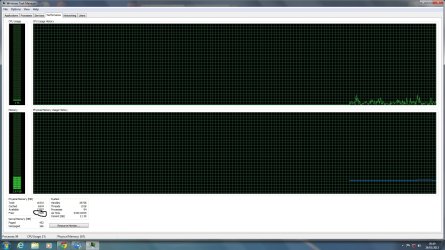
Please help strange memory leak Windows 7 64bit

Nexu21

New member
Local time
9:13 AM
Messages
14
I cant wrap my head around this strange problem iam having so i shall try and explain it, so i noticed in the task manager that the physical memory (free) was dropping to about 3gb and cached was near 10gb, this happens every time and for the life of me i cannot find the problem.

please bear in mind ive:

1. Done a clean install
2. Run virus scans and malware scans (bear in mind one of the pics has mbam.exe running)
3. ive performed memory tests and they come back as fine.

the spec is

Windows 7 Home Premium 64bit Build 7601
i7 3770k 3.5ghz
16gb ram
asus p8z77v-LX
2tb and a 1tb hdd

please if anyone can help it would be much appreciated.
 

Attachments
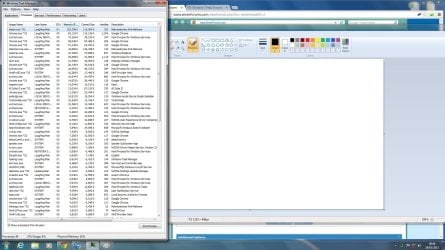
  • Task Manager.jpg
    Task Manager.jpg
    236.2 KB · Views: 15
  • Help.jpg
    Help.jpg
    338.2 KB · Views: 12

My Computer My Computer

Computer type
PC/Desktop
Computer Manufacturer/Model Number
Custom
OS
Windows 7 Home Premium 64 bit
CPU
i7 3770k
Motherboard
P877-V LX
Memory
16gb
Graphics Card(s)
680 GTX
Hard Drives
2tb sata 2 HDD
1tb sata 2 HDD
Antivirus
avast free
Browser
Google Chrome
That's quite a lot of RAM.

If you think there's a problem I'd test it overnight to really stress test the RAM - Test with Memtest86+

If there are errors the tutorial shows how to isolate the stick or slot.
 
Nothing is wrong! Cache is the same as free. (More memory is cache is a better performing computer, RAM is faster then SDD/HDDs)

You have way too much RAM to be concerning yourself with RAM usage! Stop babying it Windows know how to take care of itself. Surprissed to didn't know that your memory usage is under 3 GB despite "Free" value decreasing, that might have been a hint that "Free" is meaningless.

Again, there is nothing wrong and you have too much RAM to concern yourself with RAM usage.
 

My Computer My Computer

Computer type
PC/Desktop
Computer Manufacturer/Model Number
Alienware Aurora ALX R4
OS
Windows 10 Pro (x64)
CPU
Intel Core i7-3930K (3.2GHz - 4.5GHz)
Motherboard
Alienware Aurora-R4 x79
Memory
4x Samsung 4GB PC3-12800 DDR3 (16GB 1600MHz)
Graphics Card(s)
Nvidia Geforce GTX 690
Sound Card
SteelSeries Siberia Elite
Monitor(s) Displays
Dell UltraSharp U3011
Screen Resolution
2560x1600
Hard Drives
Samsung 850 Pro 256 GB, Seagate 1TB Desktop Hybrid HDD, 2x Western Digital 4TB Green HDD
PSU
875W Some Dell PSU <.<
Case
Alienware Aurora ALX
Cooling
Custom Liquid Cooling (EK CPU & GPU blocks) dual EK 480RAD
Keyboard
Logitech G710+ Mechanical
Mouse
Logitech G700s
Internet Speed
Verizon Fios (50 mbps average)
Other Info
Server: Intel NUC D54250WYK: i5-4250U, 16GB, 256 GB mSATA, Windows Server 2012 R2
Yes i know its alot of ram but i still get low memory errors on a daily .
 

My Computer My Computer

Computer type
PC/Desktop
Computer Manufacturer/Model Number
Custom
OS
Windows 7 Home Premium 64 bit
CPU
i7 3770k
Motherboard
P877-V LX
Memory
16gb
Graphics Card(s)
680 GTX
Hard Drives
2tb sata 2 HDD
1tb sata 2 HDD
Antivirus
avast free
Browser
Google Chrome
Also just to clarify cache reaches 14000 and free reaches 0 and stays there.
 

My Computer My Computer

Computer type
PC/Desktop
Computer Manufacturer/Model Number
Custom
OS
Windows 7 Home Premium 64 bit
CPU
i7 3770k
Motherboard
P877-V LX
Memory
16gb
Graphics Card(s)
680 GTX
Hard Drives
2tb sata 2 HDD
1tb sata 2 HDD
Antivirus
avast free
Browser
Google Chrome

My Computer My Computer

Computer Manufacturer/Model Number
Samsung NP550P5C-S02IN
OS
Windows 7 Ultimate - 64-bit | Windows 8 Pro - 64-bit
CPU
Intel® Core™ i7 Processor 3,610QM (2.30Hz, 6MB L3 Cach
Memory
8 GB
Graphics Card(s)
NVIDIA® GeForce® GT 650M 2GB Graphics, Optimus™ techno
Sound Card
SoundAlive™ JBL 3 Speakers (With sub-Woofer)
Monitor(s) Displays
39.62cm (15.6) SuperBright 300nit HD+ LED Display
Screen Resolution
1,600 x 900, Anti-Reflective
Hard Drives
1TB S-ATA II Hard Drive (5,400RPM)
Ok ill download that.

Memtest results where no errors detected
 

My Computer My Computer

Computer type
PC/Desktop
Computer Manufacturer/Model Number
Custom
OS
Windows 7 Home Premium 64 bit
CPU
i7 3770k
Motherboard
P877-V LX
Memory
16gb
Graphics Card(s)
680 GTX
Hard Drives
2tb sata 2 HDD
1tb sata 2 HDD
Antivirus
avast free
Browser
Google Chrome
heres the files as per your request please let me know if anything is missing
 

Attachments

My Computer My Computer

Computer type
PC/Desktop
Computer Manufacturer/Model Number
Custom
OS
Windows 7 Home Premium 64 bit
CPU
i7 3770k
Motherboard
P877-V LX
Memory
16gb
Graphics Card(s)
680 GTX
Hard Drives
2tb sata 2 HDD
1tb sata 2 HDD
Antivirus
avast free
Browser
Google Chrome
it ran from 1.30am last night till 5.00pm today
 

My Computer My Computer

Computer type
PC/Desktop
Computer Manufacturer/Model Number
Custom
OS
Windows 7 Home Premium 64 bit
CPU
i7 3770k
Motherboard
P877-V LX
Memory
16gb
Graphics Card(s)
680 GTX
Hard Drives
2tb sata 2 HDD
1tb sata 2 HDD
Antivirus
avast free
Browser
Google Chrome
Yes i know its alot of ram but i still get low memory errors on a daily .
Errors from what and when? Its likely a 32-bit application falling over itself.

Also just to clarify cache reaches 14000 and free reaches 0 and stays there.
That doesn't matter! Cache is as good as Free. The only value that is important is "Available". It makes no difference to an application if "Free" is zero, Windows handles memory differently then previous versions.
 

My Computer My Computer

Computer type
PC/Desktop
Computer Manufacturer/Model Number
Alienware Aurora ALX R4
OS
Windows 10 Pro (x64)
CPU
Intel Core i7-3930K (3.2GHz - 4.5GHz)
Motherboard
Alienware Aurora-R4 x79
Memory
4x Samsung 4GB PC3-12800 DDR3 (16GB 1600MHz)
Graphics Card(s)
Nvidia Geforce GTX 690
Sound Card
SteelSeries Siberia Elite
Monitor(s) Displays
Dell UltraSharp U3011
Screen Resolution
2560x1600
Hard Drives
Samsung 850 Pro 256 GB, Seagate 1TB Desktop Hybrid HDD, 2x Western Digital 4TB Green HDD
PSU
875W Some Dell PSU <.<
Case
Alienware Aurora ALX
Cooling
Custom Liquid Cooling (EK CPU & GPU blocks) dual EK 480RAD
Keyboard
Logitech G710+ Mechanical
Mouse
Logitech G700s
Internet Speed
Verizon Fios (50 mbps average)
Other Info
Server: Intel NUC D54250WYK: i5-4250U, 16GB, 256 GB mSATA, Windows Server 2012 R2
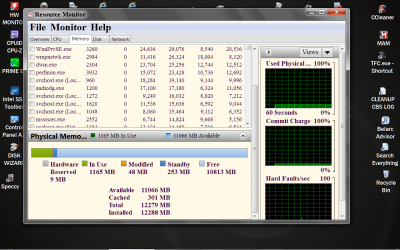
A picture like this might help. It show ram like Windows 7 sees the ram.

Resource Monitor RAM.PNG
 

My Computer My Computer

Computer type
PC/Desktop
Computer Manufacturer/Model Number
Home made Desktop
OS
Windows 10 Pro. 64/ version 1709 Windows 7 Pro/64
CPU
Intel i7-6800K @ 4.3
Motherboard
ASUS X-99 Deluxe II
Memory
Corsair Platinum 16 gig @2400
Graphics Card(s)
EVGA GTX 1070 OC
Monitor(s) Displays
Asus 27" LED LCD/VE278Q
Screen Resolution
1920-1080 or 1280-720 HDMI
Hard Drives
INTEL SSD 730-240 Gb Sata 3.0/
PSU
EVGA Platium 1200W
Case
Phanteks Luxe Tempered Glass 8 fans/ one radiator
Cooling
XSPC/ Water Cooled CPU
Keyboard
Das 4 Professional
Mouse
Logitech M705/MX Anywhere 2-S
Internet Speed
100 mbits
Antivirus
Microsoft Security Essentials/ Malwarebytes Premium 3.0/ SAS
Browser
I.E. 11 default/Firefox/ ISP Time Warner Cable/Spectrum
Other Info
LG BluRay Burner/
Sound system-KLipsch-THX/
Icy Dock ssd Hot Swap bays.
@logicearth errors stating low memory

@layback Bear good point ill try and get a screenshot
 

My Computer My Computer

Computer type
PC/Desktop
Computer Manufacturer/Model Number
Custom
OS
Windows 7 Home Premium 64 bit
CPU
i7 3770k
Motherboard
P877-V LX
Memory
16gb
Graphics Card(s)
680 GTX
Hard Drives
2tb sata 2 HDD
1tb sata 2 HDD
Antivirus
avast free
Browser
Google Chrome
Back
Top