Please help: Unable to boot normally

rajeshshenoy

New member
Local time
8:02 PM
Messages
6
Hello:

Initially I had Windows 7 Ultimate (retail version) installed on my desktop. When I tried to install Ubuntu, I found that the hard-disk partitioning scheme was GPT. So I made a back-up of my drive's contents, re-partitioned the disk as MBR, re-installed Windows 7, and overwrote the disk contents with my backed up files.

This worked splendidly (i.e., I have all my installed applications, etc. intact) EXCEPT for one nagging issue: When I boot, if I let it boot directly into the hard disk, it does not work. I have to select F10 (BIOS boot options menu), and from there select the hard-disk, and only then Windows 7 boots properly.

I tried bcdedit, bootrec, etc. No use. Any recommendations, please?

Thanks!
 

My Computer

OS
Windows 7

My Computer

Computer type
PC/Desktop
Computer Manufacturer/Model Number
Dell XPS 420
OS
Windows 10, Home Clean Install
CPU
Intel Core2 processsor Q8200(2.33Ghz 1333FSB) Quad Core Tech
Motherboard
Dell
Memory
6 gb
Graphics Card(s)
ATI Radeon 256MB HD3650
Sound Card
Intergrated 7.1 Channel Audio
Monitor(s) Displays
Dell SP2009W 20"
Hard Drives
640 GB Serial ATA Hard drive
Cooling
Fan
Keyboard
Dell USB Keyboard
Mouse
Dell Premium Optical USB
Internet Speed
DSL 2.85
Do you have any Error code? and what phase is it stopping you to get to start the boot process of win7 ?
 

My Computer

OS
Windows 7 Ultimate
Thanks for all the replies.

1. Yes the HD is the first in the boot order. My other hard disk doesn't have any OS on it, and no active partition either.
2. The error message I get when trying to boot directly is a Windows Boot Manager error message saying that there has been a malfunction and suggesting me to boot into Recovery Console and select StartUp Repair. I have done that and it has found nothing. The error message code is 0xc0000225.

Thanks.
 

My Computer

OS
Windows 7
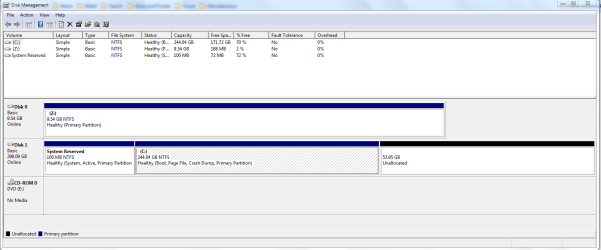
Sorry ... forgot the screenshot. Attached herewith...

Thanks for your time!
 

Attachments

  • Capture.PNG
    Capture.PNG
    25.9 KB · Views: 36

My Computer

OS
Windows 7
Another point: Windows 7 is the only OS in the HD as of now. I have left ~50GB free for Ubuntu (to be installed later), though.

Thanks.
 

My Computer

OS
Windows 7
Try removing the DVD and tapping F8 at bootup to access the Repair console placed there by the 100mb System Reserved Partition.

See if it finds an installation, offers a repair, if it does accept it and if Win7 doesn't startup return to run Startup Repair 3 times.

If not, click through to Startup repair and run up to 3 separate times.
 
Thanks for the reply.

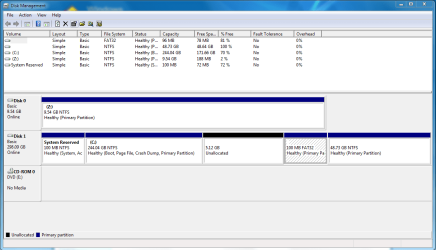
Pressing F8 does not offer Recovery Console (only Safe Modes, Last Known Good Configuration, etc.). So, like before, I used the setup disk to enter the recovery environment. (I had run Startup Repair before and it had found nothing wrong.) Today, the first time I ran it, it found and error and fixed it. But my original issue persisted. I found that it had created a new 100MB FAT32 partition on my disk. (So now I have two 100MB partitions - one NTFS and one FAT32.) Now if I run Startup Repair, it says Windows cannot repair the errors on this computer - send information to Microsoft.
 

My Computer

OS
Windows 7
This is a different 100mb partition than in the screenshot you posted earlier? That's why I assumed you have Repair console at F8 since it normally comes with the 100mb..

Post another screenshot if it actually changed somehow.

Did you try persisting with Startup Repair? Takes 3 times sometimes to work.

Also, remains of GRUB bootloader will bork Win7's MBR. It really needs to be deep cleaned off the HD. In the dual boot Ubuntu tutorial I posted it shows the way to make it work.
 
If Startup Repair will not restart 7 after 3 times:

Try booting DVD into Repair Command Line and type:

Bootrec.exe /fixboot
bootrec.exe /fixmbr

now run Startup Repari 3x, reboot

If won't start, return to Repair console Command Line and type:

bootrec.exe /fixmbr

again with Startup Repair 3x.

At this point you might consider returning to the earlier tutorial to dual boot Ubuntu/win7 and clean reisntall following the exact steps. You may have GRUB corruption of MBR that is not recoverable. It requires a deep clean of the HD to get GRUB out.
 
@gregrocker Thanks a lot for your continued support. I have attached herewith screenshot of my latest diskmgmt.msc. I tried StartUp Repair 3x but each time it is ending up with Unrecoverable Error. I had tried the bootrec commands before but not after the new 100MB partition got created. I will try it now.

Thanks, again.
 

Attachments

  • Capture.PNG
    Capture.PNG
    27.6 KB · Views: 7

My Computer

OS
Windows 7
This is really bizarre. It appears Startup Repair is attempting to repair the MBR, as it normally does before finally rewriting it. But something caused it to try to create a new 100mb partition. This is all I can figure out from it.

It really points to partition table corruption from GRUB possibly not being cleaned up well enough.

I will ask SIW2 to look at this as he would know if anyone does what is causing this strange behavior.

Meanwhile I would back up my files and gather program disks/installers because it is likely you'll need to deep clean the HD and reinstall. I don't believe a system image could even be salvaged if that is the case.
 
Last edited:
w7/ubuntu

i install ubuntu myself the other day,boot up w7 and put ur ubuntu(9.10) in your drive,now choose the option "install within windows" (second one down i think) Now you wont have to set up dual boot as w7 does it for you,when ubuntu is installed, on reboot you should have the option to boot either OS,also if your just trying ubuntu out download VMware plare and install it as a virtual machine(Ive got XP pro running within W7)
 

My Computer

Computer type
PC/Desktop
OS
Windows 7 X64 Bit
CPU
Intel(R) Core(TM)i7-4771 CPU @ 3.50GH
Motherboard
Asus Sabertooth Z87
Memory
Corsair 4x8 Vengeance (32GB)
Graphics Card(s)
NVIDIA GeForce GTX780
Monitor(s) Displays
LG
Screen Resolution
1920x1080
PSU
Corsair CX750
Case
Corsair 200 series
Cooling
H80i Liquid Cooler
Keyboard
Microsoft
Mouse
Microsoft
Internet Speed
good times-500-850 kbs bad times-50-100 kbs
Back
Top