please help! unidentified public network with invalid ip

seanarice

New member
Local time
12:22 AM
Messages
13
Hello this is my first time posting a thread on a forum site but here we go lol

I recently upgraded to windows 7 and everything was working perfect very impressed overall.
I have cable internet through comcast. I had my modem plugged into a wireless router then my desktop was directly connected to the router and internet was working fine. I decided to unplug my router because my roommate moved out so no more need of a wireless adapter, however since removing the wireless router I have no more internet connection. When I open up network and sharing it says I am connected to an unidentified public network but I have no connection. I called comcast they said everything looked good on their end. All the lights are on on the modem and all connections are secure. I tried running all the networking wizards and they all say windows could not determine the problem however one window said I had an invalid ip address? And another window said my modem or other connecting device has had an error how can this be when everything was working fine until the router was unplugged?
Please help
 

My Computer My Computer

Computer Manufacturer/Model Number
dell dimension
OS
windows 7
Did you power cycle the modem. Check your internet settings in windows Local Area Connections properties and make sure IPv4 is set to obtain IP address automatically. Go to cmd and type ipconfig /all a post it here too.
 

My Computer My Computer

Computer type
PC/Desktop
Computer Manufacturer/Model Number
Custom Build
OS
Windows 7 Pro 64bit build 7601 SP1
CPU
Intel Core I5 3570K 3.4Ghz w/ Zalman CNPS9900NT RT
Motherboard
MSI Z77A-G45 Gaming
Memory
G.Skill F3-12800CL9D-8GbXL ; 4Gx2
Graphics Card(s)
EVGA Geforce GTX 770 Superclocked
Sound Card
Creative Sound Blaster Z
Monitor(s) Displays
Dual ViewSonic VX2770Smh-LED Black 27"IPS-Panel
Screen Resolution
1920x1080
Hard Drives
Kingston Hyper X 240GB SSD Win8 Pro 64bit 6GB/s Sata III
Intel 335 Series SSD 240GB Win8 Storage 6GB/s Sata III
Intel 320 Series SSD 600GB Storage 3GB/s Sata II
Western Digital Scorpio Black 1TB - Docked via Esata
PSU
Coolermaster GX 750W
Case
Corsair Vengence C70
Cooling
Coolermaster 120mm and Enermax 140mm
Keyboard
Corsair Vengence K70
Mouse
Logitech G500
Internet Speed
22mbps+
Browser
Firefox, Chrome, IE
Other Info
Swan M50W 2.1 speakers
APC UPS
Thermaltake BlacX HDD Dock
Samsung BD Optical Drive
Netgear WNDR4500
Hi Seanarice, welcome to the Seven Forums.

First, I recommend you reconnect your router. It's always better to connect through a router and a modem, than only a modem. A router is much more than just a device to split your connection to multiple computers, wired or wireless. This article tells you more, if you are interested in finding out more.

If you really insist of using only the modem, you have to set it up. When you still had your router connected, the information needed for you to be able to connect to your ISP Comcast and further to the Internet was stored in the router. Disconnecting it leaves the modem with no valid information on how and where to connect. The lights are on or blinking to show it's ready; it understands it's connected to the net, and to your computer, but does not know how to use this information.

Not knowing the make and model of your modem, call Comcast again and ask how to set up your connection. You have most probably received a setup CD with the modem, you could also start by running it on your computer and following instructions given on screen.

Hope this helps at least a bit. Come back if you have any more questions.

Kari
 

My Computer My Computer

Computer type
Laptop
Computer Manufacturer/Model Number
HP ENVY 17-1150eg
OS
Windows 10 Pro x64 EN-GB
CPU
1.6 GHz Intel Core i7-720QM Processor
Memory
6 GB
Graphics Card(s)
ATI Mobility Radeon HD 5850 Graphics
Sound Card
Beats sound system with integrated subwoofer
Monitor(s) Displays
17" laptop display, 22" LED and 32" Full HD TV through HDMI
Screen Resolution
1600*900 (1), 1920*1080 (2&3)
Hard Drives
Internal: 2 x 500 GB SATA Hard Disk Drive 7200 rpm
External: 2TB for backups, 3TB USB3 network drive for media
Cooling
As Envy runs a bit warm, I have it on a Cooler Master pad
Keyboard
Logitech diNovo Media Desktop Laser (bluetooth)
Mouse
Logitech Performance Mouse MX
Internet Speed
50/10 Mbps VDSL
Antivirus
Windows Defender 4.3.9431.0
Browser
Maxthon 3.5.2., IE11
Hello this is my first time posting a thread on a forum site but here we go lol

I recently upgraded to windows 7 and everything was working perfect very impressed overall.
I have cable internet through comcast. I had my modem plugged into a wireless router then my desktop was directly connected to the router and internet was working fine. I decided to unplug my router because my roommate moved out so no more need of a wireless adapter, however since removing the wireless router I have no more internet connection. When I open up network and sharing it says I am connected to an unidentified public network but I have no connection. I called comcast they said everything looked good on their end. All the lights are on on the modem and all connections are secure. I tried running all the networking wizards and they all say windows could not determine the problem however one window said I had an invalid ip address? And another window said my modem or other connecting device has had an error how can this be when everything was working fine until the router was unplugged?
Please help

Sometimes a secondary default gateway is created when you change things around which can cause problems.

It's easy to fix by just entering the default gateway manually.

Just follow the link below.
Windows 7 Unidentified Network, Limited Access, No Internet Connection Problem Resolved
 

My Computer My Computer

Computer type
PC/Desktop
Computer Manufacturer/Model Number
Home built
OS
Windows 7 Ult, Windows 8.1 Pro,
CPU
Q9650-4.275GHz, E8600 4.5GHz, E6750-3.8GHz
Motherboard
Evga 780i FTW
Memory
G.Skill PC2 9600 1200Mhz 5 5 5 15 2T
Graphics Card(s)
GTX480
Sound Card
Asus Xonar D2
Monitor(s) Displays
HannsG
Screen Resolution
1680X1050
Hard Drives
GSkill Phoenix Pro 120GB SSD
PSU
ThermalTake Toughpower 1000Watt modular
Case
ThermalTake XaserV
Cooling
Xigmatek S1283
Keyboard
Logitech G15
Mouse
Logitech G9
Internet Speed
T1
I have powered cycled the modem several times as well as the computer no luck and I don't have the router anymore I gave it to a friend who actually could use one.? I'm using my smart phone to post these so I cant post the ipconfig/all. How do I tell my modem how and where to send the info? I already called comcast the sent a signal to reset the modem and they said also all my connections and signals looked good on their end and when I got the modem from them I didn't get an instalation disk.
 

My Computer My Computer

Computer Manufacturer/Model Number
dell dimension
OS
windows 7
What Kari said is definitely a good idea regarding leaving the router connected. Not only does it give you more connectivity options, but for future connections like if you have a phone with wifi or a laptop. Plus the router should have firewall for security. But if you must do you have the drivers for the modem and a usb connection to it? What brand and model is the modem? Also try to hard reset the modem. There should a little recessed button on the back. Hold that down for like 10 seconds and that should reset the modem.
 

My Computer My Computer

Computer type
PC/Desktop
Computer Manufacturer/Model Number
Custom Build
OS
Windows 7 Pro 64bit build 7601 SP1
CPU
Intel Core I5 3570K 3.4Ghz w/ Zalman CNPS9900NT RT
Motherboard
MSI Z77A-G45 Gaming
Memory
G.Skill F3-12800CL9D-8GbXL ; 4Gx2
Graphics Card(s)
EVGA Geforce GTX 770 Superclocked
Sound Card
Creative Sound Blaster Z
Monitor(s) Displays
Dual ViewSonic VX2770Smh-LED Black 27"IPS-Panel
Screen Resolution
1920x1080
Hard Drives
Kingston Hyper X 240GB SSD Win8 Pro 64bit 6GB/s Sata III
Intel 335 Series SSD 240GB Win8 Storage 6GB/s Sata III
Intel 320 Series SSD 600GB Storage 3GB/s Sata II
Western Digital Scorpio Black 1TB - Docked via Esata
PSU
Coolermaster GX 750W
Case
Corsair Vengence C70
Cooling
Coolermaster 120mm and Enermax 140mm
Keyboard
Corsair Vengence K70
Mouse
Logitech G500
Internet Speed
22mbps+
Browser
Firefox, Chrome, IE
Other Info
Swan M50W 2.1 speakers
APC UPS
Thermaltake BlacX HDD Dock
Samsung BD Optical Drive
Netgear WNDR4500
What is a default gateway and how do edit it manually and what do I change it to?
 

My Computer My Computer

Computer Manufacturer/Model Number
dell dimension
OS
windows 7
What is a default gateway and how do edit it manually and what do I change it to?

The directions for that are already in the link I posted. It's very easy to do this if you just follow the directions. :)
 

My Computer My Computer

Computer type
PC/Desktop
Computer Manufacturer/Model Number
Home built
OS
Windows 7 Ult, Windows 8.1 Pro,
CPU
Q9650-4.275GHz, E8600 4.5GHz, E6750-3.8GHz
Motherboard
Evga 780i FTW
Memory
G.Skill PC2 9600 1200Mhz 5 5 5 15 2T
Graphics Card(s)
GTX480
Sound Card
Asus Xonar D2
Monitor(s) Displays
HannsG
Screen Resolution
1680X1050
Hard Drives
GSkill Phoenix Pro 120GB SSD
PSU
ThermalTake Toughpower 1000Watt modular
Case
ThermalTake XaserV
Cooling
Xigmatek S1283
Keyboard
Logitech G15
Mouse
Logitech G9
Internet Speed
T1
So I did ipconfig this is what it says

Ethernet adapter local area connection.:

Connection specific dns suffix . . . .:
Link local IPv6 address . . . . . . . . . .: fe80::adb7:7e66:7dc6:e05d%12
Autoconfiguration IPv4 address . . : 169.254.224.93
Subnet mask . . . . . . . . . . . . . . . . . . : 255.255.0.0
Default gateway . . . . . . . . . . . . . . . :

Tunnel adapter isatap. {6A64u3C9-C7E0-4185-9E9D-32761A3AC3F4} :
Media state . . . . . . . . . . . . . . . . . . . : media disconnected
Connection-specific DNS. Suffix . . . :

Tunneladapter local area connection* 11:
Media state . . . . . . . . . . . . . . . . . . . : media disconnected
Connection-specific DNS suffix . . . :
 

My Computer My Computer

Computer Manufacturer/Model Number
dell dimension
OS
windows 7
So as you can see there is no default gateway listed therfore I cannot manually enter it some where else
 

My Computer My Computer

Computer Manufacturer/Model Number
dell dimension
OS
windows 7
You should be able to get that info from comcast although I have no idea why just resetting the modem isn't working. If DHCP is enabled under your network connections Ipv4> properties it should be working.
 

My Computer My Computer

Computer type
PC/Desktop
Computer Manufacturer/Model Number
Home built
OS
Windows 7 Ult, Windows 8.1 Pro,
CPU
Q9650-4.275GHz, E8600 4.5GHz, E6750-3.8GHz
Motherboard
Evga 780i FTW
Memory
G.Skill PC2 9600 1200Mhz 5 5 5 15 2T
Graphics Card(s)
GTX480
Sound Card
Asus Xonar D2
Monitor(s) Displays
HannsG
Screen Resolution
1680X1050
Hard Drives
GSkill Phoenix Pro 120GB SSD
PSU
ThermalTake Toughpower 1000Watt modular
Case
ThermalTake XaserV
Cooling
Xigmatek S1283
Keyboard
Logitech G15
Mouse
Logitech G9
Internet Speed
T1
Did you try the hard reset of your modem? Your modems IP should be your gateway address.
 

My Computer My Computer

Computer type
PC/Desktop
Computer Manufacturer/Model Number
Custom Build
OS
Windows 7 Pro 64bit build 7601 SP1
CPU
Intel Core I5 3570K 3.4Ghz w/ Zalman CNPS9900NT RT
Motherboard
MSI Z77A-G45 Gaming
Memory
G.Skill F3-12800CL9D-8GbXL ; 4Gx2
Graphics Card(s)
EVGA Geforce GTX 770 Superclocked
Sound Card
Creative Sound Blaster Z
Monitor(s) Displays
Dual ViewSonic VX2770Smh-LED Black 27"IPS-Panel
Screen Resolution
1920x1080
Hard Drives
Kingston Hyper X 240GB SSD Win8 Pro 64bit 6GB/s Sata III
Intel 335 Series SSD 240GB Win8 Storage 6GB/s Sata III
Intel 320 Series SSD 600GB Storage 3GB/s Sata II
Western Digital Scorpio Black 1TB - Docked via Esata
PSU
Coolermaster GX 750W
Case
Corsair Vengence C70
Cooling
Coolermaster 120mm and Enermax 140mm
Keyboard
Corsair Vengence K70
Mouse
Logitech G500
Internet Speed
22mbps+
Browser
Firefox, Chrome, IE
Other Info
Swan M50W 2.1 speakers
APC UPS
Thermaltake BlacX HDD Dock
Samsung BD Optical Drive
Netgear WNDR4500
Wut is dhcp and how do I enable/disable it I also tried a clean install of windows 7 that did nothing either ugh this is so damn frustrating all I did was unhook a wireless router how can this creat such a problem!
 

My Computer My Computer

Computer Manufacturer/Model Number
dell dimension
OS
windows 7
Besides no gateway, that IP address is wrong. So yes it appears that your computer is not "DHCPing" it's network settings from the router.

You computer must get an IP address from somewhere. You said you "unhooked a router"? If so was that were the computer was getting it's address from before?
 

My Computer My Computer

Computer Manufacturer/Model Number
Scratch built
OS
Windows 7 x64 Ultimate
CPU
i7 960
Motherboard
Asus P6X58D
Memory
12 Gig Corsair Dominator
Graphics Card(s)
Nvidia 480
Sound Card
Maudio Delta 44 + breakout box
Monitor(s) Displays
Dell UltraSharp U2410 24in and Samsung 21 dual monitors
Screen Resolution
1920x1200 and 1280x1024
Hard Drives
Primary: Intel X-25M G2 160G SSD
Secondary: Segate baracuda 1.0 TB
HDs in AHCI mode.
PSU
Corasair TX850
Case
Cooler Master HAF
Cooling
Corsair H50
Keyboard
Logitech G15 + N52 game pad
Mouse
Logitech MX518
Internet Speed
15kbs down 4.5kbps up
Other Info
WEI 7.6
CPU & RAM 7.6
Graphics 7.9
Hard disk 7.7
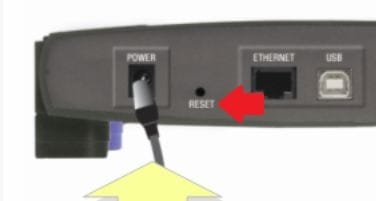
Well if you just reinstalled than than DHCP should be enabled by default. Dynamic Host Configuration Protocol - Wikipedia, the free encyclopedia But since you did that, reinstall, did you do a hard reset of the modem. Because you should be able to connect without doing anything else. Using a paperclip or pen hold down that button for about 10 seconds. The snip I attached is just an example not specific to your modem but the ideas the same.
 

Attachments

  • reset.JPG
    reset.JPG
    12.6 KB · Views: 1

My Computer My Computer

Computer type
PC/Desktop
Computer Manufacturer/Model Number
Custom Build
OS
Windows 7 Pro 64bit build 7601 SP1
CPU
Intel Core I5 3570K 3.4Ghz w/ Zalman CNPS9900NT RT
Motherboard
MSI Z77A-G45 Gaming
Memory
G.Skill F3-12800CL9D-8GbXL ; 4Gx2
Graphics Card(s)
EVGA Geforce GTX 770 Superclocked
Sound Card
Creative Sound Blaster Z
Monitor(s) Displays
Dual ViewSonic VX2770Smh-LED Black 27"IPS-Panel
Screen Resolution
1920x1080
Hard Drives
Kingston Hyper X 240GB SSD Win8 Pro 64bit 6GB/s Sata III
Intel 335 Series SSD 240GB Win8 Storage 6GB/s Sata III
Intel 320 Series SSD 600GB Storage 3GB/s Sata II
Western Digital Scorpio Black 1TB - Docked via Esata
PSU
Coolermaster GX 750W
Case
Corsair Vengence C70
Cooling
Coolermaster 120mm and Enermax 140mm
Keyboard
Corsair Vengence K70
Mouse
Logitech G500
Internet Speed
22mbps+
Browser
Firefox, Chrome, IE
Other Info
Swan M50W 2.1 speakers
APC UPS
Thermaltake BlacX HDD Dock
Samsung BD Optical Drive
Netgear WNDR4500
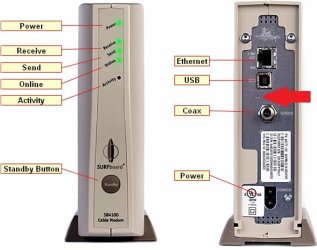
I have a motorola surfb oars modem there is a larger standby button on the top it has a power plug and an ethernet as well as a usb port but no small reset button so how do I change it to dhcp automatically?
 

My Computer My Computer

Computer Manufacturer/Model Number
dell dimension
OS
windows 7
There should be one they all have one. It's recessed beneath the back plate. There should be a hole there. It's not labeled on the motorola's. But for future reference on the DHCP goto the Control Panel and select Network and Sharing Center/Change Adapter settings and right click Local Area Connection, select properties. Then highlight internet protocol version 4 and click the properties button. That should open a window and in the general tab should display Obtain an IP address automatically. That should be enabled by default. You'll see grayed out boxes where you could manually enter an IP address, but you don't want that. The advanced button will give you other options such as entering the Default gateway as well. This should all be done automatically by windows so reset the modem and plug it into the PC and you should be good to go.
 

Attachments

  • reset.JPG
    reset.JPG
    39.3 KB · Views: 6

My Computer My Computer

Computer type
PC/Desktop
Computer Manufacturer/Model Number
Custom Build
OS
Windows 7 Pro 64bit build 7601 SP1
CPU
Intel Core I5 3570K 3.4Ghz w/ Zalman CNPS9900NT RT
Motherboard
MSI Z77A-G45 Gaming
Memory
G.Skill F3-12800CL9D-8GbXL ; 4Gx2
Graphics Card(s)
EVGA Geforce GTX 770 Superclocked
Sound Card
Creative Sound Blaster Z
Monitor(s) Displays
Dual ViewSonic VX2770Smh-LED Black 27"IPS-Panel
Screen Resolution
1920x1080
Hard Drives
Kingston Hyper X 240GB SSD Win8 Pro 64bit 6GB/s Sata III
Intel 335 Series SSD 240GB Win8 Storage 6GB/s Sata III
Intel 320 Series SSD 600GB Storage 3GB/s Sata II
Western Digital Scorpio Black 1TB - Docked via Esata
PSU
Coolermaster GX 750W
Case
Corsair Vengence C70
Cooling
Coolermaster 120mm and Enermax 140mm
Keyboard
Corsair Vengence K70
Mouse
Logitech G500
Internet Speed
22mbps+
Browser
Firefox, Chrome, IE
Other Info
Swan M50W 2.1 speakers
APC UPS
Thermaltake BlacX HDD Dock
Samsung BD Optical Drive
Netgear WNDR4500
That pic is an older surfboard mine is black with a standby button on top I think it is sb5101 or sb1501 but newyas had friend look at my system he tried the iprelease iprenew. Clear dns cache all that junk found out when we do that the nic card doesn't actually release the ip its like frooze onto the card any new suggestions
 

My Computer My Computer

Computer Manufacturer/Model Number
dell dimension
OS
windows 7
I've run out of ideas since I can't physically see what's going on with your computer. Here's a link to that modems User guide maybe it'll help you. http://www.motorola.com/staticfiles/Consumers/Products/Cable%20Modems%20and%20Gateways/SURFboard%20Cable%20Modem-SB5101/_Documents/Static%20Files/SB5101%20-%20User%20Guide.pdf If you can't view it I can email it to you or something.

You can also try to reset it by typing in a web browser(whichever one you're using Internet Explorer, Firefox, or Chrome) 192.168.100.1 and that well bring you to a GUI for the modem and you can reset it from there.
 

My Computer My Computer

Computer type
PC/Desktop
Computer Manufacturer/Model Number
Custom Build
OS
Windows 7 Pro 64bit build 7601 SP1
CPU
Intel Core I5 3570K 3.4Ghz w/ Zalman CNPS9900NT RT
Motherboard
MSI Z77A-G45 Gaming
Memory
G.Skill F3-12800CL9D-8GbXL ; 4Gx2
Graphics Card(s)
EVGA Geforce GTX 770 Superclocked
Sound Card
Creative Sound Blaster Z
Monitor(s) Displays
Dual ViewSonic VX2770Smh-LED Black 27"IPS-Panel
Screen Resolution
1920x1080
Hard Drives
Kingston Hyper X 240GB SSD Win8 Pro 64bit 6GB/s Sata III
Intel 335 Series SSD 240GB Win8 Storage 6GB/s Sata III
Intel 320 Series SSD 600GB Storage 3GB/s Sata II
Western Digital Scorpio Black 1TB - Docked via Esata
PSU
Coolermaster GX 750W
Case
Corsair Vengence C70
Cooling
Coolermaster 120mm and Enermax 140mm
Keyboard
Corsair Vengence K70
Mouse
Logitech G500
Internet Speed
22mbps+
Browser
Firefox, Chrome, IE
Other Info
Swan M50W 2.1 speakers
APC UPS
Thermaltake BlacX HDD Dock
Samsung BD Optical Drive
Netgear WNDR4500
I know this might sound dumb, but make sure the StandBy button is OFF. You might switch it on/off to see if you get connected. While doing that you will need to type ipconfig /renew in the command prompt window.
 

My Computer My Computer

Computer type
PC/Desktop
Computer Manufacturer/Model Number
Dell OP7010
OS
Windows 7 Enterprise (x64); Windows Server 2008 R2 (x64)
Memory
16GB
Monitor(s) Displays
4 Dell 24" LCD
Screen Resolution
1280x1024
Keyboard
Dell
Mouse
Dell Optical
Internet Speed
40meg
Back
Top