Solved Please help with batch or VBS file code

are6rider

New member
Local time
11:01 PM
Messages
4
Hello folks, I really need some help. I have been trying a number of ways but do not have enough experience or knowledge of the code for this. I am trying to create a batch file or VBS file that can change this:

C:\Downloads\Albums\Work Folder\Album - January\Random Junk Subfolder\Multiple .jpg images
C:\Downloads\Albums\Work Folder\Album - February\Random Junk Subfolder\Multiple .jpg images
C:\Downloads\Albums\Work Folder\Album - March\Random Junk Subfolder\Multiple .jpg images
C:\Downloads\Albums\Work Folder\Album - April\Random Junk Subfolder\Multiple .jpg images

To this:

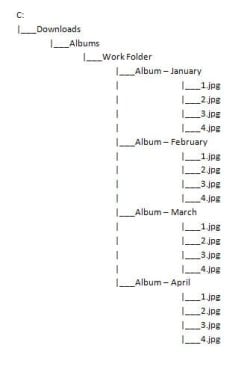
C:\Downloads\Albums\Work Folder\Album - January\Multiple .jpg images
C:\Downloads\Albums\Work Folder\Album - February\Multiple .jpg images
C:\Downloads\Albums\Work Folder\Album - March\Multiple .jpg images
C:\Downloads\Albums\Work Folder\Album - April\Multiple .jpg images

Of course, I am working with WAY more than just 4 folders. I am looking to basically get rid of the Random Junk Subfolder and move the multiple jpegs up. Icing on the cake would be to include the deletion of the Random Junk Subfolder if possible.

I have, in the past, created some VERY BASIC .bat files, but I do not know enough knowledge of the code to perform this type of task. Thank you greatly in advance for any help you can provide.

John
 

My Computer

OS
Windows 7 Ultimate 32bit
Are there many Random Junk Subfolders? You could simply go into each one, sort by file type, select the .jpgs then cut-paste them elsewhere.

Edit:
My bad, you said "way more than 4". If they're all under the same folder though, you could use search (include subfolders in results) and do the same thing. Then it's basically one huge cut-paste.
 

My Computer

Computer Manufacturer/Model Number
Self-built rig
OS
Win7 Pro x64
CPU
Koa i5-2550K
Memory
8 GB
Graphics Card(s)
Sapphire ATI 6870 1GB GDDR5
Sound Card
RealTek HD Audio / ATI HDMI Audio
Monitor(s) Displays
Samsung HDTV Monitor T23A350
Screen Resolution
1920 x 1080
Hard Drives
- SSD (C:)
- HDD (D:)
- BD-ROM (E:)
Keyboard
Logitech G110
Internet Speed
Unifi home (5mbps)
No, that wont work...the images need to be moved up one directory only, which is still not the same folder. What you are suggesting would put all the images in one giant folder. I still need them separate, just in the directory one level up (i.e., Album - January, Album - February, Album - March, etc.). Thank you ,though.

Here's a graphic. I'd like to remove the highlighted folders and move the jpgs up one level:
 

Attachments

  • File Tree 01.jpg
    File Tree 01.jpg
    28 KB · Views: 60
  • File Tree 02.jpg
    File Tree 02.jpg
    21.3 KB · Views: 54

My Computer

OS
Windows 7 Ultimate 32bit
Gotcha. Hmm, looks like a batch file might be able to do it, but I can't quite grasp how the folder parameters should look like. Seems to me you either need to supply all the random junk folder names, else you'll need to run the batch file for each random junk folder. Gonna think aloud for a sec, feel free to jump in.

move random_junk\*.jpg .
That does it for the stuff in one album. Problem is, this has to be run in each album folder, and you'll need the name of the random junk folder for that album too.

Okay wait, I know, a for loop should work and you can stick the folder names in a plaintext file for it to process. Uhh gimme a few minutes to let this boil.

Edit:
Okay, you'll need two text files, one containing the names of the album folders (say, "album.txt"), the other one containing the names of the corresponding random junk folder (say, "junk.txt"). They have to match, i.e. line X in album.txt and line X in junk.txt should be the same album/junk folder pair.

A simple "dir /ad/b >album.txt" should do the job for the former, for the latter... well damn, didn't think this one through. Wait a sec. No, change that to "dir /ad/s/b >album.txt". You'll get all the album folders and their junk folders in album.txt, then you'll have to cut-paste out the junk folders into notepad and save that as junk.txt. Still thinking about the for loop.

Edit:
Alright, the for loop is pretty simple, what we need to do is tell it "take the .jpgs from folder A and move them to folder B", and folders A and B are supplied by those 2 text files right? Here's the format:
FOR /F ["options"] %variable IN (file-set) DO command [command-parameters]

And here's the specifics:
for /f "tokens=2,3" %%1 in (folder.txt junk.txt) do move .\%%2\%%3\*.jpg .\%%2\

Run that from the parent folder above all the album folders, assuming all your album folders are under one parent folder, and that each album folder contains one random junk folder. If an album folder contains several junk folders then you'll just have to repeat the album folder in album.txt to match how many junk folders it has in junk.txt

Eh, that's the theory behind this anyway. I have not tested this!

Edit:
Oh yeah, cleanup.
for /f "tokens=2,3" %%1 in (folder.txt junk.txt) do rmdir .\%%2\%%3

rmdir as you know will delete the folders, assuming there's nothing else in there. It will fail (deliberately) if there's still some other stuff in there, dunno maybe if you forgot anything.
 
Last edited:

My Computer

Computer Manufacturer/Model Number
Self-built rig
OS
Win7 Pro x64
CPU
Koa i5-2550K
Memory
8 GB
Graphics Card(s)
Sapphire ATI 6870 1GB GDDR5
Sound Card
RealTek HD Audio / ATI HDMI Audio
Monitor(s) Displays
Samsung HDTV Monitor T23A350
Screen Resolution
1920 x 1080
Hard Drives
- SSD (C:)
- HDD (D:)
- BD-ROM (E:)
Keyboard
Logitech G110
Internet Speed
Unifi home (5mbps)
Here you go I think this will work fine, just backup the entire Work Folder just in case. It may not be the most efficient way and could take a while depending on the number of folders and files but it works.

Copy the following into a batch file and place in the Work Folder and run it from there.
Code:
@echo off
cd %~dp0

for /f "tokens=*" %%i in ('dir /b /a:d /s') do (call :COPY_FILES "%%i")

pause
exit

:COPY_FILES
cd %1
cd..

if NOT "%cd%\" == "%~dp0" xcopy /vq %1\"*.jpg" "%cd%\*.*" && rd /s /q %1
For anyone that wants to know how it works then I'll do my best to explain.

First it runs a DIR cmd for all subfolders in a FOR loop and passes each directory one by one to the COPY_FILES marker/code.

COPY_FILES starts by changing the cmd pointer/prompt to the folder passed by the FOR cmd and then changes up one level to the destination folder. This is to make the XCOPY cmd easier.

The IF statement is because the first folders to be passed will be Album - January, Album - February etc.. and when the CD.. cmd is ran it will move the cmd pointer/prompt into Work Folder. Without the IF statement we would copy any jpg files from Album - January, Album - February etc.. to the Work Folder.

The IF statement checks to see if the current directory is NOT equal to where the batch file is ran from (%~dp0) which needs to be the Work Folder before copying any files.

This is where it will be inefficient because it wil have to ignore a number of folders in the Work Folder before moving on to their subfolders.

Once it's into the subfolders the XCOPY cmd copys all the .jpg files in the directory passed by the FOR cmd (%1) to the current directory the cmd prompt is pointing to. This is why the COPY_FILES first changes the pointer to the destination folder.

If the XCOPY cmd is successful then the directory passed by the FOR cmd (%1) is removed silently. (&& rd /s /q %1)

As is the xcopy cmd only uses the verify and quiet switches but you can modify it for hidden files, read only, overwrite etc... if needed.
 

My Computer

Computer Manufacturer/Model Number
Self built
OS
Windows 7 Ultimate x64
CPU
Intel Pentium Dual Core E5200 2.5GHz (3.77GHz OC)
Motherboard
Asus P5Q-E
Memory
Corsair 4GB DDR2 (4x1GB CM2X1024-6400C4)
Graphics Card(s)
Palit GeForce GTS 250 (1024MB)
Sound Card
On Board (ADI AD2000B 8ch HD)
Monitor(s) Displays
Samsung 32in LCD TV
Screen Resolution
1360x768
Hard Drives
2 x 1TB Samsung 103SJ (Raid0)
2 x External 500GB Samsung 502IJ (NexStar 3 HD Enclosures)
PSU
550W Antec Neo HE 550
Case
Antec P180
Cooling
Xigmatex Red Scorpion CPU Cooler. 3x120mm Fans
Keyboard
Logitech MX5000 Laser (Combo)
Mouse
Logitech MX5000 Laser (Combo)
Internet Speed
ADSL2+ (avg 10 Mbps Down, 0.80 Mbps up)
Other Info
Gigabyte GN-WP01GS 54g Wireless Lan Card
Is the name realy ___Random Junk folder? Or do you mean 0a1298fd or any other random name?
 

My Computer

Computer type
Laptop
Computer Manufacturer/Model Number
ACER ASPIRE 5742G
OS
Microsoft Windows 7 Home Premium 64-bits 7601 Multiprocessor Free Service Pack 1
CPU
Intel(R) Core(TM) i3 CPU M 370 @ 2.40GHz
Motherboard
Acer Aspire 5742G
Memory
4,00 GB
Graphics Card(s)
ATI Mobility Radeon HD 5400 Series
Sound Card
(1) AMD High Definition Audio Device (2) Realtek High Defi
Screen Resolution
1366 x 768 x 32 bits (4294967296 colors) @ 60 Hz
Hard Drives
WDC WD5000BEVT-22ZAT0

My Computer

Computer type
PC/Desktop
Computer Manufacturer/Model Number
Custom built, several laptops HP/ASUS
OS
Linux CENTOS 7 / various Windows OS'es and servers
CPU
Intel i7 Intel i5
Memory
8GB, 16GB
Graphics Card(s)
On Motherboard
Sound Card
Realtek HD audio
Monitor(s) Displays
Apple Cinema display, Samsung LCD
Screen Resolution
1920 X 1080
Hard Drives
4 X 1TB SATA
Mouse
Toshiba wireless laser
Internet Speed
> 20MB up
Hey guys, just woke up and saw all these excellent responses. Thanks! While I was waiting for any response and before I went to bed last night, I actually ended up finding a program online called FileMonkey that can perform what I need, lol. I ended backing up my Work Folder and trying it out...worked like a charm. After having the files moved up one level, it left me with a ton of empty folders. I used a program called Remove Empty Directories to scan the Work Folder and it deleted all empty folders. The whole process went by fairly quick too.


Thank you guys a ton for the suggestions though.
 

My Computer

OS
Windows 7 Ultimate 32bit
"FileMonkey", heh. Good to know.

Btw, thanks for the code Duzzy, had a head cold yesterday wasn't thinking straight and just banged out what came to mind lol.
 

My Computer

Computer Manufacturer/Model Number
Self-built rig
OS
Win7 Pro x64
CPU
Koa i5-2550K
Memory
8 GB
Graphics Card(s)
Sapphire ATI 6870 1GB GDDR5
Sound Card
RealTek HD Audio / ATI HDMI Audio
Monitor(s) Displays
Samsung HDTV Monitor T23A350
Screen Resolution
1920 x 1080
Hard Drives
- SSD (C:)
- HDD (D:)
- BD-ROM (E:)
Keyboard
Logitech G110
Internet Speed
Unifi home (5mbps)
Had a quick look at FileMonkey, looks intresting.

@Trucidation
No problem. I enjoyed the challange.
 

My Computer

Computer Manufacturer/Model Number
Self built
OS
Windows 7 Ultimate x64
CPU
Intel Pentium Dual Core E5200 2.5GHz (3.77GHz OC)
Motherboard
Asus P5Q-E
Memory
Corsair 4GB DDR2 (4x1GB CM2X1024-6400C4)
Graphics Card(s)
Palit GeForce GTS 250 (1024MB)
Sound Card
On Board (ADI AD2000B 8ch HD)
Monitor(s) Displays
Samsung 32in LCD TV
Screen Resolution
1360x768
Hard Drives
2 x 1TB Samsung 103SJ (Raid0)
2 x External 500GB Samsung 502IJ (NexStar 3 HD Enclosures)
PSU
550W Antec Neo HE 550
Case
Antec P180
Cooling
Xigmatex Red Scorpion CPU Cooler. 3x120mm Fans
Keyboard
Logitech MX5000 Laser (Combo)
Mouse
Logitech MX5000 Laser (Combo)
Internet Speed
ADSL2+ (avg 10 Mbps Down, 0.80 Mbps up)
Other Info
Gigabyte GN-WP01GS 54g Wireless Lan Card
Back
Top