JavaScript is disabled. For a better experience, please enable JavaScript in your browser before proceeding.
You are using an out of date browser. It may not display this or other websites correctly.
You should upgrade or use an
alternative browser .
Solved Please help with this Windows 10 install problem
Very Senior Member
Power User
VIP
I don't have a clue how to get out of this mess so I am asking you experts.
Early this month I gave up to Microsoft's nagging and installed Windows 10 over Windows 7 on another computer and I had nothing but blue screens so I reinstalled Windows 7 which took three days.
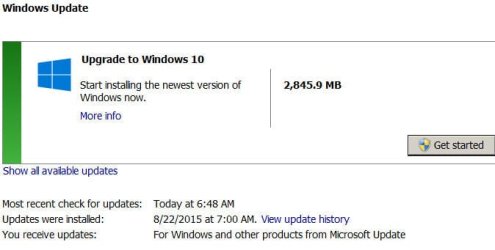
Now on another computer I am faced with the attached screen capture and am helpless. I can't install any updates because they want to install Windows 10 and I just don't want it.
If any of you can help it would be greatly appreciated.
win10.jpg
41.6 KB
· Views: 26
Computer type PC/Desktop Computer Manufacturer/Model Number Home Built OS Windows `10 Professional 64bit CPU Intel i5 [email protected] Motherboard MSI P67A-GD55 (MS7681) Memory Corsair Vengeance DDR3 1600 16G Graphics Card(s) NVIDIA GeForce GT520 1GHz Sound Card Realtek High Definition Audio Monitor(s) Displays Haans G 241 Screen Resolution 1600X1024 Hard Drives Crucial MX100 256GB SSD PSU OCZ ModXStream Modular High Performance 500 Watt Case Rosewill Challenger-U3 Cooling Just Fans Keyboard Kensington K64338B Mouse Microsoft wheel mouse 1.1A Internet Speed 240.0 Mbps Antivirus ESET Internet Security Browser Firefox Other Info SuperAntiSpyware-Pro
Malwarebytes (Premium)
Kerish Doctor
Administrator
Staff member
Computer type PC/Desktop Computer Manufacturer/Model Number Self built custom OS 64-bit Windows 11 Pro for Workstations CPU Intel i7-8700K OC'd to 5 GHz Motherboard ASUS ROG Maximus XI Formula Z390 Memory 64 GB (4x16GB) G.SKILL TridentZ RGB DDR4 3600 MHz Graphics Card(s) ASUS ROG-STRIX-GTX1080TI-O11G-GAMING Sound Card Integrated Monitor(s) Displays 2 x Samsung Odyssey G7 27" Screen Resolution 2560x1440 Hard Drives 1TB Samsung 990 PRO M.2,
4TB Samsung 990 PRO PRO M.2,
TerraMaster F8 SSD Plus NAS PSU Seasonic Prime Titanium 850W Case Thermaltake Core P3 Cooling Corsair Hydro H115i Keyboard Logitech wireless K800 Mouse Logitech MX Master 4 Internet Speed 2 Gb/s Download and 100 Mb/s Upload Antivirus Malwarebyte Anti-Malware Premium Browser Google Chrome Other Info Logitech Z625 speaker system,
Logitech BRIO 4K Pro webcam,
HP Color LaserJet Pro MFP M477fdn,
APC SMART-UPS RT 1000 XL - SURT1000XLI,
Galaxy S23 Plus phone
Very Senior Member
Power User
VIP
Thread Starter
Hello Joe,
You can use the tutorial below to disable the Upgrade to Windows 10 update.
How to Enable or Disable Upgrade to Windows 10 in Windows Update for Windows 7 and 8.1
Brink, you guys are lifesavers. I cannot tell me how much I appreciate the help you give us.
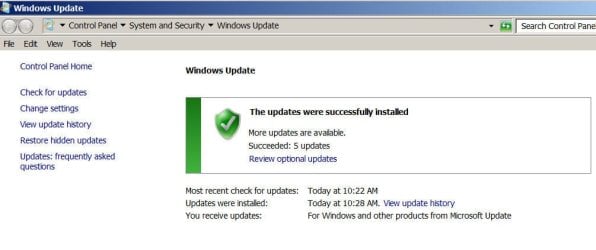
Installed the .reg file and Windows 10 started to download. Can't remember if I stopped it or it stopped by itself but the end result is that I have my Windows 7 back the way it should be.
I have seen that registry fix on line but I did not trust myself entering it by typing into the registry. This fix was exactly what I needed. I'm sure I will have more questions but that can wait - except I imagine I am safe to enter the file into my other computers, yes?
Thanks again. I am a very happy old guy right now.
win10update.jpg
75.9 KB
· Views: 0
Last edited: Sep 25, 2015
Computer type PC/Desktop Computer Manufacturer/Model Number Home Built OS Windows `10 Professional 64bit CPU Intel i5 [email protected] Motherboard MSI P67A-GD55 (MS7681) Memory Corsair Vengeance DDR3 1600 16G Graphics Card(s) NVIDIA GeForce GT520 1GHz Sound Card Realtek High Definition Audio Monitor(s) Displays Haans G 241 Screen Resolution 1600X1024 Hard Drives Crucial MX100 256GB SSD PSU OCZ ModXStream Modular High Performance 500 Watt Case Rosewill Challenger-U3 Cooling Just Fans Keyboard Kensington K64338B Mouse Microsoft wheel mouse 1.1A Internet Speed 240.0 Mbps Antivirus ESET Internet Security Browser Firefox Other Info SuperAntiSpyware-Pro
Malwarebytes (Premium)
Kerish Doctor
Administrator
Staff member
You're most welcome Joe.
Computer type PC/Desktop Computer Manufacturer/Model Number Self built custom OS 64-bit Windows 11 Pro for Workstations CPU Intel i7-8700K OC'd to 5 GHz Motherboard ASUS ROG Maximus XI Formula Z390 Memory 64 GB (4x16GB) G.SKILL TridentZ RGB DDR4 3600 MHz Graphics Card(s) ASUS ROG-STRIX-GTX1080TI-O11G-GAMING Sound Card Integrated Monitor(s) Displays 2 x Samsung Odyssey G7 27" Screen Resolution 2560x1440 Hard Drives 1TB Samsung 990 PRO M.2,
4TB Samsung 990 PRO PRO M.2,
TerraMaster F8 SSD Plus NAS PSU Seasonic Prime Titanium 850W Case Thermaltake Core P3 Cooling Corsair Hydro H115i Keyboard Logitech wireless K800 Mouse Logitech MX Master 4 Internet Speed 2 Gb/s Download and 100 Mb/s Upload Antivirus Malwarebyte Anti-Malware Premium Browser Google Chrome Other Info Logitech Z625 speaker system,
Logitech BRIO 4K Pro webcam,
HP Color LaserJet Pro MFP M477fdn,
APC SMART-UPS RT 1000 XL - SURT1000XLI,
Galaxy S23 Plus phone