Please need Help about Aero

daniel7086

New member
Local time
6:31 PM
Messages
6
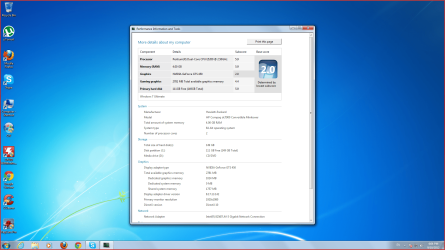
My computer is relatively good graphics card of GeForce 450GTS E5200 processor and 4GB RAM
Every game I run even the most disgusting I was once working on a maximum not work for me today ..... barely minimum
Logical that such a game I did not even run L4D2 on medium?
Or WOW I was running on a maximum day I could hardly run a minimum

Pic :
http://up351.siz.co.il/up1/3mimuwzm4tzz.png
 

My Computer

OS
Windows 7 Ultimate x64
I could only suggest updating the driver, no matter when you last did it and which version you currently have.

That card should not be registering a 2.0 on the Windows Experience Index, so something is very seriously wrong. Have you overclocked it at all?
 

My Computer

Computer Manufacturer/Model Number
Custom
OS
Windows 7 Ultimate 64-bit
CPU
AMD Phenom II X4 955 Black OC'ed 4.0GHz
Motherboard
Asus M5A88-V EVO
Memory
8GB Mushkin Enhanced Silverline (2x4GB) 1333
Graphics Card(s)
XFX Radeon HD6870 1024MB GDDR5 OC'ed 945MHz; 1151MHz
Sound Card
Soundblaster X-Fi Xtreme PCIe
Monitor(s) Displays
32" Hannspree SE32LMNB
Screen Resolution
1920 x 1080
Hard Drives
250GB Hitachi Deskstar (OS); 2TB Western Digital Elements
PSU
650W XFX XXX Edition 80PLUS Bronze Modular
Case
Cougar 6GR1 Evolution
Cooling
Corsair H60 p/p 120mm; Zalman VF3000A; x4 120mm; x1 140mm
Keyboard
Logitech G510
Mouse
CM Storm Sentinel Advance Zero-G
Internet Speed
Not fast enough :I
Other Info
No matter what your specs, my PC is better.
i dont know what to do ....... i realy dont know i update my driver something like 1000 times ....
i try the april driver one too and not work too
can u guys give me some advices what to do !? !


What you mean OVERCLOCKED ? !
 

My Computer

OS
Windows 7 Ultimate x64
Well if you don't know what it is then you're probably not in danger of having done it ;)

I really couldn't suggest anything else. It might be worth finding out how to post a log or minidump and doing so. Unfortunately I have little to no experience with them and they're still mostly a jumble of jargon and nonsense to me!
 

My Computer

Computer Manufacturer/Model Number
Custom
OS
Windows 7 Ultimate 64-bit
CPU
AMD Phenom II X4 955 Black OC'ed 4.0GHz
Motherboard
Asus M5A88-V EVO
Memory
8GB Mushkin Enhanced Silverline (2x4GB) 1333
Graphics Card(s)
XFX Radeon HD6870 1024MB GDDR5 OC'ed 945MHz; 1151MHz
Sound Card
Soundblaster X-Fi Xtreme PCIe
Monitor(s) Displays
32" Hannspree SE32LMNB
Screen Resolution
1920 x 1080
Hard Drives
250GB Hitachi Deskstar (OS); 2TB Western Digital Elements
PSU
650W XFX XXX Edition 80PLUS Bronze Modular
Case
Cougar 6GR1 Evolution
Cooling
Corsair H60 p/p 120mm; Zalman VF3000A; x4 120mm; x1 140mm
Keyboard
Logitech G510
Mouse
CM Storm Sentinel Advance Zero-G
Internet Speed
Not fast enough :I
Other Info
No matter what your specs, my PC is better.
Hi Welcome to Seven Forums.
To help us help you would you please add your systems specs? Here's how: http://www.sevenforums.com/tutorials/180324-system-info-see-your-system-specs.html#post1530002
Under System Manufacturer/Model Number add whether it is a desktop or laptop and whether self built.

Log in to Seven Forums and you will be able to transfer the info directly to your specs page in your profile directly from the System Info app.


You link to a pic doesn't work for me. Use these instructions for posting images. http://www.sevenforums.com/tutorials/9733-screenshots-files-upload-post-seven-forums.html#post93869

Have you tried a http://www.sevenforums.com/tutorials/700-system-restore.html#post4405 to a point before the issue?
 

My Computer

Computer type
PC/Desktop
Computer Manufacturer/Model Number
Home Built Desktop By DataTech
OS
Windows 7 Ultimate X64 SP1
CPU
Intel i5-2550K, Differing ~4.4-4.8GHz No built in GPU
Motherboard
ASUS P8Z68-V PRO/GEN3
Memory
16GB G.Skill Sniper 1866MHz @ 2133MHz 2x8GB
Graphics Card(s)
ASUS GTX650TIB-DC2OC-2GD5, (650TI Boost)
Sound Card
Onboard Realtek 5-1
Monitor(s) Displays
Samsung P2570HD
Screen Resolution
1920x1080
Hard Drives
Samsung 840 Pro 256GB SSD for OS, 500GB Seagate Constellation (Enterprise drive) for Data
PSU
Corsair HX650W
Case
Inwin Dragon Rider
Cooling
Hyper 212 EVO w/two Noctua fans, push-pull, @1300 RPM
Keyboard
E-Z Eyes, bright yellow keys with large characters
Mouse
steelseries SENSEI Laser Pro Gaming
Internet Speed
48-51Mbs Mbs down, 11 Mbs up Xfinity Cable
Antivirus
Norton Internet Security 2013
Browser
IE 10, Opera, Pale Moon if needed
Other Info
4 case fans, LG BluRay-RE, ASUS DVD-RW, Mr. Fusion power supply, 1.21 gigawatts.
3mimuwzm4tzz.png

HERE THE PIC ... tell me if its help you to solve it
 

My Computer

OS
Windows 7 Ultimate x64
What power supply do you have, just out of interest? This is measured in W, so if you don't know, look on the back and look for a three-digit number with a W at the end. If it's not on the back then you'll have to take the side panel off and have a look at the large box inside the tower.
 

My Computer

Computer Manufacturer/Model Number
Custom
OS
Windows 7 Ultimate 64-bit
CPU
AMD Phenom II X4 955 Black OC'ed 4.0GHz
Motherboard
Asus M5A88-V EVO
Memory
8GB Mushkin Enhanced Silverline (2x4GB) 1333
Graphics Card(s)
XFX Radeon HD6870 1024MB GDDR5 OC'ed 945MHz; 1151MHz
Sound Card
Soundblaster X-Fi Xtreme PCIe
Monitor(s) Displays
32" Hannspree SE32LMNB
Screen Resolution
1920 x 1080
Hard Drives
250GB Hitachi Deskstar (OS); 2TB Western Digital Elements
PSU
650W XFX XXX Edition 80PLUS Bronze Modular
Case
Cougar 6GR1 Evolution
Cooling
Corsair H60 p/p 120mm; Zalman VF3000A; x4 120mm; x1 140mm
Keyboard
Logitech G510
Mouse
CM Storm Sentinel Advance Zero-G
Internet Speed
Not fast enough :I
Other Info
No matter what your specs, my PC is better.
What power supply do you have, just out of interest? This is measured in W, so if you don't know, look on the back and look for a three-digit number with a W at the end. If it's not on the back then you'll have to take the side panel off and have a look at the large box inside the tower.

Do think the graphics card may be not be receiving sufficient voltages?
 

My Computer

Computer type
Laptop
Have you checked the PSU which is found within your computer, as suggested by oxymoron02?

Is your computer a laptop or desktop?

Could you please write what suggestions you have already done please?

Thanks,

Harry
 

My Computer

Computer type
Laptop
I dont know what is PSU
And my computer is desktop
I installed couple times the graphic driver
I did format to my computer and still nothing
I try to download some softwares that people say to me and still nothing
Only thing i found is this forum.
 

My Computer

OS
Windows 7 Ultimate x64
I dont know what is PSU
And my computer is desktop
I installed couple times the graphic driver
I did format to my computer and still nothing
I try to download some softwares that people say to me and still nothing
Only thing i found is this forum.

PSU = Power Supply Unit (it's a big box eletrical box with lots of warnings on it within your case).

Could please try and see what the watts is for your PSU, turn off the computer first.

What software did you download?
 

My Computer

Computer type
Laptop
You could purchase a new PSU, since stating in your last post that the wattage was 365W, and the recommended amount is 500W.

See here: GeForce GTS 450 review roundup

What does everyone else think?

You could get a lower-end graphics card or a graphics card which suits your PSU wattage better.
 

My Computer

Computer type
Laptop
I dont think the PSU connected...
With this graphic card i played alot of games with good quality and now i cant play L4D on low quality..
maybe something happend to the card ?
 

My Computer

OS
Windows 7 Ultimate x64
I dont think the PSU connected...
With this graphic card i played alot of games with good quality and now i cant play L4D on low quality..
maybe something happend to the card ?

The PSU would be connected, otherwise you wouldn't be able to turn your computer on.

How old is the card? We could perform a stress test of your hardware components, to detect any hardware faults with the graphics card.

Before, the stress test, create a BACKUP and move the backup onto a external media (e.g USB memory stick, external hard-drive or different hard-drive within the computer (not partition).

http://www.sevenforums.com/tutorials/100356-video-card-stress-test-furmark.html

Hope this helps,

Harry
 

My Computer

Computer type
Laptop
You didn't follow instructions to fill in your system specs so we are a little in the dark here.

We have only an idea of your actual GPU since many companies made it with different configurations, memory, and clock speeds. It is connected to your PSU, if not with 12V PCIe cables, then through the PCIe slot and bus.

Your title mentions Aero trouble but your post does not. :confused:
 

My Computer

Computer type
PC/Desktop
Computer Manufacturer/Model Number
Home Built Desktop By DataTech
OS
Windows 7 Ultimate X64 SP1
CPU
Intel i5-2550K, Differing ~4.4-4.8GHz No built in GPU
Motherboard
ASUS P8Z68-V PRO/GEN3
Memory
16GB G.Skill Sniper 1866MHz @ 2133MHz 2x8GB
Graphics Card(s)
ASUS GTX650TIB-DC2OC-2GD5, (650TI Boost)
Sound Card
Onboard Realtek 5-1
Monitor(s) Displays
Samsung P2570HD
Screen Resolution
1920x1080
Hard Drives
Samsung 840 Pro 256GB SSD for OS, 500GB Seagate Constellation (Enterprise drive) for Data
PSU
Corsair HX650W
Case
Inwin Dragon Rider
Cooling
Hyper 212 EVO w/two Noctua fans, push-pull, @1300 RPM
Keyboard
E-Z Eyes, bright yellow keys with large characters
Mouse
steelseries SENSEI Laser Pro Gaming
Internet Speed
48-51Mbs Mbs down, 11 Mbs up Xfinity Cable
Antivirus
Norton Internet Security 2013
Browser
IE 10, Opera, Pale Moon if needed
Other Info
4 case fans, LG BluRay-RE, ASUS DVD-RW, Mr. Fusion power supply, 1.21 gigawatts.
Do think the graphics card may be not be receiving sufficient voltages?

Pretty much. Although it's unusual for a graphics card to even allow a system to boot if it isn't even recieving enough power, it's not entirely unheard of them to operate in a low power mode (as I found out the hard way many a moon ago and after much frustration that the awesome new card I had bought was not living up to expectations!).
On the other hand in this low power mode it shouldn't have been able to handle the games that Daniel mentioned at the good quality which he said he got.

Moving into the realms of near-fiction I suppose it's vaguely possible that it was operating at the peak of its ability on a drastic lack of wattage, but something here still doesn't add up.


We may have to consider the possibility that the card has simply turned faulty. However I would still highly recommend replacing the 365W PSU with something higher.
 

My Computer

Computer Manufacturer/Model Number
Custom
OS
Windows 7 Ultimate 64-bit
CPU
AMD Phenom II X4 955 Black OC'ed 4.0GHz
Motherboard
Asus M5A88-V EVO
Memory
8GB Mushkin Enhanced Silverline (2x4GB) 1333
Graphics Card(s)
XFX Radeon HD6870 1024MB GDDR5 OC'ed 945MHz; 1151MHz
Sound Card
Soundblaster X-Fi Xtreme PCIe
Monitor(s) Displays
32" Hannspree SE32LMNB
Screen Resolution
1920 x 1080
Hard Drives
250GB Hitachi Deskstar (OS); 2TB Western Digital Elements
PSU
650W XFX XXX Edition 80PLUS Bronze Modular
Case
Cougar 6GR1 Evolution
Cooling
Corsair H60 p/p 120mm; Zalman VF3000A; x4 120mm; x1 140mm
Keyboard
Logitech G510
Mouse
CM Storm Sentinel Advance Zero-G
Internet Speed
Not fast enough :I
Other Info
No matter what your specs, my PC is better.
To try and round the points up for you:

1) Update your system specifications - Britton30
2) Stress Test, but remember to create a backup beforehand
3)PSU; consideration buying a new PSU with higher wattage - oxymoron02

Hope this makes things clearer for you.

Thanks,

Harry
 

My Computer

Computer type
Laptop
I bet the card is sitting incorrectly on the PCI-E slot causing it to run in PCI-E 1.0 x1 instead of 2.0 x16, you can check the mode with GPU-Z.
 

My Computer

Computer type
PC/Desktop
OS
Microsoft Windows 10 Professional / Windows 7 Professional
CPU
Intel i5-3570
Motherboard
Lenovo Mahobay
Memory
16GB DDR3
Graphics Card(s)
AMD Radeon HD 7850 2GB
Sound Card
(1) Realtek HD Audio (2) AMD HD Audio
Monitor(s) Displays
LG LS192WS
Screen Resolution
1440 x 900 @ 32bit color
Hard Drives
(1) SUV300S37A/120G (2) ST3500413AS SATA Disk Device AHCI mode enabled.
PSU
Corsair HX620
Case
Thermaltake V4 Black Edition
Cooling
Cooler Master Hyper 212 + Artic Silver 5 on CPU/GPU
Keyboard
Dell SK-8115
Mouse
Razer Copperhead with MAPED mat (awesome!)
Internet Speed
100 Mbps up/down
Browser
Chrome
Back
Top