Pointers & Cursors Hijacked

Chipper

Banned
Local time
8:06 AM
Messages
33
Location
Massachusetts
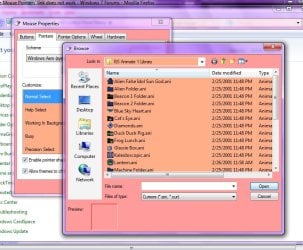
I may be to blame for this, but I went to change the mouse pointer from white to black and noticed I could not browse to any default pointers. The browse panel has been taken over by a set of .ani icons that I have in an icon folder.

I tried to put them in their, because I noticed where it said 'files of type', .ani and .cur were listed; so I figured those icons could go in there. And they did.

But I now cannot access any of the default P&Cs within browse.

And in WINDOWS/Cursors it appears as some other of my icons have taken over some of the default icons.

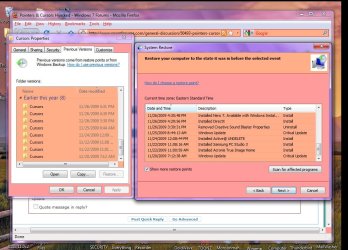
In WINDOWS/Cursors/Previous Versions I went all the way back to 11/19/09 and the alien icons are listed in there as well.

Any help here will be greatly appreciated.

Thanks all...
 

Attachments
  • Pointers.jpg
    Pointers.jpg
    84.9 KB · Views: 42
  • Icon Rampage.jpg
    Icon Rampage.jpg
    106.8 KB · Views: 333

My Computer

Computer Manufacturer/Model Number
ACER/AM3100-U3201A
OS
Windows7 (Home Premium)
CPU
AMD Athlon Dual Core 4400+ 2.30Ghz
Motherboard
AMD 690 G
Memory
3.0GB (2.75GB usable)
Graphics Card(s)
ATI Radeon X1200 Series
Sound Card
Audigy SE
Monitor(s) Displays
Liquid Video LCD
Hard Drives
C: (system) 298GB [277GB free]
D: (nonsystem) 232GB [213GB free]
J: MyBook 149GB [109GB free] external
K: MyBook 298GB [291GB free] external
PSU
120v AC ?
Case
?
Cooling
3 fans
3 things to try...click the button for Defaults. Change the theme in the dropdown window. Deselect the checkbox for "Allow themes to change mouse pointers".
 

My Computer

Computer Manufacturer/Model Number
DIY
OS
W7x64 Pro, SuSe 12.1/** W7 x64 Pro, XP MCE
CPU
Phenom II 1090T w/Noctua NH-D14 /**4400+ X2 w/CM Hyper TX 3
Motherboard
ASRock 890FX Deluxe 4/**A8N-SLI
Memory
2 x 2GB Patriot PGS34g1600LLKA/**4x1GB Corsair VS
Graphics Card(s)
EVGA GTX460 SC/**EVGA 8800GTS
Sound Card
Asus Xonar D2X/**Xonar D1
Monitor(s) Displays
Acer X233H, Dell E152FPc /**LG M237-WD
Screen Resolution
1920x1080 & 1024x768/**1980x1080
Hard Drives
WDC 2TB, 1.5TB, 1TB, 500GB,Seagate 500GB , Maxtor 80GB /**500GB Seagate & WDC 1TB Black
PSU
CM RS600 w/ APC BX1000G/**Antec 500 TP w/ APC BX1000
Case
HAF922/**Antec 1040IIB
Cooling
3x200mm, 1x140 and 1x120mm/**5x80mm fans
Keyboard
Logitech Media USB/**Saitek Eclipse
Mouse
Cordless Trackman Wheel/**Ditto
Internet Speed
3.3Mbps
Other Info
SB 560 5.1 w/ Sennheiser RS140/**Creative T20 speakers, Dvico FusionHDTV7 Gold RT, Cisco E3000, HP 5510V AIO, Linksys E3000, Belkin F5U237 hub and **F5D8055 adapter
(** = 2nd rig)
If the above does not work. Did you make a system image after you downloaded the System? If so this may be the time to use it. System Restore will not help unless you have restore points prior to the problem, which is pretty old.
 

My Computer

Computer type
PC/Desktop
Computer Manufacturer/Model Number
Dell XPS 420
OS
Windows 10, Home Clean Install
CPU
Intel Core2 processsor Q8200(2.33Ghz 1333FSB) Quad Core Tech
Motherboard
Dell
Memory
6 gb
Graphics Card(s)
ATI Radeon 256MB HD3650
Sound Card
Intergrated 7.1 Channel Audio
Monitor(s) Displays
Dell SP2009W 20"
Hard Drives
640 GB Serial ATA Hard drive
Cooling
Fan
Keyboard
Dell USB Keyboard
Mouse
Dell Premium Optical USB
Internet Speed
DSL 2.85
... sorry wrong thread
 

My Computer

Computer Manufacturer/Model Number
Custom
OS
W7 Pro/clean install
CPU
I7/940-3838A611@3750mhz
Motherboard
eVGA X58/SZ1G
Memory
OCZ DDR3 3G1600LV2G 3x2 gig
Graphics Card(s)
eVGA 295GTX/195.62 WHQL
Sound Card
Audigy 2 Platinum
Monitor(s) Displays
3 x Dell 2209WA/DTH2go
Screen Resolution
5040 x 1050@59hz
Hard Drives
1-300gig WD Velociraptor-GLFS
2 x 200 gig Seagate Barracudas-st3200822as
PSU
Corsair CMPSU-1000HX A
Case
Antec 1200
Cooling
Air cooling x 8
Keyboard
Yeah
Mouse
That too
Internet Speed
Comcast 8mg/16mg
I was able to at least change the pointer to black using the default [etc.] button, but the .ani icons still remain as-is in browse.

And of course I don't have an image made. That's why I was waiting in another thread to find out more on Acronis and W7 Imaging.

Would re-installing the Logitech mouse CD on top of W7's mouse (I presume, because I never used the LT mouse CD when I switched to W7) be of any use?

This is curious:
 

Attachments

  • Cursors & Restore Points.jpg
    Cursors & Restore Points.jpg
    120.8 KB · Views: 33

My Computer

Computer Manufacturer/Model Number
ACER/AM3100-U3201A
OS
Windows7 (Home Premium)
CPU
AMD Athlon Dual Core 4400+ 2.30Ghz
Motherboard
AMD 690 G
Memory
3.0GB (2.75GB usable)
Graphics Card(s)
ATI Radeon X1200 Series
Sound Card
Audigy SE
Monitor(s) Displays
Liquid Video LCD
Hard Drives
C: (system) 298GB [277GB free]
D: (nonsystem) 232GB [213GB free]
J: MyBook 149GB [109GB free] external
K: MyBook 298GB [291GB free] external
PSU
120v AC ?
Case
?
Cooling
3 fans
I just went back to Mouse Properties and wanted to change the black hourglass ['Busy'] to the default rotating aqua circle [.ani].

When I clicked on 'browse', the dialog window still showed the .ani icons [as above], but I clicked on open [DOH] and VOILA! All the default pointers and cursors came back.

As we say on the The Steel Guitar Forum you can lock up this thread, if the moderator so chooses. Case is closed.

Thanks again, guys...:)
 

My Computer

Computer Manufacturer/Model Number
ACER/AM3100-U3201A
OS
Windows7 (Home Premium)
CPU
AMD Athlon Dual Core 4400+ 2.30Ghz
Motherboard
AMD 690 G
Memory
3.0GB (2.75GB usable)
Graphics Card(s)
ATI Radeon X1200 Series
Sound Card
Audigy SE
Monitor(s) Displays
Liquid Video LCD
Hard Drives
C: (system) 298GB [277GB free]
D: (nonsystem) 232GB [213GB free]
J: MyBook 149GB [109GB free] external
K: MyBook 298GB [291GB free] external
PSU
120v AC ?
Case
?
Cooling
3 fans
Back
Top