Solved Possible File Association Problem or Open With Problem! MAJOR

SilentRabbit

New member
Local time
2:41 PM
Messages
4
Location
Hertfordshire
Apologies if this is not the appropriate catagory but i had trouble finding a suitable one, here is my problem:

I was messing about with a file using winrar, (sorry i cant remember which file it was) i right clicked the file and clicked 'open with' i chose winRAR and it screwed up and decided every single program on my computer could only be opened by winRAR, (every icon was changed to the winRAR icon etc.) then in my frustration i deleted winrar hoping it would then sort itself out, it didnt. (i realise this was stupid now) i then restarted my pc to find things worse, the dock at the top of my screen could no longer start up along with numurous other programmes. somehow i managed to change it from winRAR to itunes, and then every time i opened a file it opened itunes instead, ideal if i wanted itunes and only itunes, but i dont -_- i then found i can access all the programs via finding them directly (my computer, etc.)so i managed to open the internet and type this for example, i searched google i found several problems just like mine, however none of the solutions worked. i then changed it to adobe reader, again every program opened adobe reader, and then to some internet explorer thing, i have no idea what has happened.

Basically i need to set every programme to its default startup file thing (if that makes any sense at all) if you need more information as to what ive done then feel free to ask, any help is welcome!

Please Help,
Russell.

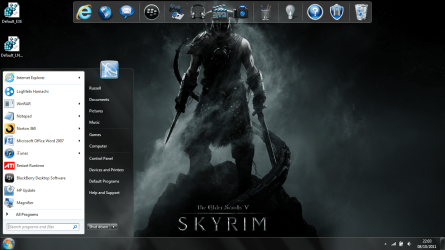
P.S. The Attached file is a .png of my computer, notice no dell dock at the top, the three programs at the bottom left are all using the same icon for what ever programme its changed to now, (the programmes should be like this from left to right: Internet Explorer, Hamachi, Norton 360 (The one with the green tick)) Also notice the open start menu, with all the programmes using the same icon, all opening the same thing, despite what they should open. like i said i have full acces to everything on my computer via my computer and navigating to them, so why dont these work? (the programmes at the bottom were opened via my computer etc.) Excuse the background. :cool:

Thanks in advance.
 

Attachments

  • See....png
    See....png
    255.9 KB · Views: 48

My Computer My Computer

At a glance

Windows 7 Home Premium 64bit.
OS
Windows 7 Home Premium 64bit.

My Computer My Computer

At a glance

Windows 7 Home Premium x64 SP1intel(R)core(TM)2 duo CPU T6600 @ 2.20GHz3 gb ddr3ati radeon hd4570/512mb
Computer Manufacturer/Model Number
acer aspire 5935g
OS
Windows 7 Home Premium x64 SP1
CPU
intel(R)core(TM)2 duo CPU T6600 @ 2.20GHz
Motherboard
intel gm45/gm47 revision 07
Memory
3 gb ddr3
Graphics Card(s)
ati radeon hd4570/512mb
Monitor(s) Displays
lop156wh2-tle1 15.3 flat
Screen Resolution
1366x768
Hard Drives
OCZ-Agility3 60gig ssd
320gig external hdd
500gig external hdd
Mouse
Optical
Internet Speed
30Mbps Down/30Mbps Up

My Computer My Computer

At a glance

Windows 7 32 bitAMD 5200+ dual core2 GBNVidia GeForce 6150SE 128 MB
Computer Manufacturer/Model Number
HP Media Center
OS
Windows 7 32 bit
CPU
AMD 5200+ dual core
Memory
2 GB
Graphics Card(s)
NVidia GeForce 6150SE 128 MB
Monitor(s) Displays
CRT
Screen Resolution
1280x1024
Hard Drives
500 GB Sata internal :

SIIG USB 3.0 docking stations w/WD Caviar Black 6 Gb/s drives
Keyboard
PS/2
Mouse
PS/2 Wheel Mouse
Other Info
SIIG USB 3.0 PCIexpress card.
Thankyou for your time danny and Milesahead, unfortuneately i dont have a restore point though.

As for you danny i tried te first option you gave me and tried the .exe (To be fair i dont know much about computers) and i didnt work, i was wandering if you (or anyone) happened to know what type programs like Internet explorer, Norton 360, iTunes and Microsoft office Word etc. are so i can fix those as they are a priority.
As for your second option, i had already tried that and it refused to work, infact i beleive that was what caused the problem...... (i did that or similar and it set every programmes default to the same programme if you understand)

Thanks again Danny and Milesahead, i apreciate the help! (And anyone else in advance)

Russell.
 

My Computer My Computer

At a glance

Windows 7 Home Premium 64bit.
OS
Windows 7 Home Premium 64bit.
Programs like those mentioned use .exe (applications) after merging the reg file did you reboot. Try opening them from their default locations in program files or program files(x86).If you are unsure right click the shortcut in the start menu, select open file location and it will take you straight to it. Try running them from there.
It also may be worth looking in default programs - http://www.sevenforums.com/tutorials/2630-default-programs-set-programs-default-associations.html and set them from there.
Looking at your screen shot everything seems to be defaulted to open with IE.

Try again downloading and merging the LNK and EXE reg files and reboot.

Regards Danny
 

My Computer My Computer

At a glance

Windows 7 Home Premium x64 SP1intel(R)core(TM)2 duo CPU T6600 @ 2.20GHz3 gb ddr3ati radeon hd4570/512mb
Computer Manufacturer/Model Number
acer aspire 5935g
OS
Windows 7 Home Premium x64 SP1
CPU
intel(R)core(TM)2 duo CPU T6600 @ 2.20GHz
Motherboard
intel gm45/gm47 revision 07
Memory
3 gb ddr3
Graphics Card(s)
ati radeon hd4570/512mb
Monitor(s) Displays
lop156wh2-tle1 15.3 flat
Screen Resolution
1366x768
Hard Drives
OCZ-Agility3 60gig ssd
320gig external hdd
500gig external hdd
Mouse
Optical
Internet Speed
30Mbps Down/30Mbps Up
failing that it may be a good idea to run sfc/scannow, if there is a corrupt systems file this method will correct it.
Please note, any third party themes you may have will be restored to windows default theme as sfc/scannow will replace patched customization files also.
SFC /SCANNOW Command - System File Checker - Windows 7 Forums
 

My Computer My Computer

At a glance

Microsoft Windows 7 Home Premium 64-bit 7600IIx4 amd athelon 635 processor2x2gbati radeon HD 5450
Computer Manufacturer/Model Number
Hewlett packard/p6512uk
OS
Microsoft Windows 7 Home Premium 64-bit 7600
CPU
IIx4 amd athelon 635 processor
Motherboard
FOXCONN 2AA9
Memory
2x2gb
Graphics Card(s)
ati radeon HD 5450
Sound Card
(1) Realtek High Definition Audio (2) AMD High Definition
Monitor(s) Displays
samsung lcd tv 32"
Screen Resolution
1360x 768
Hard Drives
(1) WDC WD10 01FAES-60Z2A0 SATA Disk Device (2) Maxtor OneTouch USB Device (3) ST310003 33AS USB Device (4) WD My Book 1111 USB Device
PSU
?
Cooling
air!
Keyboard
wireless hp
Mouse
wireless Hp,optical
Internet Speed
1.10mb/s
Antivirus
MSE
Browser
Firefox
Oh okay so i did use the right one, and yes i did reboot. Yes that does work opening from their default locations) which luckily has allowed me to write this, and use other programmes to ask friends for help. However this is inconveniant and would be much easier if my dell dock and start menu worked.

hmm setting the default programs dosent seem to of done much either.

Okay i have just dont the .lnk and .exe, and i am rebooting now.

Hopefully this works, Ill let you know in a few minutes.

Thanks again, i really appreciate it.

Russell.
 

My Computer My Computer

At a glance

Windows 7 Home Premium 64bit.
OS
Windows 7 Home Premium 64bit.
Fingers crossed ;)
 

My Computer My Computer

At a glance

Windows 7 Home Premium x64 SP1intel(R)core(TM)2 duo CPU T6600 @ 2.20GHz3 gb ddr3ati radeon hd4570/512mb
Computer Manufacturer/Model Number
acer aspire 5935g
OS
Windows 7 Home Premium x64 SP1
CPU
intel(R)core(TM)2 duo CPU T6600 @ 2.20GHz
Motherboard
intel gm45/gm47 revision 07
Memory
3 gb ddr3
Graphics Card(s)
ati radeon hd4570/512mb
Monitor(s) Displays
lop156wh2-tle1 15.3 flat
Screen Resolution
1366x768
Hard Drives
OCZ-Agility3 60gig ssd
320gig external hdd
500gig external hdd
Mouse
Optical
Internet Speed
30Mbps Down/30Mbps Up
SOrry boobah i didnt see your comment while i was writing my reply, thanks anyway but...

IT WORKED!

Thankyou so much for your time guys, especially danny!
 

Attachments

  • WOOO.png
    WOOO.png
    293.9 KB · Views: 20

My Computer My Computer

At a glance

Windows 7 Home Premium 64bit.
OS
Windows 7 Home Premium 64bit.
SOrry boobah i didnt see your comment while i was writing my reply, thanks anyway but...

IT WORKED!

Thankyou so much for your time guys, especially danny!

SilentRabbit that's great news my friend take care

Danny
 

My Computer My Computer

At a glance

Windows 7 Home Premium x64 SP1intel(R)core(TM)2 duo CPU T6600 @ 2.20GHz3 gb ddr3ati radeon hd4570/512mb
Computer Manufacturer/Model Number
acer aspire 5935g
OS
Windows 7 Home Premium x64 SP1
CPU
intel(R)core(TM)2 duo CPU T6600 @ 2.20GHz
Motherboard
intel gm45/gm47 revision 07
Memory
3 gb ddr3
Graphics Card(s)
ati radeon hd4570/512mb
Monitor(s) Displays
lop156wh2-tle1 15.3 flat
Screen Resolution
1366x768
Hard Drives
OCZ-Agility3 60gig ssd
320gig external hdd
500gig external hdd
Mouse
Optical
Internet Speed
30Mbps Down/30Mbps Up
Back
Top