Possible Hard Drive Issue?

KamilFox

New member
Local time
2:33 PM
Messages
8
Location
Tacoma
Good morning,

I recently had a bit of an issue with my laptop (ACER 5552) acting pretty slowly and not relaying information even off the internet accordingly. So, I tried defragmentation, spyware searching, malware searching, looked into the task manager. Nothing seemed to remedy the issue even when there were very few programs running (Firefox & a folder (Explorer.exe)) at the very most.

I was quite confused- so, just my luck, I happened to drop the poor thing and then when I tried to restart, I would hear a small beeping in 2 specific tones, one a piece. I feared the worst. I opened her up, and looked at the hard drive- ok, everything looked fine. Next, I tried to find out what could be wrong, then I found a PXE-E61 error along with PXE-M0F showing up as well... I am very sure the hard drive is scrap now.

So, what I am asking; If I replace the hard drive with a new one, will this solve all my problems? Please help, and thank you in advance.
 

My Computer

Computer Manufacturer/Model Number
Acer
OS
Windows 7 Home Premium
CPU
Aspire
Memory
4.00 GB
So, what I am asking; If I replace the hard drive with a new one, will this solve all my problems? Please help, and thank you in advance.
That's impossible to say until you try it. Dropping it with the HDD running I suspect did kill the HDD and caused the two PXE errors. Do those show in a Blue screen?
 

My Computer

Computer type
PC/Desktop
Computer Manufacturer/Model Number
Home Built Desktop By DataTech
OS
Windows 7 Ultimate X64 SP1
CPU
Intel i5-2550K, Differing ~4.4-4.8GHz No built in GPU
Motherboard
ASUS P8Z68-V PRO/GEN3
Memory
16GB G.Skill Sniper 1866MHz @ 2133MHz 2x8GB
Graphics Card(s)
ASUS GTX650TIB-DC2OC-2GD5, (650TI Boost)
Sound Card
Onboard Realtek 5-1
Monitor(s) Displays
Samsung P2570HD
Screen Resolution
1920x1080
Hard Drives
Samsung 840 Pro 256GB SSD for OS, 500GB Seagate Constellation (Enterprise drive) for Data
PSU
Corsair HX650W
Case
Inwin Dragon Rider
Cooling
Hyper 212 EVO w/two Noctua fans, push-pull, @1300 RPM
Keyboard
E-Z Eyes, bright yellow keys with large characters
Mouse
steelseries SENSEI Laser Pro Gaming
Internet Speed
48-51Mbs Mbs down, 11 Mbs up Xfinity Cable
Antivirus
Norton Internet Security 2013
Browser
IE 10, Opera, Pale Moon if needed
Other Info
4 case fans, LG BluRay-RE, ASUS DVD-RW, Mr. Fusion power supply, 1.21 gigawatts.
There was no blue screen of death, it just did not show that there was a HDD located. I attempted to use a boot disk as it had requested, and it showed there was no HDD available.
 

My Computer

Computer Manufacturer/Model Number
Acer
OS
Windows 7 Home Premium
CPU
Aspire
Memory
4.00 GB
When you turned on the laptop did you hear any clicking sounds coming from the hard drive ? What is the manufacture of the laptop. You could do a diagnostic test on it.
 

My Computer

Computer Manufacturer/Model Number
Custom Built
OS
Windows 7 Ultimate 32-Bit & Windows 7 Ultimate 64-Bit
CPU
Intel Core i7 CPU 950 @ 3.07GHz
Motherboard
ASUS P6T DELUXE V2
Memory
OCZ 6GB (3 x 2GB) 240-Pin DDR3 SDRAM DDR3 1600 OCZ3X1600R2
Graphics Card(s)
ATI Radeon HD 5700 Series
Sound Card
OnBoard
Hard Drives
WD6400AACS-00M3B0 (640GB SATA )
PSU
CORSAIR 850w
Case
NZXT LEXA
Cooling
Intel Stock Heatsink Fan
Keyboard
Microsoft Wireless Laser Keyboard 7000
Mouse
Microsoft Wireless Laser Mouse 7000
There were slight clicking sounds coming from the hard drive. Acer is the manufacturer. And how could I do a diagnostics? The OS is not present-- which I mean that I cannot access it since it is not recognizing the hard drive at all.
 

My Computer

Computer Manufacturer/Model Number
Acer
OS
Windows 7 Home Premium
CPU
Aspire
Memory
4.00 GB
Do you know the manufacture of the hard drive ?
 

My Computer

Computer Manufacturer/Model Number
Custom Built
OS
Windows 7 Ultimate 32-Bit & Windows 7 Ultimate 64-Bit
CPU
Intel Core i7 CPU 950 @ 3.07GHz
Motherboard
ASUS P6T DELUXE V2
Memory
OCZ 6GB (3 x 2GB) 240-Pin DDR3 SDRAM DDR3 1600 OCZ3X1600R2
Graphics Card(s)
ATI Radeon HD 5700 Series
Sound Card
OnBoard
Hard Drives
WD6400AACS-00M3B0 (640GB SATA )
PSU
CORSAIR 850w
Case
NZXT LEXA
Cooling
Intel Stock Heatsink Fan
Keyboard
Microsoft Wireless Laser Keyboard 7000
Mouse
Microsoft Wireless Laser Mouse 7000
Western Digital (WD2500BEVT) 250GB.

I have looked into getting replacements for the time being, but I have not bought yet, still looking into suggestions.
 

My Computer

Computer Manufacturer/Model Number
Acer
OS
Windows 7 Home Premium
CPU
Aspire
Memory
4.00 GB

My Computer

Computer Manufacturer/Model Number
Custom Built
OS
Windows 7 Ultimate 32-Bit & Windows 7 Ultimate 64-Bit
CPU
Intel Core i7 CPU 950 @ 3.07GHz
Motherboard
ASUS P6T DELUXE V2
Memory
OCZ 6GB (3 x 2GB) 240-Pin DDR3 SDRAM DDR3 1600 OCZ3X1600R2
Graphics Card(s)
ATI Radeon HD 5700 Series
Sound Card
OnBoard
Hard Drives
WD6400AACS-00M3B0 (640GB SATA )
PSU
CORSAIR 850w
Case
NZXT LEXA
Cooling
Intel Stock Heatsink Fan
Keyboard
Microsoft Wireless Laser Keyboard 7000
Mouse
Microsoft Wireless Laser Mouse 7000
I do not have a floppy drive, I will try to write this on a CD and see if I can get this to work.
 

My Computer

Computer Manufacturer/Model Number
Acer
OS
Windows 7 Home Premium
CPU
Aspire
Memory
4.00 GB
Download the ISO one ( second link ) right click on the ISO file and choose burn image
 

My Computer

Computer Manufacturer/Model Number
Custom Built
OS
Windows 7 Ultimate 32-Bit & Windows 7 Ultimate 64-Bit
CPU
Intel Core i7 CPU 950 @ 3.07GHz
Motherboard
ASUS P6T DELUXE V2
Memory
OCZ 6GB (3 x 2GB) 240-Pin DDR3 SDRAM DDR3 1600 OCZ3X1600R2
Graphics Card(s)
ATI Radeon HD 5700 Series
Sound Card
OnBoard
Hard Drives
WD6400AACS-00M3B0 (640GB SATA )
PSU
CORSAIR 850w
Case
NZXT LEXA
Cooling
Intel Stock Heatsink Fan
Keyboard
Microsoft Wireless Laser Keyboard 7000
Mouse
Microsoft Wireless Laser Mouse 7000
Could you provide me with the steps of what to do if I am doing it from a CD, please?
 

My Computer

Computer Manufacturer/Model Number
Acer
OS
Windows 7 Home Premium
CPU
Aspire
Memory
4.00 GB
Once you burn the ISO to the disc boot off the disc . Choose extended test
 

My Computer

Computer Manufacturer/Model Number
Custom Built
OS
Windows 7 Ultimate 32-Bit & Windows 7 Ultimate 64-Bit
CPU
Intel Core i7 CPU 950 @ 3.07GHz
Motherboard
ASUS P6T DELUXE V2
Memory
OCZ 6GB (3 x 2GB) 240-Pin DDR3 SDRAM DDR3 1600 OCZ3X1600R2
Graphics Card(s)
ATI Radeon HD 5700 Series
Sound Card
OnBoard
Hard Drives
WD6400AACS-00M3B0 (640GB SATA )
PSU
CORSAIR 850w
Case
NZXT LEXA
Cooling
Intel Stock Heatsink Fan
Keyboard
Microsoft Wireless Laser Keyboard 7000
Mouse
Microsoft Wireless Laser Mouse 7000
Just curious, should I provide photos of what is occurring?
 

My Computer

Computer Manufacturer/Model Number
Acer
OS
Windows 7 Home Premium
CPU
Aspire
Memory
4.00 GB
That would be helpful.
 

My Computer

Computer Manufacturer/Model Number
Custom Built
OS
Windows 7 Ultimate 32-Bit & Windows 7 Ultimate 64-Bit
CPU
Intel Core i7 CPU 950 @ 3.07GHz
Motherboard
ASUS P6T DELUXE V2
Memory
OCZ 6GB (3 x 2GB) 240-Pin DDR3 SDRAM DDR3 1600 OCZ3X1600R2
Graphics Card(s)
ATI Radeon HD 5700 Series
Sound Card
OnBoard
Hard Drives
WD6400AACS-00M3B0 (640GB SATA )
PSU
CORSAIR 850w
Case
NZXT LEXA
Cooling
Intel Stock Heatsink Fan
Keyboard
Microsoft Wireless Laser Keyboard 7000
Mouse
Microsoft Wireless Laser Mouse 7000
Hi KamilFox,

How to run Western Digital Data Lifeguard Diagnostic for DOS: ( There is no ISO file to burn into a CD in the Western Digital website.)

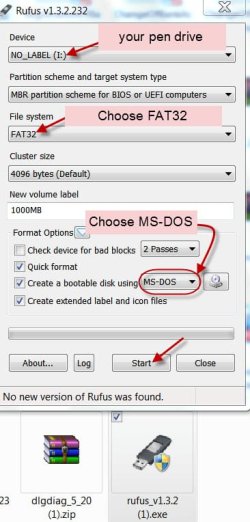
1. Download Rufus v1.3.2 (442 KB) from http://rufus.akeo.ie/ (It is just a .exe file that requires no installation. Just click/doubleclick on it to run.)

2. Backup all data in your pen drive to another media and then create a bootable DOS pen drive, running Rufus. (You will lose all data on the pen drive during formatting.)

01-05-2013 11-49-37.jpg

3. Download Data Lifeguard Diagnostic for DOS dlgdiag_5_20.zip 219KB from WD Support / Downloads / SATA & SAS / WD Black ( Also read the instructions on the page.)

4. Extract the Zip file into a folder. You will have two files dlgdiag5.exe and DLGLICE.TXT. Copy the dlgdiag5.exe into your bootable DOS pen drive. ( Or you can straightaway extract the zip file into the pen drive. Check your pen drive and confirm that the file is there on your pen drive alongwith the DOS files.)

5. Boot from the pen drive and at the command prompt type dlgdiag5.exe and press Enter to run the diagnostics.
 
Last edited:

My Computer

OS
Windows 7 Home Premium 32 bit
Back
Top