Possible solution to fixing no nvidia control panel

cobija

New member
Local time
4:52 PM
Messages
21
Hey guys. i was having this problem just a minute ago, and after several failed attempts, i finally got it! I thank gullielli specifically for instructions, but mine are more in-depth. here is the source:

http://www.sevenforums.com/graphic-cards/31637-no-nvidia-control-panel-driver-not-installing-2.html

so basically, there is the instructions:

1. Download Driver Sweeper. this program will delete all previous traces of your nvidia drivers (ones you pick). to make things easier, i copied direct links. read the first one then click I agree (theres a direct download link, but i would rather people at least know that there is no tech support on this product and can only be used at your own risk)

download from Guru3D.com

2. after downloading, install it.

3. Now here is the important part. open DriverSweeper and check "NVIDIA - Display" ONLY.

4. i recommend clicking analyze (bottom left) instead of clean (bottom right) because you can at least see what the program will remove.

5. it will ask you to reboot. this is important.

6. after reboot, do NOT (I repeat) DO NOT download new drivers from nvidia sites. after doing so about 3 times, each installation worked, however said it failed to install nvidia control panel. so do the

7. Navigate to the following: start > search "windows update" > click enter > click # optional updates avialable". Look for anything that says "NVIDIA display". If there is nothing that says that, click check for updates on the left hand column.

8. Click on install, and simply wait. the problem here was that a few times, windows would come up with an error, and not install it. but finally, 3rd time, it installed.

9. Reboot, right click, and enjoy the site of the nvidia control panel option!!

Hope this comes in handy for someone.
 
Last edited:

My Computer

OS
Windows 7 Pro 32 Bit
How to get that windows update, if it is not shown in the list?
 

My Computer

OS
Windows 7 Ultimate x64
CPU
Intel Core Duo E8400@3GHZ
Motherboard
ASUS P5N32-E SLI
Memory
4GB
Graphics Card(s)
geforce 9800gt
Hard Drives
1TB Western Digital Caviar WD1001FALS
SRY MY BAD! check for updates resolved that after reinstalling drivers.
 

My Computer

OS
Windows 7 Ultimate x64
CPU
Intel Core Duo E8400@3GHZ
Motherboard
ASUS P5N32-E SLI
Memory
4GB
Graphics Card(s)
geforce 9800gt
Hard Drives
1TB Western Digital Caviar WD1001FALS
yeah sorry..forgot to add that

ill edit it on top
 

My Computer

OS
Windows 7 Pro 32 Bit
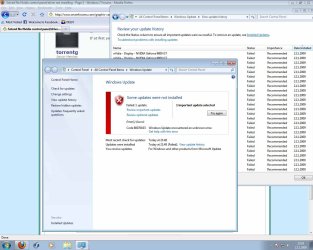
STILL no donut for me!
I`ve tried now about 30 times and still I cant install these microsoft nvidia display drivers. Removed drivers and rebooted and still nuthing:cry:

After repeated driver sweeper cleaning, this driver remover also removes my nForce drivers for ethernet (I marked only displey). Go figure out!?

Am I missing something?
Please help to solve my 5th day with total pain and agony installing new windows7 and drivers for it.
 

My Computer

OS
Windows 7 Ultimate x64
CPU
Intel Core Duo E8400@3GHZ
Motherboard
ASUS P5N32-E SLI
Memory
4GB
Graphics Card(s)
geforce 9800gt
Hard Drives
1TB Western Digital Caviar WD1001FALS
possibly you accidently checked another box..because the program is only set to delete what is checked. what i did was after the reboot (after deletion of drivers), i did a second scan to be sure everything was gone. mine forgot to delete the programdata folder i guess, so i just manually delted.
 

My Computer

OS
Windows 7 Pro 32 Bit
Hmmm:huh:

no. just checked. sweeper cant find any display drivers and still update isnt installing.
Maybe it works then only for 32bit win7.
 

Attachments

  • agony.jpg
    agony.jpg
    143.5 KB · Views: 300

My Computer

OS
Windows 7 Ultimate x64
CPU
Intel Core Duo E8400@3GHZ
Motherboard
ASUS P5N32-E SLI
Memory
4GB
Graphics Card(s)
geforce 9800gt
Hard Drives
1TB Western Digital Caviar WD1001FALS
If you can't get Windows update to work you should check the date on your machine in Windows and also check in bios to make sure it is set to the current date.

If those dates aren't right Windows update will fail everytime.
 

My Computer

Computer type
PC/Desktop
Computer Manufacturer/Model Number
Home built
OS
Windows 7 Ult, Windows 8.1 Pro,
CPU
Q9650-4.275GHz, E8600 4.5GHz, E6750-3.8GHz
Motherboard
Evga 780i FTW
Memory
G.Skill PC2 9600 1200Mhz 5 5 5 15 2T
Graphics Card(s)
GTX480
Sound Card
Asus Xonar D2
Monitor(s) Displays
HannsG
Screen Resolution
1680X1050
Hard Drives
GSkill Phoenix Pro 120GB SSD
PSU
ThermalTake Toughpower 1000Watt modular
Case
ThermalTake XaserV
Cooling
Xigmatek S1283
Keyboard
Logitech G15
Mouse
Logitech G9
Internet Speed
T1
My windows and bios dates are just fine. All my other updates are working just fine. The problem isnt there.

I have now run driver sweeper, driver cleaner pro, uninstalled from program meny and removed manually. + rebooted after every step. There are no display drivers anymore in my win7. The windows driver updater isnt working for me.

The problem is somewhere else:confused:
 

My Computer

OS
Windows 7 Ultimate x64
CPU
Intel Core Duo E8400@3GHZ
Motherboard
ASUS P5N32-E SLI
Memory
4GB
Graphics Card(s)
geforce 9800gt
Hard Drives
1TB Western Digital Caviar WD1001FALS
OK, I got that control panel working, but unfortunatly with really old 163.69 driver.
Still I have only black and white TV picture (it just wont change to pal color??) and I havent tryd any gaming yet.

Im just to frustrated nad tired to seek anymore solutions today. Ill give a try tomorrow and let u know what is happening.

cheers guys and thanks.
 

My Computer

OS
Windows 7 Ultimate x64
CPU
Intel Core Duo E8400@3GHZ
Motherboard
ASUS P5N32-E SLI
Memory
4GB
Graphics Card(s)
geforce 9800gt
Hard Drives
1TB Western Digital Caviar WD1001FALS
I got now my displey drivers working. It was a strange combination of installing and uninstalling. I used the nForce driver package from nvidia.com with included also displey drivers. They didnt work, then I uninstalled them and wolaa, now after that I could install this microsoft update drivers. Very strange, I wouldnt recomend it for first choise, but at least now it works. And also control panel works like a charm and I could change my TV settings correct.

thanks guys.
 

My Computer

OS
Windows 7 Ultimate x64
CPU
Intel Core Duo E8400@3GHZ
Motherboard
ASUS P5N32-E SLI
Memory
4GB
Graphics Card(s)
geforce 9800gt
Hard Drives
1TB Western Digital Caviar WD1001FALS
Did you try installing the new drivers and running compat mode? I had to do stuff like that with other drivers before.
 

My Computer

Computer Manufacturer/Model Number
Custom
OS
Windows 7, Linux
CPU
AMD Phemon II x2 3@3750
Motherboard
ASRock M3A770DE
Memory
1G Crucial 1666
Graphics Card(s)
8800GT OC (custom OC)
Sound Card
Sound Blaster Live! (never changes!)
Monitor(s) Displays
Vivitron 22"
Screen Resolution
1600x1200
Hard Drives
Western Digital 120G/160G SATA
Maxtor 80G IDE
PSU
450w
Case
Unknown
Cooling
Custom Air cooled
Keyboard
Logitech
Mouse
Logitech M-BZ15A Laser
Internet Speed
Cable 10mbit
i used Driver sweeper -> no effect
did all actions from manual :) many times -> no effect..

then i just installed old drivers 190.62 -> same thing like was with 191.07... still no Control Panel.. after i just tried again(without reboot or any other actions) install drivers with Windows Update and guess what? :)

success... hmm.. now all working fine with new drivers and nvidia control panel working fine... :)

hope, that will help...

P.S Windows 7 x64
 

My Computer

OS
Windows 7 x64
Well... ehm, here's how I did mine. Open Task Manager (Ctrl + Alt + Del > Task Manager). Run Nvidia Driver setup. Switch to Task Manager. Check if there's a process called nvupnpbr.exe *32 (If it's not there yet, wait for a while till it shows up). End the process (nvupnpbr.exe *32). That's it, wait for the setup to complete. Right click on desktop and the Control Panel should be there. You might want to install Nvidia Physx manually.

GF 9600 GT, Windows 7 x64

If you're having the same problem with windows 7 x32, I think your should end the process called nvupnpamd64.exe instead. Anyway, I hope this works for everyone.
 

My Computer

OS
windows 7
Back
Top