
tika
New member
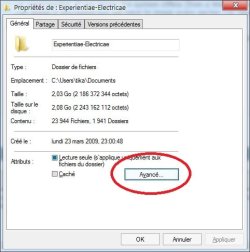
There is actually an encryption feature in Windows 7. You can select it for individual files/folders. Simply open the file properties dialog, click on the Advanced Attributes button.
Check the 'Encrypt contents to secure data' option.
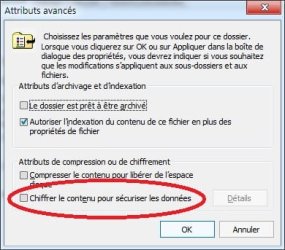
After pressing OK, make sure you apply the setting to all files and subfolders. Windows will then show you options to save the encryption key.
I don't know if this will wipe deleted files.
Hope this helps.
Check the 'Encrypt contents to secure data' option.
After pressing OK, make sure you apply the setting to all files and subfolders. Windows will then show you options to save the encryption key.
I don't know if this will wipe deleted files.
Hope this helps.
My Computer
At a glance
Windows 7 Ultimate 32bits2GHz Intel T5800 dual core3 GBATI Radeon HD3650
- Computer Manufacturer/Model Number
- Toshiba P300-1EI
- OS
- Windows 7 Ultimate 32bits
- CPU
- 2GHz Intel T5800 dual core
- Memory
- 3 GB
- Graphics Card(s)
- ATI Radeon HD3650
- Sound Card
- Yamaha MW10C USB mix board
- Hard Drives
- 250 MB Seagate Momentus XT internal
1 GB 2.5" Samsung HN-M101MBB internal
1GB 3.5" Hitachi external


