Possible to install English version over German version of Win 7?

Sito

New member
Local time
3:14 AM
Messages
6
Hi there

I bought a new Laptop here in Germany which comes, as you would expect, with a German version of Windows. I would prefer an English version though. It appears I'd have to update to Win Ultimate or Enterprise to be able to change the language which is quite expensive. However, I don't need the ability to change languages, I just want English.

So, I still have an unused English Win 7 license. Is there any way to convert my system from German to English using that license and keeping all the software that is already installed on my Computer?

Any advice will be much appreciated. Thanks!
 

My Computer My Computer

At a glance

Windows 7 Home Premium 32bit
OS
Windows 7 Home Premium 32bit
You can call MS Customer Service to find this out for sure.

I think I'd shrink C in Disk Mgmt to install to a test partition to see if English will activate with your Product Key, as this can vary. If so then we can help you remove the old OS or hide it if ever needed again.
Partition or Volume - Shrink
Partition or Volume - Extend

Put your wireless adapter on a stick so you can get online to try activating. If not just delete the test partition in Disk Mgmt and extend C back over it.

Remember you can only have 4 Primary partitions or three Primary and unlimited Logical. If in doubt post back a screenshot of Disk Management - Post a Screen Capture Image
 
Last edited:
Thanks, sounds much more complicated than I was hoping for :) I'll think about it, maybe I just run the system in German and most of the Apps in English. It's not the end of the world, just doesn't look very clean. Question is if getting it fixed is worth the hassle ;)
 

My Computer My Computer

At a glance

Windows 7 Home Premium 32bit
OS
Windows 7 Home Premium 32bit
You can call MS Customer Service to find this out for sure. Just google for your local number. But half the time if they say it can't be done, it actually can - especially when it comes to this.

Kari shouldl know for sure.
 
Last edited:
Being a Finnish ex-pat living in Germany, I've often been in the same situation. When I buy a computer here, first thing I do is wipe the hard disk and install either English or Finnish Windows, then if it's a laptop swap the keyboard Y and Z keys to get QWERTY instead of QWERTZ (desktops no need for this as I have a supply of QWERTY keyboards). It disturbs me if I do not swap the keys, to press Y to get Z and vice versa.

There's absolutely no other way to keep your installed software, files and settings when changing the language than to use language packs, which as you mentioned is only possible in Ultimate and Enterprise editions.

That was the bad news. The good news is that Windows product keys are version and edition but not language specific; you can install your English Windows 7 with a German key as long as the edition is the same.

Please notice that to get the more complete "English experience", you need to set the computers location and formats in regional settings as UK which still gives you a 24 hour clock, date as DD/MM/YYYY and so on but most important, "Wednesday" instead of "Mittwoch" and "December" instead of "Dezember", only change the £ sign to €. Setting the location to UK during installation automatically changes the time zone, do not forget to set it back to CET.

Additionally, change Google (or Bing if you prefer) settings accordingly, interface and search language = English to get more English than German search results.

Been there, done that, no T-shirt to show :).

Kari
 
Last edited:

My Computer My Computer

At a glance

Windows 10 Pro x64 EN-GB1.6 GHz Intel Core i7-720QM Processor6 GBATI Mobility Radeon HD 5850 Graphics
Computer type
Laptop
Computer Manufacturer/Model Number
HP ENVY 17-1150eg
OS
Windows 10 Pro x64 EN-GB
CPU
1.6 GHz Intel Core i7-720QM Processor
Memory
6 GB
Graphics Card(s)
ATI Mobility Radeon HD 5850 Graphics
Sound Card
Beats sound system with integrated subwoofer
Monitor(s) Displays
17" laptop display, 22" LED and 32" Full HD TV through HDMI
Screen Resolution
1600*900 (1), 1920*1080 (2&3)
Hard Drives
Internal: 2 x 500 GB SATA Hard Disk Drive 7200 rpm
External: 2TB for backups, 3TB USB3 network drive for media
Cooling
As Envy runs a bit warm, I have it on a Cooler Master pad
Keyboard
Logitech diNovo Media Desktop Laser (bluetooth)
Mouse
Logitech Performance Mouse MX
Internet Speed
50/10 Mbps VDSL
Antivirus
Windows Defender 4.3.9431.0
Browser
Maxthon 3.5.2., IE11
Thanks again!

I think my English Version might be win 7 Home which then means I can't swap it for the German Windows Pro that's on my machine...would be a downgrade so to speak...

I've done most of the things you recommend, switched Google to English etc. and that works well nowadays as so many things are done in the browser. I am German, so I understand what all the things in Windows mean but I've lived for the last 15 years or so in English-speaking countries and also most of my work is happening in English. I also have to take screenshots of certain apps on my computer for work, so it would be nicer to have it all in English. On the other hand I write a lot in German as well, so the German keyboard definitely comes in handy, because of the Umlauts...
 

My Computer My Computer

At a glance

Windows 7 Home Premium 32bit
OS
Windows 7 Home Premium 32bit
Hi there
So long as you have the PRO version I think you you can also install Language packs -- I have Icelandic for W7 and W8 and can switch between ENG and ISL. Ultimate and Enterprise versions - No prob.

The Language packs are an ADD ON so you don't re-install windows in the new language.

If it's home premium though I think you are stuck with the language it came with.

For OEM try this link

http://www.microsoft.com/OEM/en-gb/...anguage_interface_packs.aspx#fbid=jJBIpeiWJ3r

I think there was also a thread on this Forum about how to make it work for HOME PREMIUM too -- it's an old one so might not work any more.

http://www.intowindows.com/how-to-install-language-pack-in-windows-7-professional-edition/

Cheers
jimbo
 

My Computer My Computer

At a glance

Linux CENTOS 7 / various Windows OS'es and se...Intel i7 Intel i58GB, 16GBOn Motherboard
Computer type
PC/Desktop
Computer Manufacturer/Model Number
Custom built, several laptops HP/ASUS
OS
Linux CENTOS 7 / various Windows OS'es and servers
CPU
Intel i7 Intel i5
Memory
8GB, 16GB
Graphics Card(s)
On Motherboard
Sound Card
Realtek HD audio
Monitor(s) Displays
Apple Cinema display, Samsung LCD
Screen Resolution
1920 X 1080
Hard Drives
4 X 1TB SATA
Mouse
Toshiba wireless laser
Internet Speed
> 20MB up
As far as I know you can only install language packs on Ultimate and Enterprise but not on Pro. Maybe it varies between languages.
 

My Computer My Computer

At a glance

Windows 7 Home Premium 32bit
OS
Windows 7 Home Premium 32bit
I think my English Version might be win 7 Home which then means I can't swap it for the German Windows Pro that's on my machine...would be a downgrade so to speak...
You can use any English 7 Pro install media. See this tutorial for download links and how to create a USB install media: http://www.sevenforums.com/tutorials/31541-windows-7-usb-dvd-download-tool.html

On the other hand I write a lot in German as well, so the German keyboard definitely comes in handy, because of the Umlauts...

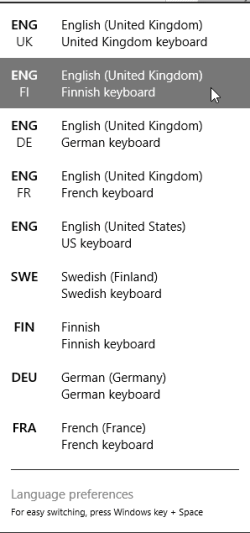
I have exactly the same situation. Luckily the physical keyboard device and selected input language have nothing to do with each other, allowing user to select any input language regardless of the physical layout of the keyboard device or Windows display display language. My default input language (keyboard layout) is Finnish as it gives me Scandinavian åÅ, äÄ & öÖ; with it I can do most of my typing in English, Finnish, Swedish and German, only needing to swap shortly to German input when I need ß and üÜ. My input languages on this Windows 8.1 laptop:

2014-05-22_12h13_44.png

As far as I know you can only install language packs on Ultimate and Enterprise but not on Pro. Maybe it varies between languages.
No, it's Ultimate and Enterprise only, in all language versions.
 
Last edited:

My Computer My Computer

At a glance

Windows 10 Pro x64 EN-GB1.6 GHz Intel Core i7-720QM Processor6 GBATI Mobility Radeon HD 5850 Graphics
Computer type
Laptop
Computer Manufacturer/Model Number
HP ENVY 17-1150eg
OS
Windows 10 Pro x64 EN-GB
CPU
1.6 GHz Intel Core i7-720QM Processor
Memory
6 GB
Graphics Card(s)
ATI Mobility Radeon HD 5850 Graphics
Sound Card
Beats sound system with integrated subwoofer
Monitor(s) Displays
17" laptop display, 22" LED and 32" Full HD TV through HDMI
Screen Resolution
1600*900 (1), 1920*1080 (2&3)
Hard Drives
Internal: 2 x 500 GB SATA Hard Disk Drive 7200 rpm
External: 2TB for backups, 3TB USB3 network drive for media
Cooling
As Envy runs a bit warm, I have it on a Cooler Master pad
Keyboard
Logitech diNovo Media Desktop Laser (bluetooth)
Mouse
Logitech Performance Mouse MX
Internet Speed
50/10 Mbps VDSL
Antivirus
Windows Defender 4.3.9431.0
Browser
Maxthon 3.5.2., IE11
Back
Top