Possible to Restore Photos/Documents from Formatted USB Or Old Laptop?

Are the majority of the photos you have usually unrecoverable when you do this?
 

My Computer My Computer

At a glance

Windows 10 Pro
Computer type
Laptop
OS
Windows 10 Pro
Chances of recovery

Are the majority of the photos you have usually unrecoverable when you do this?

For me they're mostly unrecoverable - in fact mostly undetectable but I regularly wipe free space using a secure wiping tool. If I haven't wiped then the files are usually recoverable. Sometimes in the case of USB drives - if the drive was yanked out rather than safely ejected then the data is corrupted and beyond recovery. If it was formatted and not overwritten there's usually a good chance of recovering most files.
 

My Computer My Computer

At a glance

Microsoft Windows 7 Home Premium 64-bit 7601 ...AMD C-60 APU with Radeon(tm) HD Graphics4.00 GBAMD Radeon HD 6290 Graphics
Computer type
Laptop
Computer Manufacturer/Model Number
ASUS
OS
Microsoft Windows 7 Home Premium 64-bit 7601 Multiprocessor Free Service Pack 1
CPU
AMD C-60 APU with Radeon(tm) HD Graphics
Motherboard
ASUSTeK COMPUTER INC. X501U
Memory
4.00 GB
Graphics Card(s)
AMD Radeon HD 6290 Graphics
Sound Card
(1) AMD High Definition Audio Device (2) Realtek High Defi
Screen Resolution
1366 x 768 x 32 bits (4294967296 colors) @ 60 Hz
Hard Drives
Hitachi HTS545050A7E380 SATA Disk Device
Antivirus
Comodo CIS & FW, SecureAplus App Whitelisting, Threatfire
Browser
Cyberfox 64bit, Opera 64bit, Airfox
Other Info
Spy-The-Spy, HitmanPro.Alert, Norton Connect Safe, MJRegWatcher, BitDefender TrafficLight, Voodoo Shield, Zemana AntiMalware
Hey how would i know if i had wiped those files or not? Example those files that i had, i basically had them on my documents and all i did was click delete. Then i delete it in recycle bin. Does that mean wipe? Yea i saw some files overwritten but not sure what that meant as how do i know if i did overwrite it or not. Like how i know which files i overwrite and which i didn't.
 

My Computer My Computer

At a glance

Windows 10 Pro
Computer type
Laptop
OS
Windows 10 Pro
okk
 

My Computer My Computer

At a glance

Windows 10 Pro
Computer type
Laptop
OS
Windows 10 Pro
is there a way to view more photos at once? I have to click like 2000 times it seems just to see all the jpg pictures...
 

My Computer My Computer

At a glance

Windows 10 Pro
Computer type
Laptop
OS
Windows 10 Pro
It seems diskdigger is going to take very long time. I clicked so many times already and probably saw 60000 images but not the ones i was looking for and i practially am way too tired. Is the only way to see these pictures really 16 at a time when it shows 160000 total pictures?


I tested photorec. Is it basically the same or similar files to diskdigger? It seems it will take a very very long time. But is it simialr to the files on diskdigger? If so, dont think im going to bother with it anymore...
 

My Computer My Computer

At a glance

Windows 10 Pro
Computer type
Laptop
OS
Windows 10 Pro
Photo Viewer

How did you end up with that many images on a USB? You say you formatted a USB and want to recover images from it then mention "My Documents" and deleting into recycle bin.

If you want to look at images in the TestDisk output folder use software like Irfanview which has a thumbnail viewer and can view multiple images (in a folder) in one go.
 

My Computer My Computer

At a glance

Microsoft Windows 7 Home Premium 64-bit 7601 ...AMD C-60 APU with Radeon(tm) HD Graphics4.00 GBAMD Radeon HD 6290 Graphics
Computer type
Laptop
Computer Manufacturer/Model Number
ASUS
OS
Microsoft Windows 7 Home Premium 64-bit 7601 Multiprocessor Free Service Pack 1
CPU
AMD C-60 APU with Radeon(tm) HD Graphics
Motherboard
ASUSTeK COMPUTER INC. X501U
Memory
4.00 GB
Graphics Card(s)
AMD Radeon HD 6290 Graphics
Sound Card
(1) AMD High Definition Audio Device (2) Realtek High Defi
Screen Resolution
1366 x 768 x 32 bits (4294967296 colors) @ 60 Hz
Hard Drives
Hitachi HTS545050A7E380 SATA Disk Device
Antivirus
Comodo CIS & FW, SecureAplus App Whitelisting, Threatfire
Browser
Cyberfox 64bit, Opera 64bit, Airfox
Other Info
Spy-The-Spy, HitmanPro.Alert, Norton Connect Safe, MJRegWatcher, BitDefender TrafficLight, Voodoo Shield, Zemana AntiMalware
How did you end up with that many images on a USB? You say you formatted a USB and want to recover images from it then mention "My Documents" and deleting into recycle bin.

If you want to look at images in the TestDisk output folder use software like Irfanview which has a thumbnail viewer and can view multiple images (in a folder) in one go.

I think i scanned the hard drive thats why.

I also scanned the usb just now with diskdigger. IT didn't show anything. So would that mean its pointless now?
 

My Computer My Computer

At a glance

Windows 10 Pro
Computer type
Laptop
OS
Windows 10 Pro
I used photorec and put the usb flash drive. Shows 0 files saved after deep scan.

That means i can't recover anything then right?
 

My Computer My Computer

At a glance

Windows 10 Pro
Computer type
Laptop
OS
Windows 10 Pro
Like to mention theres way too many files to search as i didnt see any of the files i was looking for though i did see somes there that is in the documents folder but wasnt the one i wanted to format. I assume then its probably not there then?
 

My Computer My Computer

At a glance

Windows 10 Pro
Computer type
Laptop
OS
Windows 10 Pro
Viewing results

In answer some of your questions:

You'd know if you'd securely wiped files or free space as it would require running software to do it.

If DiskDigger (with the image filter applied) didn't find anything on the USB then yes - it's gone.

If you open the TestDisk results folder and there are a huge number of files to look through try sorting them A-Z by file extension and bulk delete anything that's not an image. Then view the results using something like Irfanview and use the thumbnail viewer. If the file ever existed on your hard drive and TestDisk hasn't found it - then it's gone.

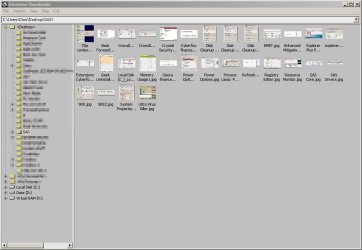
Here's an example of a folder containing a small number of images - sorry but I don't have any folders that contain thousands if images to use as an example.

IrfanView Thumbnails.jpg

I'd suggest that USB's are a really unreliable method of storing any important data. They're okay for copies but shouldn't really be used for originals. (In my opinion).
 

My Computer My Computer

At a glance

Microsoft Windows 7 Home Premium 64-bit 7601 ...AMD C-60 APU with Radeon(tm) HD Graphics4.00 GBAMD Radeon HD 6290 Graphics
Computer type
Laptop
Computer Manufacturer/Model Number
ASUS
OS
Microsoft Windows 7 Home Premium 64-bit 7601 Multiprocessor Free Service Pack 1
CPU
AMD C-60 APU with Radeon(tm) HD Graphics
Motherboard
ASUSTeK COMPUTER INC. X501U
Memory
4.00 GB
Graphics Card(s)
AMD Radeon HD 6290 Graphics
Sound Card
(1) AMD High Definition Audio Device (2) Realtek High Defi
Screen Resolution
1366 x 768 x 32 bits (4294967296 colors) @ 60 Hz
Hard Drives
Hitachi HTS545050A7E380 SATA Disk Device
Antivirus
Comodo CIS & FW, SecureAplus App Whitelisting, Threatfire
Browser
Cyberfox 64bit, Opera 64bit, Airfox
Other Info
Spy-The-Spy, HitmanPro.Alert, Norton Connect Safe, MJRegWatcher, BitDefender TrafficLight, Voodoo Shield, Zemana AntiMalware
Yea usb doesn't show anything.

But for the ssd hard drive that i have on my laptop, it showed way too much. Also many of the images were the same and it seem like most of these photos are photos through web browsing.

Im going to use testdisk now but do it with my ssd hard drive now. With all those images i spoke about it earlier that was with diskdigger.
 

My Computer My Computer

At a glance

Windows 10 Pro
Computer type
Laptop
OS
Windows 10 Pro
Using PhotoRec

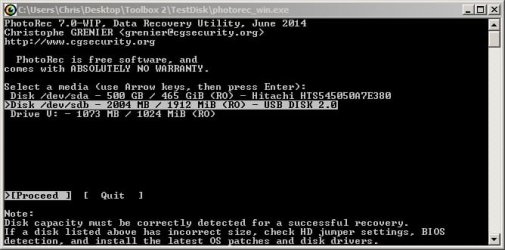
If you scanned your entire hard drive then you chose the wrong partiton.

It should look something like this if you want to scan a USB:

TestDisk_photorec_Window.jpg
 

My Computer My Computer

At a glance

Microsoft Windows 7 Home Premium 64-bit 7601 ...AMD C-60 APU with Radeon(tm) HD Graphics4.00 GBAMD Radeon HD 6290 Graphics
Computer type
Laptop
Computer Manufacturer/Model Number
ASUS
OS
Microsoft Windows 7 Home Premium 64-bit 7601 Multiprocessor Free Service Pack 1
CPU
AMD C-60 APU with Radeon(tm) HD Graphics
Motherboard
ASUSTeK COMPUTER INC. X501U
Memory
4.00 GB
Graphics Card(s)
AMD Radeon HD 6290 Graphics
Sound Card
(1) AMD High Definition Audio Device (2) Realtek High Defi
Screen Resolution
1366 x 768 x 32 bits (4294967296 colors) @ 60 Hz
Hard Drives
Hitachi HTS545050A7E380 SATA Disk Device
Antivirus
Comodo CIS & FW, SecureAplus App Whitelisting, Threatfire
Browser
Cyberfox 64bit, Opera 64bit, Airfox
Other Info
Spy-The-Spy, HitmanPro.Alert, Norton Connect Safe, MJRegWatcher, BitDefender TrafficLight, Voodoo Shield, Zemana AntiMalware
Try both programs

Either way there's no easy way to recover only the files that you're looking for. It's a question of recovering everything and deleting anything that's not an image. With DiskDigger there are file type filters and rather than clicking through eaxh preview it's better to just recover the whole lot then use an image viewer to view the files.

If you want to try less advanced software you could try Lazesoft Recovery Suite Home Edition as from memory it can restore folder structure (recover folders) but it's a while since I've used it and currently I don't have it installed. If you get stuck - give it a try.
 

My Computer My Computer

At a glance

Microsoft Windows 7 Home Premium 64-bit 7601 ...AMD C-60 APU with Radeon(tm) HD Graphics4.00 GBAMD Radeon HD 6290 Graphics
Computer type
Laptop
Computer Manufacturer/Model Number
ASUS
OS
Microsoft Windows 7 Home Premium 64-bit 7601 Multiprocessor Free Service Pack 1
CPU
AMD C-60 APU with Radeon(tm) HD Graphics
Motherboard
ASUSTeK COMPUTER INC. X501U
Memory
4.00 GB
Graphics Card(s)
AMD Radeon HD 6290 Graphics
Sound Card
(1) AMD High Definition Audio Device (2) Realtek High Defi
Screen Resolution
1366 x 768 x 32 bits (4294967296 colors) @ 60 Hz
Hard Drives
Hitachi HTS545050A7E380 SATA Disk Device
Antivirus
Comodo CIS & FW, SecureAplus App Whitelisting, Threatfire
Browser
Cyberfox 64bit, Opera 64bit, Airfox
Other Info
Spy-The-Spy, HitmanPro.Alert, Norton Connect Safe, MJRegWatcher, BitDefender TrafficLight, Voodoo Shield, Zemana AntiMalware
okay im going to scan hard drive again with diskdigger. It took very long when i did it last time. Then i will use the irfanview that i just downloaded right now. How do i use the irfanview after it finishes scanning? I have irfanview opened at the moment.
 

My Computer My Computer

At a glance

Windows 10 Pro
Computer type
Laptop
OS
Windows 10 Pro
Irfanview

When you install Irfanview you should see two desktop icons appear. One of those is "Irfanview Thumbnails" so just run it and browse to the folder that you want to view.

Alternatively try Start> Run

then copy and paste the following into the window that opens:

"C:\Program Files (x86)\IrfanView\i_view32.exe" /thumbs

Press enter.
 

My Computer My Computer

At a glance

Microsoft Windows 7 Home Premium 64-bit 7601 ...AMD C-60 APU with Radeon(tm) HD Graphics4.00 GBAMD Radeon HD 6290 Graphics
Computer type
Laptop
Computer Manufacturer/Model Number
ASUS
OS
Microsoft Windows 7 Home Premium 64-bit 7601 Multiprocessor Free Service Pack 1
CPU
AMD C-60 APU with Radeon(tm) HD Graphics
Motherboard
ASUSTeK COMPUTER INC. X501U
Memory
4.00 GB
Graphics Card(s)
AMD Radeon HD 6290 Graphics
Sound Card
(1) AMD High Definition Audio Device (2) Realtek High Defi
Screen Resolution
1366 x 768 x 32 bits (4294967296 colors) @ 60 Hz
Hard Drives
Hitachi HTS545050A7E380 SATA Disk Device
Antivirus
Comodo CIS & FW, SecureAplus App Whitelisting, Threatfire
Browser
Cyberfox 64bit, Opera 64bit, Airfox
Other Info
Spy-The-Spy, HitmanPro.Alert, Norton Connect Safe, MJRegWatcher, BitDefender TrafficLight, Voodoo Shield, Zemana AntiMalware
Yes i see those 2 icons. Okay so right now im waiting for diskdigger to scan my hard drive. This will take very long. But does it mean if i dont find the photos im looking for, then doing this big and long scan of my hard drive with photorec probably will be a waste of time as well? I was doing that scan as well earlier but it is lot of files and takes very long so i figure both are going to get me to view the same files? Currently i paused that scan and just doing the diskdigger scan now...
 

My Computer My Computer

At a glance

Windows 10 Pro
Computer type
Laptop
OS
Windows 10 Pro
Scans required?

Well as you stated that the images were stored on USB that was formatted then personally I'd run DiskDigger on the USB followed by PhotoRec on the USB. It shouldn't take long. If nothing shows up then yes - run PhotoRec on your hard drive (it will take ages) and from the extacted results delete anything that's not an image.

If you like you could try using XCOPY to copy only images to another folder but you'll need to use a command line.

Open an Elevated Command Prompt

Then use XCopy to copy only image files fro the results folder to a new folder.

Example for my machine/ user name:

Xcopy C:\Users\Chris\Desktop\Toolbox 2\TestDisk\recup_dir.1\*.jpg C:\Users\Chris\Desktop\NewFolder /s

so you need to use:

Xcopy Full path to results folder\*.jpg Full path to desination folder /s
 

My Computer My Computer

At a glance

Microsoft Windows 7 Home Premium 64-bit 7601 ...AMD C-60 APU with Radeon(tm) HD Graphics4.00 GBAMD Radeon HD 6290 Graphics
Computer type
Laptop
Computer Manufacturer/Model Number
ASUS
OS
Microsoft Windows 7 Home Premium 64-bit 7601 Multiprocessor Free Service Pack 1
CPU
AMD C-60 APU with Radeon(tm) HD Graphics
Motherboard
ASUSTeK COMPUTER INC. X501U
Memory
4.00 GB
Graphics Card(s)
AMD Radeon HD 6290 Graphics
Sound Card
(1) AMD High Definition Audio Device (2) Realtek High Defi
Screen Resolution
1366 x 768 x 32 bits (4294967296 colors) @ 60 Hz
Hard Drives
Hitachi HTS545050A7E380 SATA Disk Device
Antivirus
Comodo CIS & FW, SecureAplus App Whitelisting, Threatfire
Browser
Cyberfox 64bit, Opera 64bit, Airfox
Other Info
Spy-The-Spy, HitmanPro.Alert, Norton Connect Safe, MJRegWatcher, BitDefender TrafficLight, Voodoo Shield, Zemana AntiMalware
Will check this thread again in a couple of hours. Will be away from my machine for a while.
 

My Computer My Computer

At a glance

Microsoft Windows 7 Home Premium 64-bit 7601 ...AMD C-60 APU with Radeon(tm) HD Graphics4.00 GBAMD Radeon HD 6290 Graphics
Computer type
Laptop
Computer Manufacturer/Model Number
ASUS
OS
Microsoft Windows 7 Home Premium 64-bit 7601 Multiprocessor Free Service Pack 1
CPU
AMD C-60 APU with Radeon(tm) HD Graphics
Motherboard
ASUSTeK COMPUTER INC. X501U
Memory
4.00 GB
Graphics Card(s)
AMD Radeon HD 6290 Graphics
Sound Card
(1) AMD High Definition Audio Device (2) Realtek High Defi
Screen Resolution
1366 x 768 x 32 bits (4294967296 colors) @ 60 Hz
Hard Drives
Hitachi HTS545050A7E380 SATA Disk Device
Antivirus
Comodo CIS & FW, SecureAplus App Whitelisting, Threatfire
Browser
Cyberfox 64bit, Opera 64bit, Airfox
Other Info
Spy-The-Spy, HitmanPro.Alert, Norton Connect Safe, MJRegWatcher, BitDefender TrafficLight, Voodoo Shield, Zemana AntiMalware
no problem. Still waiting to scan it fully.
 

My Computer My Computer

At a glance

Windows 10 Pro
Computer type
Laptop
OS
Windows 10 Pro
Back
Top
