Possible Virus ?

rjeremy

New member
Local time
4:08 PM
Messages
1
Computer will start playing tidbits of commercials for about 5 seconds each and Solidworks will no longer work but everything else works fine. If I look at processes, iexplorer (three iterations) suddenly jumps up to 328mb and the sound will start playing. If I end process it stops. Multiple scans from Avira and Kapersky have not fixed.
 

My Computer

Computer type
PC/Desktop
Computer Manufacturer/Model Number
custom build
OS
windows 7 professional 64 bit sp1
CPU
AMD Phenom II X4 B60 3.3 ghz
Motherboard
MSI
Memory
8 gb
Graphics Card(s)
NVIDIA Geforce 9600 GSO
Antivirus
Kapersky
Browser
chrome
Scan with Malwarebytes Anti-Malware free as well, you can also scan with ESET Online
 

My Computer

Computer type
PC/Desktop
Computer Manufacturer/Model Number
Custom Build
OS
Windows 7 Ultimate x64 SP1
CPU
AMD Phenom 2 1090T
Motherboard
Gigabyte GA-890FXA-UD5
Memory
2x8GB Kingston HyperX Fury Black 1600Mhz Unganged
Graphics Card(s)
MSI GTX 970 Gaming 4G
Sound Card
Realtek On-Board HD 7.1 Audio / Logitech G35
Monitor(s) Displays
3xAcer GD245HQ
Screen Resolution
1920x1080
Hard Drives
Samsung 850 Pro 512GB SSD - OS /
WD Caviar Black SATA 3 - 1 TBx2 - Dynamic RAID 0 /
WD Caviar Green SATA 2 - 640GBx2 - Dynamic RAID 0 /
WD Caviar Green SATA 2 - 640GB - Internal Backup /
Seagate Barracude SATA 3 - 3TB - External Backup/ Sync
PSU
HighPower 1000W
Case
Cooler Master HAF 932
Cooling
Noctua NH-D14
Keyboard
Logitech G19
Mouse
Logitech G500
Internet Speed
100/4 Mbit Cable (100GB quota)
Antivirus
ZoneAlarm Extreme Security / MBAM Pro / MBAE Free / SAS Free
Browser
IE 11 - Firefox - Chrome
Other Info
Logitech F710/ G27/ G940/ Z5500 // TrackIR 5 // Nvidia 3D Surround Vision
Sounds like adware. AdwCleaner is good for removing that.

As suggested by GokAy, scan with Malwarebytes. The free version will work fine. After installation, be sure to uncheck the "start free pro version trial" box, let it scan & check anything it finds & quarantine it.
 

My Computer

Computer type
PC/Desktop
Computer Manufacturer/Model Number
Dell Hell oh Well
OS
Win 7 32 Home Premium, Win 7 64 Pro, Win 8.1, Win 10
CPU
Intel Core 2 Duo 2.93GHz
Memory
Not much with my ADHD
Graphics Card(s)
ATI Radeon HD 4350
Monitor(s) Displays
24" HDTV/Monitor
Screen Resolution
Blurry after a Scotch or 2
Hard Drives
1 HDD 250 GB, 1 HDD 1 TB, 3 - 1 TB Externals
Case
Don't get on my case...man :D
Cooling
I have an Air Conditioner & Diet Pepsi
Keyboard
Saitek Cyborg
Mouse
10 yr old MS optical mouse that still works
Internet Speed
Never fast enough
Antivirus
Various
Browser
Various
Hi, Borg 386

As suggested by GokAy, scan with Malwarebytes. The free version will work fine. After installation, be sure to uncheck the "start free pro version trial" box, let it scan & check anything it finds & quarantine it.

Just curious -- why do you suggest that users opt-out of the 14-day Trial of the paid features?

I'm just an MBAM home user unaffiliated with either the company or the product.
But there seems to be no harm in leaving the Trial enabled by default.
And it would provide the user with 14 days to test the Premium features (real-time protection, scheduled tasks, incremental database updates, etc.).

<just asking>

Cheers,

{{P.S. The current paid version is PREMIUM, not Pro.;) Mentioning this only because the message in the setup wizard is now "Enable free trial of Malwarebytes Anti-Malware Premium" and because "Pro" has also been replaced in the program GUI by "Premium":)}}
 

My Computer

Computer type
PC/Desktop
Computer Manufacturer/Model Number
Dell Studio XPS 8500
OS
OEM Windows 7 Ult (x64) SP1
CPU
Intel Core-i7 3770 @ 3.4 GHz
Motherboard
"Dell" branded
Memory
16 GB DDR3 SDRAM @ 1333 MHz
Graphics Card(s)
NVidia GeForce GT620 1 GB
Sound Card
THX TruStudio PC
Monitor(s) Displays
Dell U2410 Full HD
Hard Drives
2.0 TB SATA2 @ 7200 RPM
PSU
350W
Keyboard
MS 4000 Ergon - Wired
Mouse
Logitech Anywhere MX
Internet Speed
Cable HSI w/Turbo (router)
Antivirus
KIS-MBAM Premium-MBAE Premium
Browser
Fx (current version); IE
Other Info
And a Win7/64 Pro laptop; And a Win10/64 Pro desktop.
I haven't seen that screen in a while & last I saw it was pro, but apparently they have changed.....my bad:o

Some people want to use just the basic & if they want to sign up for the premium version later, then they can. I mention this because I've seen some folks complain about the nag screen when the 14 days are up, although I do hear that MBAM has made it easier to turn it off.
 

My Computer

Computer type
PC/Desktop
Computer Manufacturer/Model Number
Dell Hell oh Well
OS
Win 7 32 Home Premium, Win 7 64 Pro, Win 8.1, Win 10
CPU
Intel Core 2 Duo 2.93GHz
Memory
Not much with my ADHD
Graphics Card(s)
ATI Radeon HD 4350
Monitor(s) Displays
24" HDTV/Monitor
Screen Resolution
Blurry after a Scotch or 2
Hard Drives
1 HDD 250 GB, 1 HDD 1 TB, 3 - 1 TB Externals
Case
Don't get on my case...man :D
Cooling
I have an Air Conditioner & Diet Pepsi
Keyboard
Saitek Cyborg
Mouse
10 yr old MS optical mouse that still works
Internet Speed
Never fast enough
Antivirus
Various
Browser
Various
I haven't seen that screen in a while & last I saw it was pro, but apparently they have changed.....my bad:o

Some people want to use just the basic & if they want to sign up for the premium version later, then they can.

Excellent point.:)
FWIW, AFAIK to get the (previously unused) Trial back, they would have to cleanly reinstall MBAM and allow the default Trial during the setup wizard, when it is offered.

Also, for the record: Currently, it's one Trial per computer per program version. So, if the user does run the Trial with the current version (2.1.6), they would be able to use a "new" Trial when a new program version is released.

I mention this because I've seen some folks complain about the nag screen when the 14 days are up, although I do hear that MBAM has made it easier to turn it off.
It's very easy to deactivate the 14-day Trial and/or revert to the Free version.

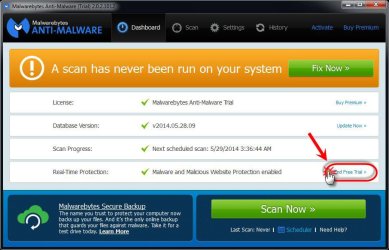
There are 4 options, any of which will work to end the Trial:

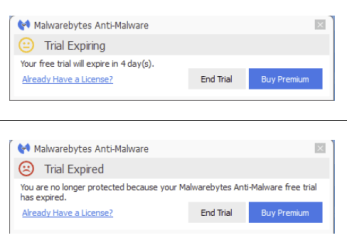
  1. Allow the trial to expire in 14 days & then click the "End Trial" button in the "Trial Expired" popup;
  2. Click the "End Free Trial" link in the GUI (sorry, screenie is from a previous version, but concept is the same);
  3. Click the "End Trial" popup notification at any time from the "Trial Expiring" popup;
  4. Perform a clean reinstall, using the method described here: MBAM Clean Removal Process 2x - be sure to "opt out" (remove the check mark from) the Free trial, IF it is offered again during the installation wizard.
  5. (For users with the paid, Premium version -- not the Trial -- one can also click the "My Account" GUI link > "Deactivate". This will revert the program to the Free, manual, on-demand version.)
I hope this helps,
 

Attachments

  • End Free Trial GUI.jpg
    End Free Trial GUI.jpg
    72.6 KB · Views: 0
  • EndTrial-2015-05-09_8-46-31.png
    EndTrial-2015-05-09_8-46-31.png
    12.8 KB · Views: 28

My Computer

Computer type
PC/Desktop
Computer Manufacturer/Model Number
Dell Studio XPS 8500
OS
OEM Windows 7 Ult (x64) SP1
CPU
Intel Core-i7 3770 @ 3.4 GHz
Motherboard
"Dell" branded
Memory
16 GB DDR3 SDRAM @ 1333 MHz
Graphics Card(s)
NVidia GeForce GT620 1 GB
Sound Card
THX TruStudio PC
Monitor(s) Displays
Dell U2410 Full HD
Hard Drives
2.0 TB SATA2 @ 7200 RPM
PSU
350W
Keyboard
MS 4000 Ergon - Wired
Mouse
Logitech Anywhere MX
Internet Speed
Cable HSI w/Turbo (router)
Antivirus
KIS-MBAM Premium-MBAE Premium
Browser
Fx (current version); IE
Other Info
And a Win7/64 Pro laptop; And a Win10/64 Pro desktop.
It would provide the user with 14 days to test the Premium features (real-time protection, scheduled tasks, incremental database updates, etc.).

Another reason to enable the free trial is access to Hyper Scan.
 

My Computer

Computer type
PC/Desktop
OS
Windows 7 x64
CPU
Intel Core2 Extreme Q6850 3.00GHz
Motherboard
EVGA 132-CK-NF79
Memory
8 GB
Graphics Card(s)
Radeon R7 260X
Sound Card
Xonar DS
Hard Drives
Hitachi Deskstar 1 tb
Back
Top