Post Your Overclock!

Status
Not open for further replies.
If your RAM will handle it and it's stable then I don't see why not.
 

My Computer

Computer Manufacturer/Model Number
Home Brew
OS
Windows 7 Ultimate Vista Ultimate x64
CPU
Core 2 Duo E8500 3.16Ghz @ 3.8Ghz
Motherboard
eVGA 750i FTW
Memory
2x2Gigs Patriot PC2-6400 LL
Graphics Card(s)
Inno3D GeForce GTX260 216 SP
Monitor(s) Displays
ASUS VW222U 22" 2ms Response time
Screen Resolution
1680x1050
Hard Drives
SATA 150GB
SATA II 250GB
USB IDE 750GB Ext.
PSU
HYTEC 600W & Thermaltake 650W Toughpower Power Exp
Case
Thermaltake Armor LCS (Liquid Cooling System)
Cooling
Liquid Cooling System
Keyboard
Logitech G15 Gaming Keyboard
Mouse
Logitech G9 Gaming Mouse
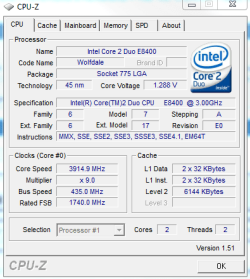
Here's my new OC

Now, why did aero go away and my second display as well? It's at 640x800 res or something. Why did all that go away?
 

Attachments

  • Capture.PNG
    Capture.PNG
    12.8 KB · Views: 22

My Computer

OS
Vista Ultimate x64, Windows 7 RC 7100
CPU
Intel C2D E8400 @ 3.8ghz
Motherboard
ASUS P5Q SE PLUS
Memory
4x 2gb G.Skill DDR2 1600
Graphics Card(s)
nVidia GTX260 896mb
Sound Card
Onboard 5.1 Surround Sound
Monitor(s) Displays
22" Acer LCD and 19" Westinghouse LCD
Screen Resolution
1680x1050 and 1280x1024
Hard Drives
Seagate Barracuda 7200rpm 750gb
Western Digital 500gb
PSU
Corsair H520X 520w
Case
Antec 300
Keyboard
Old G15
Mouse
Logitech G5
Internet Speed
15mbps down .34mbps up
No idea why that would happen, are you able to enable it again, maybe you need to refresh the WEI score.

Nice Overclock, if that's stable then your going well.
 

My Computer

Computer Manufacturer/Model Number
Home Brew
OS
Windows 7 Ultimate Vista Ultimate x64
CPU
Core 2 Duo E8500 3.16Ghz @ 3.8Ghz
Motherboard
eVGA 750i FTW
Memory
2x2Gigs Patriot PC2-6400 LL
Graphics Card(s)
Inno3D GeForce GTX260 216 SP
Monitor(s) Displays
ASUS VW222U 22" 2ms Response time
Screen Resolution
1680x1050
Hard Drives
SATA 150GB
SATA II 250GB
USB IDE 750GB Ext.
PSU
HYTEC 600W & Thermaltake 650W Toughpower Power Exp
Case
Thermaltake Armor LCS (Liquid Cooling System)
Cooling
Liquid Cooling System
Keyboard
Logitech G15 Gaming Keyboard
Mouse
Logitech G9 Gaming Mouse
It lets me go back to 1680x1050, but it doesn't see the second monitor, like it's not getting enough power to it. I lowered it from 440 FSB and 1.33v to 435 FSB and 1.32v and everything is fine now. No idea why it did that, maybe it didn't get enough power?

Here's the new OC. I'm going to run prime95 and go watch some tv and eat.
 

Attachments

  • Capture.PNG
    Capture.PNG
    16 KB · Views: 20

My Computer

OS
Vista Ultimate x64, Windows 7 RC 7100
CPU
Intel C2D E8400 @ 3.8ghz
Motherboard
ASUS P5Q SE PLUS
Memory
4x 2gb G.Skill DDR2 1600
Graphics Card(s)
nVidia GTX260 896mb
Sound Card
Onboard 5.1 Surround Sound
Monitor(s) Displays
22" Acer LCD and 19" Westinghouse LCD
Screen Resolution
1680x1050 and 1280x1024
Hard Drives
Seagate Barracuda 7200rpm 750gb
Western Digital 500gb
PSU
Corsair H520X 520w
Case
Antec 300
Keyboard
Old G15
Mouse
Logitech G5
Internet Speed
15mbps down .34mbps up
nice clocks Bryce........;)


cheers Mark, yeah i think its time for a TRUE.


:)SK
 

My Computer

Computer Manufacturer/Model Number
myself
OS
SEVEN x64
CPU
Q9450 @ 3.6GHZ 1.34v
Motherboard
ASUS P5K PREMIUM P35
Memory
8GB 1066 buffalo firestix @ 1152mhz CL5
Graphics Card(s)
Sapphire HD 5970 + GTX260 (physX)
Sound Card
Creative X-FI Xtreme Gamer
Monitor(s) Displays
SAMSUNG 20'' & SAMSUNG 23'' (dual screens)
Screen Resolution
2048x1152 & 1680x1050
Hard Drives
1x seagate 160gb IDE & 1x seagate 160gb SATA
PSU
XCILIO 850w (78A)
Case
CM590 1x 120x38mm & 2x92x38mm / 4x 120x25mm
Cooling
AC7 PRO @ 92x38mm blower, Lamptron military bus bay controll
Keyboard
LOGITECH E110
Mouse
logitech NX5
Internet Speed
2MB
Other Info
its a continual ''work in progress''....
@ Bryce; I think Mr. Grim's advice is a good way to start and go from there.

You basically want to get 1:1 (according to your earlier message) and should be doable.
 

My Computer

Computer type
PC/Desktop
Computer Manufacturer/Model Number
Custom Build/Mod
OS
Windows 7 Home Premium x64
CPU
Intel QX9650 Extreme 4.0 GHz
Motherboard
ASUS Rampage Extreme Rev2
Memory
8GB (4x2) Corsair Dominator DDR3
Graphics Card(s)
2x Radeon R390X [8GB]
Sound Card
SupremeFX X-Fi
Monitor(s) Displays
Dell 2408WFP 26" Panel
Screen Resolution
1920x1200
Hard Drives
4x WD 2TB (8TB+ Total)
2x Crucial SSD 128GB (RAID-0)
1x LG Blu-ray read/write
1x Phillips LightScribe DVD read/write
PSU
Corsair HX1000
Case
CoolerMaster - Cosmos S
Cooling
Custom Liquid - 320mm rad w/ 3x 80mm fans, CPU/NB/SB Blocks
Keyboard
Logitech Illuminater Pro
Mouse
Logitech
Internet Speed
Fractional T1 - 125Mbps
Antivirus
ESET Security Suite / Microsoft Security Essentials
Browser
Cyberfox Intel x64
Other Info
OC'd to 5.0GHz @ 44c under full load
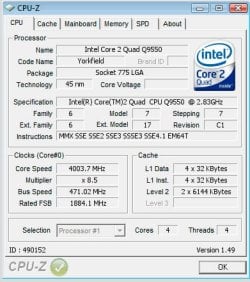
Hi folks....my forst post here...so I´ll start of with a screen of my current 24/7 stable speed.

Here´s a Cpu-Z validation linkage

Here´s a screen:
oc.jpg
 

My Computer

Computer Manufacturer/Model Number
Xterminator
OS
Windows 7 Ultimate x64
CPU
Phenom 9850 X4 Black
Motherboard
Gigabyte MA790X
Memory
8GB PNY 6400 CL4
Graphics Card(s)
ATI 4850
Sound Card
Intel HDA
Monitor(s) Displays
Acer AL2416W (24")
Screen Resolution
1920x1200
Hard Drives
1x150GB Welociraptor
2x1TB WD GP
1x1,5TB Seagate
PSU
Corsair HX750
Case
CM Cosmos 1100
Cooling
Tuniq Tower 120
Keyboard
Logitech Iluminated
Mouse
Logitech G7
Internet Speed
100/100mbit Fibre
Hi mrazster..... welcome to the forum ;)

nice clocks...


:)SK
 

My Computer

Computer Manufacturer/Model Number
myself
OS
SEVEN x64
CPU
Q9450 @ 3.6GHZ 1.34v
Motherboard
ASUS P5K PREMIUM P35
Memory
8GB 1066 buffalo firestix @ 1152mhz CL5
Graphics Card(s)
Sapphire HD 5970 + GTX260 (physX)
Sound Card
Creative X-FI Xtreme Gamer
Monitor(s) Displays
SAMSUNG 20'' & SAMSUNG 23'' (dual screens)
Screen Resolution
2048x1152 & 1680x1050
Hard Drives
1x seagate 160gb IDE & 1x seagate 160gb SATA
PSU
XCILIO 850w (78A)
Case
CM590 1x 120x38mm & 2x92x38mm / 4x 120x25mm
Cooling
AC7 PRO @ 92x38mm blower, Lamptron military bus bay controll
Keyboard
LOGITECH E110
Mouse
logitech NX5
Internet Speed
2MB
Other Info
its a continual ''work in progress''....
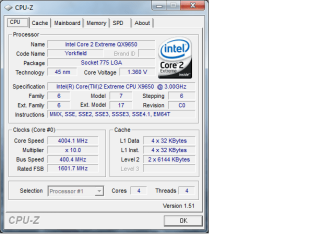
Here's my daily OC. When I push it to 5.0Ghz, the NB gets blazing hot, even under a good liquid loop. I run 4.0Ghz/1600 and it still idles at 50c! Gotta love the NB on x48/REX boards. ;)
 

Attachments

  • OC40.png
    OC40.png
    18.5 KB · Views: 44

My Computer

Computer type
PC/Desktop
Computer Manufacturer/Model Number
Custom Build/Mod
OS
Windows 7 Home Premium x64
CPU
Intel QX9650 Extreme 4.0 GHz
Motherboard
ASUS Rampage Extreme Rev2
Memory
8GB (4x2) Corsair Dominator DDR3
Graphics Card(s)
2x Radeon R390X [8GB]
Sound Card
SupremeFX X-Fi
Monitor(s) Displays
Dell 2408WFP 26" Panel
Screen Resolution
1920x1200
Hard Drives
4x WD 2TB (8TB+ Total)
2x Crucial SSD 128GB (RAID-0)
1x LG Blu-ray read/write
1x Phillips LightScribe DVD read/write
PSU
Corsair HX1000
Case
CoolerMaster - Cosmos S
Cooling
Custom Liquid - 320mm rad w/ 3x 80mm fans, CPU/NB/SB Blocks
Keyboard
Logitech Illuminater Pro
Mouse
Logitech
Internet Speed
Fractional T1 - 125Mbps
Antivirus
ESET Security Suite / Microsoft Security Essentials
Browser
Cyberfox Intel x64
Other Info
OC'd to 5.0GHz @ 44c under full load
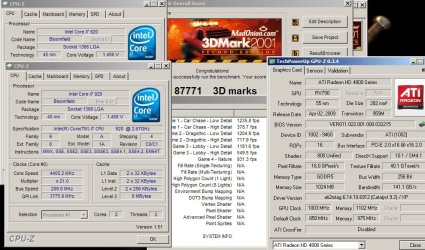
Overclock for 3dm01.

i7 920 @ 4405Mhz (210x21)
OCZ Plat. XTC @ 1680Mhz 7-7-7-21
Asus P6T Dlx V2

Not 24/s7 stable of course. With water cooling its probably doable tho.
 

Attachments

  • 4400_3dm01_O.jpg
    4400_3dm01_O.jpg
    122.3 KB · Views: 48

My Computer

OS
Windows 7 7000 64bit
CPU
Intel Core i7 920 @ 4000Mhz
Motherboard
Gigabyte EX58-UD3R
Memory
3x2 GB OCZ Platinum 1600Mhz 7-7-7-19
Graphics Card(s)
Asus GTX 260 216SP @ 720/1520/1050
Sound Card
Integrated
Monitor(s) Displays
BenQ Senseye FP202W + Mermaid Ventura
Screen Resolution
1680x1050
Hard Drives
2x Raptor @ RAID0
2x Seagate 250GB
1x WD 320GB
1x MaxWhore 160GB
PSU
Tagan TG780-U33II 780W SuperRock
Case
Cooler Master Stacker
Cooling
Stock
Keyboard
Logitec something
Mouse
Logitec MX518
Internet Speed
20/3.6 Mbit
very nice lads.........;), keep em comin, i only need to see a few more OCed C2Qs & i7s to warrant upgrading my trusty old C2D...:p


:)SK
 

My Computer

Computer Manufacturer/Model Number
myself
OS
SEVEN x64
CPU
Q9450 @ 3.6GHZ 1.34v
Motherboard
ASUS P5K PREMIUM P35
Memory
8GB 1066 buffalo firestix @ 1152mhz CL5
Graphics Card(s)
Sapphire HD 5970 + GTX260 (physX)
Sound Card
Creative X-FI Xtreme Gamer
Monitor(s) Displays
SAMSUNG 20'' & SAMSUNG 23'' (dual screens)
Screen Resolution
2048x1152 & 1680x1050
Hard Drives
1x seagate 160gb IDE & 1x seagate 160gb SATA
PSU
XCILIO 850w (78A)
Case
CM590 1x 120x38mm & 2x92x38mm / 4x 120x25mm
Cooling
AC7 PRO @ 92x38mm blower, Lamptron military bus bay controll
Keyboard
LOGITECH E110
Mouse
logitech NX5
Internet Speed
2MB
Other Info
its a continual ''work in progress''....
Installed the new MB, but the Noctua cooler I ordered turned out to be a LGA775/AM2 one, so I have to return it to get the one with LGA1366 mounts.
So... this one is not with a Noctua, but with a Cooler Master Hyper 212.
Vcore of 1.33 is a bit high for 4Ghz, but I forgot to turn it down after trying 4.2Ghz.


Core i7 920 @ 4005Mhz HT:ON
Asus P6T Deluxe V2

@Warfare: High temps? Well... no guts, no glory :D
Its stable, and no matter what normal activities I throw at it, it stays stable @ 75-80c.
With my usage im not even remotely utilizing all four cores at the same time.

I have a regular P6T and it can accept socket 775 coolers. Is it better to use one thats designed for 1366?
 

My Computer

OS
Windws 7 Ultimate 7100 RC X64
CPU
Inter Core i7 920
Motherboard
Asus P6T
Memory
6GB DDR31600 G.Skill
Graphics Card(s)
Radeon 4890
Sound Card
HD audio (motherboard)
Monitor(s) Displays
Dell 2405, LG 47inch 1080p LCD
Screen Resolution
1920*1080
Hard Drives
System: Seagate 7200.12 1tb Drobo 2nd gen with Hitachi 1tb*2 Seagate 1.5tb*2
PSU
Crosair HX 620w modular power supply
Case
Antec P183
Keyboard
Logtiech Dinovo
Mouse
Logitech Dinovo
I have a regular P6T and it can accept socket 775 coolers. Is it better to use one thats designed for 1366?


I have yet to see an LGA775 cooler that fits LGA1366 without mods or separate LGA1366 mounting kit .
The mounting holes on the motherboard are further apart on LGA1366, so I cant see how thats possible.

Where have you seen such a cooler? Or statement from Asus?

--------------------

skunksmash: If you like to play with benchmarks, here is some more fun with i7. Still on air (Coolermaster Hyper212, the old type)
 

Attachments

  • 9sek_spi.jpg
    9sek_spi.jpg
    71.7 KB · Views: 67

My Computer

OS
Windows 7 7000 64bit
CPU
Intel Core i7 920 @ 4000Mhz
Motherboard
Gigabyte EX58-UD3R
Memory
3x2 GB OCZ Platinum 1600Mhz 7-7-7-19
Graphics Card(s)
Asus GTX 260 216SP @ 720/1520/1050
Sound Card
Integrated
Monitor(s) Displays
BenQ Senseye FP202W + Mermaid Ventura
Screen Resolution
1680x1050
Hard Drives
2x Raptor @ RAID0
2x Seagate 250GB
1x WD 320GB
1x MaxWhore 160GB
PSU
Tagan TG780-U33II 780W SuperRock
Case
Cooler Master Stacker
Cooling
Stock
Keyboard
Logitec something
Mouse
Logitec MX518
Internet Speed
20/3.6 Mbit
Well, I have the board and it has 2 sets of holes for mounting coolers...
Here's a review that states the same thing..

The area around the LGA 1366 socket is really not too cramped on this version of the P6T. The 8+2 phase power design means there are fewer components in this area. Asus uses low RDS(on) MOSFETs, ferrite core chokes and solid Japanese made capacitors to make sure the power gets to the components as clean and efficiently as possible. There are a total of eight chokes around the socket with two more by the memory. One thing to notice is that Asus has included mounting holes for both LGA 775 and LGA 1366 heatsinks. This way you dont need to spend the additional money on a new heatsink, bracket or water block, something [COLOR=#289e28 !important][COLOR=#289e28 !important]users[/COLOR][/COLOR] of the popular D-Tek CPU water blocks will appreciate.

Here is the link: Asus P6T Review » Page 3 - Closer Look (The Motherboard) - Overclockers Club
 

My Computer

OS
Windws 7 Ultimate 7100 RC X64
CPU
Inter Core i7 920
Motherboard
Asus P6T
Memory
6GB DDR31600 G.Skill
Graphics Card(s)
Radeon 4890
Sound Card
HD audio (motherboard)
Monitor(s) Displays
Dell 2405, LG 47inch 1080p LCD
Screen Resolution
1920*1080
Hard Drives
System: Seagate 7200.12 1tb Drobo 2nd gen with Hitachi 1tb*2 Seagate 1.5tb*2
PSU
Crosair HX 620w modular power supply
Case
Antec P183
Keyboard
Logtiech Dinovo
Mouse
Logitech Dinovo
Well, I have the board and it has 2 sets of holes for mounting coolers...
Here's a review that states the same thing..

The area around the LGA 1366 socket is really not too cramped on this version of the P6T. The 8+2 phase power design means there are fewer components in this area. Asus uses low RDS(on) MOSFETs, ferrite core chokes and solid Japanese made capacitors to make sure the power gets to the components as clean and efficiently as possible. There are a total of eight chokes around the socket with two more by the memory. One thing to notice is that Asus has included mounting holes for both LGA 775 and LGA 1366 heatsinks. This way you dont need to spend the additional money on a new heatsink, bracket or water block, something [COLOR=#289e28 !important][COLOR=#289e28 !important]users[/COLOR][/COLOR] of the popular D-Tek CPU water blocks will appreciate.

Here is the link: Asus P6T Review » Page 3 - Closer Look (The Motherboard) - Overclockers Club


I see. Thats really a nice feature.

Asus should have done this on the rest of the P6T series, but I suppose theres reason why they havent. Probably beacause of thicker traces to cope with the increased current draw capabilities.

I doesent matter if you use a cooler for LGA1366 as long as the heat exchange capabilities are the same. The majority of coolers are designed to fit most sockets, so no one is really designed for a specific CPU.
With some exceptions of course, like coolers for servers and some of the cheaper coolers.


--------

To stay on the topic:

Yesterday ran super-pi 1M @ 4620Mhz with my C0 i7 920, and finally managed sub 9sec. But Paint.NET crashed when I was saving the screenshot. I cant see why it would do that :P

I have the screenshot .jpg and its about the right size, but corrupt. If anyone know of a .jpg or .png repair program, let me know.

I´ll try some more when its not so warm outside. Good weather is nice, but not for overclocking.
I have a feeling the CPU has some more in it, since my RAMs not stable at 1760 7-7-7. Atleast not with 1.7v
 

My Computer

OS
Windows 7 7000 64bit
CPU
Intel Core i7 920 @ 4000Mhz
Motherboard
Gigabyte EX58-UD3R
Memory
3x2 GB OCZ Platinum 1600Mhz 7-7-7-19
Graphics Card(s)
Asus GTX 260 216SP @ 720/1520/1050
Sound Card
Integrated
Monitor(s) Displays
BenQ Senseye FP202W + Mermaid Ventura
Screen Resolution
1680x1050
Hard Drives
2x Raptor @ RAID0
2x Seagate 250GB
1x WD 320GB
1x MaxWhore 160GB
PSU
Tagan TG780-U33II 780W SuperRock
Case
Cooler Master Stacker
Cooling
Stock
Keyboard
Logitec something
Mouse
Logitec MX518
Internet Speed
20/3.6 Mbit
I just played it safe with my OC
 

Attachments

  • Untitled-1.jpg
    Untitled-1.jpg
    91.3 KB · Views: 90

My Computer

Computer type
PC/Desktop
Computer Manufacturer/Model Number
Custom build using Mainly ASUS equipment
OS
Windows 10 Pro x64
CPU
Intel i7 5930k 3.5 O/C @ 4.2ghz
Motherboard
Asus Rampage V Extreme: BIOS 1902
Memory
32Gb Dominator Platinum (4x 8GB) 2666MHz
Graphics Card(s)
Asus GeForce GTX980Ti Matrix Platinum 6Gb
Sound Card
Onboard Realtek HD (SPDIF)
Monitor(s) Displays
Primary: Asus PB287Q 28" 4K, Secondary: Samsung 55" 4k
Screen Resolution
3840 x 2160
Hard Drives
1 x SM-951 .M2 SSD 512Gb (System)
1 x Samsung 850 Pro 256Gb SSD (Games)
1 x OCZ Vector 150 240Gb SSD (Games)
3 x Western Digital Caviar Black 1TB S300 16mb 7200rpm :
1 x 10Gb RamDisk
PSU
Corsair CMPSU-850AX
Case
Coolermaster Stormtrooper
Cooling
Noctua NH-D14 SE2011
Keyboard
Apple Keyboard USB
Mouse
Logitech MX Master
Internet Speed
76mb down /16mb up
Antivirus
ESET NOD V8
Browser
Firefox, Chrome, Opera, IE
Other Info
CPU Idle Temp = 36°
CPU Load Temp = 48° @100% for 40mins

Asus - RT-AC68U Router
I played safe with mine too
QX9650 @ 425 mhz x 9 = 3.825 ghz
FSB: 425 x 4 = 1700 mhz
Memory @ 1066 mhz 5-5-5-12 timings

I can hit 4 ghz with a 450 fsb but just have not felt like pushing it yet.
 

My Computer

OS
Windows 7 x64 Pro
CPU
Intel 990X
Motherboard
Asus P6T Deluxe V2
Memory
CORSAIR XMS3 6GB SDRAM DDR3 1600 (7-7-7-20)
Graphics Card(s)
2 x BFG 285 GTX OCXs in SLI
Sound Card
X-fi Elite Pro
Monitor(s) Displays
HP LP 3065
Screen Resolution
2560 x 1600
Hard Drives
2 x 150 gb Velociraptors RAID 0
PSU
PC Power & Cooling 750W
Case
CM Stacker 832
Cooling
Stock cooler
Keyboard
Saitek Eclipse II
Mouse
Logitech MX Revolution
Here's mine :)

OCmemory.jpg
OC-1.png
 

My Computer

Computer Manufacturer/Model Number
Me, myself and I
OS
Windows 7 Pro 64 Bit (Desktop)/Windows 7 64 Bit Home Prem(Laptop)
CPU
AMD FX-8120 @4.5 Ghz
Motherboard
Asus Sabertooth 990FX
Memory
Patriot Viper Extreme, 8 GB (4x2)
Graphics Card(s)
2 PowerColor HD 6950's in Crossfire(Unlocked Shaders)
Sound Card
Realtek MB HD Audio
Monitor(s) Displays
Acer H233H full 1080P HD LCD
Screen Resolution
1920x1080
Hard Drives
-1 Crucial M4 128 GB SSD (Main Drive, SATA 6 Gbps)
-3 TB Hitachi HDD (SATA 6 Gbps)
-2 WD Black 1 TB HDD's (SATA 6 Gbps)
PSU
Corsair HX850W 850 Watt
Case
Cooler Master HAF X
Cooling
Antec H2o Kuhler 920
Keyboard
Logitech
Mouse
Logitech
Internet Speed
Comcast Blast! 20/4 w/Powerboost
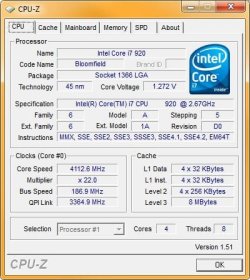
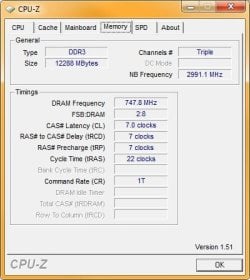
After tinkering around, here's what I came up with as my baseline config:

3.94GHz: XMP
21 CPU Ratio
187 BCLK
DDR-1499 @ 7-7-7-22
1.29125v CPU
1.64v DRAM
Others on Auto

I can run all 4 cores @ 100% for two hours, so I'm guessing it's OK for daily use. The CPU snapshot happened on Turbo mode apparently.
 

Attachments

  • CPU-Z C.jpg
    CPU-Z C.jpg
    39.1 KB · Views: 38
  • CPU-Z M.jpg
    CPU-Z M.jpg
    26.7 KB · Views: 19

My Computer

Computer Manufacturer/Model Number
Custom workstation /// Lenovo X61t tablet notebook
OS
Windows 7 RTM x64
CPU
Core i7 980X @ 4.04GHz OC /// Core Duo L7500 @ 1.6GHz
Motherboard
Asus P6T6 WS Revolution ///
Memory
12GB G. Skill @ DDR-1600 OC /// 4GB
Graphics Card(s)
Saphire HD4870 Toxic 1GB /// Intel Mobile GMA X3100
Monitor(s) Displays
Dual Eizo 24" SX2461W /// 12"
Screen Resolution
1920x1200 /// 1400x1050
Hard Drives
Workstation:
5x 750GB Barracuda-11 on Areca ARC-1220;
4x 1.5TB Barracuda-11 on Intel ICH10R;
Volumes:
300GB RAID 0, 2.7TB RAID 10 on Intel;
100GB RAID 0, 1.4TB RAID 10 on Areca ///
Notebook: G.Skill Titan 256GB SSD
PSU
Tagan ITZ 1100
Case
GHS-1500 ///
Cooling
Thermalright IFX-14 + a slew of stealth fans ///
Keyboard
Logitech Edge ///
Mouse
Logitech Wireless Optical Trackball
Internet Speed
5Mbps down / 820Kbps up
Other Info
Main use: photography;
DVD Drive: L.G GGW-H20L Blu-Ray / DVD;
OC: QPI/DRAM @ 1.33v, CPU @ 1.293v, DRAM Bus @ 1.65v, CPU PLL @ 1.88v, CPU mult = 25x, BCLK = 160, DDR3-1604 @ 7-8-7-24
After tinkering around, here's what I came up with as my baseline config:

3.94GHz: XMP
21 CPU Ratio
187 BCLK
DDR-1499 @ 7-7-7-22
1.29125v CPU
1.64v DRAM
Others on Auto

I can run all 4 cores @ 100% for two hours, so I'm guessing it's OK for daily use. The CPU snapshot happened on Turbo mode apparently.
Wow...that's a fast system! :shock:
You have 4 times the throughput of my system & I'm OCed too! :confused:
 

Attachments

  • Image 1.jpg
    Image 1.jpg
    50.9 KB · Views: 16

My Computer

Computer Manufacturer/Model Number
ABS Tech Ultimate X9
OS
Windows® 7 Ultimate x64 SP1
CPU
Intel Core 2 Duo E8400 (E0) @ 4.0GHz
Motherboard
ASUS P5Q Pro Turbo / 1780 FSB
Memory
G.SKILL-F2-8500CL5D-4GBPK (2x2Gbs) (5-5-5-15) @ 1067Mhz
Graphics Card(s)
EVGA GTX 470 SC (845/1690/2000) 160Gbs
Sound Card
VIA HD Audio / Boston Acoustics
Monitor(s) Displays
Acer X222W HD 22" LCD 2500:1 / 5ms
Screen Resolution
1680x1050
Hard Drives
Seagate Barracuda SATAII 2 x 320GB
Seagate Barracuda SATAII 1Tb
Intel® Rapid Storage Technology v10.1.0.1008
AHCI-NCQ Enabled
PSU
Silent Pro GOLD 80 PLUS 800w /95% efficiency / SLI-Crossfire
Case
ABS Stealth Black-Custom
Cooling
CoolerMaster V6GT 6 Heatpipe 200w CPU Cooler
Keyboard
Logitech G15 Gaming Keyboard (Old Style Blue!)
Mouse
Logitech MX518 Gaming Mouse
Internet Speed
1Mbs-up/ 6Mbs-down
Status
Not open for further replies.
Back
Top