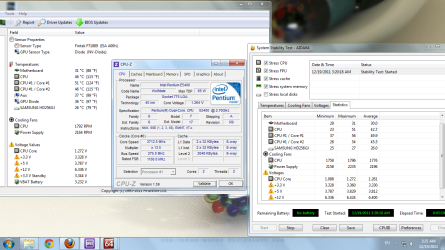
My current settings for 4.6ghz
AI Tweaker>
Ai Overclock Tuner - [X.M.P]
BCLK/PCIE Frequency [100.0]
Internal PLL Overvoltage [Disabled]
EPU Power Saving Mode [Disabled]
AI Tweaker>CPU Power Management
CPU Ratio [46]
Enhanced Intel Speedstep [Enabled]
Turbo Mode Parameters all Auto except:
Additional Turbo Voltage [0.004]
AI Tweaker>Digi+ VRM
Load Line Calibration [Regular]
VRM Frequency [Auto]
Phase Control [Extreme]
Duty Control [T.Probe]
CPU Current Capability [100%]
CPU Voltage [Offset mode]
Offset Mode Sign [-]
CPU Offset voltage [0.035]
*1
DRAM Voltage [1.65000]
*2 Yours should be 1.5000
VCCSA Voltage [Auto]
VCCIO Voltage [1.15000]
*3 Yours should be set to [Auto or 1.1000] See below
CPU PLL Voltage [1.71250]
The rest including CPU Spread Spectrum are [Auto]
Just remember that one size does not fit all. These settings are fine with my system, but may not suit yours. But hopefully it will give you a starting point.
********************************************************************************************
*1
I use a CPU voltage negative offset to maintain all the Speedstep/power saving features instead of setting a manual 'fixed' vcore. The downside to a manual setting is that the vcore is a constant voltage, so even if the clock speeds change, the voltage doesn't; which negates having Speedstep/EIST etc enabled in the first place.
When using the offset mode, the 'starting point' is based on the CPU's VID, or Voltage Identifier (the VID is the individual voltage applied to each chip the factory sets ie It's stock voltage). When using the '-' offset, it subtracts from the 'full voltage' that the system needs under full load.
ie: My max load vcore is 1.272v, but using -0.035 it can fluctuate from 1.248 up to 1.272v under full load. So depending on load, it doesn't have to run at 1.272v all the time. Offset can also affect the vcore as it adjusts through the various powerstates, from idle to full load, so if set too low it can 'trip up' between states due to insufficient vcore.
Using a manual setting is good for determining what vcore is needed for any given clock speed. Once that's established, (using IBT) you can always change it to offset mode later.
*2
My Modules are rated for 1.65v to achieve the 2133mhz speed. Depending on which G.Skill modules you have (there are a lot of different Ripjaw models

) the DRAM voltage can range between 1.5v up to 1.65v - The X.M.P profile will set this for you (as well as the RAM timings)
This important Because▼
*3
There is a .5v variance rule between DRAM voltage and VCCIO. If your DRAM voltage is outside ouf this .5v variance, it can damage the IMC (Integrated Memory Controller) on the CPU. To calculate this, you simply subtract .5v from the DRAM voltage.
So if your DRAM volts are 1.5000v, the VCCIO should be a minimum of 1.0000. The VCCIO Auto on these boards are 1.1000, so that's a .4v variance; well within the specs.
Since my modules are 1.65v, my VCCIO has to be 1.1500 If left on Auto, or using the default 1.1000 my variance would be .55v, which is out of spec and potentially damaging. Up to 1.2000 is the 'max safe' 24/7 recommendation.
Some things you could also try:
- Internal PLL Overvoltage [Enabled] (basically this allows for extra voltage when required)
- Load Line Calibration [Medium 25% or High 50% - shouldn't need any higher for 4.5]
- LLC affects vdroop, or the voltage drop when the CPU is under load. (As shown by the difference between what you put in the BIOS and what it actually is as reported by CPU-Z) Basically it 'forces' a more constant voltage.
- CPU PLL Voltage [Auto] SB tends to like lower amounts for some reason though.
- Raise vcore a few bumps, do a quick test with IBT, adjust vcore. Don't bother with Prime95 until ready for a 'proper run'
- Cross fingers
Some chips just like voltage, so don't be too discouraged if you find you need more than others for the same clocks.
Rough volt/temp guidelines:
Max safe 24/7 vcore on air 1.38v-1.4v (temps permitting)
Max safe 24/7 VCCIO 1.2000
Try to keep the cores below 85c during IBT



 -
-  temps were 45 °C with no load and 59 °C with 40% load and 64 °C with 100% load