Post Your Overclock!

Status
Not open for further replies.
@ kellymac35

Nice pictures and setup.

I see you have it in a push/pull setup from rear exhaust. Is a push/pull setup from intake and change of fans still a possibility?

On paper, two fans running at the exact RPM, make and model would be ideal but in real world performance the push fan should be slightly faster than the pull fan because air being pushed slows down when passing through the rad fins.

Just make sure you get two high static pressure fans if you still plan on changing the fans, the fans mentioned in the initial post are all high static pressure low noise fans for rad setups. :p
 

My Computer

OS
Windows 7 Professional
CPU
Intel Core i7-2670QM
Memory
Samsung 8GB
Graphics Card(s)
NVIDIA GT 555M
Hard Drives
Intel 525 120GB | HGST Travelstar 1TB
Mouse
CM Storm Xornet | Microsoft Sculpt Comfort
Internet Speed
25 Mbps | 600 Kbps
Other Info
Centrino 6205 | Seagate Backup Plus 1TB
@ kellymac35

Nice pictures and setup.

I see you have it in a push/pull setup from rear exhaust. Is a push/pull setup from intake and change of fans still a possibility?

On paper, two fans running at the exact RPM, make and model would be ideal but in real world performance the push fan should be slightly faster than the pull fan because air being pushed slows down when passing through the rad fins.

Just make sure you get two high static pressure fans if you still plan on changing the fans, the fans mentioned in the initial post are all high static pressure low noise fans for rad setups. :p

Thanks for the input Nemix77 I will have a look at the fans you mentioned. I appriciate your input. Hopefully I can get a drop in temps. To be quite honest I am setup in a well air conditioned room even at stock idle temps @ 34 to 38C with the H50 I thought I would get better performance.
 

My Computer

Computer Manufacturer/Model Number
Self Built:kellymac35/TOSHIBA LAPTOP X775 3DV78
OS
WINDOWS 7 Ultimate x64 Full
CPU
INTEL i7 930/INTEL i7 2630QM 2.9 GHz With Turbo Boost
Motherboard
EVGA X58 3X SLI CLASSIFIED/TOSHIBA
Memory
MUSHKIN ENHANCED 12GB/8GB SAMSUNG DDR3 1333 MHz
Graphics Card(s)
EVGA GTX570 S.C(SLI) FERMI /GTX560M 1.5GB of GDDR 5 DISCRETE
Sound Card
REALTEK ON BOARD /BUILT IN HARMAN KARDON STEREO SPKS
Monitor(s) Displays
TOSHIBA 32'' /17.3" LCD 3D READY 120 Hz LED BACKLIT
Screen Resolution
1360x768/1920x1080
Hard Drives
MUSHKIN Enhanced Callisto Deluxe SSD X 2 240GB RAID 0/MUSHKIN Enhanced Callisto Deluxe 240 GB SSD 750 GB Serial ATA Hard Drive
PSU
CORSAIR Professional Series AX1200 1200W
Case
THERMALTAKE Xaser VI
Cooling
CORSAIR HYDRO SERIES H70
Keyboard
Logitech MX 3200/PREMIUM RAISED TILE LED BACKLIT
Mouse
Logitech
Internet Speed
DSL
Other Info
(SPDIF) To Kenwood VR-6070 Lucasfilm THX Select Surround EX
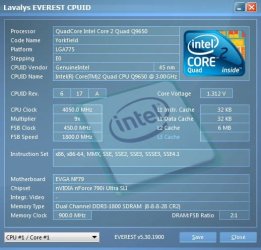
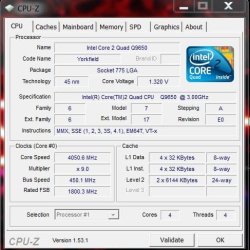
My Quad Q9650 overclocked to 4.05GHz a 35% increase, just to show what this beast can do, but I run it @ 3.6GHz 24/7.
 

Attachments

  • Everest CPUID Q9650 OC'D.jpg
    Everest CPUID Q9650 OC'D.jpg
    41.5 KB · Views: 12
  • CPU-Z Q9650 OC'D.jpg
    CPU-Z Q9650 OC'D.jpg
    42.4 KB · Views: 12

My Computer

Computer Manufacturer/Model Number
custom of course...built by grimreaper
OS
Windows 7 Ultimate X64
CPU
Intel Core 2 Quad Q9650 3.0GHz (3.6GHz 24/7) maxed 4.05GHz
Motherboard
EVGA 790i Ultra SLi Model#132-CK-NF79-A1 BIOS P10
Memory
8GB OCZ DDR3 PC3-14400 @ 1800MHz NVIDIA SLi-Ready
Graphics Card(s)
2XBFG GeForce GTX 280 OC Edition SLi'd
Sound Card
SoundBlaster X-Fi Titanium Fatal1ty Pro Series
Monitor(s) Displays
Samsung 52" 1080P LCD HDTV (LN52B550)
Screen Resolution
1920X1080 @ 60Hz
Hard Drives
3xWestern Digital WD1001FALS Caviar Black 1TB Hard Drive(s) RAID 0 x2 encased in 3xMasscool KuFormula SHF1 HDD Cooler(s)
PSU
ThermalTake ToughPower 1200W P/N:W0133RU Modularized
Case
ThermalTake P/N: VH6000BWS Armor Full-Tower
Cooling
ThermalTake SpinQ P/N: P0466 CPU Cooler
Keyboard
Logitech cordless Y-RAJ56A piece of ****
Mouse
Logitech G7 Laser Cordless mouse black
Internet Speed
10 Mbps DL-1Mbps UL wirelessly DWA-552 extreme N
Other Info
1XSamsung DVD burner SH-S223Q/BEBN SATA
1XSamsung DVD burner SH-S223L/BEBN SATA
1XLG GGW-H20L Blu-Ray burner
4XCooler Master 120mm Blue LED SickleFlow 2000 RPM
1XBelkin UPS F6C1500TWRK) backup power supply
My Quad Q9650 overclocked to 4.05GHz a 35% increase, just to show what this beast can do, but I run it @ 3.6GHz 24/7.

Nice OC grim. Good to see you back and doing well. :)

Wonder if I can push my i5 up to 4...hmm... ;)
 

My Computer

Computer type
PC/Desktop
Computer Manufacturer/Model Number
SuperBeast
OS
Windows 10 Tech Preview 9926 x64
CPU
AMD FX-8350
Motherboard
Gigabyte GA-990FXA-UD3
Memory
16GB DDR3 1333
Graphics Card(s)
Asus R9 290 DirectCU II OC, Gigabyte Windforce R9 290 OC
Sound Card
Integrated w/ Creative A250 2.1 speakers
Monitor(s) Displays
Main: Asus VN289H 28" Secondary: Acer G246HL 24"
Screen Resolution
1920x1080
Hard Drives
128 GB SanDisk Ultra Plus (Windows drive)

240 GB Crucial M500 SSD (Games drive)

1 TB WDC WD10EACS 7200RPM HDD (Data drive)

2 TB Seagate Expansion Desktop external HDD (Backup drive)
PSU
900w Antec HCG-900
Case
Raidmax Agusta Full ATX
Cooling
Corsair H80
Keyboard
Cooler Master Devastator MB24
Mouse
Cooler Master Devastator MS2K 1000/1600/2000 DPI
Internet Speed
100Mbps cable
Antivirus
Avast!
Browser
Chrome
Ok, here is what I have, stable OC tested with Prime & Everest.
My highest temp was 52 degrees celcius. Currently OCed to 3.2Ghz.
Here is the question I pose, I have looked on multiple forums, no clear answer was found:
Is it worth running my RAM slower than it's capable 1066Mhz for a higher CPU frequency?
If anyone can help me fine tune my OC it would be much appreciated.
 

My Computer

Computer Manufacturer/Model Number
I'll Fix IT Computers
OS
Windows 7 Ultimate 64 Bit
CPU
Intel Core 2 Quad 9400 2.66Ghz @ 3.20
Motherboard
Asus P5QL-E
Memory
4Gb (2x2g) Kingston HyperX 1066Mhz Dual Channel @ 2.3v
Graphics Card(s)
Gigabyte HD5670 1Gig no o/c
Sound Card
On board
Monitor(s) Displays
Screen1 = Samsung 953BW Screen 2 = Samsung 943BW
Screen Resolution
Screen 1 @ 1440x900 Screen 2 @ 1440x900
Hard Drives
Seagate SataII 500Gb 7200 Rpm
PSU
Coolermaster 550w
Case
Coolermaster RC-332
Cooling
Front 120mm, Rear 120mm, side (VGA card vent) 80mm
Keyboard
Logitech G15
Mouse
Logitech G9 Gaming Mouse
Internet Speed
Bigpond Wireless Broadband (variable speeds up to 7Mbps)
Other Info
Thermaltake Max Orb II CPU Fan @ 2000rpm

My Computer

Computer type
PC/Desktop
OS
Windows 10 Home x64
CPU
INTEL Core i5-750 Quad-Core 3.37GHz
Motherboard
ASUS P7P55D
Memory
HyperX Fury Black Series 8GB (2 x 4GB) 1866Mhz
Graphics Card(s)
EVGA GeForce GTX 750 Superclocked 1GB 128-Bit GDDR5
Monitor(s) Displays
LG 32MA68HY 32" IPS
Screen Resolution
1920 x 1080
Hard Drives
Samsung 840 Evo 120GB, SEAGATE 500GB Barracuda® 7200.12, SATA 3 Gb/s, 7200 RPM, 16MB cache
PSU
ANTEC TruePower New TP-550, 80 PLUS, 550W
Case
ANTEC Three Hundred Illusion
Cooling
COOLER MASTER Hyper 212 Plus, 4 x 120mm 1 x 140mm Noctua's
Internet Speed
85 + Mbps
Antivirus
Avast
Browser
Vivaldi
Ok, here is what I have, stable OC tested with Prime & Everest.
My highest temp was 52 degrees celcius. Currently OCed to 3.2Ghz.
Here is the question I pose, I have looked on multiple forums, no clear answer was found:
Is it worth running my RAM slower than it's capable 1066Mhz for a higher CPU frequency?
If anyone can help me fine tune my OC it would be much appreciated.

I wouldn't. The benefit from the higher overclock would be less beneficial than the Ram performance. A Guy
 

My Computer

Computer type
PC/Desktop
OS
Windows 10 Home x64
CPU
INTEL Core i5-750 Quad-Core 3.37GHz
Motherboard
ASUS P7P55D
Memory
HyperX Fury Black Series 8GB (2 x 4GB) 1866Mhz
Graphics Card(s)
EVGA GeForce GTX 750 Superclocked 1GB 128-Bit GDDR5
Monitor(s) Displays
LG 32MA68HY 32" IPS
Screen Resolution
1920 x 1080
Hard Drives
Samsung 840 Evo 120GB, SEAGATE 500GB Barracuda® 7200.12, SATA 3 Gb/s, 7200 RPM, 16MB cache
PSU
ANTEC TruePower New TP-550, 80 PLUS, 550W
Case
ANTEC Three Hundred Illusion
Cooling
COOLER MASTER Hyper 212 Plus, 4 x 120mm 1 x 140mm Noctua's
Internet Speed
85 + Mbps
Antivirus
Avast
Browser
Vivaldi
Is it worth running my RAM slower than it's capable 1066Mhz for a higher CPU frequency?

That's a question of balance. Some people, me, like to have their RAM running at full or near full capability while getting a good OC. Others sacrifice some RAM speed for pure processor speed, figuring the speed of the processor will make up for the lower RAM speed. Again, for me, I go for balance, full RAM at High clock speeds.

My two cents.
 

My Computer

Computer type
PC/Desktop
Computer Manufacturer/Model Number
Custom built by me.
OS
Windows 10 Pro
CPU
Intel Core i7-4770K (3.5Ghz)
Motherboard
Gigabyte G1 Sniper 5 (F10 Bios)
Memory
32 gig Corsair Dominator Platinum (4x8Gig)
Graphics Card(s)
Sapphire Tri-X R9 Fury
Sound Card
Soundblaster ZXR
Monitor(s) Displays
NEC PA242W 24" LCD Monitor
Screen Resolution
1920 x 1200
Hard Drives
Primary - Samsung 850 Pro (512gig), Samsung 840 Pro (256gig), 2TB WD Caviar Black.
PSU
EVGA Supernova 1000 G2
Case
Cooler Master HAF X
Cooling
Corsair H100i with Corsair Air Series SP120 Quiet Fans
Keyboard
Logitech Wireless Wave
Mouse
Logitech Performance MX
Internet Speed
High Speed Cable
Antivirus
Norton Security
Browser
IE11
Other Info
Memory Timings - 1866MHz @ 9-9-9-27-1T @ 1.5 volts
My Quad Q9650 overclocked to 4.05GHz a 35% increase, just to show what this beast can do, but I run it @ 3.6GHz 24/7.

Nice OC grim. Good to see you back and doing well. :)

Wonder if I can push my i5 up to 4...hmm... ;)

thanx blackroseMD1 if u know what your CPU can handle, anything is possible, also on a side note, always keep an eye on the temps...it's obvious that when you OC a CPU chip, naturally the temps go up.
I'm doing better, one day at a time:)
 

My Computer

Computer Manufacturer/Model Number
custom of course...built by grimreaper
OS
Windows 7 Ultimate X64
CPU
Intel Core 2 Quad Q9650 3.0GHz (3.6GHz 24/7) maxed 4.05GHz
Motherboard
EVGA 790i Ultra SLi Model#132-CK-NF79-A1 BIOS P10
Memory
8GB OCZ DDR3 PC3-14400 @ 1800MHz NVIDIA SLi-Ready
Graphics Card(s)
2XBFG GeForce GTX 280 OC Edition SLi'd
Sound Card
SoundBlaster X-Fi Titanium Fatal1ty Pro Series
Monitor(s) Displays
Samsung 52" 1080P LCD HDTV (LN52B550)
Screen Resolution
1920X1080 @ 60Hz
Hard Drives
3xWestern Digital WD1001FALS Caviar Black 1TB Hard Drive(s) RAID 0 x2 encased in 3xMasscool KuFormula SHF1 HDD Cooler(s)
PSU
ThermalTake ToughPower 1200W P/N:W0133RU Modularized
Case
ThermalTake P/N: VH6000BWS Armor Full-Tower
Cooling
ThermalTake SpinQ P/N: P0466 CPU Cooler
Keyboard
Logitech cordless Y-RAJ56A piece of ****
Mouse
Logitech G7 Laser Cordless mouse black
Internet Speed
10 Mbps DL-1Mbps UL wirelessly DWA-552 extreme N
Other Info
1XSamsung DVD burner SH-S223Q/BEBN SATA
1XSamsung DVD burner SH-S223L/BEBN SATA
1XLG GGW-H20L Blu-Ray burner
4XCooler Master 120mm Blue LED SickleFlow 2000 RPM
1XBelkin UPS F6C1500TWRK) backup power supply
on a side note, always keep an eye on the temps...it's obvious that when you OC a CPU chip, naturally the temps go up.

So very true. And It's one thing to OC to 4gig and get good temps on idle.... What about them at load? :o

And when you check the load temps, run the program for more than a minute.... unless the CPU is already calling the fire department :eek:


:)
 

My Computer

Computer type
PC/Desktop
Computer Manufacturer/Model Number
Custom built by me.
OS
Windows 10 Pro
CPU
Intel Core i7-4770K (3.5Ghz)
Motherboard
Gigabyte G1 Sniper 5 (F10 Bios)
Memory
32 gig Corsair Dominator Platinum (4x8Gig)
Graphics Card(s)
Sapphire Tri-X R9 Fury
Sound Card
Soundblaster ZXR
Monitor(s) Displays
NEC PA242W 24" LCD Monitor
Screen Resolution
1920 x 1200
Hard Drives
Primary - Samsung 850 Pro (512gig), Samsung 840 Pro (256gig), 2TB WD Caviar Black.
PSU
EVGA Supernova 1000 G2
Case
Cooler Master HAF X
Cooling
Corsair H100i with Corsair Air Series SP120 Quiet Fans
Keyboard
Logitech Wireless Wave
Mouse
Logitech Performance MX
Internet Speed
High Speed Cable
Antivirus
Norton Security
Browser
IE11
Other Info
Memory Timings - 1866MHz @ 9-9-9-27-1T @ 1.5 volts
on a side note, always keep an eye on the temps...it's obvious that when you OC a CPU chip, naturally the temps go up.

So very true. And It's one thing to OC to 4gig and get good temps on idle.... What about them at load? :o

And when you check the load temps, run the program for more than a minute.... unless the CPU is already calling the fire department :eek:


:)

If i remember correctly, idle at 29-32 degrees (depends on room temps), never goes above 40 degrees at full load (3.6GHz).
When I OC the chip to 4.05GHz, it idles at 35-40 degrees, seen it at 45-50 degrees max at full load.
Pretty damn good I think (got to love the cooler).
 

My Computer

Computer Manufacturer/Model Number
custom of course...built by grimreaper
OS
Windows 7 Ultimate X64
CPU
Intel Core 2 Quad Q9650 3.0GHz (3.6GHz 24/7) maxed 4.05GHz
Motherboard
EVGA 790i Ultra SLi Model#132-CK-NF79-A1 BIOS P10
Memory
8GB OCZ DDR3 PC3-14400 @ 1800MHz NVIDIA SLi-Ready
Graphics Card(s)
2XBFG GeForce GTX 280 OC Edition SLi'd
Sound Card
SoundBlaster X-Fi Titanium Fatal1ty Pro Series
Monitor(s) Displays
Samsung 52" 1080P LCD HDTV (LN52B550)
Screen Resolution
1920X1080 @ 60Hz
Hard Drives
3xWestern Digital WD1001FALS Caviar Black 1TB Hard Drive(s) RAID 0 x2 encased in 3xMasscool KuFormula SHF1 HDD Cooler(s)
PSU
ThermalTake ToughPower 1200W P/N:W0133RU Modularized
Case
ThermalTake P/N: VH6000BWS Armor Full-Tower
Cooling
ThermalTake SpinQ P/N: P0466 CPU Cooler
Keyboard
Logitech cordless Y-RAJ56A piece of ****
Mouse
Logitech G7 Laser Cordless mouse black
Internet Speed
10 Mbps DL-1Mbps UL wirelessly DWA-552 extreme N
Other Info
1XSamsung DVD burner SH-S223Q/BEBN SATA
1XSamsung DVD burner SH-S223L/BEBN SATA
1XLG GGW-H20L Blu-Ray burner
4XCooler Master 120mm Blue LED SickleFlow 2000 RPM
1XBelkin UPS F6C1500TWRK) backup power supply
If i remember correctly, idle at 29-32 degrees (depends on room temps), never goes above 40 degrees at full load (3.6GHz).
When I OC the chip to 4.05GHz, it idles at 35-40 degrees, seen it at 45-50 degrees max at full load.
Pretty damn good I think (got to love the cooler).

Yes, those are good temps. Mine idles between 30c and 34c. Highest temp during 6 hours of OCCT was I think 67, with 62 being about average. More than adequate since I don't do anything that remotely approaches 100% CPU usage. A Guy
 

My Computer

Computer type
PC/Desktop
OS
Windows 10 Home x64
CPU
INTEL Core i5-750 Quad-Core 3.37GHz
Motherboard
ASUS P7P55D
Memory
HyperX Fury Black Series 8GB (2 x 4GB) 1866Mhz
Graphics Card(s)
EVGA GeForce GTX 750 Superclocked 1GB 128-Bit GDDR5
Monitor(s) Displays
LG 32MA68HY 32" IPS
Screen Resolution
1920 x 1080
Hard Drives
Samsung 840 Evo 120GB, SEAGATE 500GB Barracuda® 7200.12, SATA 3 Gb/s, 7200 RPM, 16MB cache
PSU
ANTEC TruePower New TP-550, 80 PLUS, 550W
Case
ANTEC Three Hundred Illusion
Cooling
COOLER MASTER Hyper 212 Plus, 4 x 120mm 1 x 140mm Noctua's
Internet Speed
85 + Mbps
Antivirus
Avast
Browser
Vivaldi
My Overclock:

i7-930 @ 4GHz.
vCore: 1.29
Multipliers: 19x211 (got lower temps this way, used to have 21x but the temps was higher and required higher vCore to run stable.
Turbo: Off
Temps: 60-67 degrees max load under stress, rarely goes over 63-64 in gaming, which for me is ok.
Idle: 39-43 degrees with fan on 50%
I don't see the point in going higher, and it's not really smart either. The performance over 4GHz in games are very small. I would maybe get 5-10 fps more with 4.2GHz, and when in most games I have over 100fps what's the point?
 

My Computer

Computer Manufacturer/Model Number
Self Built
OS
Windows 7 Ultimate x64
CPU
[email protected]
Motherboard
MSI P67A-GD80 B3
Memory
Corsair Vengeance 1600MHz 16GB
Graphics Card(s)
MSI Geforce 580 Twin Frozr II @ SLI
Sound Card
Creative Sound Blaster Pro (USB)
Monitor(s) Displays
Dell Ultrasharp 27"
Screen Resolution
2560x1440
Hard Drives
Intel 510 Series 250GB SSD
Corsair Reactor Series 120GB SSD
WD Caviar Black 1TB
3x External HDD's.
PSU
Corsair AX 1200W
Case
Corsair Obsidian 800D
Cooling
Antec Kuhler H2O 920 & 3x Scythe Gentle Typhoon AP-15
Keyboard
Mionix Cibal 60
Mouse
CM Storm SENTINEL
Internet Speed
Pretty Fast
For a friend

I overclocked a friend's rig. He was using a Core i7-920 in a system he built himself.

Got it up to 4.4 GHZ on air cooling alone (using the Cooler Master Hyper 212 Plus).

At idle, it lingers at 40-50 Celsius. Under load, it reaches 70-80 degrees celsius (under Prime95), though I got it to hit 91 one time.
 

My Computer

Computer type
PC/Desktop
Computer Manufacturer/Model Number
Apple Macbook Pro
OS
Windows 7 Professional
CPU
Intel i7-620M
Motherboard
Apple Logic Board
Memory
4 GB DDR3 1066 MhZ
Graphics Card(s)
Geforce GT 330M
Monitor(s) Displays
Asus VE278Q
Screen Resolution
1440x900 and 1920x1080p
Hard Drives
1 500GB Hitachi 5400rpm HDD (Win7 Partition: 150 GB)
PSU
85 W
Case
Apple
Cooling
Apple
Antivirus
AVG Free
Browser
Chrome
I overclocked a friend's rig. He was using a Core i7-920 in a system he built himself.

Got it up to 4.4 GHZ on air cooling alone (using the Cooler Master Hyper 212 Plus).

At idle, it lingers at 40-50 Celsius. Under load, it reaches 70-80 degrees celsius (under Prime95), though I got it to hit 91 one time.

Hmm. If you want your cpu to last a bit it's not recommended to go over 80.
 

My Computer

Computer Manufacturer/Model Number
Self Built
OS
Windows 7 Ultimate x64
CPU
[email protected]
Motherboard
MSI P67A-GD80 B3
Memory
Corsair Vengeance 1600MHz 16GB
Graphics Card(s)
MSI Geforce 580 Twin Frozr II @ SLI
Sound Card
Creative Sound Blaster Pro (USB)
Monitor(s) Displays
Dell Ultrasharp 27"
Screen Resolution
2560x1440
Hard Drives
Intel 510 Series 250GB SSD
Corsair Reactor Series 120GB SSD
WD Caviar Black 1TB
3x External HDD's.
PSU
Corsair AX 1200W
Case
Corsair Obsidian 800D
Cooling
Antec Kuhler H2O 920 & 3x Scythe Gentle Typhoon AP-15
Keyboard
Mionix Cibal 60
Mouse
CM Storm SENTINEL
Internet Speed
Pretty Fast
My Overclock:

i7-930 @ 4GHz.
vCore: 1.29
Multipliers: 19x211 (got lower temps this way, used to have 21x but the temps was higher and required higher vCore to run stable.
Turbo: Off
Temps: 60-67 degrees max load under stress, rarely goes over 63-64 in gaming, which for me is ok.
Idle: 39-43 degrees with fan on 50%

What's your memory running at? Just curious.

BTW I'm at 3.5GHz and happy with that.

Multi 21x160 (turbo 22x160)
Turbo on
Vcore 1.1875
QPI/Vtt 1.215
Memory 8-8-8-20-1T @1600MHz @1.640v

Idle temps 42 (CPU fan running at a quiet 890 RPM idle)
Prime 95 Load temps 72 (CPU fan running at a quiet 1200 RPM load)
 

My Computer

Computer type
PC/Desktop
Computer Manufacturer/Model Number
Custom built by me.
OS
Windows 10 Pro
CPU
Intel Core i7-4770K (3.5Ghz)
Motherboard
Gigabyte G1 Sniper 5 (F10 Bios)
Memory
32 gig Corsair Dominator Platinum (4x8Gig)
Graphics Card(s)
Sapphire Tri-X R9 Fury
Sound Card
Soundblaster ZXR
Monitor(s) Displays
NEC PA242W 24" LCD Monitor
Screen Resolution
1920 x 1200
Hard Drives
Primary - Samsung 850 Pro (512gig), Samsung 840 Pro (256gig), 2TB WD Caviar Black.
PSU
EVGA Supernova 1000 G2
Case
Cooler Master HAF X
Cooling
Corsair H100i with Corsair Air Series SP120 Quiet Fans
Keyboard
Logitech Wireless Wave
Mouse
Logitech Performance MX
Internet Speed
High Speed Cable
Antivirus
Norton Security
Browser
IE11
Other Info
Memory Timings - 1866MHz @ 9-9-9-27-1T @ 1.5 volts
Memory @ 1678MHz.
But I had to raise my vCore again "sight", cause my games kept crashing to desktop with my current config, for some unknown reason.
 

My Computer

Computer Manufacturer/Model Number
Self Built
OS
Windows 7 Ultimate x64
CPU
[email protected]
Motherboard
MSI P67A-GD80 B3
Memory
Corsair Vengeance 1600MHz 16GB
Graphics Card(s)
MSI Geforce 580 Twin Frozr II @ SLI
Sound Card
Creative Sound Blaster Pro (USB)
Monitor(s) Displays
Dell Ultrasharp 27"
Screen Resolution
2560x1440
Hard Drives
Intel 510 Series 250GB SSD
Corsair Reactor Series 120GB SSD
WD Caviar Black 1TB
3x External HDD's.
PSU
Corsair AX 1200W
Case
Corsair Obsidian 800D
Cooling
Antec Kuhler H2O 920 & 3x Scythe Gentle Typhoon AP-15
Keyboard
Mionix Cibal 60
Mouse
CM Storm SENTINEL
Internet Speed
Pretty Fast
I lowered my OC to 3.85 GHz. Seems more stable, and vcore is much lower.
It's weird you need so much more vcore with just 150MHz more.
My temps are now better too.
 

My Computer

Computer Manufacturer/Model Number
Self Built
OS
Windows 7 Ultimate x64
CPU
[email protected]
Motherboard
MSI P67A-GD80 B3
Memory
Corsair Vengeance 1600MHz 16GB
Graphics Card(s)
MSI Geforce 580 Twin Frozr II @ SLI
Sound Card
Creative Sound Blaster Pro (USB)
Monitor(s) Displays
Dell Ultrasharp 27"
Screen Resolution
2560x1440
Hard Drives
Intel 510 Series 250GB SSD
Corsair Reactor Series 120GB SSD
WD Caviar Black 1TB
3x External HDD's.
PSU
Corsair AX 1200W
Case
Corsair Obsidian 800D
Cooling
Antec Kuhler H2O 920 & 3x Scythe Gentle Typhoon AP-15
Keyboard
Mionix Cibal 60
Mouse
CM Storm SENTINEL
Internet Speed
Pretty Fast
What QPI/Vtt voltage did/do you have?

BTW 4gig+ is nice, if it's stable. It one thing to hit 4gig, it's another to be stable across all applications ;)
 

My Computer

Computer type
PC/Desktop
Computer Manufacturer/Model Number
Custom built by me.
OS
Windows 10 Pro
CPU
Intel Core i7-4770K (3.5Ghz)
Motherboard
Gigabyte G1 Sniper 5 (F10 Bios)
Memory
32 gig Corsair Dominator Platinum (4x8Gig)
Graphics Card(s)
Sapphire Tri-X R9 Fury
Sound Card
Soundblaster ZXR
Monitor(s) Displays
NEC PA242W 24" LCD Monitor
Screen Resolution
1920 x 1200
Hard Drives
Primary - Samsung 850 Pro (512gig), Samsung 840 Pro (256gig), 2TB WD Caviar Black.
PSU
EVGA Supernova 1000 G2
Case
Cooler Master HAF X
Cooling
Corsair H100i with Corsair Air Series SP120 Quiet Fans
Keyboard
Logitech Wireless Wave
Mouse
Logitech Performance MX
Internet Speed
High Speed Cable
Antivirus
Norton Security
Browser
IE11
Other Info
Memory Timings - 1866MHz @ 9-9-9-27-1T @ 1.5 volts
I have the QPI to auto.

Yes. For some reason 4GHz runs stable with a 21 multiplier in everything, but then it gets too hot because of the voltage: 80+ degrees
And with a 19 multiplier 4GHz runs stable with lower voltage, but then I get these game crashes after 20 minutes.
 

My Computer

Computer Manufacturer/Model Number
Self Built
OS
Windows 7 Ultimate x64
CPU
[email protected]
Motherboard
MSI P67A-GD80 B3
Memory
Corsair Vengeance 1600MHz 16GB
Graphics Card(s)
MSI Geforce 580 Twin Frozr II @ SLI
Sound Card
Creative Sound Blaster Pro (USB)
Monitor(s) Displays
Dell Ultrasharp 27"
Screen Resolution
2560x1440
Hard Drives
Intel 510 Series 250GB SSD
Corsair Reactor Series 120GB SSD
WD Caviar Black 1TB
3x External HDD's.
PSU
Corsair AX 1200W
Case
Corsair Obsidian 800D
Cooling
Antec Kuhler H2O 920 & 3x Scythe Gentle Typhoon AP-15
Keyboard
Mionix Cibal 60
Mouse
CM Storm SENTINEL
Internet Speed
Pretty Fast
Status
Not open for further replies.
Back
Top