
Power Button - Start Menu

How to Change the Default Windows 7 Start Menu Power Button Action

   Information
This will show you how to change the Windows 7 Start Menu power button default action for the current user account or all user accounts to be either Switch User, Log Off, Lock, Restart, Sleep, Hibernate, or Shutdown when clicked on.
   Tip
The Hibernate option will not be available in the Start Menu Power Button unless you have hibernate enabled and have hybrid sleep turned off in your Power Plan Options.
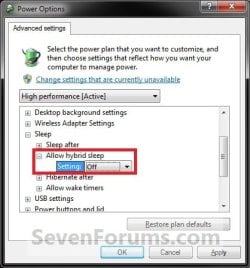
Power_Options.jpg


EXAMPLE: Start Menu Power Button
Start_Menu.jpg


OPTION ONE

Through Taskbar and Start Menu Properties


NOTE: This option will let you change the default action for the Start Menu power button only in the user account that you are currently logged on.
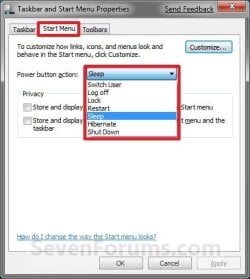
1. Right click on the Start button and click on Properties.

2. To the right of Power button action, select the action that you want for the Start Menu power button and click on OK. (see screenshot below)
NOTE: The Hibernate option will not be listed unless you enable hibernate and have turned off the Hybrid sleep option in the Power Plan Settings. If you are using Hybrid sleep, then you would select Sleep from below.
Start_Menu_Properties.jpg


OPTION TWO

Through Advanced Power Options


NOTE: This option will let you change the default action for the Start Menu power button only in the user account that you are currently logged on.
1. Open Advanced Power Options for your power plan.

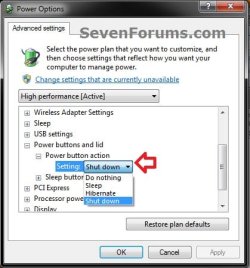
2. Scroll down, and expand the Power buttons and lid and Power button action options. (see screenshot below step 3)

3. To the right of the Power button action Setting, select the action you would like for the Start Menu power button and click on OK. (see screenshot below)
NOTE: The Hibernate option will not be listed unless you enable hibernate and have turned off the Hybrid sleep option in the Power Plan Settings. If you are using Hybrid sleep, then you would select Sleep from below.
Power_Options-2.jpg


OPTION THREE

Through System Settings


NOTE: This option will let you change the default action for the Start Menu power button only in the user account that you are currently logged on. This will also change the Power button setting in all power plans in your user account.
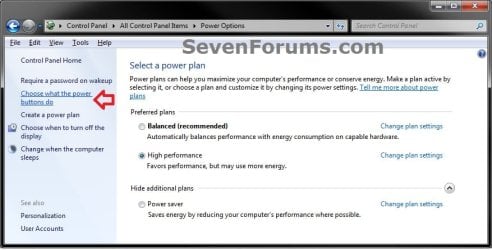
1. Open the Control Panel (Icons View), and click on the Power Options icon.

2. In the left pane, click on the Choose what the power buttons do link. (see screenshot below)
System_Settings-1.jpg
3. To the right of When I press the power button, select the action that you want for the Start Menu power button in the drop down box and click on the Save changes button. (see screenshot below)
NOTE: The Save changes button will remain grayed out until you make a change in the settings. The Hibernate option will not be listed unless you enable hibernate and have turned off the Hybrid sleep option in the Power Plan Settings. If you are using Hybrid sleep, then you would select Sleep from below.
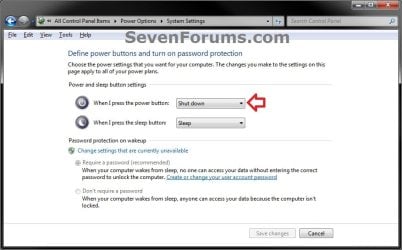
System_Settings-2_UAC.jpg
4. You can close the Power Options window when done. (see screenshot below step 2)


OPTION FOUR

Manually in Registry Editor


NOTE: This option will let you change the default action for the Start Menu power button only in the user account that you are currently logged on.
1. Open the Start Menu, then type regedit in the search box and press Enter.

2. If prompted by UAC, then click on Yes (if administrator) or enter administrator's password (if standard user).

3. Do step 4 or 5 below for how you want to set this.

4. Same as OPTION 1, 2, or 3 above
A) In regedit, navigate to the location below. (see screenshot below)
HKEY_CURRENT_USER\Software\Microsoft\Windows\CurrentVersion\Explorer\Advanced
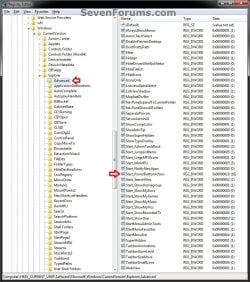
Reg-1.jpg
B) In the right pane of Advanced, double click on Start_PowerButtonAction to modify it, and go to step 6 below. (see screenshot above)
5. Same as OPTION FIVE below with Group Policy for All Users
NOTE: You must be logged in as an administrator to be able to do this step.
A) In regedit, navigate to the location below.
HKEY_CURRENT_USER\Software\Policies\Microsoft\Windows\Explorer
B) In the right pane of Advanced, double click on Start_PowerButtonAction to modify it, and go to step 6 below.
NOTE: If Start_PowerButtonAction doesn't exist, then right click on an empty area in the right pane of Explorer, click on New and DWORD (32-bit) Value, type Start_PowerButtonAction, and press Enter.
6. Type in the Hexadecimal Value data number below for the Power Button option that you want, and click on OK. (see screenshot below)
NOTE: The Hibernate option will not be available unless you enable hibernate and have turned off the Hybrid sleep option in the Power Plan Settings. If you are using Hybrid sleep, then you would select Sleep from below.
Power Button | Hex Value data
Switch User |100

Log Off |1

Lock|200

Restart|4

Sleep|10

Hibernate|40

Shutdown|2

REG-2.jpg
7. Close regedit.

8. If open, close and reopen Taskbar and Start Menu Properties (Option One) to see the changes.
NOTE: If you used step 5, then you may need to log off and on to apply first.


OPTION FIVE

Through Local Group Policy Editor


NOTE: You can only do this option while logged in an administrator account.
1. Open the all users, specific users or groups, or all users except administrators Local Group Policy Editor for how you want this policy applied.

2. In the left pane, double click on User Configuration, Administrative Templates, and click on Start Menu and Taskbar. (see screenshot below)
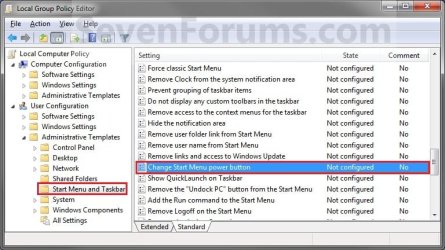
Power_Group_Policy.jpg
3. In the right pane of Start Menu and Taskbar, right click on Change Start Menu power button and click on Edit. (See screenshot below)

4. To Allow All Users to Change Power Button
NOTE: This option will allow all users to be able to change their Start Menu power button to what they like using OPTION ONE above.
A) Select (dot) Not Configured or Disabled. (see screenshot below step 6)

B) Go to step 6.
5. To Change Start Menu Power Button for All Users
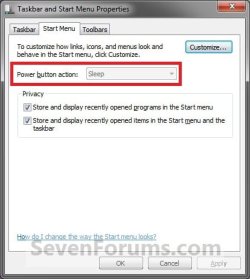
NOTE: This option will let you change the Start Menu power button to what you want for all users accounts on the computer. After applied, the Power button action option in the Start Menu will be grayed out for all users and cannot be changed (see step 7).
A) Select (dot) Enabled, then under Options, select the action you want for the Start Menu power button in the drop down menu. (see screenshot below step 6)
NOTE: The Hibernate option will not be listed unless you enable hibernate and have turned off the Hybrid sleep option in thePower Plan Settings. If you are using Hybrid sleep, then you would select Sleep from below.
6. Click on OK. (See screenshot below)
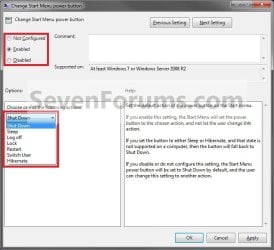
Power_Properties.jpg
7. If you check Start Menu and Taskbar Properties using the OPTION ONE section above, you will now notice that the option to change the Start Menu power button is grayed out and set to what you have it set to in step 5A above. (see screenshot below)
Power_Start.jpg
That's it,
Shawn


Last edited:
Hi Shawn,

Just one thing I've noticed in Build 7000.

The Hibernate option for the button only shows when the hybrid sleep mode is disabled via the power options

This applies on my system anyway ;)
 

My Computers

System One System Two

  • Computer type
    PC/Desktop
    Computer Manufacturer/Model Number
    ChillBlast - Custom to my design
    OS
    Windows 11 Pro x64 [Latest Release and Release Preview]
    CPU
    Ryzen 9 5950X, 3.8 - 5.2 MHz
    Motherboard
    Asus Prime X570-Pro
    Memory
    64GB [2 x 32GB] DDR4 3200MHz
    Graphics Card(s)
    4GB NVIDIA GEFORCE GTX 1650 Ti
    Sound Card
    On-board SPDIF to 5.1 System + HDMI [5.1 system]
    Monitor(s) Displays
    32" UHD 32 Bit HDR Monitor + 43" UHD 4K 32Bit HDR TV
    Screen Resolution
    2 x 3840 x 2160 @60Hz
    Hard Drives
    1TB M2 SSD OS, 500GB Fast Access SSD, 2 x 8TB Data + Various Externals from 1TB to 4TB, 10TB NAS
    PSU
    NZXT C750 80 PLUS Gold 750W Modular PSU
    Case
    Workstation Case [Matt Black]
    Cooling
    NZXT Kraken X63 280mm CPU Cooler +2x Quiet Case fans
    Keyboard
    Logitech Wireless MX Keys & K400 + others
    Mouse
    Logitech Wireless MX Master 3S
    Internet Speed
    920 MB Down 50 MB Up
    Antivirus
    BitDefender Total Security Pro
    Browser
    Chrome (always run latest Non-Beta)
    Other Info
    Also run ...
    Laptop - Quad 8GB - Windows 10 Pro x64
    Nexus 7 Android tablet x2
    Samsung 10.2" tablet
    Blackview TAB 8 4G Android Tablet c/w Keyboard
    Wacom Intuos Pro Medium Pen Pad
    Wacom Intuos Pro Small Pen Pad
    Wacom Expresskeys Remote
    Loopdeck+ Graphics Controller
    Shuttle Pro v2 Control
  • Computer type
    Laptop
    System Manufacturer/Model Number
    Dell XPS 17 10750H
    OS
    Windows 11 Pro x64 Latest RP
    CPU
    Intel I7 10750H 5.0GHz
    Motherboard
    Dell XPS
    Memory
    32GB [2x16GB] DDR4 2933 MHz
    Graphics Card(s)
    nVidia GTX1650Ti 4 GB GDDR6
    Sound Card
    Stock [Realtek] 4 Speaker
    Monitor(s) Displays
    17" IPS UHD+ Infinity Edge Touchscreen
    Screen Resolution
    3840 x 2400
    Hard Drives
    2TB M2 NVMe, 4TB External + various 500GB & 1TB External NVMe (also have access to spinner HDD from
    PSU
    Stock
    Case
    Stock XPS Aluminium & Carbon Fibre
    Cooling
    Stock - Active Fan Control
    Keyboard
    Backlit + Various Logitech
    Mouse
    Stock Track Pad + Logitech MX Trackball
    Internet Speed
    72 MB Down 18MB Up
    Browser
    Chrome
    Other Info
    Also run ...
    Laptop - Quad 8GB - Windows 10 Pro x64
    Nexus 7 Android tablet x2
    10.2" tablet
    Sony Z3 Android Smartphone
    Wacom Intuos Pro Medium Pen Pad
    Wacom Intuos Pro Small Pen Pad
    Wacom Expresskeys Remote
    Loopdeck+ Graphics Controller
    Shuttle Pro v2 Control Pad
    10TB NAS
Last edited:

My Computer

Computer type
PC/Desktop
Computer Manufacturer/Model Number
Self built custom
OS
64-bit Windows 11 Pro for Workstations
CPU
Intel i7-8700K OC'd to 5 GHz
Motherboard
ASUS ROG Maximus XI Formula Z390
Memory
64 GB (4x16GB) G.SKILL TridentZ RGB DDR4 3600 MHz
Graphics Card(s)
ASUS ROG-STRIX-GTX1080TI-O11G-GAMING
Sound Card
Integrated
Monitor(s) Displays
2 x Samsung Odyssey G7 27"
Screen Resolution
2560x1440
Hard Drives
1TB Samsung 990 PRO M.2,
4TB Samsung 990 PRO PRO M.2,
TerraMaster F8 SSD Plus NAS
PSU
Seasonic Prime Titanium 850W
Case
Thermaltake Core P3
Cooling
Corsair Hydro H115i
Keyboard
Logitech wireless K800
Mouse
Logitech MX Master 4
Internet Speed
2 Gb/s Download and 100 Mb/s Upload
Antivirus
Malwarebyte Anti-Malware Premium
Browser
Google Chrome
Other Info
Logitech Z625 speaker system,
Logitech BRIO 4K Pro webcam,
HP Color LaserJet Pro MFP M477fdn,
APC SMART-UPS RT 1000 XL - SURT1000XLI,
Galaxy S23 Plus phone
But how will you make it to icon instead of a text Shut Down. Just like in vista instead of text Shut Down, you will only see an icon. Thanks!
 

My Computer

OS
Microsoft Windows 7
Hello Meteorolog0, and welcome to Seven Forums,

I'm sorry, but there is no way that I know of in Windows 7. :(

You could use the shutdown shortcut from the link below to have a icon that you can pin to the Start menu and use instead.

Shutdown shortcut - Vista Forums

Hope this helps,
Shawn
 

My Computer

Computer type
PC/Desktop
Computer Manufacturer/Model Number
Self built custom
OS
64-bit Windows 11 Pro for Workstations
CPU
Intel i7-8700K OC'd to 5 GHz
Motherboard
ASUS ROG Maximus XI Formula Z390
Memory
64 GB (4x16GB) G.SKILL TridentZ RGB DDR4 3600 MHz
Graphics Card(s)
ASUS ROG-STRIX-GTX1080TI-O11G-GAMING
Sound Card
Integrated
Monitor(s) Displays
2 x Samsung Odyssey G7 27"
Screen Resolution
2560x1440
Hard Drives
1TB Samsung 990 PRO M.2,
4TB Samsung 990 PRO PRO M.2,
TerraMaster F8 SSD Plus NAS
PSU
Seasonic Prime Titanium 850W
Case
Thermaltake Core P3
Cooling
Corsair Hydro H115i
Keyboard
Logitech wireless K800
Mouse
Logitech MX Master 4
Internet Speed
2 Gb/s Download and 100 Mb/s Upload
Antivirus
Malwarebyte Anti-Malware Premium
Browser
Google Chrome
Other Info
Logitech Z625 speaker system,
Logitech BRIO 4K Pro webcam,
HP Color LaserJet Pro MFP M477fdn,
APC SMART-UPS RT 1000 XL - SURT1000XLI,
Galaxy S23 Plus phone
ok, anyway thanks for this wonderful forum. more power
 

My Computer

OS
Microsoft Windows 7
Thanks so much Barman58! I was trying to figure out why hibernate wasn't an option just about forever! (meaning 1-2 hours) Finally! Thanks again!
 

My Computer

OS
7
Confirm before shutdown

Is there any way that windows 7 confirms the shut down.

I vividly remember that windows xp used to confirm and that makes more sense to me.

Any way to do this?
 

My Computer

OS
CromeOS
Hello Kaunhaiye, and welcome to Seven Forums.

Sorry, but no. :(

You could create a Shut Down shortcut that has a time delay on it with a notice. This way you can use the Abort shortcut before the time delay runs out in case you accidentally clicked on the Shut Down shortcut.

Hope this helps,
Shawn
 

My Computer

Computer type
PC/Desktop
Computer Manufacturer/Model Number
Self built custom
OS
64-bit Windows 11 Pro for Workstations
CPU
Intel i7-8700K OC'd to 5 GHz
Motherboard
ASUS ROG Maximus XI Formula Z390
Memory
64 GB (4x16GB) G.SKILL TridentZ RGB DDR4 3600 MHz
Graphics Card(s)
ASUS ROG-STRIX-GTX1080TI-O11G-GAMING
Sound Card
Integrated
Monitor(s) Displays
2 x Samsung Odyssey G7 27"
Screen Resolution
2560x1440
Hard Drives
1TB Samsung 990 PRO M.2,
4TB Samsung 990 PRO PRO M.2,
TerraMaster F8 SSD Plus NAS
PSU
Seasonic Prime Titanium 850W
Case
Thermaltake Core P3
Cooling
Corsair Hydro H115i
Keyboard
Logitech wireless K800
Mouse
Logitech MX Master 4
Internet Speed
2 Gb/s Download and 100 Mb/s Upload
Antivirus
Malwarebyte Anti-Malware Premium
Browser
Google Chrome
Other Info
Logitech Z625 speaker system,
Logitech BRIO 4K Pro webcam,
HP Color LaserJet Pro MFP M477fdn,
APC SMART-UPS RT 1000 XL - SURT1000XLI,
Galaxy S23 Plus phone
Is there any way of changing back to the two icons like in vista?
 

My Computer

Computer Manufacturer/Model Number
Compaq Presario F700
OS
Windows 7 x32
CPU
AMD Turion 64 Mobile TK-53
Motherboard
Quanta 30EA
Memory
DDR2 - 2048 Mbytes
Graphics Card(s)
NVIDIA GeForce 7000M/nForce 610M
Sound Card
?
Monitor(s) Displays
Normal Laptop Screen
Hard Drives
?
PSU
?
Case
?
Cooling
?
Hello Jake,

Sorry, but no. You might try the free program Vista Start Menu for this option and more though to see if it may work for you instead.

Hope this helps,
Shawn
 

My Computer

Computer type
PC/Desktop
Computer Manufacturer/Model Number
Self built custom
OS
64-bit Windows 11 Pro for Workstations
CPU
Intel i7-8700K OC'd to 5 GHz
Motherboard
ASUS ROG Maximus XI Formula Z390
Memory
64 GB (4x16GB) G.SKILL TridentZ RGB DDR4 3600 MHz
Graphics Card(s)
ASUS ROG-STRIX-GTX1080TI-O11G-GAMING
Sound Card
Integrated
Monitor(s) Displays
2 x Samsung Odyssey G7 27"
Screen Resolution
2560x1440
Hard Drives
1TB Samsung 990 PRO M.2,
4TB Samsung 990 PRO PRO M.2,
TerraMaster F8 SSD Plus NAS
PSU
Seasonic Prime Titanium 850W
Case
Thermaltake Core P3
Cooling
Corsair Hydro H115i
Keyboard
Logitech wireless K800
Mouse
Logitech MX Master 4
Internet Speed
2 Gb/s Download and 100 Mb/s Upload
Antivirus
Malwarebyte Anti-Malware Premium
Browser
Google Chrome
Other Info
Logitech Z625 speaker system,
Logitech BRIO 4K Pro webcam,
HP Color LaserJet Pro MFP M477fdn,
APC SMART-UPS RT 1000 XL - SURT1000XLI,
Galaxy S23 Plus phone
ok, thanks :)
 

My Computer

Computer Manufacturer/Model Number
Compaq Presario F700
OS
Windows 7 x32
CPU
AMD Turion 64 Mobile TK-53
Motherboard
Quanta 30EA
Memory
DDR2 - 2048 Mbytes
Graphics Card(s)
NVIDIA GeForce 7000M/nForce 610M
Sound Card
?
Monitor(s) Displays
Normal Laptop Screen
Hard Drives
?
PSU
?
Case
?
Cooling
?
I know it is possible to click on the Start Power button and then to click on the arrow to get all the options, but the arrow is the smaller physical option to click on and I find myself clicking the first default option more often than not. Which results in the computer either shutting down or sleeping or whatever I have the default set to with no other option or chance to do otherwise. I don't want it do to this I want it do what Windows XP used to and to give me the options as the default first click - I don't want the default click to activate anyone of the other options. How do I make it do this please? The choices are still there - you can get them on the arrow click - I want the arrow click choices to become the defaults rather than one of the single actions. Is this possible please?
 

My Computer

OS
Windows 7 Home Premium 32bit
Hello Joc, and welcome to Seven Forums.

I'm not sure of what you mean. You would only need to hover the mouse pointer over the arrow to the right of the power button for the menu to open to then click on whatever option you like.

Did you want a shortcut for one of these options to use where you like instead?

You might look at these tutorials to see if they may help.

http://www.sevenforums.com/tutorials/16801-shut-down-windows-shortcut.html

http://www.sevenforums.com/tutorials/779-shut-down-windows-alt-f4-window-change-default-action.html
 

My Computer

Computer type
PC/Desktop
Computer Manufacturer/Model Number
Self built custom
OS
64-bit Windows 11 Pro for Workstations
CPU
Intel i7-8700K OC'd to 5 GHz
Motherboard
ASUS ROG Maximus XI Formula Z390
Memory
64 GB (4x16GB) G.SKILL TridentZ RGB DDR4 3600 MHz
Graphics Card(s)
ASUS ROG-STRIX-GTX1080TI-O11G-GAMING
Sound Card
Integrated
Monitor(s) Displays
2 x Samsung Odyssey G7 27"
Screen Resolution
2560x1440
Hard Drives
1TB Samsung 990 PRO M.2,
4TB Samsung 990 PRO PRO M.2,
TerraMaster F8 SSD Plus NAS
PSU
Seasonic Prime Titanium 850W
Case
Thermaltake Core P3
Cooling
Corsair Hydro H115i
Keyboard
Logitech wireless K800
Mouse
Logitech MX Master 4
Internet Speed
2 Gb/s Download and 100 Mb/s Upload
Antivirus
Malwarebyte Anti-Malware Premium
Browser
Google Chrome
Other Info
Logitech Z625 speaker system,
Logitech BRIO 4K Pro webcam,
HP Color LaserJet Pro MFP M477fdn,
APC SMART-UPS RT 1000 XL - SURT1000XLI,
Galaxy S23 Plus phone
Hi Brink

Hovering over the arrow was a nuisance - I kept clicking by default and instinct and hitting the mail shutdown button as I used to in XP when I might have wanted to do something different. The trouble with the new button is once you are clicked you are committed to the default action. However, that link you provided to the shut down windows shortcut will be more than suitable as a work around - with that on the desktop and the task bar and anywhere else I fancy lobbing I won't need to find my way to the arrow to get my choice of action. Many thanks for the suggestion and it is already implemented :-)

mail shutdown button should of course be 'main shutdown button'
 
Last edited by a moderator:

My Computer

OS
Windows 7 Home Premium 32bit
You're most welcome Joc. I'm happy to hear that will work for you. :)
 

My Computer

Computer type
PC/Desktop
Computer Manufacturer/Model Number
Self built custom
OS
64-bit Windows 11 Pro for Workstations
CPU
Intel i7-8700K OC'd to 5 GHz
Motherboard
ASUS ROG Maximus XI Formula Z390
Memory
64 GB (4x16GB) G.SKILL TridentZ RGB DDR4 3600 MHz
Graphics Card(s)
ASUS ROG-STRIX-GTX1080TI-O11G-GAMING
Sound Card
Integrated
Monitor(s) Displays
2 x Samsung Odyssey G7 27"
Screen Resolution
2560x1440
Hard Drives
1TB Samsung 990 PRO M.2,
4TB Samsung 990 PRO PRO M.2,
TerraMaster F8 SSD Plus NAS
PSU
Seasonic Prime Titanium 850W
Case
Thermaltake Core P3
Cooling
Corsair Hydro H115i
Keyboard
Logitech wireless K800
Mouse
Logitech MX Master 4
Internet Speed
2 Gb/s Download and 100 Mb/s Upload
Antivirus
Malwarebyte Anti-Malware Premium
Browser
Google Chrome
Other Info
Logitech Z625 speaker system,
Logitech BRIO 4K Pro webcam,
HP Color LaserJet Pro MFP M477fdn,
APC SMART-UPS RT 1000 XL - SURT1000XLI,
Galaxy S23 Plus phone
if i use sleep as my power button will it change like vista to shutdown when there are updates?
 

My Computer

Computer type
PC/Desktop
Computer Manufacturer/Model Number
Custom Build
OS
Windows 7 Professional 64bit
CPU
Intel Core i5 - 2500K @ 3.30GHz
Motherboard
Gigabyte Z77-HD3
Memory
4GB DDR3
Graphics Card(s)
EVGA Nvidia GeForce GT 740 2GB DDR3
Screen Resolution
1680 x 1050
Hard Drives
1T Samaung HD/ 1T toshiba external drive/ 1T western digital external drive/ 2T seagate external drive/ 250gb samaung SSD
PSU
Antec 430W
Keyboard
Microsoft Wireless Keyboard 800
Mouse
Microsoft Wireless Mouse 1000
Antivirus
AVG
Browser
Internet Explorer
That's a good question Mitch. I don't remember ever seing it change to shutdown on my system.
 

My Computer

Computer type
PC/Desktop
Computer Manufacturer/Model Number
Self built custom
OS
64-bit Windows 11 Pro for Workstations
CPU
Intel i7-8700K OC'd to 5 GHz
Motherboard
ASUS ROG Maximus XI Formula Z390
Memory
64 GB (4x16GB) G.SKILL TridentZ RGB DDR4 3600 MHz
Graphics Card(s)
ASUS ROG-STRIX-GTX1080TI-O11G-GAMING
Sound Card
Integrated
Monitor(s) Displays
2 x Samsung Odyssey G7 27"
Screen Resolution
2560x1440
Hard Drives
1TB Samsung 990 PRO M.2,
4TB Samsung 990 PRO PRO M.2,
TerraMaster F8 SSD Plus NAS
PSU
Seasonic Prime Titanium 850W
Case
Thermaltake Core P3
Cooling
Corsair Hydro H115i
Keyboard
Logitech wireless K800
Mouse
Logitech MX Master 4
Internet Speed
2 Gb/s Download and 100 Mb/s Upload
Antivirus
Malwarebyte Anti-Malware Premium
Browser
Google Chrome
Other Info
Logitech Z625 speaker system,
Logitech BRIO 4K Pro webcam,
HP Color LaserJet Pro MFP M477fdn,
APC SMART-UPS RT 1000 XL - SURT1000XLI,
Galaxy S23 Plus phone
My default is set to Restart and will show shutdown when some updates need to install.
 

My Computer

Computer type
PC/Desktop
Computer Manufacturer/Model Number
Home Built Desktop By DataTech
OS
Windows 7 Ultimate X64 SP1
CPU
Intel i5-2550K, Differing ~4.4-4.8GHz No built in GPU
Motherboard
ASUS P8Z68-V PRO/GEN3
Memory
16GB G.Skill Sniper 1866MHz @ 2133MHz 2x8GB
Graphics Card(s)
ASUS GTX650TIB-DC2OC-2GD5, (650TI Boost)
Sound Card
Onboard Realtek 5-1
Monitor(s) Displays
Samsung P2570HD
Screen Resolution
1920x1080
Hard Drives
Samsung 840 Pro 256GB SSD for OS, 500GB Seagate Constellation (Enterprise drive) for Data
PSU
Corsair HX650W
Case
Inwin Dragon Rider
Cooling
Hyper 212 EVO w/two Noctua fans, push-pull, @1300 RPM
Keyboard
E-Z Eyes, bright yellow keys with large characters
Mouse
steelseries SENSEI Laser Pro Gaming
Internet Speed
48-51Mbs Mbs down, 11 Mbs up Xfinity Cable
Antivirus
Norton Internet Security 2013
Browser
IE 10, Opera, Pale Moon if needed
Other Info
4 case fans, LG BluRay-RE, ASUS DVD-RW, Mr. Fusion power supply, 1.21 gigawatts.
Deploy changes to the enterprise?

Hi All,

Is there a way to push the power button changes to multiple PCs? By that I mean, can I set the power button to "Log Off" on multiple machines with a script? We prefer to log off in our domain instead of shutdown, and it would be nice to set the 'Shut Down' button to 'Log off' on all my PCs (and all my users) in the domain without visiting each machine...

Thanks guys,

M
 

My Computer

OS
Windows 7 Ent x64 SP1 (7601)
Back
Top