power options on 64bit RC

tannim

New member
Power User
Local time
6:43 PM
Messages
121
When I used 32bit windows 7 RC build 7100 on this laptop I could change power options between custom 1 minute monitor and 10 minute monitor. Two profiles I made. It worked well. I'd click the icon, and it would display the two profiles I used most and that I wanted it to show.

When I put 64bit RC 7100 on the laptop to see how it would do, I found I cannot do that. It will only allow one custom profile that I made to show and be easily accessible. The other will always be the useless default PowerSave.

I would like the 64bit power options to function as the 32bit did. So that it will show the two profiles I want it to show instead of only one and powersave.

Is there a fix for this? can I force it to show my two profiles instead of always having the one I don't want?
 

My Computer My Computer

At a glance

win7 home premium 64bit
Computer Manufacturer/Model Number
Acer 5720z laptop
OS
win7 home premium 64bit

My Computer My Computer

At a glance

64-bit Windows 11 Pro for WorkstationsIntel i7-8700K OC'd to 5 GHz64 GB (4x16GB) G.SKILL TridentZ RGB DDR4 3600...ASUS ROG-STRIX-GTX1080TI-O11G-GAMING
Computer type
PC/Desktop
Computer Manufacturer/Model Number
Self built custom
OS
64-bit Windows 11 Pro for Workstations
CPU
Intel i7-8700K OC'd to 5 GHz
Motherboard
ASUS ROG Maximus XI Formula Z390
Memory
64 GB (4x16GB) G.SKILL TridentZ RGB DDR4 3600 MHz
Graphics Card(s)
ASUS ROG-STRIX-GTX1080TI-O11G-GAMING
Sound Card
Integrated
Monitor(s) Displays
2 x Samsung Odyssey G7 27"
Screen Resolution
2560x1440
Hard Drives
1TB Samsung 990 PRO M.2,
4TB Samsung 990 PRO PRO M.2,
TerraMaster F8 SSD Plus NAS
PSU
Seasonic Prime Titanium 850W
Case
Thermaltake Core P3
Cooling
Corsair Hydro H115i
Keyboard
Logitech wireless K800
Mouse
Logitech MX Master 4
Internet Speed
2 Gb/s Download and 100 Mb/s Upload
Antivirus
Malwarebyte Anti-Malware Premium
Browser
Google Chrome
Other Info
Logitech Z625 speaker system,
Logitech BRIO 4K Pro webcam,
HP Color LaserJet Pro MFP M477fdn,
APC SMART-UPS RT 1000 XL - SURT1000XLI,
Galaxy S23 Plus phone
that takes up a lot of extra space on the task bar. Isn't there a way to make it work as it did in 32bit? In 32bit I clicked on the power/battery icon one time and then chose the power profile I wanted out of the two it showed.

Thanks though.
 
Last edited:

My Computer My Computer

At a glance

win7 home premium 64bit
Computer Manufacturer/Model Number
Acer 5720z laptop
OS
win7 home premium 64bit
Tannim,

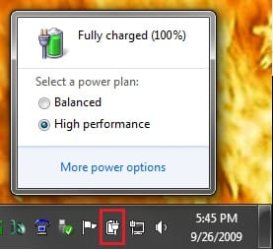
You can left click on the Power icon to select a power plan instead.

Power_Icon.jpg
 
Last edited:

My Computer My Computer

At a glance

64-bit Windows 11 Pro for WorkstationsIntel i7-8700K OC'd to 5 GHz64 GB (4x16GB) G.SKILL TridentZ RGB DDR4 3600...ASUS ROG-STRIX-GTX1080TI-O11G-GAMING
Computer type
PC/Desktop
Computer Manufacturer/Model Number
Self built custom
OS
64-bit Windows 11 Pro for Workstations
CPU
Intel i7-8700K OC'd to 5 GHz
Motherboard
ASUS ROG Maximus XI Formula Z390
Memory
64 GB (4x16GB) G.SKILL TridentZ RGB DDR4 3600 MHz
Graphics Card(s)
ASUS ROG-STRIX-GTX1080TI-O11G-GAMING
Sound Card
Integrated
Monitor(s) Displays
2 x Samsung Odyssey G7 27"
Screen Resolution
2560x1440
Hard Drives
1TB Samsung 990 PRO M.2,
4TB Samsung 990 PRO PRO M.2,
TerraMaster F8 SSD Plus NAS
PSU
Seasonic Prime Titanium 850W
Case
Thermaltake Core P3
Cooling
Corsair Hydro H115i
Keyboard
Logitech wireless K800
Mouse
Logitech MX Master 4
Internet Speed
2 Gb/s Download and 100 Mb/s Upload
Antivirus
Malwarebyte Anti-Malware Premium
Browser
Google Chrome
Other Info
Logitech Z625 speaker system,
Logitech BRIO 4K Pro webcam,
HP Color LaserJet Pro MFP M477fdn,
APC SMART-UPS RT 1000 XL - SURT1000XLI,
Galaxy S23 Plus phone
right, I left click on the power icon, and in the 32bit it would show the two I used most, the 1 minute and 10 minute monitor. On 64 bit when I click it, it will show... 1 minute monitor and powersave, or 10 minute and powersave. I want that to show 1 minute and 10 minute monitor profiles without powersave. Powersave will not leave the quick list. I do not want to make a shortcut on the task bar as it will take up space on it I need for other things. Is it possible to registry hack the annoyingly stuck powersave out of the quick list?
 

My Computer My Computer

At a glance

win7 home premium 64bit
Computer Manufacturer/Model Number
Acer 5720z laptop
OS
win7 home premium 64bit
Tannim,

You can change the two power plans settings that you have displayed when you left click on the Power icon to what you want them to be set as. This way you can just select between them from the Power icon. All power plans have the same available settings, so it's just a matter of setting how you want it in that power plan.

If this is not what you mean, then please post a screenshot like the one I have above for your power icon so I can see what you have instead. :)
 

My Computer My Computer

At a glance

64-bit Windows 11 Pro for WorkstationsIntel i7-8700K OC'd to 5 GHz64 GB (4x16GB) G.SKILL TridentZ RGB DDR4 3600...ASUS ROG-STRIX-GTX1080TI-O11G-GAMING
Computer type
PC/Desktop
Computer Manufacturer/Model Number
Self built custom
OS
64-bit Windows 11 Pro for Workstations
CPU
Intel i7-8700K OC'd to 5 GHz
Motherboard
ASUS ROG Maximus XI Formula Z390
Memory
64 GB (4x16GB) G.SKILL TridentZ RGB DDR4 3600 MHz
Graphics Card(s)
ASUS ROG-STRIX-GTX1080TI-O11G-GAMING
Sound Card
Integrated
Monitor(s) Displays
2 x Samsung Odyssey G7 27"
Screen Resolution
2560x1440
Hard Drives
1TB Samsung 990 PRO M.2,
4TB Samsung 990 PRO PRO M.2,
TerraMaster F8 SSD Plus NAS
PSU
Seasonic Prime Titanium 850W
Case
Thermaltake Core P3
Cooling
Corsair Hydro H115i
Keyboard
Logitech wireless K800
Mouse
Logitech MX Master 4
Internet Speed
2 Gb/s Download and 100 Mb/s Upload
Antivirus
Malwarebyte Anti-Malware Premium
Browser
Google Chrome
Other Info
Logitech Z625 speaker system,
Logitech BRIO 4K Pro webcam,
HP Color LaserJet Pro MFP M477fdn,
APC SMART-UPS RT 1000 XL - SURT1000XLI,
Galaxy S23 Plus phone
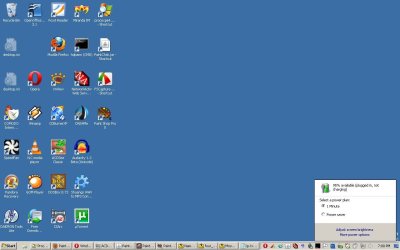
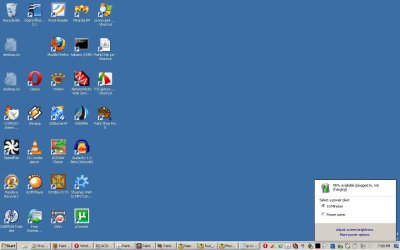
I started with 1 minute selected

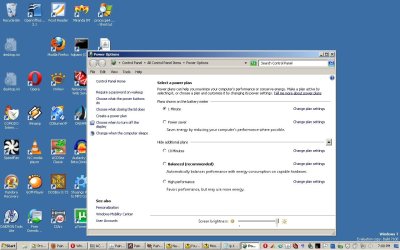
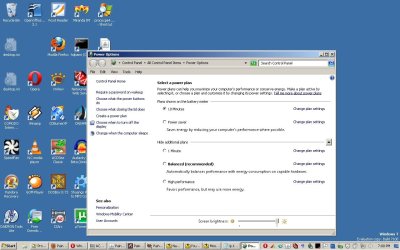
I then clicked more options

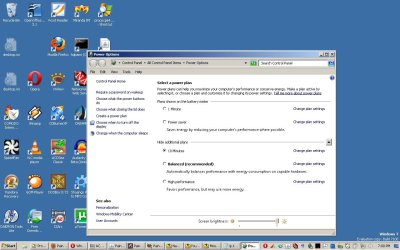
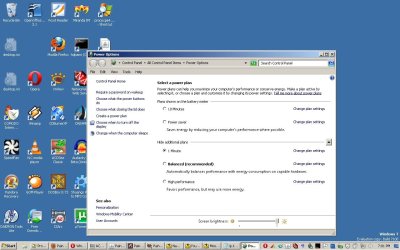
I clicked 10 minutes to select it

I closed the power panel

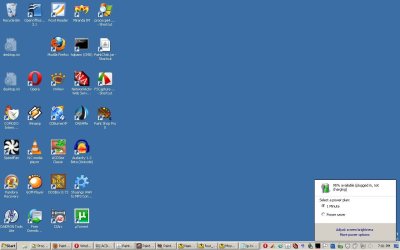
I clicked the power icon again to show 10 minutes and power save

I open power panel again from "more power options" to show the new list order.

I clicked 1 minute again.

Powersave will not leave.

In 32bit windows 7 RC it would have displayed the two I had selected last. I cannot find an "order" option.
 

Attachments

  • 1MinuteIsSelected.jpg
    1MinuteIsSelected.jpg
    65.8 KB · Views: 26
  • AfterclickingMoreOptions.jpg
    AfterclickingMoreOptions.jpg
    108.9 KB · Views: 18
  • Iclicked10Minutes.jpg
    Iclicked10Minutes.jpg
    108.9 KB · Views: 29
  • ClickedTheIconAgain.jpg
    ClickedTheIconAgain.jpg
    65.8 KB · Views: 16
  • TheNewListOrder.jpg
    TheNewListOrder.jpg
    108.5 KB · Views: 23
  • Clicked1minute.jpg
    Clicked1minute.jpg
    108.9 KB · Views: 18
  • PowerSaveWontLeave.jpg
    PowerSaveWontLeave.jpg
    65.7 KB · Views: 12

My Computer My Computer

At a glance

win7 home premium 64bit
Computer Manufacturer/Model Number
Acer 5720z laptop
OS
win7 home premium 64bit
Ah, I see. You're using custom power plans.

You might consider deleting both custom power plans, and making changes that you had for them to the Balanced and one other default power plans instead. This way they will both be listed in the Power icon. The Balanced plan and the current plan is the usual one that displays in the Power icon.
 

My Computer My Computer

At a glance

64-bit Windows 11 Pro for WorkstationsIntel i7-8700K OC'd to 5 GHz64 GB (4x16GB) G.SKILL TridentZ RGB DDR4 3600...ASUS ROG-STRIX-GTX1080TI-O11G-GAMING
Computer type
PC/Desktop
Computer Manufacturer/Model Number
Self built custom
OS
64-bit Windows 11 Pro for Workstations
CPU
Intel i7-8700K OC'd to 5 GHz
Motherboard
ASUS ROG Maximus XI Formula Z390
Memory
64 GB (4x16GB) G.SKILL TridentZ RGB DDR4 3600 MHz
Graphics Card(s)
ASUS ROG-STRIX-GTX1080TI-O11G-GAMING
Sound Card
Integrated
Monitor(s) Displays
2 x Samsung Odyssey G7 27"
Screen Resolution
2560x1440
Hard Drives
1TB Samsung 990 PRO M.2,
4TB Samsung 990 PRO PRO M.2,
TerraMaster F8 SSD Plus NAS
PSU
Seasonic Prime Titanium 850W
Case
Thermaltake Core P3
Cooling
Corsair Hydro H115i
Keyboard
Logitech wireless K800
Mouse
Logitech MX Master 4
Internet Speed
2 Gb/s Download and 100 Mb/s Upload
Antivirus
Malwarebyte Anti-Malware Premium
Browser
Google Chrome
Other Info
Logitech Z625 speaker system,
Logitech BRIO 4K Pro webcam,
HP Color LaserJet Pro MFP M477fdn,
APC SMART-UPS RT 1000 XL - SURT1000XLI,
Galaxy S23 Plus phone
I'm seriously considering just dumping windows 7 64 bit and going to 32bit. 64 bit has some other problems too. But it is really irritating that it doesn't have the same functionality between the two versions. Thanks for trying.
 

My Computer My Computer

At a glance

win7 home premium 64bit
Computer Manufacturer/Model Number
Acer 5720z laptop
OS
win7 home premium 64bit
When you're using custom power plans, it's the same in both the 32-bit and 64-bit though.
 

My Computer My Computer

At a glance

64-bit Windows 11 Pro for WorkstationsIntel i7-8700K OC'd to 5 GHz64 GB (4x16GB) G.SKILL TridentZ RGB DDR4 3600...ASUS ROG-STRIX-GTX1080TI-O11G-GAMING
Computer type
PC/Desktop
Computer Manufacturer/Model Number
Self built custom
OS
64-bit Windows 11 Pro for Workstations
CPU
Intel i7-8700K OC'd to 5 GHz
Motherboard
ASUS ROG Maximus XI Formula Z390
Memory
64 GB (4x16GB) G.SKILL TridentZ RGB DDR4 3600 MHz
Graphics Card(s)
ASUS ROG-STRIX-GTX1080TI-O11G-GAMING
Sound Card
Integrated
Monitor(s) Displays
2 x Samsung Odyssey G7 27"
Screen Resolution
2560x1440
Hard Drives
1TB Samsung 990 PRO M.2,
4TB Samsung 990 PRO PRO M.2,
TerraMaster F8 SSD Plus NAS
PSU
Seasonic Prime Titanium 850W
Case
Thermaltake Core P3
Cooling
Corsair Hydro H115i
Keyboard
Logitech wireless K800
Mouse
Logitech MX Master 4
Internet Speed
2 Gb/s Download and 100 Mb/s Upload
Antivirus
Malwarebyte Anti-Malware Premium
Browser
Google Chrome
Other Info
Logitech Z625 speaker system,
Logitech BRIO 4K Pro webcam,
HP Color LaserJet Pro MFP M477fdn,
APC SMART-UPS RT 1000 XL - SURT1000XLI,
Galaxy S23 Plus phone
It's not the same though. I just used 32bit on this laptop three days ago. It worked as I wanted. With the 64bit version, it doesn't. I assume a microsoft programmer missed checking that setting. the second of the two listed will always be Either balanced, powersave, or high performance on 64 bit. At least for me.
 

My Computer My Computer

At a glance

win7 home premium 64bit
Computer Manufacturer/Model Number
Acer 5720z laptop
OS
win7 home premium 64bit
And that is really a make or break sort of thing???

You can get the same functionality as Brink said by just inputting your desired settings into the power plans that currently appear on the quick list. The only thing that will be different is their names. Although I can see how this could be mildly annoying, doesn't seem like a big deal to me. Certainly not enough of a reason to cause a return to using the x86 version.
 

My Computer My Computer

At a glance

Windows 7 Ultimate x64 (Retail)i7-Q 7206 GBnVidia GeForce GT 230M (1GB)
Computer Manufacturer/Model Number
HP DV8t quad
OS
Windows 7 Ultimate x64 (Retail)
CPU
i7-Q 720
Motherboard
Motherboard Chipset Intel Ibex Peak-M PM55, Intel Lynnfield
Memory
6 GB
Graphics Card(s)
nVidia GeForce GT 230M (1GB)
Sound Card
IDT High Definition Audio CODEC
Monitor(s) Displays
18.4 inch HP Infinity FHD (Samsung 184HT03-001)
Screen Resolution
1920 x 1080
Hard Drives
Hitachi 500GB 7200 rpm (x2)
Seagate FreeAgent 1.5 TB External USB (x2)
Thermaltake BlacX eSATA/USB 2.0 3.5/2.5 HD dock
Cooling
Zalman NC-2000 notebook cooling pad
Keyboard
laptop
Mouse
Logitech VX Revolution
Other Info
Backup Unit: Lenovo T61p
There are other reasons. Lugaru doesn't work correctly on 64bit, a game I play often, there are minor graphical distortion on the startup screen that probably doesn't bode well, I had another few but I can't remember them at the moment.
 

My Computer My Computer

At a glance

win7 home premium 64bit
Computer Manufacturer/Model Number
Acer 5720z laptop
OS
win7 home premium 64bit
Tannim,

Well, I suppose that if you have 4GB or less of RAM installed, then you will not lose much from going back to 32-bit Windows 7 instead. Hopefully they will have a patch for your game that will resolve it's problem in the near future as well.
 

My Computer My Computer

At a glance

64-bit Windows 11 Pro for WorkstationsIntel i7-8700K OC'd to 5 GHz64 GB (4x16GB) G.SKILL TridentZ RGB DDR4 3600...ASUS ROG-STRIX-GTX1080TI-O11G-GAMING
Computer type
PC/Desktop
Computer Manufacturer/Model Number
Self built custom
OS
64-bit Windows 11 Pro for Workstations
CPU
Intel i7-8700K OC'd to 5 GHz
Motherboard
ASUS ROG Maximus XI Formula Z390
Memory
64 GB (4x16GB) G.SKILL TridentZ RGB DDR4 3600 MHz
Graphics Card(s)
ASUS ROG-STRIX-GTX1080TI-O11G-GAMING
Sound Card
Integrated
Monitor(s) Displays
2 x Samsung Odyssey G7 27"
Screen Resolution
2560x1440
Hard Drives
1TB Samsung 990 PRO M.2,
4TB Samsung 990 PRO PRO M.2,
TerraMaster F8 SSD Plus NAS
PSU
Seasonic Prime Titanium 850W
Case
Thermaltake Core P3
Cooling
Corsair Hydro H115i
Keyboard
Logitech wireless K800
Mouse
Logitech MX Master 4
Internet Speed
2 Gb/s Download and 100 Mb/s Upload
Antivirus
Malwarebyte Anti-Malware Premium
Browser
Google Chrome
Other Info
Logitech Z625 speaker system,
Logitech BRIO 4K Pro webcam,
HP Color LaserJet Pro MFP M477fdn,
APC SMART-UPS RT 1000 XL - SURT1000XLI,
Galaxy S23 Plus phone
Back
Top