
Solved Power Outage while working with partitions

Zisc0r

New member
Local time
4:42 PM
Messages
4
Hi!

While using MiniTool Partition Wizard 9.0 to resize and allocate spaces between two partitions(let's call them A and B), a power outage happened, resulting in my PC shutting down.

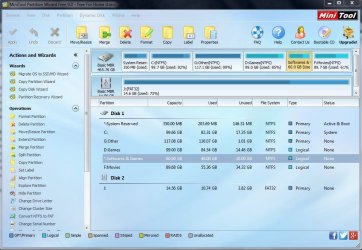
What I did was first reduce the size of A and then added the Unallocated space to B and clicked on 'Apply'. A few seconds into the process is when the power went out. When I opened the PC back up after the power came, A(the one I took away space from) was not showing up in My Computer. However, on MiniTool, partition A is showing, but it has an asterisk(*) before it, just like the 'System Reserved' partition does. However, there isn't an Unallocated partition showing. One more thing is that A shows an unusually perfect size of Used and Unused(60 GB and 40 GB respectively).

My questions are, is my partition A the same size as before, because it clearly has more space unused in it than what it should show. If the unallocated space is missing, how can I recover it back? Also, how can I get A to show up on My Computer?

I've attached this photo to show you exactly what shows up on the computer screen.
 

Attachments
  • -_-.JPG
    -_-.JPG
    108.7 KB · Views: 5

My Computer

Computer type
PC/Desktop
OS
Windows 7 Ultimate 32bit
It is clearly an NTFS file system but with out a drive letter. Have you tried changing that partitions drive letter from the option in the left column?
 

My Computer

Computer type
PC/Desktop
Computer Manufacturer/Model Number
Custom Built By Me.
OS
Windows 10 Pro 64 bit
CPU
AMD FX 9590 8 Core Black Edition
Motherboard
MSI 990FXA GAMING (MS-7893)
Memory
Corsair Vengeance 16GB DDR3
Graphics Card(s)
AMD Radeon (TM) R9 380 Gaming Series
Sound Card
AMD High Definition
Monitor(s) Displays
Samsung 32" 60Hz 4ms Curved PLS LED
Screen Resolution
1920 X 1080
Hard Drives
C: 223 GB SSD = E: 465 GB HDD = F: 931 GB HDD = G: 149 GB HDD = H: 931 GB HDD
PSU
EVGA Supernova NEX750B 750W ATX EPS12V 80PLUS Bronze
Case
Cool Master
Cooling
Noctua NH-D15 Premium Cooler with 2x NF-A15 PWM 140mm Fan
Internet Speed
Fiber Optic: Download 332.7 Mbps / Upload 331.5 Mbps
Antivirus
Windows Defender
Browser
Slimjet (64bit)

My Computer

Computer type
PC/Desktop
Computer Manufacturer/Model Number
Custom Build
OS
Windows 7 Home Premium 32-Bit - Build 7600 SP1
CPU
Intel Core i3-2120 3.30Ghz
Motherboard
Asus P8Z68-V LX Intel Z68 Socket H2 ATX
Memory
Kingston 4 GB DDR3 1333 mhz
Graphics Card(s)
AMD Radeon HD6670
Sound Card
Sound Blaster Audigy SE 24-Bit
Monitor(s) Displays
Asus VE228
Screen Resolution
1440 X 900
Hard Drives
OCZ Vertex 3 120 GB Sata 3 SSD ==
Kingston SH103/S3 120 G Hyper X 120 GB SSD ==
Western Digital 500 GB Caviar Green 7200 RPM ==
PSU
Corsair CX600M == 600 Watt
Case
NZXT Apollo - Silver with Clear Side Panel
Cooling
Three 120 mm Fans
Keyboard
Microsoft Natural 4000
Mouse
Microsoft Custom Optical 3000
Internet Speed
AT&T Fiber Optic Wireless Network
Antivirus
Microsoft Security Essentials
Browser
Chrome
Other Info
120 mm Blue LED Fan -- Three Blue LED Lazer Light Sticks
Before the power went out, that partition had a letter. I'll definitely give it a letter, and try out the process again. Thanks to both of you!

Also, @bigmck, I just felt giving out a lot of info on the two drives wold make it easy to spot them out from the picture, but I'll tell you now. Drive A is 'Softwares and Games' and Drive B is 'Other'.

EDIT: Well, I gave 'Softwares and Games' a letter and that seemed to make it appear again. After that, I just resized and extended between the two partitions and it worked. Though I'm not sure all the space I took out of it is still there. Question: Do most 500GB HDDs(old ones atleast) have about 460GB actually usable?
 
Last edited:

My Computer

Computer type
PC/Desktop
OS
Windows 7 Ultimate 32bit
Before the power went out, that partition had a letter. I'll definitely give it a letter, and try out the process again. Thanks to both of you!

Also, @bigmck, I just felt giving out a lot of info on the two drives wold make it easy to spot them out from the picture, but I'll tell you now. Drive A is 'Softwares and Games' and Drive B is 'Other'.

EDIT: Well, I gave 'Softwares and Games' a letter and that seemed to make it appear again. After that, I just resized and extended between the two partitions and it worked. Though I'm not sure all the space I took out of it is still there. Question: Do most 500GB HDDs(old ones atleast) have about 460GB actually usable?

Yes, a 500 GB HDD will never hold 500 GB. It will usually be about 460 GB. Why you may ask? A GB is 1024 MB, not 1000 MB as is assumed. Divide 500 GB by 1024 MB and you will see about what it holds. Even after the math it may not be exactly, but you get the idea.
 

My Computer

Computer type
PC/Desktop
Computer Manufacturer/Model Number
Custom Build
OS
Windows 7 Home Premium 32-Bit - Build 7600 SP1
CPU
Intel Core i3-2120 3.30Ghz
Motherboard
Asus P8Z68-V LX Intel Z68 Socket H2 ATX
Memory
Kingston 4 GB DDR3 1333 mhz
Graphics Card(s)
AMD Radeon HD6670
Sound Card
Sound Blaster Audigy SE 24-Bit
Monitor(s) Displays
Asus VE228
Screen Resolution
1440 X 900
Hard Drives
OCZ Vertex 3 120 GB Sata 3 SSD ==
Kingston SH103/S3 120 G Hyper X 120 GB SSD ==
Western Digital 500 GB Caviar Green 7200 RPM ==
PSU
Corsair CX600M == 600 Watt
Case
NZXT Apollo - Silver with Clear Side Panel
Cooling
Three 120 mm Fans
Keyboard
Microsoft Natural 4000
Mouse
Microsoft Custom Optical 3000
Internet Speed
AT&T Fiber Optic Wireless Network
Antivirus
Microsoft Security Essentials
Browser
Chrome
Other Info
120 mm Blue LED Fan -- Three Blue LED Lazer Light Sticks
Hey!

Actually it would be exact, but you have to calculate from Bytes and up :) https://en.wikipedia.org/wiki/Gibibyte

465.6612873077393 = 500 x 1000/1024(MB) x 1000/1024(KB) x 1000/1024(B)
 

My Computer

Computer type
PC/Desktop
Computer Manufacturer/Model Number
Custom Build
OS
Windows 7 Ultimate x64 SP1
CPU
AMD Phenom 2 1090T
Motherboard
Gigabyte GA-890FXA-UD5
Memory
2x8GB Kingston HyperX Fury Black 1600Mhz Unganged
Graphics Card(s)
MSI GTX 970 Gaming 4G
Sound Card
Realtek On-Board HD 7.1 Audio / Logitech G35
Monitor(s) Displays
3xAcer GD245HQ
Screen Resolution
1920x1080
Hard Drives
Samsung 850 Pro 512GB SSD - OS /
WD Caviar Black SATA 3 - 1 TBx2 - Dynamic RAID 0 /
WD Caviar Green SATA 2 - 640GBx2 - Dynamic RAID 0 /
WD Caviar Green SATA 2 - 640GB - Internal Backup /
Seagate Barracude SATA 3 - 3TB - External Backup/ Sync
PSU
HighPower 1000W
Case
Cooler Master HAF 932
Cooling
Noctua NH-D14
Keyboard
Logitech G19
Mouse
Logitech G500
Internet Speed
100/4 Mbit Cable (100GB quota)
Antivirus
ZoneAlarm Extreme Security / MBAM Pro / MBAE Free / SAS Free
Browser
IE 11 - Firefox - Chrome
Other Info
Logitech F710/ G27/ G940/ Z5500 // TrackIR 5 // Nvidia 3D Surround Vision
Back
Top