Powered up: no signal to monitor + clicking noise after driver install

PhilM1

New member
Local time
7:55 AM
Messages
7
Location
Biggleswade
Hi all,

Please forgive me for introducing myself with a request for help but this problem is quite urgent and i cant find a solution myself.

I bought my PC from ebay - its a refurb. Windows 7 Ultimate x64 with an ATI radeon x550 graphics card and a Gigabyte GA-8I915PMD motherboard.

My first problem came after installing the driver for the graphics card - upon rebooting to finish the install windows wouldn't fully boot up and hung on the welcome screen. I came on here and did some searching and found this to be a common problem because the ati driver had to be version 9.3 and there would be no further support. Even with correct version of the driver i had the same problem, and also when i change the driver to vista compatibility mode.

In the end i resolved to simply disable the driver and go on without as the picture wasn't so bad and i could still watch video's online (which surprised me).

To come to my problem - i updated windows 7 to the latest service pack and installed a load of other updates from the update manager and its been working fine for a few weeks but then i decide to try the driver again and now when my computer loads up, i get no picture to the monitor at all, and there is a clicking noise that sounds like its coming from the video card. Whats more is that the vga that goes into the motherboard is a 9 pin female end it seems so i cant even plug a wire into that as i don't have one.

So far I've tried taking the RAM out and giving it a wipe - to no avail.

Any suggestions would be greatly appreciated.

Thanks

Phil
 

My Computer My Computer

At a glance

Windows 7 x64 Ultimate3.06 Ghz Intel Pentium 42GB DDR2Radeon x500
Computer type
PC/Desktop
Computer Manufacturer/Model Number
Custom Build
OS
Windows 7 x64 Ultimate
CPU
3.06 Ghz Intel Pentium 4
Motherboard
Gigabyte
Memory
2GB DDR2
Graphics Card(s)
Radeon x500
Hard Drives
80Gb
PSU
FSP250-60HEN
Case
Packard Bell
Hiyya Phil mate sounds like that card is not much chop mate and to be honest you are running not really enough RAM 4GB would be a far better amount and it is DDR2 which in my own experiences is a bit slower than the DDR3 stuff which of course you cannot fit in your machine.

Mate run a memtest http://www.sevenforums.com/tutorials/105647-ram-test-memtest86.html you will need to let it run for at least 8 passes unless you get errors straight away.

Another tool http://www.sevenforums.com/tutorials/92394-sf-diagnostic-tool-using-troubleshooting.html
and
http://www.sevenforums.com/tutorials/219533-troubleshooting-windows-7-failure-boot.html

But personally I would look at getting the extra RAM in any case.
 

My Computer My Computer

At a glance

Desk1 7 Home Prem / Desk2 10 Pro / Main lap A...Desk1 i5 3750K / Laptop i7 GTX 860M / Desk2 i...Desk1 8GB (1866) / Desk2 16GB (1333) / Laptop...Desk 1& 2NVidia GTX 650 & Laptops on board Intel
Computer type
PC/Desktop
Computer Manufacturer/Model Number
Own build (new) Desk1 / Asus ROG Win 7 / Desk2 1st build
OS
Desk1 7 Home Prem / Desk2 10 Pro / Main lap Asus ROG 10 Pro 2 laptop Toshiba 7 Pro Asus P2520 7 & 10
CPU
Desk1 i5 3750K / Laptop i7 GTX 860M / Desk2 i5 2500
Motherboard
Desk1 Asus P877-V / Desk2 Gigabyte H67 UD3H / Laptop ?
Memory
Desk1 8GB (1866) / Desk2 16GB (1333) / Laptop 8Gb DDR3
Graphics Card(s)
Desk 1& 2NVidia GTX 650 & Laptops on board Intel
Sound Card
Desk 1 & 2 -XONAR DG Realtek High Def audio Laptop
Monitor(s) Displays
Desk 1 Benq HD 2450 / Desk2 Philips 24" / Laptop 17.5"
Screen Resolution
1920x1080 D1 & D2 & Laptop 1
Hard Drives
Desk1 Samsung 120GB 830 SSD
Asus ROG 256GB 850 Pro SSD
Desk2 Samsung 840 256 SSD
Toshiba 120GB EVO
PSU
Desk 1 Corsair HX 1050/ Laptop ? / Desk 2 Corsair HX 650
Case
Desk 1 Cooler HAF XM ? Toshiba laptop / Desk2 Coolermaster
Cooling
Fans on all Desk1 -2 Desk2 - all Coolermasters 5 Laptop ?
Keyboard
Desk 1 MS Sidewinder X6 Desk 2 MS Sidewinder X 4
Mouse
Desk 1&2 - Gigabyte MS 900 gamer - laptop - Logitec wireless
Internet Speed
ADSL2+
Other Info
One other Desktop (tester) and spare Toshba laptop both with SSD's
Running Kaspersky 2016 ISS on all machines config'd identically
Logitec audio stereo systems on each machine (x3)
Canon MG5250MFC
Router/modem TP-Link running WPA2SK
Hi ICit,

Thanks for the tips on RAM and for the tutorials but I cant actully get onto the computer at all. It powers up but I get nothing just a black screen.

The ticking noise is almost like a clocks ticking.

What ive tried so far:

Pulled out the hard drive to see if will boot to bios - didnt work and the machine was still ticking.

Pulled out the graphics card - machine still ticking.

Unplugged the fan on from motherboard - still ticking

Checked PSU fan is spinning - which it is.

Took out the CMOS battery left it over a minute put it back in - still ticking.

I actually think my CPU has gone but im no expert.
 

My Computer My Computer

At a glance

Windows 7 x64 Ultimate3.06 Ghz Intel Pentium 42GB DDR2Radeon x500
Computer type
PC/Desktop
Computer Manufacturer/Model Number
Custom Build
OS
Windows 7 x64 Ultimate
CPU
3.06 Ghz Intel Pentium 4
Motherboard
Gigabyte
Memory
2GB DDR2
Graphics Card(s)
Radeon x500
Hard Drives
80Gb
PSU
FSP250-60HEN
Case
Packard Bell

My Computer My Computer

At a glance

Desk1 7 Home Prem / Desk2 10 Pro / Main lap A...Desk1 i5 3750K / Laptop i7 GTX 860M / Desk2 i...Desk1 8GB (1866) / Desk2 16GB (1333) / Laptop...Desk 1& 2NVidia GTX 650 & Laptops on board Intel
Computer type
PC/Desktop
Computer Manufacturer/Model Number
Own build (new) Desk1 / Asus ROG Win 7 / Desk2 1st build
OS
Desk1 7 Home Prem / Desk2 10 Pro / Main lap Asus ROG 10 Pro 2 laptop Toshiba 7 Pro Asus P2520 7 & 10
CPU
Desk1 i5 3750K / Laptop i7 GTX 860M / Desk2 i5 2500
Motherboard
Desk1 Asus P877-V / Desk2 Gigabyte H67 UD3H / Laptop ?
Memory
Desk1 8GB (1866) / Desk2 16GB (1333) / Laptop 8Gb DDR3
Graphics Card(s)
Desk 1& 2NVidia GTX 650 & Laptops on board Intel
Sound Card
Desk 1 & 2 -XONAR DG Realtek High Def audio Laptop
Monitor(s) Displays
Desk 1 Benq HD 2450 / Desk2 Philips 24" / Laptop 17.5"
Screen Resolution
1920x1080 D1 & D2 & Laptop 1
Hard Drives
Desk1 Samsung 120GB 830 SSD
Asus ROG 256GB 850 Pro SSD
Desk2 Samsung 840 256 SSD
Toshiba 120GB EVO
PSU
Desk 1 Corsair HX 1050/ Laptop ? / Desk 2 Corsair HX 650
Case
Desk 1 Cooler HAF XM ? Toshiba laptop / Desk2 Coolermaster
Cooling
Fans on all Desk1 -2 Desk2 - all Coolermasters 5 Laptop ?
Keyboard
Desk 1 MS Sidewinder X6 Desk 2 MS Sidewinder X 4
Mouse
Desk 1&2 - Gigabyte MS 900 gamer - laptop - Logitec wireless
Internet Speed
ADSL2+
Other Info
One other Desktop (tester) and spare Toshba laptop both with SSD's
Running Kaspersky 2016 ISS on all machines config'd identically
Logitec audio stereo systems on each machine (x3)
Canon MG5250MFC
Router/modem TP-Link running WPA2SK
After reading the post about jump starting I really dont fancy trying that.

I'm pretty sure the PSU is in good working order as the computer comes on and both the fan in the PSU and on motherboard are spinning as normal.
 

My Computer My Computer

At a glance

Windows 7 x64 Ultimate3.06 Ghz Intel Pentium 42GB DDR2Radeon x500
Computer type
PC/Desktop
Computer Manufacturer/Model Number
Custom Build
OS
Windows 7 x64 Ultimate
CPU
3.06 Ghz Intel Pentium 4
Motherboard
Gigabyte
Memory
2GB DDR2
Graphics Card(s)
Radeon x500
Hard Drives
80Gb
PSU
FSP250-60HEN
Case
Packard Bell
Have you checked the CD/DVD drive(s)? I had one go bad and it made a clicking noise, too.
 

My Computer My Computer

At a glance

Windows 7 Ultimate 32bit SP1Intel(R) Core(TM)2 Quad CPU @ 2.40GHz, 2400 MHz4 GBATI Radeon HD 2600 Pro
Computer type
PC/Desktop
Computer Manufacturer/Model Number
Bruce ... somewhere in his 40's
OS
Windows 7 Ultimate 32bit SP1
CPU
Intel(R) Core(TM)2 Quad CPU @ 2.40GHz, 2400 MHz
Motherboard
INTEL/D975XBX2
Memory
4 GB
Graphics Card(s)
ATI Radeon HD 2600 Pro
Monitor(s) Displays
Samsung SyncMaster 914v
Screen Resolution
1280 x 1024
Hard Drives
2/500GB each ... ST3500630AS ATA Device.
One is not connected
PSU
Rocketfish 700 W
Case
G.Skill Gigabyte Chassis
Keyboard
Standard PS/2 Keyboard
Mouse
Microsoft PS/2 Mouse
Internet Speed
DSL
Antivirus
Avira Internet Security
Browser
IE 11
Other Info
ATI HDMI Audio
After reading the post about jump starting I really dont fancy trying that.

I'm pretty sure the PSU is in good working order as the computer comes on and both the fan in the PSU and on motherboard are spinning as normal.
Hmm Phil it quite safe the problem lies with opening the PSU up left intact there is nothing that can do any harm to you or anyone apart from pouring water into it or jamming screwdrivers inside all of which you will agree are just about what a moron would do.
I have done this many times and with a multimeter you can quickly check the volt s the current is far harder to determine as you would need to insert an ammeter in line.

But I think Jacee has a very valid point one which I didn't think of to be honest plus I am wondering maybe the hard drive is ticking too. I cannot remember if you said that the ticking was still there with the hard drive out? Just as thought is the CPU fan spinning real fats or is it ticking and is it the stock cooler too mate.

PS see this http://www.tomshardware.com/forum/384914-31-computer-making-clicking-sound and post back the specs on the PSU mate it may not be able to keep that card running.
 

My Computer My Computer

At a glance

Desk1 7 Home Prem / Desk2 10 Pro / Main lap A...Desk1 i5 3750K / Laptop i7 GTX 860M / Desk2 i...Desk1 8GB (1866) / Desk2 16GB (1333) / Laptop...Desk 1& 2NVidia GTX 650 & Laptops on board Intel
Computer type
PC/Desktop
Computer Manufacturer/Model Number
Own build (new) Desk1 / Asus ROG Win 7 / Desk2 1st build
OS
Desk1 7 Home Prem / Desk2 10 Pro / Main lap Asus ROG 10 Pro 2 laptop Toshiba 7 Pro Asus P2520 7 & 10
CPU
Desk1 i5 3750K / Laptop i7 GTX 860M / Desk2 i5 2500
Motherboard
Desk1 Asus P877-V / Desk2 Gigabyte H67 UD3H / Laptop ?
Memory
Desk1 8GB (1866) / Desk2 16GB (1333) / Laptop 8Gb DDR3
Graphics Card(s)
Desk 1& 2NVidia GTX 650 & Laptops on board Intel
Sound Card
Desk 1 & 2 -XONAR DG Realtek High Def audio Laptop
Monitor(s) Displays
Desk 1 Benq HD 2450 / Desk2 Philips 24" / Laptop 17.5"
Screen Resolution
1920x1080 D1 & D2 & Laptop 1
Hard Drives
Desk1 Samsung 120GB 830 SSD
Asus ROG 256GB 850 Pro SSD
Desk2 Samsung 840 256 SSD
Toshiba 120GB EVO
PSU
Desk 1 Corsair HX 1050/ Laptop ? / Desk 2 Corsair HX 650
Case
Desk 1 Cooler HAF XM ? Toshiba laptop / Desk2 Coolermaster
Cooling
Fans on all Desk1 -2 Desk2 - all Coolermasters 5 Laptop ?
Keyboard
Desk 1 MS Sidewinder X6 Desk 2 MS Sidewinder X 4
Mouse
Desk 1&2 - Gigabyte MS 900 gamer - laptop - Logitec wireless
Internet Speed
ADSL2+
Other Info
One other Desktop (tester) and spare Toshba laptop both with SSD's
Running Kaspersky 2016 ISS on all machines config'd identically
Logitec audio stereo systems on each machine (x3)
Canon MG5250MFC
Router/modem TP-Link running WPA2SK
I can only take a look at my PC tommorrow so I will check the dvd drive as I havent done that yet. But would a problem with the DVD prevent me getting a picture?

I may look into the PSU test tommorrow aswell if I have time so thanks for the tips.

I feel stupid for not saying in the first place but the heat sink on CPU is actually hanging off ( it was before my current problem), the CPU has thermal paste on it and has been ok up to now. I dont play any games on or run anything heavy software wise. I was always under the impression that the computer switches itself off before it can overheat but maybe im wrong and have actually blown it.

If it is blown would it make a ticking sound?

Sorry to throw this is now but thanks for the replies thus far.
 

My Computer My Computer

At a glance

Windows 7 x64 Ultimate3.06 Ghz Intel Pentium 42GB DDR2Radeon x500
Computer type
PC/Desktop
Computer Manufacturer/Model Number
Custom Build
OS
Windows 7 x64 Ultimate
CPU
3.06 Ghz Intel Pentium 4
Motherboard
Gigabyte
Memory
2GB DDR2
Graphics Card(s)
Radeon x500
Hard Drives
80Gb
PSU
FSP250-60HEN
Case
Packard Bell
I can only take a look at my PC tommorrow so I will check the dvd drive as I havent done that yet. But would a problem with the DVD prevent me getting a picture?

I may look into the PSU test tommorrow aswell if I have time so thanks for the tips.

I feel stupid for not saying in the first place but the heat sink on CPU is actually hanging off ( it was before my current problem), the CPU has thermal paste on it and has been ok up to now. I dont play any games on or run anything heavy software wise. I was always under the impression that the computer switches itself off before it can overheat but maybe im wrong and have actually blown it.

If it is blown would it make a ticking sound?

Sorry to throw this is now but thanks for the replies thus far.

I would recommend removing/disconnecting the PSU and turning it on manually to see if you still hear the tick, which I imagine you will, and if so it's a failed PSU. But you saying that the CPU was without a heatsink, even if it was only three seconds, will usually destroy the CPU. It can go from 70F to 200F in a matter of seconds.
 

My Computer My Computer

At a glance

Windows 7 Home Premium 64bitIntel Core i5-2430M (Quad thread/dual core @ ...Kingston 6GB (4GB+2GB) DDR3 1333MHznVidia GeForce GT 540M 1GB DDR3
Computer type
Laptop
Computer Manufacturer/Model Number
Acer Aspire 5830TG-6614
OS
Windows 7 Home Premium 64bit
CPU
Intel Core i5-2430M (Quad thread/dual core @ 2.4-3GHz)
Memory
Kingston 6GB (4GB+2GB) DDR3 1333MHz
Graphics Card(s)
nVidia GeForce GT 540M 1GB DDR3
Screen Resolution
1366x768
Hard Drives
Toshiba 640GB 5400RPM 8MB Buffer
Antivirus
Avast Free
Browser
Chrome
Yes mate the heatsink hanging would have maybe let the thermal compound from the die to it leak out or worse still lose any contact with at all so no cooling. I don't know it that particular core would have a thermal cut out so to prevent the thing from frying but it is a definite possibility as my own i5 3570K has likely been cooked by the cooler failing so being an older core????

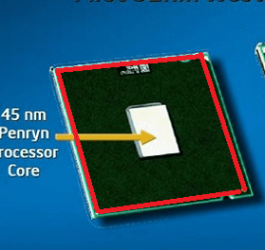
I might suggest that you if you can take out the CPU and gently lift the lid off and take a look at what is inside it will look something lie in the pic you can add some thermal compound to the die in the centre and then if you can stick the heatsink lid back down (roughly will fit where I put the red line and then a small edge) - nothing to lose at this stage.
 

Attachments

  • DIE.PNG
    DIE.PNG
    31.2 KB · Views: 10

My Computer My Computer

At a glance

Desk1 7 Home Prem / Desk2 10 Pro / Main lap A...Desk1 i5 3750K / Laptop i7 GTX 860M / Desk2 i...Desk1 8GB (1866) / Desk2 16GB (1333) / Laptop...Desk 1& 2NVidia GTX 650 & Laptops on board Intel
Computer type
PC/Desktop
Computer Manufacturer/Model Number
Own build (new) Desk1 / Asus ROG Win 7 / Desk2 1st build
OS
Desk1 7 Home Prem / Desk2 10 Pro / Main lap Asus ROG 10 Pro 2 laptop Toshiba 7 Pro Asus P2520 7 & 10
CPU
Desk1 i5 3750K / Laptop i7 GTX 860M / Desk2 i5 2500
Motherboard
Desk1 Asus P877-V / Desk2 Gigabyte H67 UD3H / Laptop ?
Memory
Desk1 8GB (1866) / Desk2 16GB (1333) / Laptop 8Gb DDR3
Graphics Card(s)
Desk 1& 2NVidia GTX 650 & Laptops on board Intel
Sound Card
Desk 1 & 2 -XONAR DG Realtek High Def audio Laptop
Monitor(s) Displays
Desk 1 Benq HD 2450 / Desk2 Philips 24" / Laptop 17.5"
Screen Resolution
1920x1080 D1 & D2 & Laptop 1
Hard Drives
Desk1 Samsung 120GB 830 SSD
Asus ROG 256GB 850 Pro SSD
Desk2 Samsung 840 256 SSD
Toshiba 120GB EVO
PSU
Desk 1 Corsair HX 1050/ Laptop ? / Desk 2 Corsair HX 650
Case
Desk 1 Cooler HAF XM ? Toshiba laptop / Desk2 Coolermaster
Cooling
Fans on all Desk1 -2 Desk2 - all Coolermasters 5 Laptop ?
Keyboard
Desk 1 MS Sidewinder X6 Desk 2 MS Sidewinder X 4
Mouse
Desk 1&2 - Gigabyte MS 900 gamer - laptop - Logitec wireless
Internet Speed
ADSL2+
Other Info
One other Desktop (tester) and spare Toshba laptop both with SSD's
Running Kaspersky 2016 ISS on all machines config'd identically
Logitec audio stereo systems on each machine (x3)
Canon MG5250MFC
Router/modem TP-Link running WPA2SK
Ok ive had a look and listen just now. Its definitley not the PSU. The sound is somewhere on the motherboard.

....i think its probably gone beyond my ability to fix so I may take it to a shop. If I do i'll report back what the problem was and the resolution.
 

My Computer My Computer

At a glance

Windows 7 x64 Ultimate3.06 Ghz Intel Pentium 42GB DDR2Radeon x500
Computer type
PC/Desktop
Computer Manufacturer/Model Number
Custom Build
OS
Windows 7 x64 Ultimate
CPU
3.06 Ghz Intel Pentium 4
Motherboard
Gigabyte
Memory
2GB DDR2
Graphics Card(s)
Radeon x500
Hard Drives
80Gb
PSU
FSP250-60HEN
Case
Packard Bell
Yes mate the heatsink hanging would have maybe let the thermal compound from the die to it leak out or worse still lose any contact with at all so no cooling. I don't know it that particular core would have a thermal cut out so to prevent the thing from frying but it is a definite possibility as my own i5 3570K has likely been cooked by the cooler failing so being an older core????

I might suggest that you if you can take out the CPU and gently lift the lid off and take a look at what is inside it will look something lie in the pic you can add some thermal compound to the die in the centre and then if you can stick the heatsink lid back down (roughly will fit where I put the red line and then a small edge) - nothing to lose at this stage.

I STRONGLY discourage doing this. What you are recommending will destroy the CPU. Yes inspect the heatsink for good contact, even remove the heatsink and reapply the thermal paste, but never remove the heat spreader on top of the CPU. That is an act only insane overclockers do and nine times out of ten they end up literally ripping the CPU open thus destroying it. Another thing to note is if your CPU had a metallic thermal paste on it and it managed to melt down off of the CPU on to something else, it most likely would short it out. So that is something to look for.
 

My Computer My Computer

At a glance

Windows 7 Home Premium 64bitIntel Core i5-2430M (Quad thread/dual core @ ...Kingston 6GB (4GB+2GB) DDR3 1333MHznVidia GeForce GT 540M 1GB DDR3
Computer type
Laptop
Computer Manufacturer/Model Number
Acer Aspire 5830TG-6614
OS
Windows 7 Home Premium 64bit
CPU
Intel Core i5-2430M (Quad thread/dual core @ 2.4-3GHz)
Memory
Kingston 6GB (4GB+2GB) DDR3 1333MHz
Graphics Card(s)
nVidia GeForce GT 540M 1GB DDR3
Screen Resolution
1366x768
Hard Drives
Toshiba 640GB 5400RPM 8MB Buffer
Antivirus
Avast Free
Browser
Chrome
Two things I'm not certain about after re-reading through this thread...
1. "Whats more is that the vga that goes into the motherboard is a 9 pin female end it seems so i cant even plug a wire into that as i don't have one."
Are you saying you can't plug in the power cord to the video card or that you can't plug your monitor into the video card?
2. "I feel stupid for not saying in the first place but the heat sink on CPU is actually hanging off ( it was before my current problem), the CPU has thermal paste on it and has been ok up to now."
Are you saying you used this computer while knowing no CPU heatsink was installed, or that it just fell off once and you put it back on?
 

My Computer My Computer

At a glance

Windows 7 Home Premium 64bitIntel Core i5-2430M (Quad thread/dual core @ ...Kingston 6GB (4GB+2GB) DDR3 1333MHznVidia GeForce GT 540M 1GB DDR3
Computer type
Laptop
Computer Manufacturer/Model Number
Acer Aspire 5830TG-6614
OS
Windows 7 Home Premium 64bit
CPU
Intel Core i5-2430M (Quad thread/dual core @ 2.4-3GHz)
Memory
Kingston 6GB (4GB+2GB) DDR3 1333MHz
Graphics Card(s)
nVidia GeForce GT 540M 1GB DDR3
Screen Resolution
1366x768
Hard Drives
Toshiba 640GB 5400RPM 8MB Buffer
Antivirus
Avast Free
Browser
Chrome
Two things I'm not certain about after re-reading through this thread...
1. "Whats more is that the vga that goes into the motherboard is a 9 pin female end it seems so i cant even plug a wire into that as i don't have one."
Are you saying you can't plug in the power cord to the video card or that you can't plug your monitor into the video card?
2. "I feel stupid for not saying in the first place but the heat sink on CPU is actually hanging off ( it was before my current problem), the CPU has thermal paste on it and has been ok up to now."
Are you saying you used this computer while knowing no CPU heatsink was installed, or that it just fell off once and you put it back on?

1: Originally I thought I couldnt get a signal from the computer to monitor because my graphics had been damaged. So I wanted to try the onboard graphics from the motherboard, but the vga socket on the motherboard is 9 pin male. So I need a female wire, which I dont have.

2: Yes I used this computer for a few weeks knowing the heatsink was actually hanging off.
 

My Computer My Computer

At a glance

Windows 7 x64 Ultimate3.06 Ghz Intel Pentium 42GB DDR2Radeon x500
Computer type
PC/Desktop
Computer Manufacturer/Model Number
Custom Build
OS
Windows 7 x64 Ultimate
CPU
3.06 Ghz Intel Pentium 4
Motherboard
Gigabyte
Memory
2GB DDR2
Graphics Card(s)
Radeon x500
Hard Drives
80Gb
PSU
FSP250-60HEN
Case
Packard Bell
Phil did you try what I suggested at post#10 mate as you have nothing to lose . The VGA issue you could have sorted with an adaptor perhaps.
There is a similar shaped and configured socket on some older boards that the reason escapes me right now but it is not for graphics a far as I can remember so the VGA would not fit it in any case and it was not coloured blue.
 

My Computer My Computer

At a glance

Desk1 7 Home Prem / Desk2 10 Pro / Main lap A...Desk1 i5 3750K / Laptop i7 GTX 860M / Desk2 i...Desk1 8GB (1866) / Desk2 16GB (1333) / Laptop...Desk 1& 2NVidia GTX 650 & Laptops on board Intel
Computer type
PC/Desktop
Computer Manufacturer/Model Number
Own build (new) Desk1 / Asus ROG Win 7 / Desk2 1st build
OS
Desk1 7 Home Prem / Desk2 10 Pro / Main lap Asus ROG 10 Pro 2 laptop Toshiba 7 Pro Asus P2520 7 & 10
CPU
Desk1 i5 3750K / Laptop i7 GTX 860M / Desk2 i5 2500
Motherboard
Desk1 Asus P877-V / Desk2 Gigabyte H67 UD3H / Laptop ?
Memory
Desk1 8GB (1866) / Desk2 16GB (1333) / Laptop 8Gb DDR3
Graphics Card(s)
Desk 1& 2NVidia GTX 650 & Laptops on board Intel
Sound Card
Desk 1 & 2 -XONAR DG Realtek High Def audio Laptop
Monitor(s) Displays
Desk 1 Benq HD 2450 / Desk2 Philips 24" / Laptop 17.5"
Screen Resolution
1920x1080 D1 & D2 & Laptop 1
Hard Drives
Desk1 Samsung 120GB 830 SSD
Asus ROG 256GB 850 Pro SSD
Desk2 Samsung 840 256 SSD
Toshiba 120GB EVO
PSU
Desk 1 Corsair HX 1050/ Laptop ? / Desk 2 Corsair HX 650
Case
Desk 1 Cooler HAF XM ? Toshiba laptop / Desk2 Coolermaster
Cooling
Fans on all Desk1 -2 Desk2 - all Coolermasters 5 Laptop ?
Keyboard
Desk 1 MS Sidewinder X6 Desk 2 MS Sidewinder X 4
Mouse
Desk 1&2 - Gigabyte MS 900 gamer - laptop - Logitec wireless
Internet Speed
ADSL2+
Other Info
One other Desktop (tester) and spare Toshba laptop both with SSD's
Running Kaspersky 2016 ISS on all machines config'd identically
Logitec audio stereo systems on each machine (x3)
Canon MG5250MFC
Router/modem TP-Link running WPA2SK
Two things I'm not certain about after re-reading through this thread...
1. "Whats more is that the vga that goes into the motherboard is a 9 pin female end it seems so i cant even plug a wire into that as i don't have one."
Are you saying you can't plug in the power cord to the video card or that you can't plug your monitor into the video card?
2. "I feel stupid for not saying in the first place but the heat sink on CPU is actually hanging off ( it was before my current problem), the CPU has thermal paste on it and has been ok up to now."
Are you saying you used this computer while knowing no CPU heatsink was installed, or that it just fell off once and you put it back on?

1: Originally I thought I couldnt get a signal from the computer to monitor because my graphics had been damaged. So I wanted to try the onboard graphics from the motherboard, but the vga socket on the motherboard is 9 pin male. So I need a female wire, which I dont have.

2: Yes I used this computer for a few weeks knowing the heatsink was actually hanging off.

1. That is a COM port, not a VGA port.
2. I can pretty much guarantee you fried the CPU, possibly took the motherboard with it.

And as I stated before ICit2lol what you are suggesting he do will do nothing but destroy the CPU for good. It may already be fried, but I still want to make it clear that what you are recommending will not diagnose or fix anything it will only make issues worse. Removing a CPUs heat spreader will destroy a CPU, it is glued to the top of the core, if you remove it you rip the core off with it.
 

My Computer My Computer

At a glance

Windows 7 Home Premium 64bitIntel Core i5-2430M (Quad thread/dual core @ ...Kingston 6GB (4GB+2GB) DDR3 1333MHznVidia GeForce GT 540M 1GB DDR3
Computer type
Laptop
Computer Manufacturer/Model Number
Acer Aspire 5830TG-6614
OS
Windows 7 Home Premium 64bit
CPU
Intel Core i5-2430M (Quad thread/dual core @ 2.4-3GHz)
Memory
Kingston 6GB (4GB+2GB) DDR3 1333MHz
Graphics Card(s)
nVidia GeForce GT 540M 1GB DDR3
Screen Resolution
1366x768
Hard Drives
Toshiba 640GB 5400RPM 8MB Buffer
Antivirus
Avast Free
Browser
Chrome
Ok thanks herqulees.

Im resolved to take the computer to a local technician. Ill post up what the outcome is for all who might be interested.
 

My Computer My Computer

At a glance

Windows 7 x64 Ultimate3.06 Ghz Intel Pentium 42GB DDR2Radeon x500
Computer type
PC/Desktop
Computer Manufacturer/Model Number
Custom Build
OS
Windows 7 x64 Ultimate
CPU
3.06 Ghz Intel Pentium 4
Motherboard
Gigabyte
Memory
2GB DDR2
Graphics Card(s)
Radeon x500
Hard Drives
80Gb
PSU
FSP250-60HEN
Case
Packard Bell
Ok thanks herqulees.

Im resolved to take the computer to a local technician. Ill post up what the outcome is for all who might be interested.

No problem, maybe refer them to a link to this thread if they are interested in reading through everything we've already tried, has helped me when fixing peoples computers before.
 

My Computer My Computer

At a glance

Windows 7 Home Premium 64bitIntel Core i5-2430M (Quad thread/dual core @ ...Kingston 6GB (4GB+2GB) DDR3 1333MHznVidia GeForce GT 540M 1GB DDR3
Computer type
Laptop
Computer Manufacturer/Model Number
Acer Aspire 5830TG-6614
OS
Windows 7 Home Premium 64bit
CPU
Intel Core i5-2430M (Quad thread/dual core @ 2.4-3GHz)
Memory
Kingston 6GB (4GB+2GB) DDR3 1333MHz
Graphics Card(s)
nVidia GeForce GT 540M 1GB DDR3
Screen Resolution
1366x768
Hard Drives
Toshiba 640GB 5400RPM 8MB Buffer
Antivirus
Avast Free
Browser
Chrome
Just gonna say this in here real quick, ICit2lol you sent me a PM but I can't reply, it says you have private messages blocked.
 

My Computer My Computer

At a glance

Windows 7 Home Premium 64bitIntel Core i5-2430M (Quad thread/dual core @ ...Kingston 6GB (4GB+2GB) DDR3 1333MHznVidia GeForce GT 540M 1GB DDR3
Computer type
Laptop
Computer Manufacturer/Model Number
Acer Aspire 5830TG-6614
OS
Windows 7 Home Premium 64bit
CPU
Intel Core i5-2430M (Quad thread/dual core @ 2.4-3GHz)
Memory
Kingston 6GB (4GB+2GB) DDR3 1333MHz
Graphics Card(s)
nVidia GeForce GT 540M 1GB DDR3
Screen Resolution
1366x768
Hard Drives
Toshiba 640GB 5400RPM 8MB Buffer
Antivirus
Avast Free
Browser
Chrome
Back
Top