Powerpoint viewer 2010 will not play videos

desertscroller

New member
Local time
10:48 AM
Messages
1
I have created a presentation that has been saved as a slide show. The videos will not play in the viewer (Powerpoint Viewer 2010). I have tried linking and embedding the videos. They play several seconds then stop. I have also tried embedding Windows Media Play but it does not run at all. Does anyone have any ideas that might help? This presentation is part of a 5 day class which I would like the videos available thru the presentation.

Note: In the full version of Powerpoint 2010 everything appears to work fine. The computers in the classroom only have the view software.

Is there a way to launch a media play externally that could play the videos? That is without stopping the presentation.

Rod
 

My Computer My Computer

At a glance

Windows 7 Home Premium 32bit
Computer type
Laptop
Computer Manufacturer/Model Number
Dell
OS
Windows 7 Home Premium 32bit
Solution to: Power Point Viewer 2010 will not play videos

I had a similar problem recently.

A trainer friend gets PowerPoint presentations from his head office, and has to present them on his laptop, or whatever PCs are available at client premises.
On a machine with PowerPoint 2010 installed, the presentation worked fine, and attached video files played correctly when located in the same folder as the PPT file.

Not everyone wants to pay for the full version of Microsoft Office, just to view PowerPoint presentations.
But when he downloaded the latest free PowerPoint Viewer from Microsoft and installed on these machines, running either Windows 7 or Windows 8, the slides would present okay, but the videos would not play!
This was a major problem.

On a hunch, I found a copy of the 2003 version of PowerPoint Viewer, and installed it on these machines.
And I found that this one works perfectly!! plays the videos and presents the slides no problem!
Even though the PPT was created using PowerPoint 2010.

And the PowerPoint Viewer 2003 installer was only a 1.9MB download, compared to the latest PowerPoint Viewer 2010 which is a 61MB download and then won't play the videos!!
Well done Microsoft, make the program 30 times bigger and not as good!!

Okay, PowerPoint Viewer 2003 is only a 32bit app, and it hides itself away in the folder:
C:\Program Files (x86)\Microsoft Office\PowerPoint Viewer\PPTVIEW.exe

But it works fine on both Windows 7 and Windows 8, including 64 bit versions, and it's not too difficult to set it as the default viewer for PPT files.
 

My Computer My Computer

At a glance

Windows 7 Professional 64bitAMD FX-63008GB
Computer type
PC/Desktop
OS
Windows 7 Professional 64bit
CPU
AMD FX-6300
Memory
8GB

My Computer My Computer

At a glance

Vista, Windows7, Mint Mate, Zorin, Windows 8from 1.6GHz Duo to i7
Computer Manufacturer/Model Number
HP, Dell, Gateway, Toshiba - 4 laptops and 2 desktops
OS
Vista, Windows7, Mint Mate, Zorin, Windows 8
CPU
from 1.6GHz Duo to i7
Monitor(s) Displays
2x HP w2207
Hard Drives
5x HDD, 7x SSD, 12x Externals
Keyboard
with trackball - no mices
Mouse
Trackball mice
Internet Speed
DSL 6000

My Computer My Computer

At a glance

Windows 7 Professional 64bitAMD FX-63008GB
Computer type
PC/Desktop
OS
Windows 7 Professional 64bit
CPU
AMD FX-6300
Memory
8GB
One thing you could do is to upload the PP file to authorSTREAM and run it from the internet.

Slide Sharing - Share PowerPoint Slides Online on authorSTREAM


May be okay for some people located in major cities areas with full time high bandwidth internet connections.
But no good for the rest of us out in the real world, where high bandwidth internet is too expensive or non-existent!!
I don't know about your country, but in the US and in Germany I live in very rural areas and have high speed internet (DSL 6000) for $20. We'll have to see what the OPs situation is.
 

My Computer My Computer

At a glance

Vista, Windows7, Mint Mate, Zorin, Windows 8from 1.6GHz Duo to i7
Computer Manufacturer/Model Number
HP, Dell, Gateway, Toshiba - 4 laptops and 2 desktops
OS
Vista, Windows7, Mint Mate, Zorin, Windows 8
CPU
from 1.6GHz Duo to i7
Monitor(s) Displays
2x HP w2207
Hard Drives
5x HDD, 7x SSD, 12x Externals
Keyboard
with trackball - no mices
Mouse
Trackball mice
Internet Speed
DSL 6000
You make the other 90% of us who live in the rest of the world very jealous.

But okay, I agree that your solution will suit some people.

To summarise:

PROBLEM: PowerPoint Viewer 2010 will not play videos.

SOLUTION: Users should choose one of the following solutions, depending on their particular situation.

Solution 1: get the full Microsoft Office with full version of PowerPoint.
(cost approx $100-$300 per PC, depending on options and country of purchase)

Solution 2: use an online service such as authorSTREAM.
(streaming requires broadband internet connection, cost from $20/month upwards if available)

Solution 3: use PowerPoint Viewer 2003 instead.
(may be used any time, any where, on any PC, cost $0)
(well okay there may be a small one time cost to access the internet to download the 1.9MB installer file)
 

My Computer My Computer

At a glance

Windows 7 Professional 64bitAMD FX-63008GB
Computer type
PC/Desktop
OS
Windows 7 Professional 64bit
CPU
AMD FX-6300
Memory
8GB
An additional solution might be to use one of the free Office packages - e.g. Libre Office Impress. I just tried .pps, .ppsx and .pptx files. They all work with Libre Office.

http://www.libreoffice.org/

Btw: I think you are dead wrong. It would be terrible if 90% of the internet users would not have access to fast internet. There may be a high percentage in third world countries, but in the industrialized nations my guess would be that it is more like 10%.
 

My Computer My Computer

At a glance

Vista, Windows7, Mint Mate, Zorin, Windows 8from 1.6GHz Duo to i7
Computer Manufacturer/Model Number
HP, Dell, Gateway, Toshiba - 4 laptops and 2 desktops
OS
Vista, Windows7, Mint Mate, Zorin, Windows 8
CPU
from 1.6GHz Duo to i7
Monitor(s) Displays
2x HP w2207
Hard Drives
5x HDD, 7x SSD, 12x Externals
Keyboard
with trackball - no mices
Mouse
Trackball mice
Internet Speed
DSL 6000
I guess I didn't mention in my first posting, but in my case our first choice for PowerPoint presentations was OpenOffice Impress, from which Libre Office Impress derives, and while it showed the normal slides fine, it also did not play the videos.
It was only after OpenOffice failed that we went to the latest PowerPoint Viewer 2010 and found that also did not play the videos.
From our testing only PowerPoint Viewer 2003, or the fully paid version of PowerPoint worked.
I have not tried your online solution, since I don't have the bandwidth.

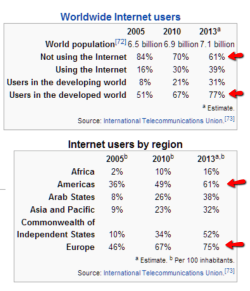
Yes maybe only 10% of people in "industrialised" nations miss out on high bandwidth internet.
But only a small percentage of the world is located in such countries.
And yes, the people located outside those countries do have PCs and they do want to use them to give PowerPoint presentations.
So I stand by the statement that 90% of the world do not have cheap high bandwidth internet.

If this forum is intended only for people in "industrialised" nations such as USA and Germany, then it should be stated up front so the rest of us will know not to waste our time here.
 

My Computer My Computer

At a glance

Windows 7 Professional 64bitAMD FX-63008GB
Computer type
PC/Desktop
OS
Windows 7 Professional 64bit
CPU
AMD FX-6300
Memory
8GB
A few numbers may help.
 

Attachments

  • 2013-11-13_1821.png
    2013-11-13_1821.png
    41.5 KB · Views: 7

My Computer My Computer

At a glance

Vista, Windows7, Mint Mate, Zorin, Windows 8from 1.6GHz Duo to i7
Computer Manufacturer/Model Number
HP, Dell, Gateway, Toshiba - 4 laptops and 2 desktops
OS
Vista, Windows7, Mint Mate, Zorin, Windows 8
CPU
from 1.6GHz Duo to i7
Monitor(s) Displays
2x HP w2207
Hard Drives
5x HDD, 7x SSD, 12x Externals
Keyboard
with trackball - no mices
Mouse
Trackball mice
Internet Speed
DSL 6000
Back
Top