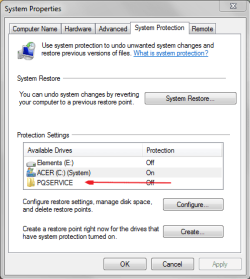
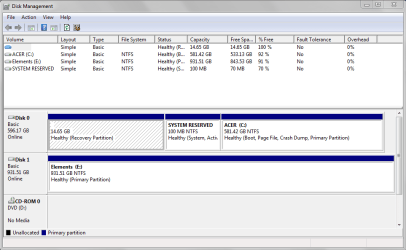
PQService is ACER's recovery partition. It is not the active partition but does contain all the required boot files (Bootmgr, Boot folder containing the BCD).
Although not normally required, you can boot directly into it by making the partition active or using the Hirens Boot CD to boot directly into it. This can be useful in some difficult factory restore situations.
Hirens can bypass the MBR and avoid the need to make the PQService partition active. The significance of the active status only means something to the MBR boot code.
So PQService just sits there until needed and should be left alone. It doesn't play a dual system reserved role (like Dell or is it HP).
Thank you.
That still does not explain why it ( recovery partition ) appears to be " empty " ???
(1)
It's a hidden partition and it's a quirk of Windows Disk Management that shows it empty. Extremely unlikely it is empty!
Use Partition Wizard (see free programs link) to view your partitions. You will see that that partition will have ~8GB of stuff. Use PW's "explore partition" to safely browse within that partition and system reserved if you want. There is no need to assign letters etc.
(2)
You can launch e-Recovery (under programs) and see the option to do a factory restore which uses said partion. Obviously exit before going all the way - you get plenty of opportunities.
I think that answers it all????