Solved Upon Boot, screen says Preparing your Desktop for a long time

jamesprice

New member
Local time
11:36 AM
Messages
3
I recently tried to boot up my backup hard drive, ( a cloned copy by Macrium Reflect), and it hangs for a long time displaying "Preparing your Desktop", and never does give me the desktop. I found an article on google that referenced Microsoft support and KB947215 for a fix, but I can't find KB947215 because support for Windows 7 is over. Can anyone help me with this? I need a fix or access to KB947215.
 

My Computer My Computer

At a glance

windows 7 ultimate x64amd4 gbnone; use motherboard
Computer type
PC/Desktop
Computer Manufacturer/Model Number
custom build
OS
windows 7 ultimate x64
CPU
amd
Motherboard
evga
Memory
4 gb
Graphics Card(s)
none; use motherboard
Hard Drives
wd 1000 gb
Antivirus
avast free
Browser
ie
Hi jamesprice,

Welcome to Sevenforums!

Internal or external backup drive?


My Computer My Computer

At a glance

Win 10 x64, Linux Lite, Win 7 x64, BlackArch,...
Computer type
PC/Desktop
Computer Manufacturer/Model Number
HP Desktop & Compaq Laptop
OS
Win 10 x64, Linux Lite, Win 7 x64, BlackArch, & Kali
Hard Drives
Samsung 850 Pro 256Gb,
Hitachi HDD 1Tb,
Crucial MX SSD 250Gb
Segate 3Tb USB 3.0 Ext. Backup HDD
Internet Speed
150Mbps dn, 20Mbps up
Antivirus
Avast Free, Malwarebytes Anti-Exploit & Anti-Ransomware
Browser
Firefox, Chrome, Opera, & VPN

My Computers My Computers

  • At a glance

    7 X64i5 84002x8gb 3200mhz
    Computer type
    PC/Desktop
    OS
    7 X64
    CPU
    i5 8400
    Motherboard
    gigabyte b365m ds3h
    Memory
    2x8gb 3200mhz
    Hard Drives
    various
    PSU
    pure power 11 400w cm
    Case
    Coolermaster
    Cooling
    cryorig m9i
  • At a glance

    7x64g54008gb ddr4 2400
    Computer type
    PC/Desktop
    OS
    7x64
    CPU
    g5400
    Motherboard
    ga b365m ds3h
    Memory
    8gb ddr4 2400
    PSU
    xfx pro 450w
The hdd that hangs is a separate hard drive. It is a copy of my main system hard drive. I connected it up using a usb to sata interface and copied it using Macrium reflect. When I connected it up as my main drive to try it out it hangs on "preparing my desktop. Can someone supply me with a copy of KB947215?
 

My Computer My Computer

At a glance

windows 7 ultimate x64amd4 gbnone; use motherboard
Computer type
PC/Desktop
Computer Manufacturer/Model Number
custom build
OS
windows 7 ultimate x64
CPU
amd
Motherboard
evga
Memory
4 gb
Graphics Card(s)
none; use motherboard
Hard Drives
wd 1000 gb
Antivirus
avast free
Browser
ie
:confused:

"The User Profile Service failed the logon”

is a different issue from

hangs on "preparing my desktop.

The latter is an issue that can happen when cloning - have come across it several times with macrium users.

use the fix described in my previous post.
 
Last edited:

My Computers My Computers

  • At a glance

    7 X64i5 84002x8gb 3200mhz
    Computer type
    PC/Desktop
    OS
    7 X64
    CPU
    i5 8400
    Motherboard
    gigabyte b365m ds3h
    Memory
    2x8gb 3200mhz
    Hard Drives
    various
    PSU
    pure power 11 400w cm
    Case
    Coolermaster
    Cooling
    cryorig m9i
  • At a glance

    7x64g54008gb ddr4 2400
    Computer type
    PC/Desktop
    OS
    7x64
    CPU
    g5400
    Motherboard
    ga b365m ds3h
    Memory
    8gb ddr4 2400
    PSU
    xfx pro 450w
SIW2,


Thank you for your post. Your advice solved the problem.
 

My Computer My Computer

At a glance

windows 7 ultimate x64amd4 gbnone; use motherboard
Computer type
PC/Desktop
Computer Manufacturer/Model Number
custom build
OS
windows 7 ultimate x64
CPU
amd
Motherboard
evga
Memory
4 gb
Graphics Card(s)
none; use motherboard
Hard Drives
wd 1000 gb
Antivirus
avast free
Browser
ie
You're welcome :-)
 

My Computers My Computers

  • At a glance

    7 X64i5 84002x8gb 3200mhz
    Computer type
    PC/Desktop
    OS
    7 X64
    CPU
    i5 8400
    Motherboard
    gigabyte b365m ds3h
    Memory
    2x8gb 3200mhz
    Hard Drives
    various
    PSU
    pure power 11 400w cm
    Case
    Coolermaster
    Cooling
    cryorig m9i
  • At a glance

    7x64g54008gb ddr4 2400
    Computer type
    PC/Desktop
    OS
    7x64
    CPU
    g5400
    Motherboard
    ga b365m ds3h
    Memory
    8gb ddr4 2400
    PSU
    xfx pro 450w
Your tool solved my issue as well! Is there any way you can explain what the fix does? Sorry to revive old thread.
 

My Computers My Computers

  • At a glance

    windows
    OS
    windows
  • Computer type
    PC/Desktop
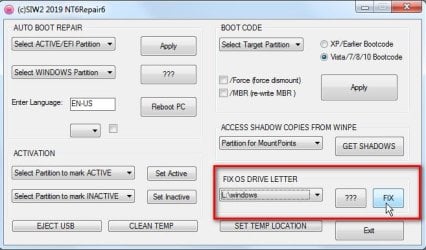
The os drive letter ( typically, but not necessarily C ) is an alias for the device volume value ( which is a very long number that identifies the disk and partition).

when an os is transferred to a different volume the os letter needs to be set to the new device volume value.

Otherwise windows will be looking for the old volume to load things from and cant find it. So it keeps searching in vain "preparing desktop" forever.

The tool finds the os letter and sets it to the correct volume value.
 

My Computers My Computers

  • At a glance

    7 X64i5 84002x8gb 3200mhz
    Computer type
    PC/Desktop
    OS
    7 X64
    CPU
    i5 8400
    Motherboard
    gigabyte b365m ds3h
    Memory
    2x8gb 3200mhz
    Hard Drives
    various
    PSU
    pure power 11 400w cm
    Case
    Coolermaster
    Cooling
    cryorig m9i
  • At a glance

    7x64g54008gb ddr4 2400
    Computer type
    PC/Desktop
    OS
    7x64
    CPU
    g5400
    Motherboard
    ga b365m ds3h
    Memory
    8gb ddr4 2400
    PSU
    xfx pro 450w

Attachments

  • image.png
    image.png
    13.1 KB · Views: 1

My Computers My Computers

  • At a glance

    windows 7 professional 64 bitIntel Core i5-4590 CPU 3.3GHz
    Computer type
    PC/Desktop
    Computer Manufacturer/Model Number
    asus
    OS
    windows 7 professional 64 bit
    CPU
    Intel Core i5-4590 CPU 3.3GHz
    Antivirus
    avast
    Browser
    chrome
  • Computer type
    PC/Desktop
Back
Top