
You are using an out of date browser. It may not display this or other websites correctly.
You should upgrade or use an alternative browser.
You should upgrade or use an alternative browser.
Solved prevent copy my files into usb flash memory
- Thread starter muiacir
- Start date

- Local time
- 11:11 AM
- Messages
- 5,915
Try USB Write Protect.
Enable USB Write Protection to Prevent Virus Attacks and Un-Authorize Use | Free and Useful Online Resources for Designers and Developers
( You may have to Run it as an Administrator. I am not sure since I have not tried it. )
Enable USB Write Protection to Prevent Virus Attacks and Un-Authorize Use | Free and Useful Online Resources for Designers and Developers
( You may have to Run it as an Administrator. I am not sure since I have not tried it. )
My Computer
- OS
- Windows 7 Home Premium 32 bit
thank you so much. it was exactly that i wanted.i mark this thread as solved but have 2 question.Try USB Write Protect.
Enable USB Write Protection to Prevent Virus Attacks and Un-Authorize Use | Free and Useful Online Resources for Designers and Developers
( You may have to Run it as an Administrator. I am not sure since I have not tried it. )
1-can anyone format the usb when we apply write protection?
2- can anyone disable write protection without this program?
My Computer
- OS
- windows 7 ultimate x64
- Local time
- 11:11 AM
- Messages
- 5,915
1. A knowledgeable person ( like me  ) who knows how to write-protect it, can also undo it and format it . The program actually toggles a registry entry between 0 and 1. Can be done manually too.
2. Answered above.
So it applies to your PC only and less-endowed users of your PC.
Do not keep extending your requirements. Then the solutions necessarily have to be different.
) who knows how to write-protect it, can also undo it and format it . The program actually toggles a registry entry between 0 and 1. Can be done manually too.2. Answered above.
So it applies to your PC only and less-endowed users of your PC.
Do not keep extending your requirements. Then the solutions necessarily have to be different.
My Computer
- OS
- Windows 7 Home Premium 32 bit
thank you very much my friend.can you explain for manually write protection what should exactlly do?1. A knowledgeable person ( like me
2. Answered above.
So it applies to your PC only and less-endowed users of your PC.
Do not keep extending your requirements. Then the solutions necessarily have to be different.
My Computer
- OS
- windows 7 ultimate x64
excuse me jumanji but i have another question.is there a way to write protect a flash memory in any system. i mean if i insert my flash into my friend's system.he can not delete or format my flash memory?Have a look at the post here. ( I don't want to write a long post.
It also gives you the link for USB Flash Security (Free for Personal Use) to password-protect your pendrive.
My Computer
- OS
- windows 7 ultimate x64
- Local time
- 11:11 AM
- Messages
- 5,915
Hmmmm.........
Having said what I had said in my previous post, you may still get your objective to a large extent.
How?
I had mentioned about USB Flash Security in my post #8. You may download the free version from here. KASHU-USB Flash Security
The free version is limited to one USB pendrive and less than 4GB. ( Pay if you want more.)
Download and install it on your desktop. ( Be aware that it may try to install some unwanted tooolbars. Check them out during install.)
With your less-than 4GB pendrive plugged in, run the program and password-protect your pendrive.(All existing data on your pendrive will be erased during this process. So back them up and have a clean pendrive to start with. In addition I start with a FAT32 formatted pendrive.)
It will write the necessary .exe file to release/lock the pendrive in a 597KB unprotected area, while you can copy your data to the rest of the protected area.
Anyone using it on their computer can only see the unprotected area ( cannot access the protected area without the password) and can only FAT format that 597KB unprotected area with Windows 7. Your data in the protected area will still be safe. But then how do you access it? The enter/exit .exe is gone.
With the pendrive plugged in, rewrite what has been lost. You are back in business.
The screenshots.
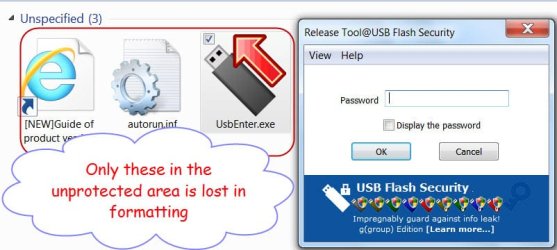
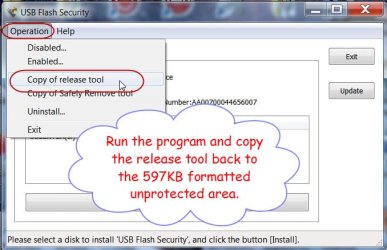
Your friend can still beat you by formatting the whole drive with HP USB Disk Storage Format Tool . Your only consolation will be that he was not able to access the data you had stored. (Well, actually that is the purpose of this tool - to prevent others from accessing your important data if your pendrive is lost or stolen.)
Having said what I had said in my previous post
, you may still get your objective to a large extent.How?
I had mentioned about USB Flash Security in my post #8. You may download the free version from here. KASHU-USB Flash Security
The free version is limited to one USB pendrive and less than 4GB. ( Pay if you want more.)
Download and install it on your desktop. ( Be aware that it may try to install some unwanted tooolbars. Check them out during install.)
With your less-than 4GB pendrive plugged in, run the program and password-protect your pendrive.(All existing data on your pendrive will be erased during this process. So back them up and have a clean pendrive to start with. In addition I start with a FAT32 formatted pendrive.)
It will write the necessary .exe file to release/lock the pendrive in a 597KB unprotected area, while you can copy your data to the rest of the protected area.
Anyone using it on their computer can only see the unprotected area ( cannot access the protected area without the password) and can only FAT format that 597KB unprotected area with Windows 7. Your data in the protected area will still be safe. But then how do you access it? The enter/exit .exe is gone.
With the pendrive plugged in, rewrite what has been lost. You are back in business.
The screenshots.
Your friend can still beat you by formatting the whole drive with HP USB Disk Storage Format Tool
. Your only consolation will be that he was not able to access the data you had stored. (Well, actually that is the purpose of this tool - to prevent others from accessing your important data if your pendrive is lost or stolen.)
Last edited:
My Computer
- OS
- Windows 7 Home Premium 32 bit
- Local time
- 11:11 AM
- Messages
- 5,915
Glad you found it useful. When these old posts popup and I read them, I feel I am relearning everything from my own writings.  I also keep wondering "OMG! Did I write it or was it a ghost-writer in me? !!!"
I also keep wondering "OMG! Did I write it or was it a ghost-writer in me? !!!" My Computer
- OS
- Windows 7 Home Premium 32 bit
Similar threads
- Replies
- 1
- Views
- 603

- Replies
- 3
- Views
- 10K

- Replies
- 9
- Views
- 5K

- Sticky
- Replies
- 4
- Views
- 32K
