Prevent user changing time manually?

gkarasik

New member
Local time
10:14 PM
Messages
23
Location
Los Angeles
Hi,

I have a user who keeps changing the time on her Win7 workstation. The PC eventually resets the correct time automatically, but I would like to find a way to prevent her changing time manually. I've looked at various ways to prevent users from changing time (local security policy, GPO), but they all prevent not only the manual time-change but also the automatic reset of the time. What I seek is a way to prevent the manual time-change that still allows the automatic. I'm open to a third-party solution as well.

GaryK
 

My Computers

System One System Two

  • Computer type
    PC/Desktop
    Computer Manufacturer/Model Number
    Dell Optiplex 780
    OS
    Windows 7 Enterprise 32-bit
    Hard Drives
    480g SSD
    Internet Speed
    1g
    Antivirus
    Trend Max Security
    Browser
    Brave
  • Antivirus
    Trend Max Security
Change the user instead!

Sorry couldn't resist :p

Hope you solve this.
 

My Computer

Computer type
PC/Desktop
Computer Manufacturer/Model Number
Custom Build
OS
Windows 7 Ultimate x64 SP1
CPU
AMD Phenom 2 1090T
Motherboard
Gigabyte GA-890FXA-UD5
Memory
2x8GB Kingston HyperX Fury Black 1600Mhz Unganged
Graphics Card(s)
MSI GTX 970 Gaming 4G
Sound Card
Realtek On-Board HD 7.1 Audio / Logitech G35
Monitor(s) Displays
3xAcer GD245HQ
Screen Resolution
1920x1080
Hard Drives
Samsung 850 Pro 512GB SSD - OS /
WD Caviar Black SATA 3 - 1 TBx2 - Dynamic RAID 0 /
WD Caviar Green SATA 2 - 640GBx2 - Dynamic RAID 0 /
WD Caviar Green SATA 2 - 640GB - Internal Backup /
Seagate Barracude SATA 3 - 3TB - External Backup/ Sync
PSU
HighPower 1000W
Case
Cooler Master HAF 932
Cooling
Noctua NH-D14
Keyboard
Logitech G19
Mouse
Logitech G500
Internet Speed
100/4 Mbit Cable (100GB quota)
Antivirus
ZoneAlarm Extreme Security / MBAM Pro / MBAE Free / SAS Free
Browser
IE 11 - Firefox - Chrome
Other Info
Logitech F710/ G27/ G940/ Z5500 // TrackIR 5 // Nvidia 3D Surround Vision
Change the user instead!

Sorry couldn't resist :p

Hope you solve this.

If wishes were horses then beggars would ride.

Thanks for the sympathy.
 

My Computers

System One System Two

  • Computer type
    PC/Desktop
    Computer Manufacturer/Model Number
    Dell Optiplex 780
    OS
    Windows 7 Enterprise 32-bit
    Hard Drives
    480g SSD
    Internet Speed
    1g
    Antivirus
    Trend Max Security
    Browser
    Brave
  • Antivirus
    Trend Max Security

My Computer

Computer type
PC/Desktop
Computer Manufacturer/Model Number
Custom Build
OS
Windows 7 Ultimate x64 SP1
CPU
AMD Phenom 2 1090T
Motherboard
Gigabyte GA-890FXA-UD5
Memory
2x8GB Kingston HyperX Fury Black 1600Mhz Unganged
Graphics Card(s)
MSI GTX 970 Gaming 4G
Sound Card
Realtek On-Board HD 7.1 Audio / Logitech G35
Monitor(s) Displays
3xAcer GD245HQ
Screen Resolution
1920x1080
Hard Drives
Samsung 850 Pro 512GB SSD - OS /
WD Caviar Black SATA 3 - 1 TBx2 - Dynamic RAID 0 /
WD Caviar Green SATA 2 - 640GBx2 - Dynamic RAID 0 /
WD Caviar Green SATA 2 - 640GB - Internal Backup /
Seagate Barracude SATA 3 - 3TB - External Backup/ Sync
PSU
HighPower 1000W
Case
Cooler Master HAF 932
Cooling
Noctua NH-D14
Keyboard
Logitech G19
Mouse
Logitech G500
Internet Speed
100/4 Mbit Cable (100GB quota)
Antivirus
ZoneAlarm Extreme Security / MBAM Pro / MBAE Free / SAS Free
Browser
IE 11 - Firefox - Chrome
Other Info
Logitech F710/ G27/ G940/ Z5500 // TrackIR 5 // Nvidia 3D Surround Vision
What was the reply when you asked the user why is the time constantly being changed? Maybe the problem and solution is further upstream.
 

My Computer

Computer type
PC/Desktop
Computer Manufacturer/Model Number
Antec desktop; Acer Aspire laptops
OS
Windows 7 Professional 64-bit
CPU
Desktop i5; Acers i5 & i7
Memory
desktop 16GB; 1 Acer 8GB & 1 Acer 16GB
Hard Drives
1TB split into 2 equal partitions [OS and data] usable by RJS
Internet Speed
AT&T DSL
Browser
FF, GChrome, msIE
Other Info
Windows 7 Firewall, Emsisoft AM/AV, MSE [scan-only], SpywareBlaster, Ruiware/BillP combine

My Computers

System One System Two

  • Computer type
    PC/Desktop
    Computer Manufacturer/Model Number
    Dell Optiplex 780
    OS
    Windows 7 Enterprise 32-bit
    Hard Drives
    480g SSD
    Internet Speed
    1g
    Antivirus
    Trend Max Security
    Browser
    Brave
  • Antivirus
    Trend Max Security
What was the reply when you asked the user why is the time constantly being changed? Maybe the problem and solution is further upstream.

Known her for a long time. She's poorly organized. She likes to keep the clock five minutes fast. If I can find a local solution, that would be better than taking it to management. That option is open, but for later if I can't find a local solution.

GaryK
 

My Computers

System One System Two

  • Computer type
    PC/Desktop
    Computer Manufacturer/Model Number
    Dell Optiplex 780
    OS
    Windows 7 Enterprise 32-bit
    Hard Drives
    480g SSD
    Internet Speed
    1g
    Antivirus
    Trend Max Security
    Browser
    Brave
  • Antivirus
    Trend Max Security
According to post #3 by Brink (he is the Admin with over 50k posts, I guess he knows what he is talking about) in the link I gave:
"Only listed users and groups are allowed to change the date and time. You'll just need to add any user or group that you want to allow to change the date and time."

So if that user is able to change date time, then there is a problem somewhere in your domain(?)/local computer. As an example, I have seen users being added to local administrators group so they could install programs before. So it may be possible in your case.

See there are 2 preconfigured allows in the Local Security Policy. Administrators (manual) and Local Service (I believe this is the automatic). Not an expert in this issue but that's what I understand. Your user shouldn't be able to change in the first place!

Wanted to add: I haven't worked in a corporate environment for a long time, you might need to check group policy instead.
 

My Computer

Computer type
PC/Desktop
Computer Manufacturer/Model Number
Custom Build
OS
Windows 7 Ultimate x64 SP1
CPU
AMD Phenom 2 1090T
Motherboard
Gigabyte GA-890FXA-UD5
Memory
2x8GB Kingston HyperX Fury Black 1600Mhz Unganged
Graphics Card(s)
MSI GTX 970 Gaming 4G
Sound Card
Realtek On-Board HD 7.1 Audio / Logitech G35
Monitor(s) Displays
3xAcer GD245HQ
Screen Resolution
1920x1080
Hard Drives
Samsung 850 Pro 512GB SSD - OS /
WD Caviar Black SATA 3 - 1 TBx2 - Dynamic RAID 0 /
WD Caviar Green SATA 2 - 640GBx2 - Dynamic RAID 0 /
WD Caviar Green SATA 2 - 640GB - Internal Backup /
Seagate Barracude SATA 3 - 3TB - External Backup/ Sync
PSU
HighPower 1000W
Case
Cooler Master HAF 932
Cooling
Noctua NH-D14
Keyboard
Logitech G19
Mouse
Logitech G500
Internet Speed
100/4 Mbit Cable (100GB quota)
Antivirus
ZoneAlarm Extreme Security / MBAM Pro / MBAE Free / SAS Free
Browser
IE 11 - Firefox - Chrome
Other Info
Logitech F710/ G27/ G940/ Z5500 // TrackIR 5 // Nvidia 3D Surround Vision
According to post #3 by Brink (he is the Admin with over 50k posts, I guess he knows what he is talking about) in the link I gave:
"Only listed users and groups are allowed to change the date and time. You'll just need to add any user or group that you want to allow to change the date and time."

So if that user is able to change date time, then there is a problem somewhere in your domain(?)/local computer. As an example, I have seen users being added to local administrators group so they could install programs before. So it may be possible in your case.

See there are 2 preconfigured allows in the Local Security Policy. Administrators (manual) and Local Service (I believe this is the automatic). Not an expert in this issue but that's what I understand. Your user shouldn't be able to change in the first place!

Wanted to add: I haven't worked in a corporate environment for a long time, you might need to check group policy instead.

You are correct in every respect. The user can change the time. I can prevent this, but this also prevents the automatic reset. A solution may not be available, but I seek a more-granular solution that allows the system to change the time but not the user. Group Policy has the same effect--time change either on or off.

Perhaps there's a per-user way to remove the "Change date and time settings..." option from the tray-clock dialog. That might mean editing a DLL. That in turn presumes locating the correct DLL.
 

My Computers

System One System Two

  • Computer type
    PC/Desktop
    Computer Manufacturer/Model Number
    Dell Optiplex 780
    OS
    Windows 7 Enterprise 32-bit
    Hard Drives
    480g SSD
    Internet Speed
    1g
    Antivirus
    Trend Max Security
    Browser
    Brave
  • Antivirus
    Trend Max Security
Are you absolutely sure this user of yours has a regular user account? Perhaps a power user but then again only admins have the right to change time, so I don't know :sarc:.

Are you in a domain environment? You never told anything about it. Provide with some details please, not for me, but for those more knowledgeable in managing a domain. (If you are in a domain)

I still think you are looking at the wrong direction trying to prevent something that's supposedly not happening in the first place.

----------------
Another idea would be finding a clock program that would run independent of the system date/time which she could adjust to her heart's desire. I did search a bit but all seems to sync with system. Maybe you will find such a program easier, as English is 2nd language to me.

I bet this would be extremely easy for someone with programming knowledge, perhaps you can find someone here in this forum.

Thanks for bearing with me
 

My Computer

Computer type
PC/Desktop
Computer Manufacturer/Model Number
Custom Build
OS
Windows 7 Ultimate x64 SP1
CPU
AMD Phenom 2 1090T
Motherboard
Gigabyte GA-890FXA-UD5
Memory
2x8GB Kingston HyperX Fury Black 1600Mhz Unganged
Graphics Card(s)
MSI GTX 970 Gaming 4G
Sound Card
Realtek On-Board HD 7.1 Audio / Logitech G35
Monitor(s) Displays
3xAcer GD245HQ
Screen Resolution
1920x1080
Hard Drives
Samsung 850 Pro 512GB SSD - OS /
WD Caviar Black SATA 3 - 1 TBx2 - Dynamic RAID 0 /
WD Caviar Green SATA 2 - 640GBx2 - Dynamic RAID 0 /
WD Caviar Green SATA 2 - 640GB - Internal Backup /
Seagate Barracude SATA 3 - 3TB - External Backup/ Sync
PSU
HighPower 1000W
Case
Cooler Master HAF 932
Cooling
Noctua NH-D14
Keyboard
Logitech G19
Mouse
Logitech G500
Internet Speed
100/4 Mbit Cable (100GB quota)
Antivirus
ZoneAlarm Extreme Security / MBAM Pro / MBAE Free / SAS Free
Browser
IE 11 - Firefox - Chrome
Other Info
Logitech F710/ G27/ G940/ Z5500 // TrackIR 5 // Nvidia 3D Surround Vision
If her computer is five minutes ahead of everyone else in that office, does that affect any server-level folder & files backup? Sharing of her documents, modified or not, with others? If so, you're going to have to gently explain the unintended consequences of the five-minute difference upon others, and, appeal to her sense of accomplishment that leaving the correct time is best for everyone, including her.
 

My Computer

Computer type
PC/Desktop
Computer Manufacturer/Model Number
Antec desktop; Acer Aspire laptops
OS
Windows 7 Professional 64-bit
CPU
Desktop i5; Acers i5 & i7
Memory
desktop 16GB; 1 Acer 8GB & 1 Acer 16GB
Hard Drives
1TB split into 2 equal partitions [OS and data] usable by RJS
Internet Speed
AT&T DSL
Browser
FF, GChrome, msIE
Other Info
Windows 7 Firewall, Emsisoft AM/AV, MSE [scan-only], SpywareBlaster, Ruiware/BillP combine
Are you absolutely sure this user of yours has a regular user account? Perhaps a power user but then again only admins have the right to change time, so I don't know :sarc:.

Are you in a domain environment? You never told anything about it. Provide with some details please, not for me, but for those more knowledgeable in managing a domain. (If you are in a domain)

I still think you are looking at the wrong direction trying to prevent something that's supposedly not happening in the first place.

----------------
Another idea would be finding a clock program that would run independent of the system date/time which she could adjust to her heart's desire. I did search a bit but all seems to sync with system. Maybe you will find such a program easier, as English is 2nd language to me.

I bet this would be extremely easy for someone with programming knowledge, perhaps you can find someone here in this forum.

Thanks for bearing with me

Sorry, I should have said. Win7 Ent/SP1. She's an admin, for corporate/political reasons, and that's the way that's going to stay. I can argue for the time-change restriction because it's a security issue, but the larger, Admin status is not going to change. Yes, it's a domain. I like the 3rd-party idea and am looking; perhaps an alarm program. I'm also going to look at the option of adding full System permissions to the LocSec policy.

No bearing with you going on. This is helping me think this through. I appreciate your devoting time to my problem.
 

My Computers

System One System Two

  • Computer type
    PC/Desktop
    Computer Manufacturer/Model Number
    Dell Optiplex 780
    OS
    Windows 7 Enterprise 32-bit
    Hard Drives
    480g SSD
    Internet Speed
    1g
    Antivirus
    Trend Max Security
    Browser
    Brave
  • Antivirus
    Trend Max Security
If her computer is five minutes ahead of everyone else in that office, does that affect any server-level folder & files backup? Sharing of her documents, modified or not, with others? If so, you're going to have to gently explain the unintended consequences of the five-minute difference upon others, and, appeal to her sense of accomplishment that leaving the correct time is best for everyone, including her.

Thanks. Already gently explained. Response was "Uh huh."

GaryK
 

My Computers

System One System Two

  • Computer type
    PC/Desktop
    Computer Manufacturer/Model Number
    Dell Optiplex 780
    OS
    Windows 7 Enterprise 32-bit
    Hard Drives
    480g SSD
    Internet Speed
    1g
    Antivirus
    Trend Max Security
    Browser
    Brave
  • Antivirus
    Trend Max Security
We posted at the same time, did you see my questions & possible suggestion?
 

My Computer

Computer type
PC/Desktop
Computer Manufacturer/Model Number
Antec desktop; Acer Aspire laptops
OS
Windows 7 Professional 64-bit
CPU
Desktop i5; Acers i5 & i7
Memory
desktop 16GB; 1 Acer 8GB & 1 Acer 16GB
Hard Drives
1TB split into 2 equal partitions [OS and data] usable by RJS
Internet Speed
AT&T DSL
Browser
FF, GChrome, msIE
Other Info
Windows 7 Firewall, Emsisoft AM/AV, MSE [scan-only], SpywareBlaster, Ruiware/BillP combine

My Computers

System One System Two

  • Computer type
    PC/Desktop
    Computer Manufacturer/Model Number
    Dell Optiplex 780
    OS
    Windows 7 Enterprise 32-bit
    Hard Drives
    480g SSD
    Internet Speed
    1g
    Antivirus
    Trend Max Security
    Browser
    Brave
  • Antivirus
    Trend Max Security
Oh here we go, so she is an admin :)

Go to the link I gave earlier, and do try the option to "To Only Prevent Specific Administrators ".
Basically, you will remove the Administrators group and add all administrator accounts but her manually one by one!

Hopefully someone with domain experience will comment if the procedure is different in such a setting. For example, does the Local Security Policy get overridden by group policy or some other policy?
 

My Computer

Computer type
PC/Desktop
Computer Manufacturer/Model Number
Custom Build
OS
Windows 7 Ultimate x64 SP1
CPU
AMD Phenom 2 1090T
Motherboard
Gigabyte GA-890FXA-UD5
Memory
2x8GB Kingston HyperX Fury Black 1600Mhz Unganged
Graphics Card(s)
MSI GTX 970 Gaming 4G
Sound Card
Realtek On-Board HD 7.1 Audio / Logitech G35
Monitor(s) Displays
3xAcer GD245HQ
Screen Resolution
1920x1080
Hard Drives
Samsung 850 Pro 512GB SSD - OS /
WD Caviar Black SATA 3 - 1 TBx2 - Dynamic RAID 0 /
WD Caviar Green SATA 2 - 640GBx2 - Dynamic RAID 0 /
WD Caviar Green SATA 2 - 640GB - Internal Backup /
Seagate Barracude SATA 3 - 3TB - External Backup/ Sync
PSU
HighPower 1000W
Case
Cooler Master HAF 932
Cooling
Noctua NH-D14
Keyboard
Logitech G19
Mouse
Logitech G500
Internet Speed
100/4 Mbit Cable (100GB quota)
Antivirus
ZoneAlarm Extreme Security / MBAM Pro / MBAE Free / SAS Free
Browser
IE 11 - Firefox - Chrome
Other Info
Logitech F710/ G27/ G940/ Z5500 // TrackIR 5 // Nvidia 3D Surround Vision
Do you know what account is used to change the time automatically ???
Maybe you need to add the SYSTEM account to allow time changes, when you add GPO restrictions ???
I don't know, just guessing here.
 

My Computer

Computer type
PC/Desktop
Computer Manufacturer/Model Number
home built
OS
Multi-Boot W7_Pro_x64 W8.1_Pro_x64 W10_Pro_x64 +Linux_VMs +Chromium_VM
CPU
AMD Athlon II x4 620
Motherboard
Gigabyte GA-MA785G-UD3H
Memory
6GB GSkill DDR2 800
Graphics Card(s)
AMD 4670 GPU + AMD 4200 IGP
Sound Card
on board Realtek ALC889A
Monitor(s) Displays
RCA 40" LCD TV, Insignia 32" LCD TV, HP 15" LCD monitor
Screen Resolution
1680 x 1050
Hard Drives
OCZ Vertex 3 120GB,
Samsung F3 1TB (3),
Several others - WD, Seagate, Hitachi, ...
PSU
Corsair 500 W
Case
Rosewill mid tower
Cooling
CM 90mm rifle
Keyboard
Gyration wireless, Logitech wireless, Dell USB wired
Mouse
Gyration wireless, Logitech wireless, V7 USB wired
Internet Speed
Spectrum - 100Mbps D / 10Mbps U
Antivirus
Avast, MBAM3, EMET, WinPatrol
Browser
Pale Moon, Firefox, IE
Other Info
2 multi-boot PC's
Mainly HTPC/Office/Gen purpose (no gaming).
Trendnet USB KVM.
LG DVD burner/Blue Ray Player.
Tray system for removable SATA backup drives.

Not currently OCd, under-volted.
I use Hybrid sleep, rarely re-boot or shutdown.

Hauppauge HD-PVR, Avermedia PCIe TV Tuner, Hauppauge PCI TV Tuner.
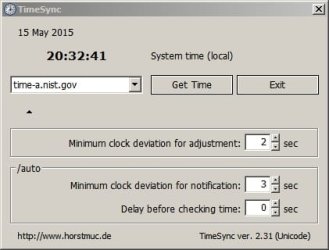
Well here's some thoughts.... I use third party software to adjust my system clock. You can find the download here:

TimeSync

The intersting thing is that you can run it with the /AUTO switch and set it to only adjust time if clock deviation is greater than a specified number of seconds. It also works it's way through a list of time servers until one connects when using the /AUTO switch.

TimeSync.jpg

Maybe it's possible to install this portable application in a hidden folder and run it silently and automatically at regular intervals? Probably it could be done using task scheduler.

Just a thought.
 
Last edited:

My Computer

Computer type
Laptop
Computer Manufacturer/Model Number
ASUS
OS
Microsoft Windows 7 Home Premium 64-bit 7601 Multiprocessor Free Service Pack 1
CPU
AMD C-60 APU with Radeon(tm) HD Graphics
Motherboard
ASUSTeK COMPUTER INC. X501U
Memory
4.00 GB
Graphics Card(s)
AMD Radeon HD 6290 Graphics
Sound Card
(1) AMD High Definition Audio Device (2) Realtek High Defi
Screen Resolution
1366 x 768 x 32 bits (4294967296 colors) @ 60 Hz
Hard Drives
Hitachi HTS545050A7E380 SATA Disk Device
Antivirus
Comodo CIS & FW, SecureAplus App Whitelisting, Threatfire
Browser
Cyberfox 64bit, Opera 64bit, Airfox
Other Info
Spy-The-Spy, HitmanPro.Alert, Norton Connect Safe, MJRegWatcher, BitDefender TrafficLight, Voodoo Shield, Zemana AntiMalware
I don't believe it will run invisibly; sooner or later, computer user will catch on.
 

My Computer

Computer type
PC/Desktop
Computer Manufacturer/Model Number
Antec desktop; Acer Aspire laptops
OS
Windows 7 Professional 64-bit
CPU
Desktop i5; Acers i5 & i7
Memory
desktop 16GB; 1 Acer 8GB & 1 Acer 16GB
Hard Drives
1TB split into 2 equal partitions [OS and data] usable by RJS
Internet Speed
AT&T DSL
Browser
FF, GChrome, msIE
Other Info
Windows 7 Firewall, Emsisoft AM/AV, MSE [scan-only], SpywareBlaster, Ruiware/BillP combine
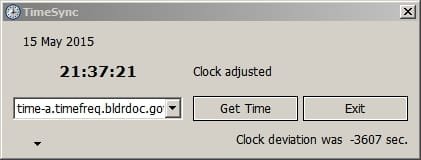
Well I can get it to run on a schedule and sync the clock every minute without the program launch window showing up. The problem I've got is that once time sync is complete I get this window.

TimeSync 2.jpg

So if I could figure out how to hide it?

In any case even if the system clock was adjusted to always show the correct time using any method - obviously the user will catch on! I mean who doesn't check the time on their mobile phone, wristwatch of office wall clock?
 

My Computer

Computer type
Laptop
Computer Manufacturer/Model Number
ASUS
OS
Microsoft Windows 7 Home Premium 64-bit 7601 Multiprocessor Free Service Pack 1
CPU
AMD C-60 APU with Radeon(tm) HD Graphics
Motherboard
ASUSTeK COMPUTER INC. X501U
Memory
4.00 GB
Graphics Card(s)
AMD Radeon HD 6290 Graphics
Sound Card
(1) AMD High Definition Audio Device (2) Realtek High Defi
Screen Resolution
1366 x 768 x 32 bits (4294967296 colors) @ 60 Hz
Hard Drives
Hitachi HTS545050A7E380 SATA Disk Device
Antivirus
Comodo CIS & FW, SecureAplus App Whitelisting, Threatfire
Browser
Cyberfox 64bit, Opera 64bit, Airfox
Other Info
Spy-The-Spy, HitmanPro.Alert, Norton Connect Safe, MJRegWatcher, BitDefender TrafficLight, Voodoo Shield, Zemana AntiMalware
Back
Top