Previously functional USB3 external hard drive shows not initialized

UBob

New member
Member
Local time
6:54 AM
Messages
25
Have a 1TB Iomega USB3 external hard drive that worked well on both a desktop and laptop Win7/64 system. Now it shows up as unidentified and not initialized using computer/manage/storage/disk management. Disk Management also gives the optiin to initialize it but I declined because I would like to recover the data. The power light comes on and it spins up with both a USB3 or USB2 connections and is identified as an Iomega eGo drive when I use the USB eject function.
Hard Drive Sentinel does not recognize it at all. Any suggestions appreciated.
 

My Computer My Computer

OS
Windows 7
1. Please post a screenshot of Disk Management with your external HDD plugged in. http://www.sevenforums.com/tutorials/274797-disk-management-post-screen-capture-image.html

2. It would indeed be prudent to recover the data before you try anything else on the HDD.

You may try to access the hard drive booting into a live Linux CD/pendrive.

Download Lucid Puppy (Ubuntu-Compatible Build) v5.2.8 ISO from http://puppylinux.org/main/Download%20Latest%20Release.htm

It is light and only 132.6 MB.

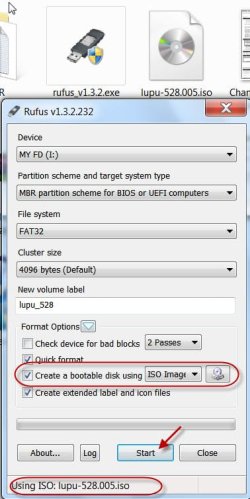
Make a Bootable pendrive with Rufus v1.3.2 (442 KB) http://rufus.akeo.ie/

It takes less than 2 minutes to create your bootable live Linux pendrive.

For more guidance on the recovery process directly get into the heading Recovering files from the non-bootable Internal Drive - applicable to recovery from any hard drive - in [URL="http://www.sevenforums.com/software/198909-lucid-puppy-way-recover-files-non-bootable-computer.html"]Lucid Puppy way to recover files from a non-bootable computer[/URL]

You may also use this tutorial by Golden http://www.sevenforums.com/tutorials/256518-peppermint3-create-live-cd-dvd-usb-use-emergency-backup.html to create your bootable pendrive with Peppermint3 Linux.

Lucid Puppy or Peppermint3, in either case you can use Rufus to create your bootable pendrive.
 

My Computer My Computer

OS
Windows 7 Home Premium 32 bit
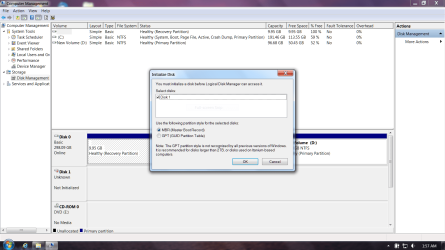
Attaching full screen capture from Disk Management Screen. As stated before it shows Disk1 as unrecognized and uninitialized with the option to initialize.
In the process of downloading Lucid Puppy and reading links for recovery. Have zero experience with Linux/Ubuntu so will update if issues arise. Thank you for your update and suggestions. Much appreciated.
 

Attachments

  • Capture.PNG
    Capture.PNG
    74.3 KB · Views: 15

My Computer My Computer

OS
Windows 7
Ok, in your case you will be mounting both the external drives, the one to be recovered and the one to which you want to backup. Identify these by their capacity.

( Before booting into Linux, plug in both your external drives.)

If you understand the principles it is so easy. You need not know anything about Linux. ( Neither did I, when I ran that trial. :) )
 

My Computer My Computer

OS
Windows 7 Home Premium 32 bit
What if the USB enclosure is failing?
If the hard drive can be safely removed from the enclosure it would be interesting to
see what it says when connected via SATA. The data recovery can still be run.
 

My Computer My Computer

Computer type
PC/Desktop
Computer Manufacturer/Model Number
Custom Built
OS
Windows 7 HP 64Bit
CPU
AMD Athlon
Motherboard
Asus M2N-SLI Deluxe
Memory
Geil PC2-6400 2GB
Graphics Card(s)
ATI Radeon x1550
Screen Resolution
1600x1050
Hard Drives
WD 640 GB
Antivirus
Trendmicro
LL:
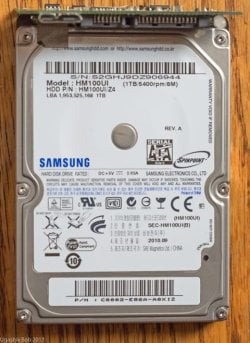
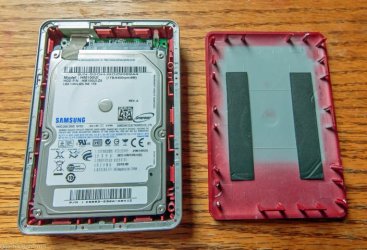
I should of mentioned previously that I removed the drive from the enclosure and unplugged the USB interface card. I then plugged it directly into my 3GB SATA interface on my desktop with the same results. Would spin up but not recognized.
 

Attachments

  • 20130322-1W9A0028.jpg
    20130322-1W9A0028.jpg
    86.1 KB · Views: 15
  • 20130322-1W9A0032.jpg
    20130322-1W9A0032.jpg
    104.2 KB · Views: 5
  • 20130322-1W9A0037.jpg
    20130322-1W9A0037.jpg
    99 KB · Views: 4

My Computer My Computer

OS
Windows 7
OK, it is now your second internal drive. You can still check whether Linux can see that internal drive and show the files. If it does, you can backup to another external drive or even to your other internal drive, if space is available.
 

My Computer My Computer

OS
Windows 7 Home Premium 32 bit
OK finally got Lucid Puppy to boot. The Active ISO burner Win7 app I was using didn't work but ImgBurn did. In case someone else runs into this the most confusing part was using lupu-528.005.iso which was a zip file as input to the ISO burn. Evidently the ImgBurn app unzips it. End of good news.
Having not a .5 clue what was happening once Lucid Puppy finally booted I could see the icons showing the three partitions of my internal hard drive on the laptop and the icon showing the DVD I had just booted from. Tried Pmount with and without mut options and the externally mounted USB drive did not display. Was able to do file displays etc on my internal drive but could find no way to find anything about the external hard drive. Any suggestions on how to use Lucid Puppy to display external drive?
 

My Computer My Computer

OS
Windows 7
1. If you had followed my instructions carefully, you would have downloaded lupu-528.005.iso(132.6MB) directly from this link, saving you all the trouble. :D The download is not a zip file but a .iso file that can be burnt to a CD or written to a pendrive with appropriate software.
Lucid Puppy (Ubuntu-Compatible Build)
.............Download latest version of 5.2.8 from ibiblio.org: Get lupu-528.005.iso or explore the folder.
Download latest version of 5.2.8 from nluug.nl: Get lupu-528.005.iso or explore the folder.
MD5 Checksum: 8ad170c46b523436776398fa5ce39fa4
ISO Size: 132.6 MB

2. Again, if you had followed my instructions to use Rufus to make the bootable pendrive with that bootable ISO, you would have finished the job in 2 minutes instead of fumbling and tumbling. :D No need to burn a CD/DVD for that. Your pendrive is not locked to Lucid Puppy only. You could use the remaining space to save anything you want as you would use a pendrive normally and still use the pendrive as an emergency backup tool to access drives that become inaccessible to Windows.

30-03-2013 09-17-07.jpg

3. You would have to plug-in your external drive where you want to backup even before booting into Lucid Puppy for it to be seen.. If you plug-in after you boot, it may not be seen.

4. Please go through my guide carefully on how to copy the files from one drive to another.
 
Last edited:

My Computer My Computer

OS
Windows 7 Home Premium 32 bit
I did follow your instructions and made a bootable pendrive via Rufus on a 16GB Sandisk Cruzer but my laptop had no provisions in the bios to boot from a usb device hence the DVD creation.
Yes I see the advantages of using a pendrive if your bios allows you to boot from it. In my case Lucid Puppy was booted from DVD successfully with the external drive in question plugged in BEFORE boot and Lucid Puppy did not recognize it but did recognize the internal drive. Everything in your guide assumes bios supports usb boot and once booted all the copy instructions assume Lucid Puppy recognized the external drive which it did not.
I also tested another known good external USB3 drive on Lucid Puppy and it was NOT recognized on the USB3 port but did work on a USB2 Port. The failing USB3 ego drive not only failed on the USB2 port but hung the system during boot. Does Lucid Puppy support USB3 or do we need special drivers?
 

My Computer My Computer

OS
Windows 7
Now let me be clear.

You have taken out the problem drive from its casing and it is now the second internal drive. Right? yes/no

Booting with Lucid Puppy you are able to access and see the files in the problem drive, that is now your second internal drive. yes/no

Lucid Puppy can see an external drive connected to the USB2 port even if it is a USB3 drive. yes/no

(You have brought in USB 3 now. Even Windows requires drivers for USB3.)

If the answers to the above three questions is "yes" then go ahead and copy the files from the problem drive which is now the second internal drive to the external drive connected to the USB2 port..

Even if one answer is a "no", I cannot help you any further on this issue. You can take Lucid Puppy has failed.

Personally, I did not like your having taken out the problem drive out of the casing before trying recovery/resolution with non-invasive procedures. Handling the drive/case electronics without proper precautions can screw them further. It should be done only as a last resort when all other non-invasive procedures for an in-situ resolution fail.. Once you handle them, its all your good/bad luck, more so if you are shifting it back and forth from an internal to external status and vice-versa.:D
Stick to one setup, if you want to recover.
 
Last edited:

My Computer My Computer

OS
Windows 7 Home Premium 32 bit
You have taken out the problem drive from its casing and it is now the second internal drive. Right? yes/no-no.
All testing with Lucid Puppy was done with the drive in question mounted in its case and tested through its USB3/2 interface connected via USB3/2 ports to the laptop/Lucid Puppy and it was not recognized as anything. . Earlier the drive was tested out of its case and through the SATA 3GB interface of my desktop/Win 7. It was then reassembled and tested with Lucid Puppy. When the drive is tested via usb3/2 interface on my Laptop/Win7 it is recognized as non initialized. Lucy Puppy on the same laptop does not recognize either the good or the bad drive through the USB3 interface but does recognize the good drive on USB2. That is why I asked about USB3 driver support for Lucid Puppy.

Booting with Lucid Puppy you are able to access and see the files in the problem drive, that is now your second internal drive. yes/no- no

Lucid Puppy can see an external drive connected to the USB2 port even if it is a USB3 drive. yes/no- yes it recognizes a known good USB3/2 drive in a USB2 port but does not recognize the failing drive.

I agree about removing the drive from the case but at the time I did it I was not aware of other options like Lucid Puppy which in our case only proved Lucid Puppy does not recognize USB3 external drives without additonal USB3 drivers that apparently are not included at the level I downloaded. I would like to know if Lucid Puppy supports external USB3 drives at higher levels.
 

My Computer My Computer

OS
Windows 7
Lucid Puppy USB3 support

Lucid Puppy requires at least the 2.6.38 level for USB3 support.
 

My Computer My Computer

OS
Windows 7
Back
Top