
Print Spooler Queue - Clear and Reset

How to Clear and Reset the Print Spooler Queue in Vista, Windows 7, and Windows 8

   Information
This tutorial will show you how to clear and reset the print spooler queue in Vista, Windows 7, and Windows 8.

This can be handy if you have a document stuck in the print spooler, and/or not allowing your computer to go to sleep automatically if set to do so.

You must be logged in as an administrator to be able to do the steps in this tutorial.

   Note
If the print spooler issue persists after resetting it below, the installed printer driver may not be compatible or corrupted. Check the printer manufacturer's website to download and install the latest Windows compatible driver for it.


OPTION ONE

To Automatically Clear and Reset Print Spooler Queue with a BAT File


1. Click/tap on the Download button below to download the file below.
Reset_and_Clear_Print_Spooler_Queue.bat


Download


2. Save the .bat file to your desktop.

3. Right click or press and hold on the downloaded .bat file, and click/tap on Run as administrator.

4. If prompted by UAC, then click/tap on Yes (UAC-Windows 7/8) or Continue (UAC-Vista).

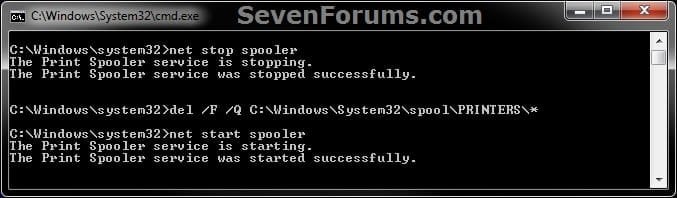
5. You will now see a command prompt open for a few seconds, run the commands, and then automatically close. (see screenshot below)
CMD.jpg
6. You can now delete the download .bat file if you like.


OPTION TWO

To Manually Clear and Reset Print Spooler Queue


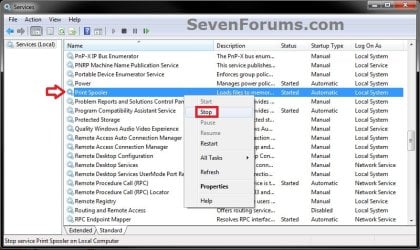
1. Open Services, and stop the Print Spooler service. (see screenshot below)
Step1.jpg
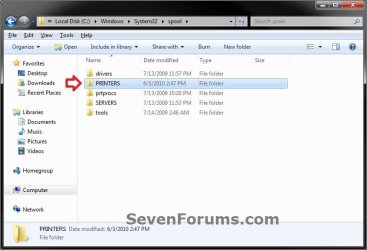
2. Navigate to the folder below, and open the PRINTERS. (see screenshot below)
C:\Windows\system32\spool\PRINTERS
Step2.jpg
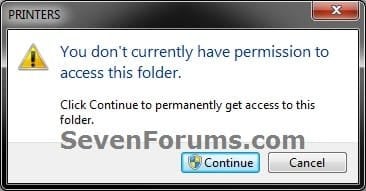
3. Click/tap on Continue and Yes (if prompted by UAC) to approve opening the PRINTERS folder. (see screenshot below)
Step3.jpg
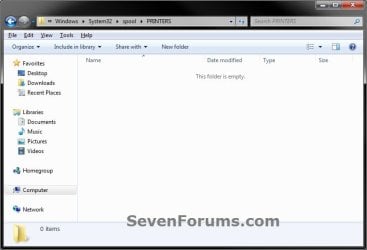
4. Delete all files in the PRINTERS folder until it is empty, then close Windows Explorer. (see screenshot below)
:warn:WARNING: DO NOT DELETE the PRINTERS folder itself. Only delete it's contents.
Step4.jpg
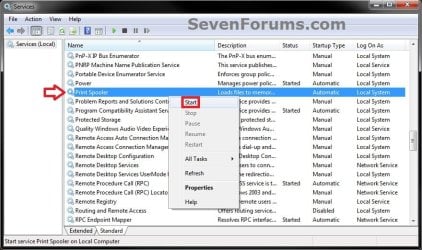
5. Open Services, and start the Print Spooler service. (see screenshot below)
Step5.jpg
That's it,
Shawn


Attachments

Last edited:
Thanks very much, I deleted the folders and restarted as you suggested and this worked.

Have a fantastic Christmas and New year.

Regards

Steve
 

My Computer

OS
Windows 7 64
CPU
Intel Core 2 Q9400 Quad Core
Motherboard
EvGA 680i
Memory
OCZ Reaper - 4 x 1GB @ 800
Graphics Card(s)
2 x Evga 9400 GTX Super Super Clocked
Sound Card
Creative Soundblaster X-treme Music
Monitor(s) Displays
NEC mULTISYNC 20wgx
Screen Resolution
1680x1050
Hard Drives
4 X Seagate Barracuda 320 GB
1 X Seagate Barracuda 2 TB
1 x Seagate Barracuda 1TB
PSU
950 W PC Quiet & Cooling
Case
Antec 900
Cooling
Standard Plus Hard Drive 7 Case Fans
Keyboard
Wolf claw
Mouse
Microsoft
Internet Speed
18 MB/S
You're most welcome Steve. :)
 

My Computer

Computer type
PC/Desktop
Computer Manufacturer/Model Number
Self built custom
OS
64-bit Windows 11 Pro for Workstations
CPU
Intel i7-8700K OC'd to 5 GHz
Motherboard
ASUS ROG Maximus XI Formula Z390
Memory
64 GB (4x16GB) G.SKILL TridentZ RGB DDR4 3600 MHz
Graphics Card(s)
ASUS ROG-STRIX-GTX1080TI-O11G-GAMING
Sound Card
Integrated
Monitor(s) Displays
2 x Samsung Odyssey G7 27"
Screen Resolution
2560x1440
Hard Drives
1TB Samsung 990 PRO M.2,
4TB Samsung 990 PRO PRO M.2,
TerraMaster F8 SSD Plus NAS
PSU
Seasonic Prime Titanium 850W
Case
Thermaltake Core P3
Cooling
Corsair Hydro H115i
Keyboard
Logitech wireless K800
Mouse
Logitech MX Master 4
Internet Speed
2 Gb/s Download and 100 Mb/s Upload
Antivirus
Malwarebyte Anti-Malware Premium
Browser
Google Chrome
Other Info
Logitech Z625 speaker system,
Logitech BRIO 4K Pro webcam,
HP Color LaserJet Pro MFP M477fdn,
APC SMART-UPS RT 1000 XL - SURT1000XLI,
Galaxy S23 Plus phone
Please help.

I cannot locate these folders

C:\Windows\system32\spool\PRINTERS

Print spooler is present under Services, but when I click start it says "cannot!"
 

My Computer

Computer Manufacturer/Model Number
n/a
OS
Windows 7
CPU
intel core 17
Motherboard
Gigabyte
Memory
12 gb
Graphics Card(s)
nvidia geforce gts250
Sound Card
hi definition audio device
Monitor(s) Displays
HP W1907v
Hard Drives
wdc wdisears-0025bi ata device
PSU
n/a
Case
n/a
Cooling
n/a
Please open an Elevated Command Prompt window and run the following commands

NET START SPOOLER
SC QC SPOOLER
SC QUERYEX SPOOLER


post the results


Here are some instructions to make life easier :)
1) To open an Elevated Command Prompt Window (the ECP window), click on Start, All Programs, Accessories – then right-click on Command Prompt, and select Run as Administrator. Accept the UAC prompt.
2) To run the commands easier, highlight the block of commands, and right-click on the highlight – select Copy. In the CP Window, click on the black/white icon at top left – select Paste. The commands will run but may not complete the last command, so hit the Enter Key once.
3) To copy the results... click on the Black/White icon in the top left, and select Edit... 'Select All', and hit the Enter key - then use Ctrl+V or r-click+Paste to paste it into your response.
 
Last edited:

My Computer

Computer type
Laptop
Computer Manufacturer/Model Number
Asus K52F or Lenovo B51-80
OS
Win 7 x64 Home Premium (and x86 VirtualBox VM)/Win10
CPU
i3 370M/i7 6500U
Motherboard
Asus/Lenovo
Memory
8GB - finally :)/8GB
Graphics Card(s)
it's an i3, dude!/dual Intel&nVidia
Sound Card
onboard
Monitor(s) Displays
15.6" built-in
Screen Resolution
1366x768/1920x1080
Hard Drives
750GB Seagate internal
Sundry external drives attached to other computers on the local network
1TB SSD on the Lenovo
PSU
n/a
Internet Speed
as much as I can get - usually on a dongle/phone, so <1MB/s
Antivirus
MSE/Defender
Browser
IE11/12/Edge/Chrome/FF(if I must)
Thanks for this! This is so good to know for future reference.
 

My Computer

Computer Manufacturer/Model Number
Gateway DX4300-11
OS
Windows 7 Ultimate
CPU
AMD Phenom II X4 805 Quad core
Motherboard
Proprietary
Memory
8GB DDR2
Graphics Card(s)
AYI Radeon HD 3200 Integrated
Sound Card
Integrated High Def sound
Monitor(s) Displays
Dell ST2410 24" full HD
Hard Drives
500 Gig SeaGate Barracuda(boot)
1TB Western Digital CG(Media Storage)
PSU
OEM 400 Watt
Case
OEM Gateway
Cooling
OEM Gateway
You're most welcome Anthony. Glad it could help. :)
 

My Computer

Computer type
PC/Desktop
Computer Manufacturer/Model Number
Self built custom
OS
64-bit Windows 11 Pro for Workstations
CPU
Intel i7-8700K OC'd to 5 GHz
Motherboard
ASUS ROG Maximus XI Formula Z390
Memory
64 GB (4x16GB) G.SKILL TridentZ RGB DDR4 3600 MHz
Graphics Card(s)
ASUS ROG-STRIX-GTX1080TI-O11G-GAMING
Sound Card
Integrated
Monitor(s) Displays
2 x Samsung Odyssey G7 27"
Screen Resolution
2560x1440
Hard Drives
1TB Samsung 990 PRO M.2,
4TB Samsung 990 PRO PRO M.2,
TerraMaster F8 SSD Plus NAS
PSU
Seasonic Prime Titanium 850W
Case
Thermaltake Core P3
Cooling
Corsair Hydro H115i
Keyboard
Logitech wireless K800
Mouse
Logitech MX Master 4
Internet Speed
2 Gb/s Download and 100 Mb/s Upload
Antivirus
Malwarebyte Anti-Malware Premium
Browser
Google Chrome
Other Info
Logitech Z625 speaker system,
Logitech BRIO 4K Pro webcam,
HP Color LaserJet Pro MFP M477fdn,
APC SMART-UPS RT 1000 XL - SURT1000XLI,
Galaxy S23 Plus phone
Windows Print Spool Lockup - Mucho Grande Gracias Amigo

Thank you for posting this solution:D. Microsoft's "Cancel All Print Jobs" button is a Charlie Foxtrot. Having to start and stop services and delete files in obscure locations leaves me with a headache imagining they hired Lindsay Lohan, Kim Kardashian and Snooki as half vast programmers in Redmond.

If it weren't for nice guys like you, I'd have documents sitting in queues for another 10-months --for half a dozen printers that don't exist anymore. What should be intuitively obvious to the most casual observer ain't even close.

This is an example of why everybody is moving towards Apple Macs/iPhones and Google/Android and LAMP

Call me an anachronism if you want, but this has gotten worse with Windows 8. Every basic action now requires a Google search. I'm booting up in Chameleon Hackintosh and Ubuntu more and more often now because the learning curve is not as high, steep or laced with as many crevasses and avalanches.
 

My Computer

Computer type
PC/Desktop
OS
Windows 7 Home Premium 64-bit
You're most welcome Jules, and welcome to Seven Forums. I'm glad it was able to help. :)
 

My Computer

Computer type
PC/Desktop
Computer Manufacturer/Model Number
Self built custom
OS
64-bit Windows 11 Pro for Workstations
CPU
Intel i7-8700K OC'd to 5 GHz
Motherboard
ASUS ROG Maximus XI Formula Z390
Memory
64 GB (4x16GB) G.SKILL TridentZ RGB DDR4 3600 MHz
Graphics Card(s)
ASUS ROG-STRIX-GTX1080TI-O11G-GAMING
Sound Card
Integrated
Monitor(s) Displays
2 x Samsung Odyssey G7 27"
Screen Resolution
2560x1440
Hard Drives
1TB Samsung 990 PRO M.2,
4TB Samsung 990 PRO PRO M.2,
TerraMaster F8 SSD Plus NAS
PSU
Seasonic Prime Titanium 850W
Case
Thermaltake Core P3
Cooling
Corsair Hydro H115i
Keyboard
Logitech wireless K800
Mouse
Logitech MX Master 4
Internet Speed
2 Gb/s Download and 100 Mb/s Upload
Antivirus
Malwarebyte Anti-Malware Premium
Browser
Google Chrome
Other Info
Logitech Z625 speaker system,
Logitech BRIO 4K Pro webcam,
HP Color LaserJet Pro MFP M477fdn,
APC SMART-UPS RT 1000 XL - SURT1000XLI,
Galaxy S23 Plus phone
I got issue:

Now i see in step 4. above that the PRINTERS folder should not be erased. We'll I erased it and then created a new folder by the same name. Now i cannot print. Please help me print again.

The details:
A large .pdf file clogged my printer and then slowed my machine to a crawl. In safe mode i managed to get into the ..SPOOL\PRINTER folder to see a "shock wave flash object" at 235 megs dated the time i made my last print and it was locked. Also in this folder were over 1.1 million files totaling over 8 GB! Hmm. Because selecting and deleting was taking too long I deleted the folder PRINTERS and then recreated it after the hour it took to delete all the files. After reboot i print and see the Kyocera printer queue flash SPOOLING under the Status column but then in a flash of my eye it then says "deleting - spooling". The .shd file and shockwave flash files are made in the ..SPOOL\PRINTERS folder but are size 0KB. No change in status if i restart the print spooler service.
 

My Computer

Computer type
PC/Desktop
Computer Manufacturer/Model Number
Dell precision T3500
OS
Illinois
CPU
Intel Xeon CPU W3565 @ 3.2GHz 3.20 GHz
Memory
4.00GB
Hard Drives
Intel Raid 1 Volumne SCSI Disk Device
Antivirus
Trend Micro
I got issue:

Now i see in step 4. above that the PRINTERS folder should not be erased. We'll I erased it and then created a new folder by the same name. Now i cannot print. Please help me print again.

The details:
A large .pdf file clogged my printer and then slowed my machine to a crawl. In safe mode i managed to get into the ..SPOOL\PRINTER folder to see a "shock wave flash object" at 235 megs dated the time i made my last print and it was locked. Also in this folder were over 1.1 million files totaling over 8 GB! Hmm. Because selecting and deleting was taking too long I deleted the folder PRINTERS and then recreated it after the hour it took to delete all the files. After reboot i print and see the Kyocera printer queue flash SPOOLING under the Status column but then in a flash of my eye it then says "deleting - spooling". The .shd file and shockwave flash files are made in the ..SPOOL\PRINTERS folder but are size 0KB. No change in status if i restart the print spooler service.

Hello c8b8c, and welcome to Seven Forums.

You might see if running a sfc /scannow command may be able to help. :)
 
Last edited:

My Computer

Computer type
PC/Desktop
Computer Manufacturer/Model Number
Self built custom
OS
64-bit Windows 11 Pro for Workstations
CPU
Intel i7-8700K OC'd to 5 GHz
Motherboard
ASUS ROG Maximus XI Formula Z390
Memory
64 GB (4x16GB) G.SKILL TridentZ RGB DDR4 3600 MHz
Graphics Card(s)
ASUS ROG-STRIX-GTX1080TI-O11G-GAMING
Sound Card
Integrated
Monitor(s) Displays
2 x Samsung Odyssey G7 27"
Screen Resolution
2560x1440
Hard Drives
1TB Samsung 990 PRO M.2,
4TB Samsung 990 PRO PRO M.2,
TerraMaster F8 SSD Plus NAS
PSU
Seasonic Prime Titanium 850W
Case
Thermaltake Core P3
Cooling
Corsair Hydro H115i
Keyboard
Logitech wireless K800
Mouse
Logitech MX Master 4
Internet Speed
2 Gb/s Download and 100 Mb/s Upload
Antivirus
Malwarebyte Anti-Malware Premium
Browser
Google Chrome
Other Info
Logitech Z625 speaker system,
Logitech BRIO 4K Pro webcam,
HP Color LaserJet Pro MFP M477fdn,
APC SMART-UPS RT 1000 XL - SURT1000XLI,
Galaxy S23 Plus phone
Nope, 'Windows Resource Protection did not find any integrity violations"
 

My Computer

Computer type
PC/Desktop
Computer Manufacturer/Model Number
Dell precision T3500
OS
Illinois
CPU
Intel Xeon CPU W3565 @ 3.2GHz 3.20 GHz
Memory
4.00GB
Hard Drives
Intel Raid 1 Volumne SCSI Disk Device
Antivirus
Trend Micro
Try using OPTION ONE and restart the computer to see if that may.
 

My Computer

Computer type
PC/Desktop
Computer Manufacturer/Model Number
Self built custom
OS
64-bit Windows 11 Pro for Workstations
CPU
Intel i7-8700K OC'd to 5 GHz
Motherboard
ASUS ROG Maximus XI Formula Z390
Memory
64 GB (4x16GB) G.SKILL TridentZ RGB DDR4 3600 MHz
Graphics Card(s)
ASUS ROG-STRIX-GTX1080TI-O11G-GAMING
Sound Card
Integrated
Monitor(s) Displays
2 x Samsung Odyssey G7 27"
Screen Resolution
2560x1440
Hard Drives
1TB Samsung 990 PRO M.2,
4TB Samsung 990 PRO PRO M.2,
TerraMaster F8 SSD Plus NAS
PSU
Seasonic Prime Titanium 850W
Case
Thermaltake Core P3
Cooling
Corsair Hydro H115i
Keyboard
Logitech wireless K800
Mouse
Logitech MX Master 4
Internet Speed
2 Gb/s Download and 100 Mb/s Upload
Antivirus
Malwarebyte Anti-Malware Premium
Browser
Google Chrome
Other Info
Logitech Z625 speaker system,
Logitech BRIO 4K Pro webcam,
HP Color LaserJet Pro MFP M477fdn,
APC SMART-UPS RT 1000 XL - SURT1000XLI,
Galaxy S23 Plus phone
Noel,
When I use the options in either the Printer or Document dropdown on the Printer Status screen they hardly ever help; e.g., Document Restart. Currently, my STATUS on this windows is Printing. But it is not. The script submitted by Brink does work- but not always!

Here are the results of sc qu spooler and sc queryex spooler.
C:\Windows\system32>sc qc spooler
[SC] QueryServiceConfig SUCCESS

SERVICE_NAME: spooler
TYPE : 110 WIN32_OWN_PROCESS (interactive)
START_TYPE : 2 AUTO_START
ERROR_CONTROL : 1 NORMAL
BINARY_PATH_NAME : C:\Windows\System32\spoolsv.exe
LOAD_ORDER_GROUP : SpoolerGroup
TAG : 0
DISPLAY_NAME : Print Spooler
DEPENDENCIES : RPCSS
: http
SERVICE_START_NAME : LocalSystem

C:\Windows\system32>sc queryex spooler

SERVICE_NAME: spooler
TYPE : 110 WIN32_OWN_PROCESS (interactive)
STATE : 4 RUNNING
(STOPPABLE, NOT_PAUSABLE, IGNORES_SHUTDOWN)
WIN32_EXIT_CODE : 0 (0x0)
SERVICE_EXIT_CODE : 0 (0x0)
CHECKPOINT : 0x0
WAIT_HINT : 0x0
PID : 7060
FLAGS :

Is there anything else I can do apart from rebooting?
 

My Computer

Computer type
PC/Desktop
Computer Manufacturer/Model Number
Dell Studio 540
OS
windows 7 ultimate x64
CPU
Intel Core2 Quad Q8200 2.34 GHz
Motherboard
intel G45 + ICH10R
Memory
6 GB
Graphics Card(s)
integrated intel GMA x4500HD
Hard Drives
SATA 698 GB
Antivirus
Microsoft Security Essentials
Browser
Chrome
clean the print spool

Thank you very much. Opening cmd as administrator and
net stop spooler
del /F /Q c:\windows\system32\spool\printers\*
net start spooler

Did the job for me in Windows 7 Ultimate 32bit

Florisz
 

My Computer

OS
Windows 7 Ultimate 32bit
Thanks for the help clearing my printer spooler.
 

My Computer

Computer type
Laptop
Computer Manufacturer/Model Number
Asus
OS
Microsoft Windows 7 Home Premium 64
CPU
1.73 gigahertz Intel Core i7 Q 740
Motherboard
ASUSTeK G73Jw 1.0 Bus Clock: 133 megahertz BIO
Memory
8GB
Graphics Card(s)
NVIDIA GeForce GTX 460M
Monitor(s) Displays
Acer S201HL; Hanns.G HSD173PUW1
Screen Resolution
1920 x 1080
Hard Drives
ST9500420AS X 2
Seagate Backup+ Desk USB Device [Hard drive] (2000.40 GB)
Internet Speed
29 Mbps
Antivirus
Norton 360
Browser
Chrome
Local printing holding jobs in queue and not printing

I have a local printer connected via USB that has just stopped printing. It shows the job in the queue as spooled and printing but no print job comes out and the job just sits in the queue. All network printers work just fine. I think it may be a spooler issue with the local printer, an HP Color LaserJet CP1215. Any suggestions on how to resolve this?
 

My Computer

Computer type
PC/Desktop
Computer Manufacturer/Model Number
Dell
OS
WIndows 7 Professional 64-bit
CPU
Intel Core i5-2400 3.10GHz
Memory
8 GB
Graphics Card(s)
AMD Radeon
Hard Drives
WDC 500 GB
Antivirus
Trend Micro Worry-Free Business Security
Browser
Internet Explorer 11
Hello Jay, and welcome to Seven Forums. :)

Did you already see if clearing the print spooler queue may help?
 

My Computer

Computer type
PC/Desktop
Computer Manufacturer/Model Number
Self built custom
OS
64-bit Windows 11 Pro for Workstations
CPU
Intel i7-8700K OC'd to 5 GHz
Motherboard
ASUS ROG Maximus XI Formula Z390
Memory
64 GB (4x16GB) G.SKILL TridentZ RGB DDR4 3600 MHz
Graphics Card(s)
ASUS ROG-STRIX-GTX1080TI-O11G-GAMING
Sound Card
Integrated
Monitor(s) Displays
2 x Samsung Odyssey G7 27"
Screen Resolution
2560x1440
Hard Drives
1TB Samsung 990 PRO M.2,
4TB Samsung 990 PRO PRO M.2,
TerraMaster F8 SSD Plus NAS
PSU
Seasonic Prime Titanium 850W
Case
Thermaltake Core P3
Cooling
Corsair Hydro H115i
Keyboard
Logitech wireless K800
Mouse
Logitech MX Master 4
Internet Speed
2 Gb/s Download and 100 Mb/s Upload
Antivirus
Malwarebyte Anti-Malware Premium
Browser
Google Chrome
Other Info
Logitech Z625 speaker system,
Logitech BRIO 4K Pro webcam,
HP Color LaserJet Pro MFP M477fdn,
APC SMART-UPS RT 1000 XL - SURT1000XLI,
Galaxy S23 Plus phone
Yes. Sorry I should have been more in depth. I have cleared the print spooler. I went into C:\WIndows\System32\Spool\printers and deleted the files in that folder. I went into HKEY_LOCAL_MACHINE\SYSTEM\CurrentControlSet\Control\Print\Environments\Windows NT x86\Drivers\Version-3 and deleted the driver. I have even completely removed the printer, drivers and all folders relating to the printer from the pc and reinstalled it from the beginning and the problem remains. You hit print the queue shows the job but it just sits there and nothing happens. I hooked the printer up to another pc and it prints perfectly. I know it is something with this Windows 7 machine. All network printers work just fine.
 

My Computer

Computer type
PC/Desktop
Computer Manufacturer/Model Number
Dell
OS
WIndows 7 Professional 64-bit
CPU
Intel Core i5-2400 3.10GHz
Memory
8 GB
Graphics Card(s)
AMD Radeon
Hard Drives
WDC 500 GB
Antivirus
Trend Micro Worry-Free Business Security
Browser
Internet Explorer 11

My Computer

Computer type
PC/Desktop
Computer Manufacturer/Model Number
Self built custom
OS
64-bit Windows 11 Pro for Workstations
CPU
Intel i7-8700K OC'd to 5 GHz
Motherboard
ASUS ROG Maximus XI Formula Z390
Memory
64 GB (4x16GB) G.SKILL TridentZ RGB DDR4 3600 MHz
Graphics Card(s)
ASUS ROG-STRIX-GTX1080TI-O11G-GAMING
Sound Card
Integrated
Monitor(s) Displays
2 x Samsung Odyssey G7 27"
Screen Resolution
2560x1440
Hard Drives
1TB Samsung 990 PRO M.2,
4TB Samsung 990 PRO PRO M.2,
TerraMaster F8 SSD Plus NAS
PSU
Seasonic Prime Titanium 850W
Case
Thermaltake Core P3
Cooling
Corsair Hydro H115i
Keyboard
Logitech wireless K800
Mouse
Logitech MX Master 4
Internet Speed
2 Gb/s Download and 100 Mb/s Upload
Antivirus
Malwarebyte Anti-Malware Premium
Browser
Google Chrome
Other Info
Logitech Z625 speaker system,
Logitech BRIO 4K Pro webcam,
HP Color LaserJet Pro MFP M477fdn,
APC SMART-UPS RT 1000 XL - SURT1000XLI,
Galaxy S23 Plus phone
Back
Top