Solved printer install issues

WebFoot

New member
Local time
3:19 PM
Messages
16
Newbie here with a few printer install issues.

Printer = HP laserjet 2605dn, Computer = HP Z series workstation W7 Pro 64. Connection via USB. Oh, network connection isn't practical as the router is at the other end of the house.

Recently our inkjet bit the dust, so I went looking for a used color laser printer. Found this printer that has not been used all that much and price was right. Printer use will be mostly limited to color for the cards/brouchers the wife makes on a very limited basis. The principle printer is and will remain a Brother HL-5470 (monochrome) as it is connected via wireless network connection and accessed throughout the house.

Found an old thread here regarding installing this printer on a W7 machine. Was helpful and printer is up and running. The issues pertain to features/functions available when using the UPD drivers. When using Windows update the drivers found was for Post Script. Don't know if that has any impact on my issues. Very impressed with the qlty of the color output even when using normal copy paper.

First issue, under color management the only thing available is print gray scale. Shouldn't there be other settings available? On the test printouts I've made, I don't think I need any adjmts but would be nice to have them available.

Second issue, need to add additional memory. Presently have the stk 64MB and is reported correctly on the config report. Have additional memory on order and will have early next week. Reading the manual, it says after adding the memory you need to change amount of available memory in the driver. All I've found so far is under Printer-Properties/Device-settings/Installable-options is a listing for Printer memory and that has a drop down menu with two choices and the smallest choice is for 384-494MB which is more than the printer can handle. Right now I don't know what to expect when I install the new memory module.

Any help you can offer will be greatly appreciated.
 

My Computer

Computer type
PC/Desktop
Computer Manufacturer/Model Number
HP Z series workstation
OS
W7 Pro x64
CPU
i7
Memory
8GB
Graphics Card(s)
AMD FirePro V3900
Hard Drives
500G
560G
1T
Antivirus
Comodo
First issue, under color management the only thing available is print gray scale. Shouldn't there be other settings available? On the test printouts I've made, I don't think I need any adjmts but would be nice to have them available.
The problem here is with the HP driver for the printer. It is set up for "auto", but for some reason this has the effect of producing black-and-white.

You need to change it to "color".

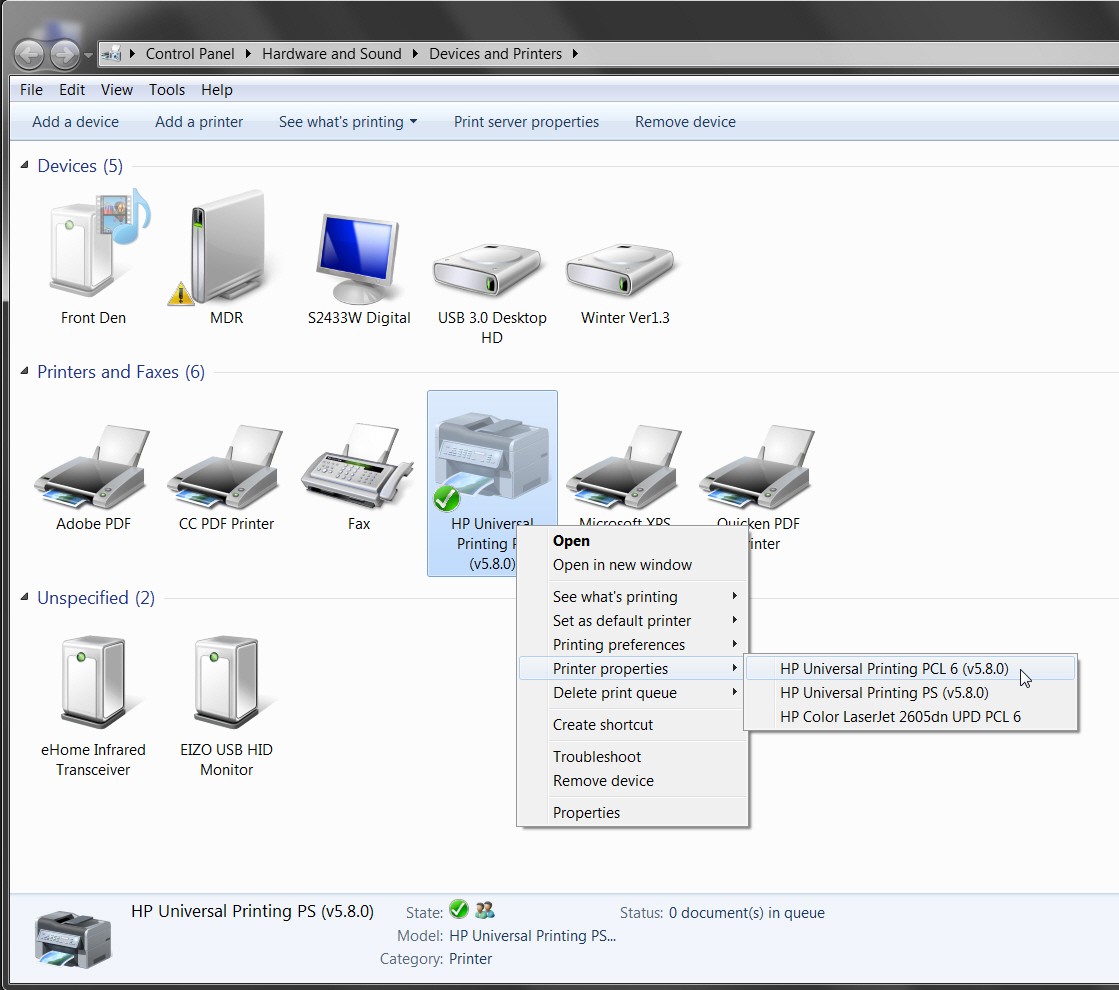
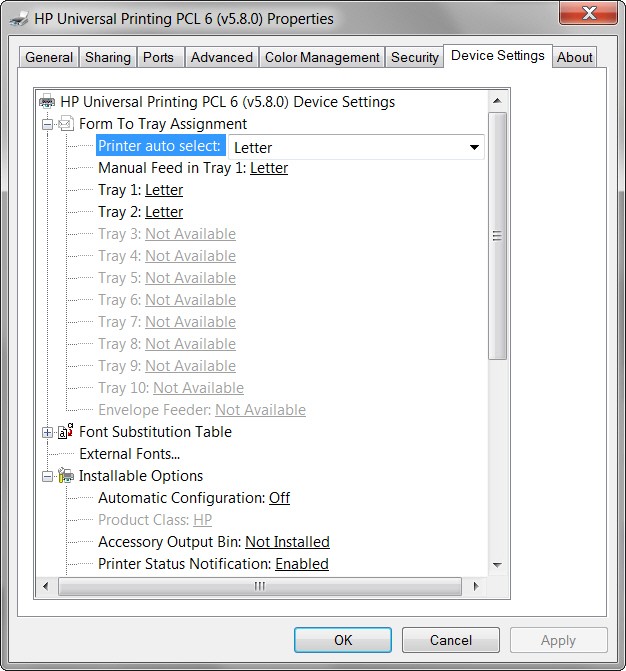
Devices and printers -> select your 2605dn and right-click on it -> printer properties -> device settings -> scroll down to the very bottom, and change "Device type" from "auto detect" to "color".

That will solve your problem.

NOTE: if you have both PCL6 and PS drivers installed (as I do, but I never use the PCL6 printer and have the PS printer defined as my "default"), you need to make this "auto detect" -> "color" change for both. HP made the same error in both drivers.


Second issue, need to add additional memory. Presently have the stk 64MB and is reported correctly on the config report. Have additional memory on order and will have early next week. Reading the manual, it says after adding the memory you need to change amount of available memory in the driver. All I've found so far is under Printer-Properties/Device-settings/Installable-options is a listing for Printer memory and that has a drop down menu with two choices and the smallest choice is for 384-494MB which is more than the printer can handle. Right now I don't know what to expect when I install the new memory module.
I don't know what driver software you got from HP and are running. Can you please provide?

I'm running v5.6.0 for both PCL6 and PS drivers, and do not show any "Installable options" item for printer memory like you describe. I now see that there is a 5.8.0 version for both drivers that just got released, so I supposed I should upgrade.

I recently upgraded my own 2605dn memory from the standard 64MB to the max of 320MB, through the addition of a 256MB module. All I had to do was insert it, and the device configuration report correctly showed that it had been recognized and was functional. I made no other change to any driver setting to support the additional hardware memory in the printer.

I know for a fact that the memory must be working, because some documents I printed that had HUGE graphics imbedded in them were now able to print, whereas before they produced "printer error". And I did nothing to make this work now, other than install the additional 256MB physical memory.

Now there IS an item in the PS driver "installable options" named "available Postscript memory" and it currently shows 6144K, or just 6MB. I haven't changed it, though maybe I should, given that I've now gone from 64MB -> 320MB of physical memory. I will research to see if I can find out what this option is for, and whether it pertains to an available memory buffer in the printer or memory buffer size used on the PC. In either case, seems that enlarging this number would provide additional in-memory performance, presumably. I'll research this.

Or, perhaps the memory setting you describe is new in the 5.8.0 drivers. I'll see shortly.


P.S. - forget about PCL6, unless you are printing something that for some reason requires PCL6 and cannot be printed using PS. Just use the PS driver as your default, and forget about PCL6. Of course naturally by default action Windows will install the PCL6 driver when it first senses the printer, so you have to go after the PS driver yourself (and now you have two printers). In my experience there's no point in uninstalling the PCL printer, because Windows will just go right back and re-install it. Just forget about it, and use the PS printer as your default.
 

My Computer

Computer type
PC/Desktop
Computer Manufacturer/Model Number
Home-built, two systems (1) and (2)
OS
Windows 7 Pro x64 (1), Win7 Pro X64 (2)
CPU
i5-3350p 3.1Ghz/6MB-cache (1); E8400 3.0Ghz/6MB-cache (2)
Motherboard
ASUS P8Z77-V Pro (1); ASUS P5Q3 (2)
Memory
8GB PC3-12800 DDR3 (1); 4GB PC3-10600 DDR3 (2)
Graphics Card(s)
ATI HD7750 (1), (see TV cards); ATI R7 250 (2)
Sound Card
Realtek ALC892 HD Audio (1); Realtek ALC1200 HD Audio (2)
Monitor(s) Displays
Eizo HD2441W LCD, Eizo S2433W (1); Eizo 24" S2433W (2)
Screen Resolution
1920x1200, 1920x1200 (1); 1920x1200 (2)
Hard Drives
(1) 1TB SATA-II (7200RPM), 2x2TB SATA-III (7200RPM), 250GB SATA-III (10000RPM) for OS; 2x2TB external USB 3.0

(2) 320GB SATA-II (7200RPM), 750GB SATA-II (7200RPM), 150GB SATA-II (10000RPM) for OS; 2TB external USB 3.0
PSU
Nesteq ECS-6001 600W (1); Nesteq ECS-5001 500W (2)
Case
Acousti-Case 360 (1) and (2)
Cooling
Noctua NH-U12P SE2 for CPU, 2x120mm case fans (1) and (2)
Keyboard
IBM PS/2 (1) and (2)
Mouse
Logitech MX Revolution wireless (1); Microsoft wired (2)
Internet Speed
100mbps down / 10mbps up
Antivirus
Microsoft Security Essentials; Malwarebyte Anti-Malware Pro
Browser
Firefox
Other Info
Ceton InfiniTV 4-tuner cablecard-enabled TV card as well as Hauppauge HVR-2250 OTA/ATSC 2-tuner TV card in (1), running under Win7 WMC
Ok. Found some information on that "available postscript memory" option.

Apparently this value SHOULD be a function of installed printer memory, but apparently this does not automatically happen.

The recommendations are:

Total RAM = 128 MB, Available Postscript Memory = 6144 KB
Total RAM = 256 MB, Available Postscript Memory = 38912 KB
Total RAM = 384 MB, Available Postscript Memory = 104448 KB
Total RAM = 512 MB, Available Postscript Memory = 169984 KB

I guess 6144KB is the minimum, even for the default of only 64MB which the standard memory size in the 2605dn.


Since there's no value shown for the 320MB of memory now in my 2605dn, I think I'll just interporlate between the 256MB and 384MB values shown, and set my "available postscript memory" number to 71680 KB.


EDIT: the above information apparently applies to some other printer, and not the 2605dn. The above suggested large numbers for "available postscript memory" are NOT ALLOWED for the 2605dn "printer properties" configuration. The maximum number which is allowed for the 2605dn is 32767, so that's what I've gone with.
 
Last edited:

My Computer

Computer type
PC/Desktop
Computer Manufacturer/Model Number
Home-built, two systems (1) and (2)
OS
Windows 7 Pro x64 (1), Win7 Pro X64 (2)
CPU
i5-3350p 3.1Ghz/6MB-cache (1); E8400 3.0Ghz/6MB-cache (2)
Motherboard
ASUS P8Z77-V Pro (1); ASUS P5Q3 (2)
Memory
8GB PC3-12800 DDR3 (1); 4GB PC3-10600 DDR3 (2)
Graphics Card(s)
ATI HD7750 (1), (see TV cards); ATI R7 250 (2)
Sound Card
Realtek ALC892 HD Audio (1); Realtek ALC1200 HD Audio (2)
Monitor(s) Displays
Eizo HD2441W LCD, Eizo S2433W (1); Eizo 24" S2433W (2)
Screen Resolution
1920x1200, 1920x1200 (1); 1920x1200 (2)
Hard Drives
(1) 1TB SATA-II (7200RPM), 2x2TB SATA-III (7200RPM), 250GB SATA-III (10000RPM) for OS; 2x2TB external USB 3.0

(2) 320GB SATA-II (7200RPM), 750GB SATA-II (7200RPM), 150GB SATA-II (10000RPM) for OS; 2TB external USB 3.0
PSU
Nesteq ECS-6001 600W (1); Nesteq ECS-5001 500W (2)
Case
Acousti-Case 360 (1) and (2)
Cooling
Noctua NH-U12P SE2 for CPU, 2x120mm case fans (1) and (2)
Keyboard
IBM PS/2 (1) and (2)
Mouse
Logitech MX Revolution wireless (1); Microsoft wired (2)
Internet Speed
100mbps down / 10mbps up
Antivirus
Microsoft Security Essentials; Malwarebyte Anti-Malware Pro
Browser
Firefox
Other Info
Ceton InfiniTV 4-tuner cablecard-enabled TV card as well as Hauppauge HVR-2250 OTA/ATSC 2-tuner TV card in (1), running under Win7 WMC
Correction to my earlier post regarding "available postscript memory", now that I've upgraded to version 5.8.0 of the driver (both PCL6 and PS).

I must have been reading an article for a different HP printer. I've now just upgraded to the latest 5.8.0 version of the PS driver from the HP site, and cannot enter a number larger than 32767 in the "available postscript memory" field. So while 6144 still was there as the default, apparently 32767 is the maximum allowed for the 2605dn.

Don't know if this is intentional or unintentional on HP's part (even with 320MB memory now in the printer instead of the original 64MB), but I'll just leave it at 32767 and be satisfied.


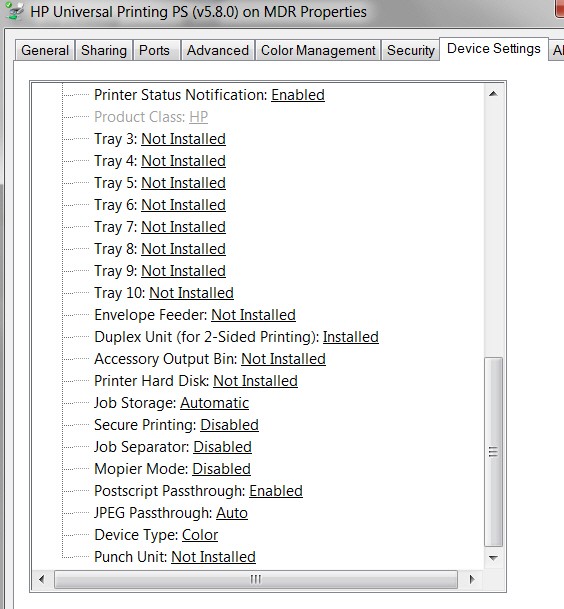
Also, the "device type" -> COLOR change I mentioned earlier to activate color printing does still need to be done as the "auto detect" value is still misinterpreted to produce B&W.

But HP has now added one more new item ("punch unit") following the "device type" item. So "device type" is no longer the very bottom item. It's now second-from-the-bottom. But it still should be set to "COLOR".


Finally, for some reason the "duplex unit for 2-sided printing" item was also presented as "not installed" by default, which is incorrect for the 2605dn which is a duplexing printer. This was certainly the case with the PCL6 driver version 5.8.0. So I had to change that item to show "installed" for the PCL6 driver.

When I then installed the PS driver version 5.8.0 it already showed "installed" for the duplex feature. I don't know if this was already correct, or if it resulted from my change to the PCL6 driver setting (though that seems highly unlikely). In any case I did NOT have to make the same change for the PS driver.
 

My Computer

Computer type
PC/Desktop
Computer Manufacturer/Model Number
Home-built, two systems (1) and (2)
OS
Windows 7 Pro x64 (1), Win7 Pro X64 (2)
CPU
i5-3350p 3.1Ghz/6MB-cache (1); E8400 3.0Ghz/6MB-cache (2)
Motherboard
ASUS P8Z77-V Pro (1); ASUS P5Q3 (2)
Memory
8GB PC3-12800 DDR3 (1); 4GB PC3-10600 DDR3 (2)
Graphics Card(s)
ATI HD7750 (1), (see TV cards); ATI R7 250 (2)
Sound Card
Realtek ALC892 HD Audio (1); Realtek ALC1200 HD Audio (2)
Monitor(s) Displays
Eizo HD2441W LCD, Eizo S2433W (1); Eizo 24" S2433W (2)
Screen Resolution
1920x1200, 1920x1200 (1); 1920x1200 (2)
Hard Drives
(1) 1TB SATA-II (7200RPM), 2x2TB SATA-III (7200RPM), 250GB SATA-III (10000RPM) for OS; 2x2TB external USB 3.0

(2) 320GB SATA-II (7200RPM), 750GB SATA-II (7200RPM), 150GB SATA-II (10000RPM) for OS; 2TB external USB 3.0
PSU
Nesteq ECS-6001 600W (1); Nesteq ECS-5001 500W (2)
Case
Acousti-Case 360 (1) and (2)
Cooling
Noctua NH-U12P SE2 for CPU, 2x120mm case fans (1) and (2)
Keyboard
IBM PS/2 (1) and (2)
Mouse
Logitech MX Revolution wireless (1); Microsoft wired (2)
Internet Speed
100mbps down / 10mbps up
Antivirus
Microsoft Security Essentials; Malwarebyte Anti-Malware Pro
Browser
Firefox
Other Info
Ceton InfiniTV 4-tuner cablecard-enabled TV card as well as Hauppauge HVR-2250 OTA/ATSC 2-tuner TV card in (1), running under Win7 WMC
Wow, thanks for the time spent dsperber.

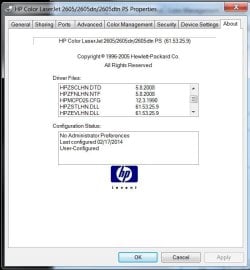
First let me say there is some differences in what we are seeing and experiencing. As for what drivers I'm using, lot of drivers being mentioned but the top one is HPMCPD25.PPD = 5.8.2008. Got this off the HP site about 4 days ago.

As for having both the PS and the PLC drivers installed, that didn't work for me. After having the PS driver installed and printer working I tried installing the PLC UPD and that didn't work. Ended up with new printer and ICON looked like a floor model. Printer didn't work when trying to print a test page. And on top of that the PLC driver install removed the PS drivers. Was able to recover and now am back to where I started and printer is now back working.

As for what is seen under the device settings, down at the bottom under Installable options I see Automatic Configuration with choice of OFF or UPDATE NOW. Next line up from that is Mopier Mode which is set to disabled. Not sure what Mopier Mode is.

As for adding the memory, I saw the requirement for updating the driver in the user manual but that could be old info that no longer applies.

Lets see, what else. Oh, as for color, Color output is working fine. Under printing preferences/color, The image of the page is shown in color and when I click on print grayscale the page image turns to blk/wht. There are no other choices. Seems like in some info seen there was a pic shown of this page with adjmts for the various parameters.

Did I forget to reply on some other comments you made??? Again, thanks, for your comments.

PS
Duplex is working just fine.
 

My Computer

Computer type
PC/Desktop
Computer Manufacturer/Model Number
HP Z series workstation
OS
W7 Pro x64
CPU
i7
Memory
8GB
Graphics Card(s)
AMD FirePro V3900
Hard Drives
500G
560G
1T
Antivirus
Comodo
First let me say there is some differences in what we are seeing and experiencing. As for what drivers I'm using, lot of drivers being mentioned but the top one is HPMCPD25.PPD = 5.8.2008. Got this off the HP site about 4 days ago.
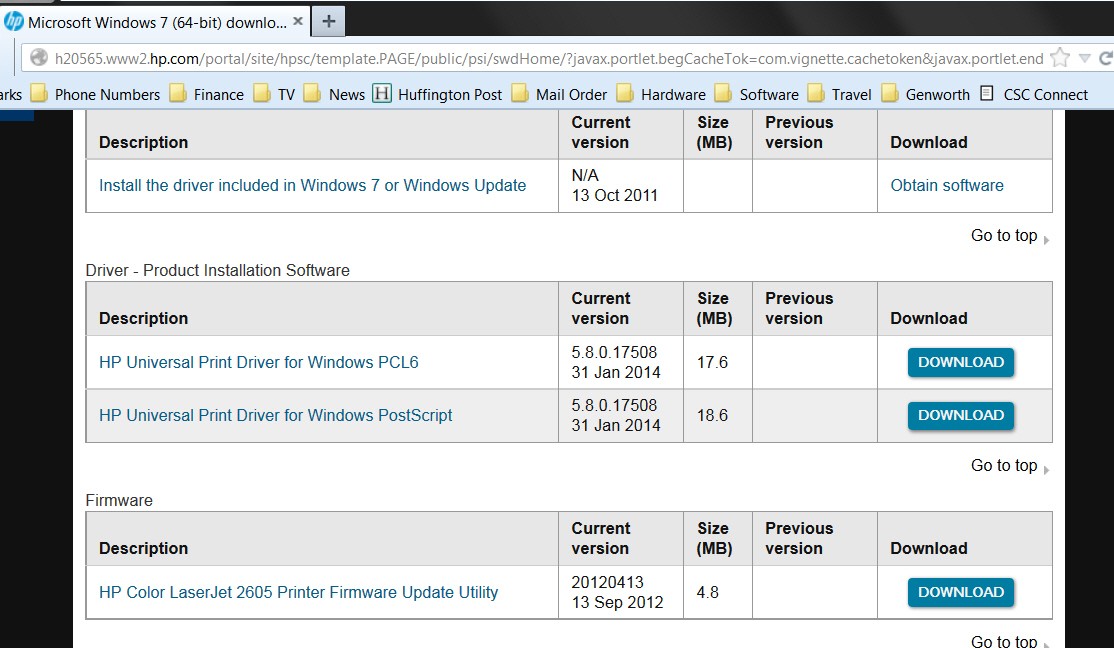
The 5.8.0.17508 driver I installed (for both PS and PCL6) is from the page with the link I provided in my first reply:

y0fn.jpg


As for having both the PS and the PLC drivers installed, that didn't work for me. After having the PS driver installed and printer working I tried installing the PLC UPD and that didn't work.
Actually, if the printer is connected with USB cable and powered off, when you power it on for the first time Windows will do an auto-install of the PCL6 driver immediately.

Then you can run the PS installer file (downloaded from the above HP page) and it will be added as a second printer driver for the same device. So you'll end up with a single printer object in "Devices and Printers", but if you right-click on it and select either "printer preferences" or "printer properties" from the context menu you will see BOTH the PCL6 and PS printers and you can then click on either to get into the dialog for that printer.


Ended up with new printer and ICON looked like a floor model. Printer didn't work when trying to print a test page.
If you go to "printer properties" -> "ports" tab, you'll probably not see "USB001" which is the proper port you should see. If you don't see "USB001" then you really won't be able to print, and printing a test page will fail.

Installation of a "second printer" should select "local printer", and "use existing port", and select "USB001" (which was already created by Windows when it auto-installed the PCL6 printer when you first powered it on).

You might just start over. Go to "Devices and Printers", right-click on the printers that are there and then select "remove device". When you have any/all of these 2605dn-related objects gone power the printer off and re-boot. Then power the printer on and Windows should automatically auto-install the PCL6 driver.

Optionally, you can then run the PCL6 driver you've downloaded (from the HP site) but I believe it'll in all likelihood be the same 5.2.0.17508 driver as Windows probably just installed automatically. Nevertheless if you just proceed, you'll end up with two PCL6 printers. Not a problem. Again, select "local printer" and "use existing port" and select USB001.

Then you can run the PS driver, again choosing to add "local printer" and "use existing port" and select USB001.


As for what is seen under the device settings, down at the bottom under Installable options I see Automatic Configuration with choice of OFF or UPDATE NOW. Next line up from that is Mopier Mode which is set to disabled. Not sure what Mopier Mode is.
I also show "automatic configuration: OFF", but I don't show "Mopier mode" above it. Instead, "Mopier mode" is below it.

Here is what my 5.8.0.17508 driver shows BELOW the "automatic configuration: OFF" line (note that the second-to-last line is "device type: color" which is what I manually set):

ijrq.jpg


As for adding the memory, I saw the requirement for updating the driver in the user manual but that could be old info that no longer applies.
The PDF manual doesn't provide any specific details on what this value means or what it should be as a function of physical printer memory.

In any case 32767 is definitely the largest value you can actually type there. If you try entering a larger number it just gets changed (as you're typing) to 32767.


Lets see, what else. Oh, as for color, Color output is working fine. Under printing preferences/color, The image of the page is shown in color and when I click on print grayscale the page image turns to blk/wht.
Yes, that is how it SHOULD be working.

But if you don't manually correct "device type: auto detect" to "device type: COLOR" (see my screenshot above) then you won't see the page in color. It will only be in B&W because the driver mistakenly treats "auto detect" as "monochrome" (i.e. B&W) when it should be treated as "color". Once you change that setting to COLOR now the page image appears in color as it should.
 

My Computer

Computer type
PC/Desktop
Computer Manufacturer/Model Number
Home-built, two systems (1) and (2)
OS
Windows 7 Pro x64 (1), Win7 Pro X64 (2)
CPU
i5-3350p 3.1Ghz/6MB-cache (1); E8400 3.0Ghz/6MB-cache (2)
Motherboard
ASUS P8Z77-V Pro (1); ASUS P5Q3 (2)
Memory
8GB PC3-12800 DDR3 (1); 4GB PC3-10600 DDR3 (2)
Graphics Card(s)
ATI HD7750 (1), (see TV cards); ATI R7 250 (2)
Sound Card
Realtek ALC892 HD Audio (1); Realtek ALC1200 HD Audio (2)
Monitor(s) Displays
Eizo HD2441W LCD, Eizo S2433W (1); Eizo 24" S2433W (2)
Screen Resolution
1920x1200, 1920x1200 (1); 1920x1200 (2)
Hard Drives
(1) 1TB SATA-II (7200RPM), 2x2TB SATA-III (7200RPM), 250GB SATA-III (10000RPM) for OS; 2x2TB external USB 3.0

(2) 320GB SATA-II (7200RPM), 750GB SATA-II (7200RPM), 150GB SATA-II (10000RPM) for OS; 2TB external USB 3.0
PSU
Nesteq ECS-6001 600W (1); Nesteq ECS-5001 500W (2)
Case
Acousti-Case 360 (1) and (2)
Cooling
Noctua NH-U12P SE2 for CPU, 2x120mm case fans (1) and (2)
Keyboard
IBM PS/2 (1) and (2)
Mouse
Logitech MX Revolution wireless (1); Microsoft wired (2)
Internet Speed
100mbps down / 10mbps up
Antivirus
Microsoft Security Essentials; Malwarebyte Anti-Malware Pro
Browser
Firefox
Other Info
Ceton InfiniTV 4-tuner cablecard-enabled TV card as well as Hauppauge HVR-2250 OTA/ATSC 2-tuner TV card in (1), running under Win7 WMC
Thanks for getting back so quickly.

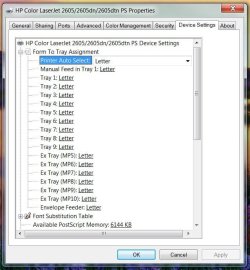
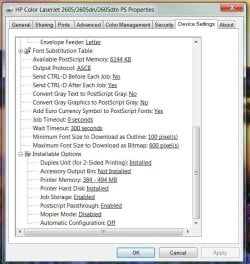
Your device setting screen is a lot different than what I'm seeing. Here are a couple shots to show all the settings.

As for your first screen shot, been to that page and another one or two showing the same UPD drivers.

Forgot exactly all I did when I tried to install the PCL drivers. Currently the printer is set up for USB001.

I have a schedules engagement shortly so won't be able to do much on this today. Tomorrow will give a shot to your recommendation to remove the printer device and then proceed reinstalling.

You know this is sort of funny asking for the help. 27yrs with HP but in another field other than printers. Then my son has 20 yrs in the HP Vancouver div but they are strictly inkjet.

As I previously said, there will be little use of this printer for text as I will be using my other laser printer for monochrome/text. That being the case I likely won't spend too much time with trying to get both the PLC and PS drivers working if I have problems.

Once again, thanks for the help.
 

Attachments

  • Clipboard01.jpg
    Clipboard01.jpg
    61.6 KB · Views: 19
  • Clipboard02.jpg
    Clipboard02.jpg
    71.7 KB · Views: 20

My Computer

Computer type
PC/Desktop
Computer Manufacturer/Model Number
HP Z series workstation
OS
W7 Pro x64
CPU
i7
Memory
8GB
Graphics Card(s)
AMD FirePro V3900
Hard Drives
500G
560G
1T
Antivirus
Comodo
First let me say there is some differences in what we are seeing and experiencing. As for what drivers I'm using, lot of drivers being mentioned but the top one is HPMCPD25.PPD = 5.8.2008. Got this off the HP site about 4 days ago.
"Some differences"??? Seems impossible that you could have downloaded the driver for the 2605dn from the same page that I provided a link to. This is for Win7 x64?? Are you sure??

My PCL6 driver is HPCU1606.GPD. And my PS driver is designated HPCU160S.PPD. Neither is the HPMCPD25.PPD, which I believe is for a different printer entirely.

Assuming we're now talking just about PCL6 and not PS (as my earlier screenshots were for, since that's actually the only printer I use by default), here is what my current 5.8.0.17508 PCL6 printer looks like. Note again that I have THREE separate printers shown with ONE PRINTER ICON, because that's how Windows presents it. One of them (the original PCL6 driver) occurred automatically when I powered on the printer and Windows automatically recognized it and auto-installed the PCL6 driver and created USB001 port. The other two (the official 5.8.0.17508 versions) for both PCL6 and PS are also shown in the flyout for either "printer preferences" or "printer properties".

9iie.jpg


So, if I then select "printer properties" for my own added PCL6 driver, here is what the ABOUT looks like. Note the difference in the PPD member, which is NOT the same file name as you say is on your machine. Again, this says to me you didn't download the specific driver for the 2605dn from that page, else you couldn't show a different PPD file name.

fbc6.jpg


And then if I go to the "Device Settings" tab, here is what is presented:

adn7.jpg


lmam.jpg


I recommend you "remove device" for whatever you have, and do a fresh download from the HP driver page I provided the link for, and start from scratch again. The different PPD name is a "giant clue"that you have a different driver installed than you should.
 

My Computer

Computer type
PC/Desktop
Computer Manufacturer/Model Number
Home-built, two systems (1) and (2)
OS
Windows 7 Pro x64 (1), Win7 Pro X64 (2)
CPU
i5-3350p 3.1Ghz/6MB-cache (1); E8400 3.0Ghz/6MB-cache (2)
Motherboard
ASUS P8Z77-V Pro (1); ASUS P5Q3 (2)
Memory
8GB PC3-12800 DDR3 (1); 4GB PC3-10600 DDR3 (2)
Graphics Card(s)
ATI HD7750 (1), (see TV cards); ATI R7 250 (2)
Sound Card
Realtek ALC892 HD Audio (1); Realtek ALC1200 HD Audio (2)
Monitor(s) Displays
Eizo HD2441W LCD, Eizo S2433W (1); Eizo 24" S2433W (2)
Screen Resolution
1920x1200, 1920x1200 (1); 1920x1200 (2)
Hard Drives
(1) 1TB SATA-II (7200RPM), 2x2TB SATA-III (7200RPM), 250GB SATA-III (10000RPM) for OS; 2x2TB external USB 3.0

(2) 320GB SATA-II (7200RPM), 750GB SATA-II (7200RPM), 150GB SATA-II (10000RPM) for OS; 2TB external USB 3.0
PSU
Nesteq ECS-6001 600W (1); Nesteq ECS-5001 500W (2)
Case
Acousti-Case 360 (1) and (2)
Cooling
Noctua NH-U12P SE2 for CPU, 2x120mm case fans (1) and (2)
Keyboard
IBM PS/2 (1) and (2)
Mouse
Logitech MX Revolution wireless (1); Microsoft wired (2)
Internet Speed
100mbps down / 10mbps up
Antivirus
Microsoft Security Essentials; Malwarebyte Anti-Malware Pro
Browser
Firefox
Other Info
Ceton InfiniTV 4-tuner cablecard-enabled TV card as well as Hauppauge HVR-2250 OTA/ATSC 2-tuner TV card in (1), running under Win7 WMC
Trying to think back on the exact steps I went through 5 days ago and is a little foggy. Very possible I didn't have the printer connected to the computer. For the last few printers I've had, you didn't make the connection until after the drivers were installed.

Went with ADD PRINTER and from the list of brands and models I didn't see anything for the 2605. Next clicked on Windows Update. From there I selected the driver titled as can be seen at the top of the screen shots I posted. After getting the printer up and running I next went to the pg you've shown and DL'd the driver for PCL setup. That is when I started getting into trouble.

So here is what I intend to do today.

* Remove current printer drivers.

* Turn on the printer and plug it into the computer. (At this point the computer should install the basic drivers. Right?)

* Next go to the pg you've shown with both of the latest drivers. DL both drivers separately. Make sure they are set up to use the USB001 port.

* After this I should see all the drivers listed like you've shown under printer properties.

* When I go to Device Settings, I should then see the same items that are shown on your machine.

I'll get back after I'm done and report how the reinstall went.
 

My Computer

Computer type
PC/Desktop
Computer Manufacturer/Model Number
HP Z series workstation
OS
W7 Pro x64
CPU
i7
Memory
8GB
Graphics Card(s)
AMD FirePro V3900
Hard Drives
500G
560G
1T
Antivirus
Comodo
Reinstall complete. As far as auto install drivers when first plugged in, didn't go exactly as described it would. During the install it went out to Windows Update and installed the same drivers as I initially had. Next DL'd the 2 driver packages on the HP site and made sure they were set up for using USB001 port. Rest of install went well and I now can see all 3 driver sets. As long as I select either of the 5.8.0 drivers, all looks like the screen shots dsperber posted.

Think I've gone as far as I can go on the install. Only thing left is after I install the additional memory later this week.

Anything else I need to do?
 

My Computer

Computer type
PC/Desktop
Computer Manufacturer/Model Number
HP Z series workstation
OS
W7 Pro x64
CPU
i7
Memory
8GB
Graphics Card(s)
AMD FirePro V3900
Hard Drives
500G
560G
1T
Antivirus
Comodo
Reinstall complete. As far as auto install drivers when first plugged in, didn't go exactly as described it would. During the install it went out to Windows Update and installed the same drivers as I initially had.
This still baffles me. That PPD you named is also physically in my own Driver Repository (from base Win7), but has nothing to do with the 2605dn printer neither PCL6 nor PS. It's for some other Officejet or Inkjet printer, if my analysis is correct.

Can you actually print a test page with that printer??

Can you please post a screenshot of the "ABOUT" page for that printer?

Anyway, as long as you've specified the 5.8.0.17508 "PS" printer as your default, you'll be fine. You can just permanently ignore the PCL6 printer as well as whatever it was that got auto-installed when you first powered the printer on and plugged it in. The PS printer will work for everything you send to it.


Next DL'd the 2 driver packages on the HP site and made sure they were set up for using USB001 port. Rest of install went well and I now can see all 3 driver sets. As long as I select either of the 5.8.0 drivers, all looks like the screen shots dsperber posted.
Good.

Did you set the "duplex" setting to INSTALLED? Did you change the "device type" setting to COLOR?


Think I've gone as far as I can go on the install. Only thing left is after I install the additional memory later this week.

Anything else I need to do?
If you can print a test page and the MS graphic is in color, you're done.

If you want duplex printing to be your default, don't forget to go into "printing preferences" ("Finishing" tab) and set it to "print on both sides" (along with "portrait mode" presumably). Note that if/when you might print something in landscape mode on both sides of the paper, you should also check the "flip pages up" box to get the landscape-mode duplexing along the long edge of the paper, rather than along the short edge.

Final point, just in case this is your first laserjet printer. You should use proper "laserjet paper", not "inkjet paper". It's smoother and whiter and is different because of the powdered ink toner used for a laserjet printer. I use "98 bright" and "24 lb." paper from Mohawk ("color copy") and it produces beautiful printed output both B&W and color. I buy it at my local Kelly Paper store, but you can probably find it elsewhere and online at good prices (but don't forget shipping charge).

Also, although it's more expensive for sure, I only use true genuine HP toner cartridges. I once tried a much less expensive "compatible" (recharge or whatever) from some ink supply place and it was awful. I was thankful it didn't cause any physical damage to my printer. Anyway, once was enough, and never again. Just use true original genuine HP toner is my recommendation.
 

My Computer

Computer type
PC/Desktop
Computer Manufacturer/Model Number
Home-built, two systems (1) and (2)
OS
Windows 7 Pro x64 (1), Win7 Pro X64 (2)
CPU
i5-3350p 3.1Ghz/6MB-cache (1); E8400 3.0Ghz/6MB-cache (2)
Motherboard
ASUS P8Z77-V Pro (1); ASUS P5Q3 (2)
Memory
8GB PC3-12800 DDR3 (1); 4GB PC3-10600 DDR3 (2)
Graphics Card(s)
ATI HD7750 (1), (see TV cards); ATI R7 250 (2)
Sound Card
Realtek ALC892 HD Audio (1); Realtek ALC1200 HD Audio (2)
Monitor(s) Displays
Eizo HD2441W LCD, Eizo S2433W (1); Eizo 24" S2433W (2)
Screen Resolution
1920x1200, 1920x1200 (1); 1920x1200 (2)
Hard Drives
(1) 1TB SATA-II (7200RPM), 2x2TB SATA-III (7200RPM), 250GB SATA-III (10000RPM) for OS; 2x2TB external USB 3.0

(2) 320GB SATA-II (7200RPM), 750GB SATA-II (7200RPM), 150GB SATA-II (10000RPM) for OS; 2TB external USB 3.0
PSU
Nesteq ECS-6001 600W (1); Nesteq ECS-5001 500W (2)
Case
Acousti-Case 360 (1) and (2)
Cooling
Noctua NH-U12P SE2 for CPU, 2x120mm case fans (1) and (2)
Keyboard
IBM PS/2 (1) and (2)
Mouse
Logitech MX Revolution wireless (1); Microsoft wired (2)
Internet Speed
100mbps down / 10mbps up
Antivirus
Microsoft Security Essentials; Malwarebyte Anti-Malware Pro
Browser
Firefox
Other Info
Ceton InfiniTV 4-tuner cablecard-enabled TV card as well as Hauppauge HVR-2250 OTA/ATSC 2-tuner TV card in (1), running under Win7 WMC
This still baffles me. That PPD you named is also physically in my own Driver Repository (from base Win7), but has nothing to do with the 2605dn printer neither PCL6 nor PS. It's for some other Officejet or Inkjet printer, if my analysis is correct.

Can you actually print a test page with that printer??


Can you please post a screenshot of the "ABOUT" page for that printer?

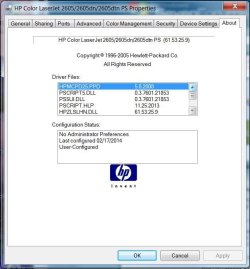
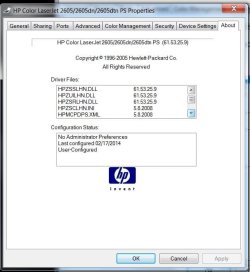
That driver set may be for something else but as you can see, it is titled for the various 2605 models. Have been printing from that driver for 4-5 days without any real problems.

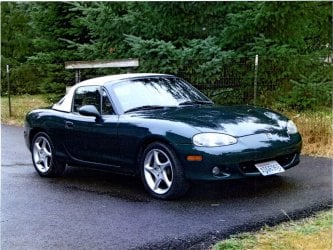
Including 3 shots from the ABOUT pg so you can see most of the various drivers included. Lastly included a copy of a scan I made from a printout using that first driver set. As I've said before, very pleased with the color output.
 

Attachments

  • Clipboard01.jpg
    Clipboard01.jpg
    45.1 KB · Views: 10
  • Clipboard02.jpg
    Clipboard02.jpg
    43.4 KB · Views: 10
  • Clipboard03.jpg
    Clipboard03.jpg
    41.8 KB · Views: 10
  • miata.jpg
    miata.jpg
    176.7 KB · Views: 2

My Computer

Computer type
PC/Desktop
Computer Manufacturer/Model Number
HP Z series workstation
OS
W7 Pro x64
CPU
i7
Memory
8GB
Graphics Card(s)
AMD FirePro V3900
Hard Drives
500G
560G
1T
Antivirus
Comodo
That driver set may be for something else but as you can see, it is titled for the various 2605 models. Have been printing from that driver for 4-5 days without any real problems.
Well not to belabor this mystery, but I'm really puzzled.

The HPMCPD25.PPD file you show is actually for a PS printer, not a PCL printer as I was thinking. I'm really amazed that the Windows auto-install when you power on that 2605dn for the first time causes your Windows to auto-install a PS printer driver instead of a PCL printer driver.

Furthermore, on my Windows system the HPMCPD25.PPD file is located in:

"C:\Windows\winsxs\amd64_prnhp002.inf_31bf3856ad364e35_6.1.7600.16385_none_2f4e6f72537f8faa\Amd64\HPMCPD25.PPD"

And PRNHP002.INF is not for a 2605 (or 2600 series) laserjet printer. It is for other HP printers, not the 2605 laserjet. In fact, PRNHP002.INF shows that HPMCPD25.PPD is the PS definition for:

"HP Color LaserJet 2800 Series PS" = hpmcpd25.ppd

All in all, I have no idea at all how or why this PS printer driver got installed on your system, and how it ends up appearing as a 2605 type printer when there's nothing in my versions of the files you show in your ABOUT screenshots which provides the title information shown in your ABOUT.

I'm stumped to explain what you have for that auto-installed printer driver.


3 shots from the ABOUT pg so you can see most of the various drivers included.
We can't really compare apples to oranges. My auto-install printer is PCL6. Yours is for PS.

I give up. And besides, we're not using that printer but rather are using the 5.8.0.17508 PS printer as the default... at least I assume you are, same as me.


Lastly included a copy of a scan I made from a printout using that first driver set. As I've said before, very pleased with the color output.
Wait... you printed a digital picture you'd taken with your camera (JPG or some other image format) on the 2605dn? And then you scanned that print back into your computer as a JPG? And this picture you're now posting is that SECOND JPG produced from a scan of a paper printout on the 2605dn of a camera-produced JPG?

I find that remarkable, honestly, because the picture you've attached here looks like the original JPG... and doesn't seem possible to be a second-generation JPG from a scan-from-paper-printout on a 2605dn (which is not a photo printer, but an ordinary laserjet color printer) of a first-generation JPG. Color in your JPG as well as other detail is simply TOO GOOD TO BE A SCAN FROM A LASERJET PRINTER (as opposed to say being a scan from a photo printer, on glossy photo paper).

In other words, the photo you've attached is SUPERB! Looks like the original from the camera, not the "round-the-horn" version produced by the multi-step process involving printing on the 2605dn and then scanning that printout back into a JPG.

Are you sure you've attached that second-generation JPG, and not the original first-generation camera-produced shot?? Sure looks like the original to me. Looks like a true original digital photo.
 

My Computer

Computer type
PC/Desktop
Computer Manufacturer/Model Number
Home-built, two systems (1) and (2)
OS
Windows 7 Pro x64 (1), Win7 Pro X64 (2)
CPU
i5-3350p 3.1Ghz/6MB-cache (1); E8400 3.0Ghz/6MB-cache (2)
Motherboard
ASUS P8Z77-V Pro (1); ASUS P5Q3 (2)
Memory
8GB PC3-12800 DDR3 (1); 4GB PC3-10600 DDR3 (2)
Graphics Card(s)
ATI HD7750 (1), (see TV cards); ATI R7 250 (2)
Sound Card
Realtek ALC892 HD Audio (1); Realtek ALC1200 HD Audio (2)
Monitor(s) Displays
Eizo HD2441W LCD, Eizo S2433W (1); Eizo 24" S2433W (2)
Screen Resolution
1920x1200, 1920x1200 (1); 1920x1200 (2)
Hard Drives
(1) 1TB SATA-II (7200RPM), 2x2TB SATA-III (7200RPM), 250GB SATA-III (10000RPM) for OS; 2x2TB external USB 3.0

(2) 320GB SATA-II (7200RPM), 750GB SATA-II (7200RPM), 150GB SATA-II (10000RPM) for OS; 2TB external USB 3.0
PSU
Nesteq ECS-6001 600W (1); Nesteq ECS-5001 500W (2)
Case
Acousti-Case 360 (1) and (2)
Cooling
Noctua NH-U12P SE2 for CPU, 2x120mm case fans (1) and (2)
Keyboard
IBM PS/2 (1) and (2)
Mouse
Logitech MX Revolution wireless (1); Microsoft wired (2)
Internet Speed
100mbps down / 10mbps up
Antivirus
Microsoft Security Essentials; Malwarebyte Anti-Malware Pro
Browser
Firefox
Other Info
Ceton InfiniTV 4-tuner cablecard-enabled TV card as well as Hauppauge HVR-2250 OTA/ATSC 2-tuner TV card in (1), running under Win7 WMC
....
I find that remarkable, honestly, because the picture you've attached here looks like the original JPG... and doesn't seem possible to be a second-generation JPG from a scan-from-paper-printout on a 2605dn (which is not a photo printer, but an ordinary laserjet color printer) of a first-generation JPG. Color in your JPG as well as other detail is simply TOO GOOD TO BE A SCAN FROM A LASERJET PRINTER (as opposed to say being a scan from a photo printer, on glossy photo paper).

In other words, the photo you've attached is SUPERB! Looks like the original from the camera, not the "round-the-horn" version produced by the multi-step process involving printing on the 2605dn and then scanning that printout back into a JPG.

Are you sure you've attached that second-generation JPG, and not the original first-generation camera-produced shot?? Sure looks like the original to me. Looks like a true original digital photo.

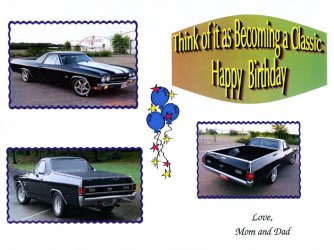
That's right, a scanned image from the output of this printer. Here is another scanned print. It is of a card the wife made several yrs ago. Typ graphic you'd expect to see from this kind of application but it also contains 3 photo images. This is more typ of how this printer is going to be used. Both this and the prior attachment were printed last Thurs-Fri.

As I've said before, I'm very impressed with the output of this printer. Son was also impressed with the output and he is an Eng at HP's inkjet Div.
 

Attachments

  • color scan.jpg
    color scan.jpg
    96.6 KB · Views: 1

My Computer

Computer type
PC/Desktop
Computer Manufacturer/Model Number
HP Z series workstation
OS
W7 Pro x64
CPU
i7
Memory
8GB
Graphics Card(s)
AMD FirePro V3900
Hard Drives
500G
560G
1T
Antivirus
Comodo
What type of paper are you using? I know the printed result often depends on the quality of the JPG/raw original photo you're printing, but I'm very impressed.

I recently used my 2605dn to print a "knife collection memoir book" for my cousin (actually contained in two WORD documents, which are limited in size to a max of 512MB), which included 100 full-page color images of his knives. The pictures themselves had been produced by SCANNING (at 600DPI, to TIFF) on a Canon MP990 all-in-one printer/scanner/FAX, the knives being placed over the glass and then just closing the top cover over them as best as possible. The 2605dn output was duplexed, to give them a "working copy" to look at. I was actually very impressed with the results out of the 2605dn for most of those 100 "plates" (printed on that "98 bright" 24-lb. Mohawk color copy paper I mentioned earlier)... as compared to how the original/cropped TIFF scans looked vs. how they looked as pages in the WORD document (which were actually pretty much identical to how they looked in the original TIFF form). Obviously the WORD document was HUGE (hence why it had to be split in two) because they had produced the book by dropping in those huge TIFF's in their original form.

NOTE: it was because of the HUGE sizes of some of these pages (which were actually HUGE TIFF images in the WORD document) that I needed to buy the additional 256MB so that the 2605dn could even print these pages... two pages at a time if need be (since I wanted duplex output)!!

Anyway, I then also printed each of the 100 "plate" pages on my Canon Pro9000 photo printer, using Canon "Photo Platinum" glossy paper (and highest-quality print settings), and printed the other non-image pages one-sided (simplex) on the 2605dn, so that they could insert the glossy photo "plate" pages where they belonged. I let all of the 100 "plate" pages dry (spread out on the floor) for 24 hours, which truly makes the color "cure".

Most of the photo printer results were clearly superior to the output of the 2605dn but that's also clearly partially subjective because of the glossy nature of the paper and the resulting "photo look" of the result. However I was really very satisfied with the same images produced in the original duplex "working copy" version out of the 2605dn as well.


I bought my 2605dn new from HP back in 2006, and it came with a small packet of plain white HP laserjet paper as well as a small packet of "HP laserjet glossy heavy photo paper".

I tried printing a true high-quality photo on that HP laserjet glossy photo paper (you need to make sure you first click the right values in printer settings to designate the type of paper being used which results in a much slower special pass through the rollers inside the printer, and also to print on only one side and not duplex the thing) and it was only fair (probably because there are only three colored powdered toner cartridges plus black in the 2605dn). Certainly nothing like my Canon Pixma Pro9000 which has seven different color liquid ink tanks plus black) which prints on true Canon high-quality glossy photo "Platinum" paper.

Anyway, I'm still amazed at your results, coming not only from a direct print on the 2605dn but then scanning it back in (using what scanner and what settings?) to what you show above. And JPG is a lossy compression, so every time you go through a transformation you lose even more detail and quality as compared to the true original (which again, may have its own quality issues depending on the JPG quality/compression parameters used and the software used to produce the JPG).

Very impressive. Certainly the green in the original image is fabulous! Very surprising.
 

My Computer

Computer type
PC/Desktop
Computer Manufacturer/Model Number
Home-built, two systems (1) and (2)
OS
Windows 7 Pro x64 (1), Win7 Pro X64 (2)
CPU
i5-3350p 3.1Ghz/6MB-cache (1); E8400 3.0Ghz/6MB-cache (2)
Motherboard
ASUS P8Z77-V Pro (1); ASUS P5Q3 (2)
Memory
8GB PC3-12800 DDR3 (1); 4GB PC3-10600 DDR3 (2)
Graphics Card(s)
ATI HD7750 (1), (see TV cards); ATI R7 250 (2)
Sound Card
Realtek ALC892 HD Audio (1); Realtek ALC1200 HD Audio (2)
Monitor(s) Displays
Eizo HD2441W LCD, Eizo S2433W (1); Eizo 24" S2433W (2)
Screen Resolution
1920x1200, 1920x1200 (1); 1920x1200 (2)
Hard Drives
(1) 1TB SATA-II (7200RPM), 2x2TB SATA-III (7200RPM), 250GB SATA-III (10000RPM) for OS; 2x2TB external USB 3.0

(2) 320GB SATA-II (7200RPM), 750GB SATA-II (7200RPM), 150GB SATA-II (10000RPM) for OS; 2TB external USB 3.0
PSU
Nesteq ECS-6001 600W (1); Nesteq ECS-5001 500W (2)
Case
Acousti-Case 360 (1) and (2)
Cooling
Noctua NH-U12P SE2 for CPU, 2x120mm case fans (1) and (2)
Keyboard
IBM PS/2 (1) and (2)
Mouse
Logitech MX Revolution wireless (1); Microsoft wired (2)
Internet Speed
100mbps down / 10mbps up
Antivirus
Microsoft Security Essentials; Malwarebyte Anti-Malware Pro
Browser
Firefox
Other Info
Ceton InfiniTV 4-tuner cablecard-enabled TV card as well as Hauppauge HVR-2250 OTA/ATSC 2-tuner TV card in (1), running under Win7 WMC
Printer = HP laserjet 2605dn, Computer = HP Z series workstation W7 Pro 64. Connection via USB. Oh, network connection isn't practical as the router is at the other end of the house.

The principle printer is and will remain a Brother HL-5470 (monochrome) as it is connected via wireless network connection and accessed throughout the house.
Just in passing, just because the 2605dn doesn't have wireless networking capability and locating it near the router at the other end of the house so as to use it in "networked mode" is not really an option, doesn't mean you can't still use the 2605dn for your whole-home printing needs.

You don't need to print to a "networked printer" (either wired or wireless to the network-capable printer).

You can "share" the printer which is now being hosted locally (via USB) by your HP Z-series workstation with every other computer in your home that has networking connectivity to your HP workstation machine as part of your home LAN.

I don't know what other machines (laptops or desktops, doesn't matter) you have, and it also doesn't matter if they're running 32-bit WinXP/Vista or 32/64-bit Win7 or Win8/8.1, if they're all on your home LAN and you've got things set up properly (so that all of your home machines are in the same workgroup and all are visible and show up as part of "Network" when you look) then the printer hosted by your HP Z machine can be used by all of your other machines... through "printer sharing" functionality of all versions Windows. You can set up the 2605dn on the networked HP Z machine as the "default" printer on any other machine, same as if it were truly "local"... as a result of the "add printer" dialog on each client machine.

If necessary you can install TWO versions (one 32-bit and one 64-bit) of the HP printer driver on the "host/server" HP Z machine where the printer is locally USB-connected. Then when you go through the setup for "add a networked printer" on each of the other "client" machines the HP Z machine will actually "deliver" the appropriate 32-bit or 64-bit version of the driver to that "client" machine. And that's it!

Bingo! You now can print to the 2605dn hosted locally via USB on the HP Z machine from any other machine in your house that is on the LAN and has connectivity to the HP Z machine.

Let me know if you'd like to do this but don't know exactly how to do it, and I'll walk you through it. Seems highly desirable even if you don't think it'll get much use, but I think that once you have it available you WILL use it as the printed output on the 2605dn on 98 bright paper (no matter whether color or B&W) is typically much "prettier" than what comes out of an inkjet printer. Plus, you can print duplex on the 2605dn, and surely you'd want to make that feature available from any computer in your home.
 

My Computer

Computer type
PC/Desktop
Computer Manufacturer/Model Number
Home-built, two systems (1) and (2)
OS
Windows 7 Pro x64 (1), Win7 Pro X64 (2)
CPU
i5-3350p 3.1Ghz/6MB-cache (1); E8400 3.0Ghz/6MB-cache (2)
Motherboard
ASUS P8Z77-V Pro (1); ASUS P5Q3 (2)
Memory
8GB PC3-12800 DDR3 (1); 4GB PC3-10600 DDR3 (2)
Graphics Card(s)
ATI HD7750 (1), (see TV cards); ATI R7 250 (2)
Sound Card
Realtek ALC892 HD Audio (1); Realtek ALC1200 HD Audio (2)
Monitor(s) Displays
Eizo HD2441W LCD, Eizo S2433W (1); Eizo 24" S2433W (2)
Screen Resolution
1920x1200, 1920x1200 (1); 1920x1200 (2)
Hard Drives
(1) 1TB SATA-II (7200RPM), 2x2TB SATA-III (7200RPM), 250GB SATA-III (10000RPM) for OS; 2x2TB external USB 3.0

(2) 320GB SATA-II (7200RPM), 750GB SATA-II (7200RPM), 150GB SATA-II (10000RPM) for OS; 2TB external USB 3.0
PSU
Nesteq ECS-6001 600W (1); Nesteq ECS-5001 500W (2)
Case
Acousti-Case 360 (1) and (2)
Cooling
Noctua NH-U12P SE2 for CPU, 2x120mm case fans (1) and (2)
Keyboard
IBM PS/2 (1) and (2)
Mouse
Logitech MX Revolution wireless (1); Microsoft wired (2)
Internet Speed
100mbps down / 10mbps up
Antivirus
Microsoft Security Essentials; Malwarebyte Anti-Malware Pro
Browser
Firefox
Other Info
Ceton InfiniTV 4-tuner cablecard-enabled TV card as well as Hauppauge HVR-2250 OTA/ATSC 2-tuner TV card in (1), running under Win7 WMC
Those prints were printed on some Xerox Premium Multipurpose Paper. 24# 96 brightness. same paper I was using on my Canon printer up until it bit the dust recently. Appears the printhead is shot and the best price I could find on a new PH was $120. Paid less than that for the 2605.

The scanner I use is an Epson Perfection 4490 photo scanner. I'm not much of an all-in-one fan and have always kept my scanning and printer needs separate.

Don't really have a need for a color photo printer at home. When ever I need glossy photo prints I put the files on a memory stick and get them printed on very high end photo printers that are available to employees at the local HP Div. 4x6 up to poster size prints. And did I mention, FREE is a very good price. :D The 2605 is going to do just fine for the wife's card printing needs. I'm also adding the extra memory due to the large file sizes the card program generates.


I know all about printer sharing. Didn't really work with the old desktop running XP and the laptop running Vista. The wireless laser printer has taken care of that. The card prgm the wife uses requires the swapping of CD's from time to time so limiting the use of that prgm to the new desktop seems the most practical thus the USB connection is just fine.
 

My Computer

Computer type
PC/Desktop
Computer Manufacturer/Model Number
HP Z series workstation
OS
W7 Pro x64
CPU
i7
Memory
8GB
Graphics Card(s)
AMD FirePro V3900
Hard Drives
500G
560G
1T
Antivirus
Comodo
Those prints were printed on some Xerox Premium Multipurpose Paper. 24# 96 brightness. same paper I was using on my Canon printer up until it bit the dust recently. Appears the printhead is shot and the best price I could find on a new PH was $120. Paid less than that for the 2605.
Well obviously that was a terrific price for your used 2605dn. I would have been a bit skeptical of its condition for that price, but if it works fine then it was obviously a great deal.

I paid $860 to HP Home back in 2006 for mine new, along with a set of four toner cartridges (which go for $282 online today) and some other supplies. Can't recall exactly but I think it was on sale for $499, and then tax+shipping, etc. I don't think HP makes them anymore, and new they're over $1K. Used and refurb they're down in the $100-$400 range.

Real workhorse. I bought it to replace an old HP Laserjet 4+ (with duplex attachment) that I'd owned for about 14 years, and which still worked fine. But I wanted a faster printer and color.

So far in eight years I've only had one true "failure" of the 2605dn which required genuine repair by a printer repair shop here in LA that came over to pick it up and then dropped it back off when it was finished. The printer would power itself off immediately after going through its seemingly normal power-on sequence. Needed a new processor card inside that was about $150.


The scanner I use is an Epson Perfection 4490 photo scanner. I'm not much of an all-in-one fan and have always kept my scanning and printer needs separate.
Apparently we both think along similar lines, equipment-wise.

I have an Epson Perfection 4990 Photo scanner, along with Lasersoft's Silverfast Ai v8 scanning software package to supplement the Epson driver. Photoshop CS6.


Anyway, glad you're finally up and running with the 2605dn and the latest HP PS/PCL6 drivers... "in production".

Your additional 256MB of memory add-on should complete the project. Don't forget to update the PS driver "printer properties" to show 32767 of "available Postscript memory".
 

My Computer

Computer type
PC/Desktop
Computer Manufacturer/Model Number
Home-built, two systems (1) and (2)
OS
Windows 7 Pro x64 (1), Win7 Pro X64 (2)
CPU
i5-3350p 3.1Ghz/6MB-cache (1); E8400 3.0Ghz/6MB-cache (2)
Motherboard
ASUS P8Z77-V Pro (1); ASUS P5Q3 (2)
Memory
8GB PC3-12800 DDR3 (1); 4GB PC3-10600 DDR3 (2)
Graphics Card(s)
ATI HD7750 (1), (see TV cards); ATI R7 250 (2)
Sound Card
Realtek ALC892 HD Audio (1); Realtek ALC1200 HD Audio (2)
Monitor(s) Displays
Eizo HD2441W LCD, Eizo S2433W (1); Eizo 24" S2433W (2)
Screen Resolution
1920x1200, 1920x1200 (1); 1920x1200 (2)
Hard Drives
(1) 1TB SATA-II (7200RPM), 2x2TB SATA-III (7200RPM), 250GB SATA-III (10000RPM) for OS; 2x2TB external USB 3.0

(2) 320GB SATA-II (7200RPM), 750GB SATA-II (7200RPM), 150GB SATA-II (10000RPM) for OS; 2TB external USB 3.0
PSU
Nesteq ECS-6001 600W (1); Nesteq ECS-5001 500W (2)
Case
Acousti-Case 360 (1) and (2)
Cooling
Noctua NH-U12P SE2 for CPU, 2x120mm case fans (1) and (2)
Keyboard
IBM PS/2 (1) and (2)
Mouse
Logitech MX Revolution wireless (1); Microsoft wired (2)
Internet Speed
100mbps down / 10mbps up
Antivirus
Microsoft Security Essentials; Malwarebyte Anti-Malware Pro
Browser
Firefox
Other Info
Ceton InfiniTV 4-tuner cablecard-enabled TV card as well as Hauppauge HVR-2250 OTA/ATSC 2-tuner TV card in (1), running under Win7 WMC
Wanted to thank you again for your help.

The printer shows a total page count <10k which seems not bad for a printer rated for something like 3.5k/mo. Firmware was updated last yr and a had a service check in recent months. All that was needed/done was to clean the mirrors.

You mentioned LA, I grew up there and lived in several towns close to LAX.
 

My Computer

Computer type
PC/Desktop
Computer Manufacturer/Model Number
HP Z series workstation
OS
W7 Pro x64
CPU
i7
Memory
8GB
Graphics Card(s)
AMD FirePro V3900
Hard Drives
500G
560G
1T
Antivirus
Comodo
Wanted to thank you again for your help.
You're welcome.

Just one more post-mortem observation (I'm simply not willing to give up until I get to the bottom of the mystery to my satisfaction)...

As I look back at your "Device Settings" -> ABOUT screenshots from your original auto-installed driver (which clearly shows it as being a PS driver using HPMCPD25.PPD, and not a PCL driver as I'd just assumed it would be) and compare them to my own (which were from my latest 5.8.0.17508 PCL6 driver), I see that your device title is different from mine (even from my own PS driver), showing as "HP Color LaserJet 2605/2605dn/2605dtn PS".

Also, the copyright date statement from HP on the ABOUT page is also very different. Yours shows 2005 as the copyright date for that HPMCPD25.PPD PS driver, and the latest 5.8.0.17508 from HP shows 2013, for both my PCL6 and PS printers. I still can't imagine how the auto-install your Windows 7 system went through (which used Windows Update to go up to the Microsoft driver repository in the cloud to retrieve what presumably would then have been the "most recent" driver) would have ended up with a 9-year old version of that driver! And a PS driver at that, rather than a PCL driver as occurred on my own machine.

Now true, the driver retrieved automatically from MS's driver download site is whatever HP (the vendor) most recently provided to MS. That's also how some other hardware driver updates get "pushed out" with Windows Update, from the vendor to user through Windows Update. But in this case the implication is that HP hasn't updated the drivers given to MS since 2005?? Is that really possible?

Anyway, in the 8 years since I've had my 2605dn, I've probably done six Windows 7 installs "from scratch" where the first time auto-install (at power-on) for the correct driver for the USB-attached printer went through its motions, I have NEVER ended up with a PS driver with a copyright date of 2005. It has ALWAYS been a much more recent PCL6 driver that I ended up with (can't recall now if it was actually the same as the "most recent" PCL6 driver downloaded from the HP site itself, as it's been quite a while since my last Win7 install on the machine to which the 2605dn is currently USB-connected).

But for absolute sure I do remember that it was always a PCL driver, not a PS driver as you show in your screenshots.

Furthermore, as I mentioned previously, although I did find HPMCPD25.PPD on my machine in the Windows \Driver Repository, my research suggests it is PS for an HP 2800 series printer, not an HP 2600 series printer. I wonder if this is tied to your particular HP Z-series machine itself? Is this a Win7 pre-installed by HP, or did you do your own subsequent reinstall-from-scratch?

In other words I wonder if something already in the \Driver Repository on your machine (with an HP-pre-installed Windows 7) told the auto-install process (when you powered on your new 2605dn) that your local PS driver for a 2800-series printer (a) somehow also applied to the 2605dn hardware id, and (b) was "more current" or appropriate than the PCL6 driver which I'm sure is on the MS driver repository in the cloud??


Ok. Enough blabbering speculation and questioning.

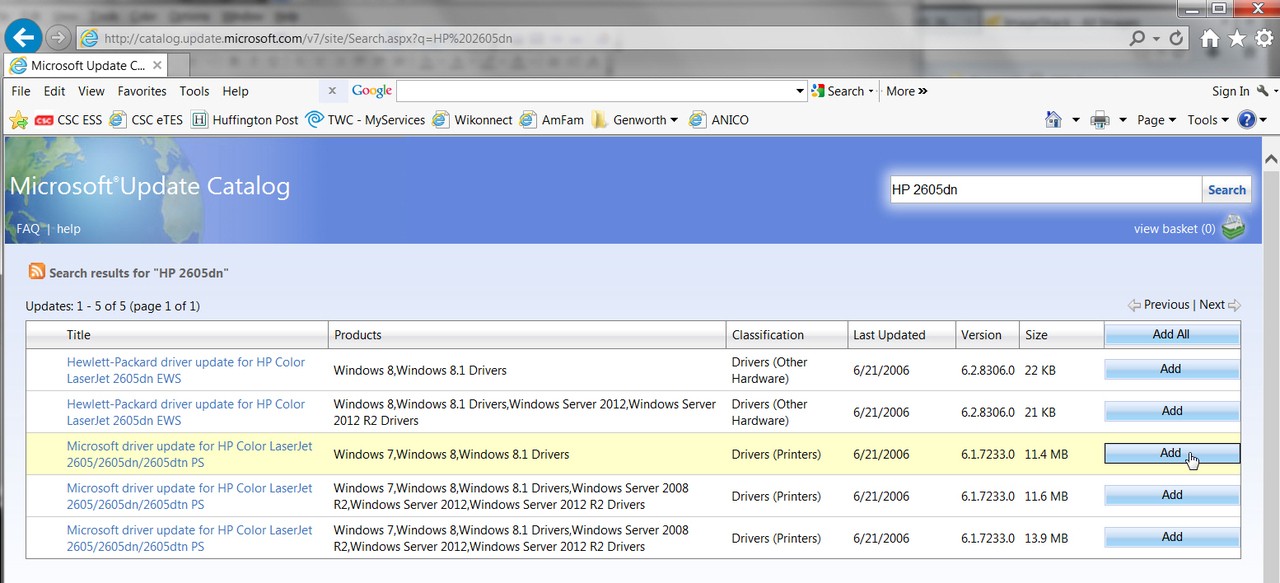
To satisfy my own curiosity, I went directly to the Microsoft Update Catalog site (where Windows Update goes for software updates and drivers, but you must use IE and not Firefox as otherwise the page won't open properly). I then searched for "HP 2605dn" and received the following hit list (showing three drivers eligible for use with Win7):

lm2x.jpg


Although the annotation appears the same, my experience is that typically these three drivers offered are for (1) x86, (2) x64, and (3) Xeon processors. So I selected all three and downloaded them, and sure enough what I got were the predicted three driver CAB variant packages, and I then expanded the x64 version:

n66a.jpg


which revealed the sought-after INF file inside, namely PRNHP001.INF:

ugzt.jpg


I then looked inside PRNHP001.INF using NOTEPAD (with "wordwrap" enabled so I could take a complete screenshot) and looked down at the item for the 2605dn printer (see highlight in the following screenshot):

uya3.jpg


Well, sure enough, now that I can see inside this PRNHP001.INF it's clear that the corresponding driver obviously is a PS driver and is EXACTLY THE ONE YOU HAVE BEEN GETTING, and which uses HPMCPD25.PPD!!! It is also named exactly the same as is shown in your ABOUT screenshot, and I suspect that while the MS download site shows it as version 6.1.7233.0 dated 6/21/2006, my guess is that that it would have your 2005 copyright date inside and other matching specific details.

Amazingly, it absolutely IS a PS driver and not a PCL6 driver. This is very definitely different from the last time I did my own auto-install for the 2605dn and which resulted in a PCL6 driver, and not a PS driver. Obviously if I were to do a fresh reinstall-from-scratch today for Win7, that when I first powered-on my 2605dn and the auto-install was done, that I too would be given exactly this same driver as it is what is now being offered through Windows Update and the MS update catalog site.

I'm guessing this is all tied to what they did to update of the MS driver site in support Windows 8/8.1 as well as previous Windows 7 environments. Note from my screenshot above that they also have two drivers specifically for Windows 8/8.1 only (they look like small "bootstrap" files, not the complete driver files), with a newer version 6.2.8306.0, although also dated 6/21/2006. Seems very strange as Windows 8 was not around back then, but who knows how these things get titled and dated?

Note that the file dates of these objects goes back to 2009, when HP was probably doing its development for Windows 8 drivers before handing them over to MS for inclusion 3 years later in the released finished Windows 8 product.


Anyway, I have now satisfied my own curiosity as to why you got what you got. It has nothing to do with your HP-Z machine. It has everything to do with what's now on the MS Windows Updates site for this printer. And apparently HP has decided it should be the PS driver that gets auto-installed, and not the PCL6 driver... something I'm all for.

Yes, this is STILL NOT THE LATEST DRIVER AVAILABLE THROUGH HP (which is 5.8.0.17508 and dated January 2014, which oddly seems to have a lower number than either 6.1.7233.0 or 6.2.8306.0 as shown on the MS site, both of which are dated June 2006!!), but at this point I don't care anymore!

I'm only finally satisfied that I at last understand WHY you got what you got, and why the ABOUT information shows what it did.

I'd say "case closed".
 

My Computer

Computer type
PC/Desktop
Computer Manufacturer/Model Number
Home-built, two systems (1) and (2)
OS
Windows 7 Pro x64 (1), Win7 Pro X64 (2)
CPU
i5-3350p 3.1Ghz/6MB-cache (1); E8400 3.0Ghz/6MB-cache (2)
Motherboard
ASUS P8Z77-V Pro (1); ASUS P5Q3 (2)
Memory
8GB PC3-12800 DDR3 (1); 4GB PC3-10600 DDR3 (2)
Graphics Card(s)
ATI HD7750 (1), (see TV cards); ATI R7 250 (2)
Sound Card
Realtek ALC892 HD Audio (1); Realtek ALC1200 HD Audio (2)
Monitor(s) Displays
Eizo HD2441W LCD, Eizo S2433W (1); Eizo 24" S2433W (2)
Screen Resolution
1920x1200, 1920x1200 (1); 1920x1200 (2)
Hard Drives
(1) 1TB SATA-II (7200RPM), 2x2TB SATA-III (7200RPM), 250GB SATA-III (10000RPM) for OS; 2x2TB external USB 3.0

(2) 320GB SATA-II (7200RPM), 750GB SATA-II (7200RPM), 150GB SATA-II (10000RPM) for OS; 2TB external USB 3.0
PSU
Nesteq ECS-6001 600W (1); Nesteq ECS-5001 500W (2)
Case
Acousti-Case 360 (1) and (2)
Cooling
Noctua NH-U12P SE2 for CPU, 2x120mm case fans (1) and (2)
Keyboard
IBM PS/2 (1) and (2)
Mouse
Logitech MX Revolution wireless (1); Microsoft wired (2)
Internet Speed
100mbps down / 10mbps up
Antivirus
Microsoft Security Essentials; Malwarebyte Anti-Malware Pro
Browser
Firefox
Other Info
Ceton InfiniTV 4-tuner cablecard-enabled TV card as well as Hauppauge HVR-2250 OTA/ATSC 2-tuner TV card in (1), running under Win7 WMC
Back
Top