Printer Installed, but not visible

drockwood94

New member
Local time
1:50 PM
Messages
16
Location
Illinois
First and foremost, this thread is very similar to one below, but I figured it was probably better to post a new topic rather than reviving a thread from 2010. (Which I already posted to without realizing the date on it)

Okay, so I've got a problem where we installed an HP LaserJet 6P on our HP dx2450 that is running 32-bit Windows 7 Professional. When I connected the printer, it did not appear in devices and printers, but it showed up in device manager under other devices. I went ahead and installed the driver that is available to me (Through catalog.update.microsoft.com).

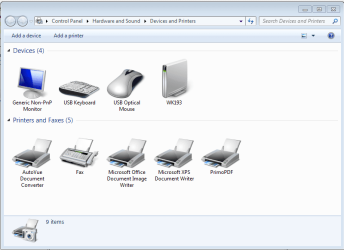
The printer installed successfully, according to the window, but it did not show up in Devices and Printers.
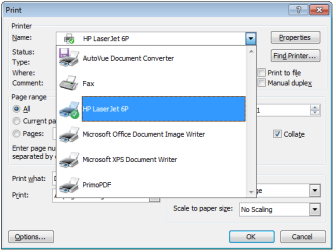
The printer shows up in the print context menus, as well as in the print management program.

The printer disappears occasionally upon reboot, and reinstalling it appears to work, but we get the same results as before.

Any help with this issue would be appreciated. While the printer showing up in devices and printers isn't necessary, it would be nice.
 

Attachments
  • Devices and Printers.PNG
    Devices and Printers.PNG
    24.8 KB · Views: 2
  • Print Dialogue.png
    Print Dialogue.png
    12.2 KB · Views: 9
  • Print Management.PNG
    Print Management.PNG
    17.1 KB · Views: 1

My Computer

Computer type
PC/Desktop
Computer Manufacturer/Model Number
Custom Build
OS
Windows 7 Professional x64
CPU
Intel Sandy Bridge i3-2120
Motherboard
ASRock Z77 Extreme3
Memory
16 GB DDR3 1600MHz
Graphics Card(s)
EVGA Superclocked Nvidia GeForce 660 3GB GDDR5 192-Bit
Hard Drives
2x1TB WD Blue
1x2TB WD Blue
1x128GB Hynix SSD
Antivirus
Microsoft Security Essentials
Browser
Chrome, Firefox, Opera, Dolphin, and IE
The proper way to install a device, such as a printer, for most is to First Install the software and ONLY connect the device to the PC when the install program tells you. Connecting the device first can result in either no install or a corrupt install.

I recently installed a new HP All in One printer. The HP install instructions listed installing the software first.
 

My Computer

Computer type
PC/Desktop
Computer Manufacturer/Model Number
My Own Build
OS
Windows 10 64 bit
CPU
Intel i7 6700K
Motherboard
ASUS ROG Maximus VIII Hero
Memory
16GB Corsair Dominator
Graphics Card(s)
Intel CPU Graphics
Sound Card
RealTek
Monitor(s) Displays
27" Dell S2719dgf
Screen Resolution
2560X1440
Hard Drives
1 TB Samsung 850 EVO SSD for Win 10 Pro
500GB Samsung 850 EVO SSD for Win 10 Insider
2 TB drive for backup
PSU
EVGA Supernova 750G2
Case
BeQuiet Silent Base 600
Cooling
Deepcool Captain 120EX
Keyboard
Microsoft Wireless 2000
Mouse
Microsoft wireless
Internet Speed
100 MB/sec (Cable)
Antivirus
Microsoft Defender and Malwarebytes
Browser
Edge/Firefox
Other Info
Cakewalk (Sonar) by BandLab and Studio One 4.1 Pro recording studio software. MOTU 896Mk3 Hybrid recording interface, Frontier Tranzport wireless control unit, Behringer X-Touch Control Surface.
Five USB connected optical drives for CD Audio production using Nero BurningROM
Unfortunately, since HP doesn't offer windows 7 drivers for the 6P, only the drivers from Microsoft are available. You are unable to install these drivers without having the printer plugged in, as it needs to see that you have something compatible to use them with before it will allow the install. (There is no exe, you have to go through device manager to install these drivers and select the inf file)
 

My Computer

Computer type
PC/Desktop
Computer Manufacturer/Model Number
Custom Build
OS
Windows 7 Professional x64
CPU
Intel Sandy Bridge i3-2120
Motherboard
ASRock Z77 Extreme3
Memory
16 GB DDR3 1600MHz
Graphics Card(s)
EVGA Superclocked Nvidia GeForce 660 3GB GDDR5 192-Bit
Hard Drives
2x1TB WD Blue
1x2TB WD Blue
1x128GB Hynix SSD
Antivirus
Microsoft Security Essentials
Browser
Chrome, Firefox, Opera, Dolphin, and IE
I've seen some of the older HP's that have the built in drivers. I didn't realize this was one of them.

The printer should be listed in the Device Manager. If it is, Right click on the entry to highlight it and then LEFT click "Uninstall". DO NOT uninstall the drivers. Disconnect the printer and restart the PC. Connect the printer and it should go through a new installation. This may fix the apparent Windows status corruptions.
 

My Computer

Computer type
PC/Desktop
Computer Manufacturer/Model Number
My Own Build
OS
Windows 10 64 bit
CPU
Intel i7 6700K
Motherboard
ASUS ROG Maximus VIII Hero
Memory
16GB Corsair Dominator
Graphics Card(s)
Intel CPU Graphics
Sound Card
RealTek
Monitor(s) Displays
27" Dell S2719dgf
Screen Resolution
2560X1440
Hard Drives
1 TB Samsung 850 EVO SSD for Win 10 Pro
500GB Samsung 850 EVO SSD for Win 10 Insider
2 TB drive for backup
PSU
EVGA Supernova 750G2
Case
BeQuiet Silent Base 600
Cooling
Deepcool Captain 120EX
Keyboard
Microsoft Wireless 2000
Mouse
Microsoft wireless
Internet Speed
100 MB/sec (Cable)
Antivirus
Microsoft Defender and Malwarebytes
Browser
Edge/Firefox
Other Info
Cakewalk (Sonar) by BandLab and Studio One 4.1 Pro recording studio software. MOTU 896Mk3 Hybrid recording interface, Frontier Tranzport wireless control unit, Behringer X-Touch Control Surface.
Five USB connected optical drives for CD Audio production using Nero BurningROM
Unfortunately, the printer does not appear under device manger after the initial installation. I did uninstall the printer through print management, though, and reinstalled. This did not work.


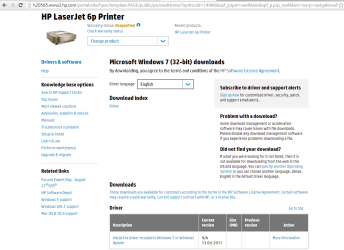
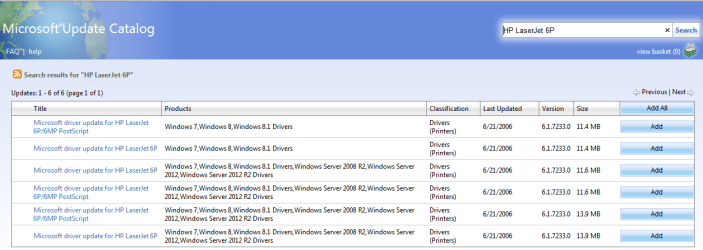
By built into the printer do you mean like the 1102 that pops up with a "Smart Install" when you connect it and it doesn't have the drivers? The HP LaserJet 6P doesn't have that. The only things available are the files available from Windows Update. (See attached image from HP's website in regards to obtaining drivers for this printer)

The next attachment is the website that HP refers you to (after jumping through a few hoops).
This is where I obtained my driver. It works flawlessly for all of our other printers. Just not this one.

By all our other printers, I mean printers of different models. The driver set includes information on multiple printers.

I'm not sure if the issue is with the printer, the driver, or the parallel interface card between the two. If it was the card, you'd think there'd be a problem with its drivers. But there isn't. The computer can communicate with the printer, so it shouldn't be the parallel card.
 

Attachments

  • HP Website.png
    HP Website.png
    37.8 KB · Views: 2
  • update catalog.png
    update catalog.png
    34.4 KB · Views: 2
Last edited:

My Computer

Computer type
PC/Desktop
Computer Manufacturer/Model Number
Custom Build
OS
Windows 7 Professional x64
CPU
Intel Sandy Bridge i3-2120
Motherboard
ASRock Z77 Extreme3
Memory
16 GB DDR3 1600MHz
Graphics Card(s)
EVGA Superclocked Nvidia GeForce 660 3GB GDDR5 192-Bit
Hard Drives
2x1TB WD Blue
1x2TB WD Blue
1x128GB Hynix SSD
Antivirus
Microsoft Security Essentials
Browser
Chrome, Firefox, Opera, Dolphin, and IE
What I was referring to was with many HP PC's, they have included the drivers for many of their products and the users do not have to download and install drivers. Just connect the unit and it is detected and the drivers installed.

This is a different case. I'm sorry I responded as this is out of my area.
 

My Computer

Computer type
PC/Desktop
Computer Manufacturer/Model Number
My Own Build
OS
Windows 10 64 bit
CPU
Intel i7 6700K
Motherboard
ASUS ROG Maximus VIII Hero
Memory
16GB Corsair Dominator
Graphics Card(s)
Intel CPU Graphics
Sound Card
RealTek
Monitor(s) Displays
27" Dell S2719dgf
Screen Resolution
2560X1440
Hard Drives
1 TB Samsung 850 EVO SSD for Win 10 Pro
500GB Samsung 850 EVO SSD for Win 10 Insider
2 TB drive for backup
PSU
EVGA Supernova 750G2
Case
BeQuiet Silent Base 600
Cooling
Deepcool Captain 120EX
Keyboard
Microsoft Wireless 2000
Mouse
Microsoft wireless
Internet Speed
100 MB/sec (Cable)
Antivirus
Microsoft Defender and Malwarebytes
Browser
Edge/Firefox
Other Info
Cakewalk (Sonar) by BandLab and Studio One 4.1 Pro recording studio software. MOTU 896Mk3 Hybrid recording interface, Frontier Tranzport wireless control unit, Behringer X-Touch Control Surface.
Five USB connected optical drives for CD Audio production using Nero BurningROM
Don't apologize for trying to help. That's just silly. We now have a good explanation of the problem rather than the half-explained piece of crap that was my original post.

You were definitely helpful in helping me puzzle out and troubleshoot my sound issue last week, so thanks for chiming in!
 

My Computer

Computer type
PC/Desktop
Computer Manufacturer/Model Number
Custom Build
OS
Windows 7 Professional x64
CPU
Intel Sandy Bridge i3-2120
Motherboard
ASRock Z77 Extreme3
Memory
16 GB DDR3 1600MHz
Graphics Card(s)
EVGA Superclocked Nvidia GeForce 660 3GB GDDR5 192-Bit
Hard Drives
2x1TB WD Blue
1x2TB WD Blue
1x128GB Hynix SSD
Antivirus
Microsoft Security Essentials
Browser
Chrome, Firefox, Opera, Dolphin, and IE
Back
Top