Solved Printer Shared but not showing in my network places

Monirul

New member
Member
Local time
9:06 PM
Messages
28
Hello everybody, hope all of you are well. I encounterd a problem. But I can't resolved that. So I need help from all of you. I have printer named hp laser jet 2055d. It's connect my pc, there I using windows seven. I shared it. My another system is windows xp. I want to print from here using my shared printer. If I browse my windows seven pc using "my network placecs" here don't showing my shared printer. If I browse my pc from run using IP address then my shared printer is showing. So what's problem in my xp pc. why my network places option not showing shared printer. If have any connectivity problem then I didn't found it by run option. I checked the advance file and printer sharing option. Here tern on is network discovery and file and printer sharing option. Please help me to find out where the problem, windows seven or windows xp.

Thanks.
 

My Computer My Computer

At a glance

windows 7 ultimate 32 bit
OS
windows 7 ultimate 32 bit
Are both the host Win7 system and client WinXP system defined as being in the same "workgroup"?

Win7 has support for both "homegroup" (a new concept) and "workgroup" (compatible with WinXP). Both of your machines should be defined to be in the same "workgroup" if you want to share a printer hosted off of the Win7 machine.

Also, if your Win7 host is x64 and your WinXP is x86, there will likely be a driver problem at "connect" time when you try to "add printer" from the WinXP machine to point to the shared printer on the Win7 machine. This is normally when the host machine provides a driver over to the connecting client machine... so that you don't have to have a print driver installed previously on the client machine.

Well, the 64-bit driver on the Win7 machine is unacceptable on the 32-bit environment of your WinXP machine. So normally you go through the "add additional driver" process on the x64 Win7 system, so that it has both 64-bit driver for itself and other connecting 64-bit systems, and also a 32-bit driver for other connecting 32-bit systems.

This latter driver-related issue is a second problem you may face eventually, when you finally can "see" the shared printer and try to connect to it. But for now, let's just solve your "I can't see it from WinXP" problem.


So, are both machines on the same "workgroup"? Do you know how to look on both systems? Do you know how to change "workgroup" if necessary on either system?
 

My Computer My Computer

At a glance

Windows 7 Pro x64 (1), Win7 Pro X64 (2)i5-3350p 3.1Ghz/6MB-cache (1); E8400 3.0Ghz/6...8GB PC3-12800 DDR3 (1); 4GB PC3-10600 DDR3 (2)ATI HD7750 (1), (see TV cards); ATI R7 250 (2)
Computer type
PC/Desktop
Computer Manufacturer/Model Number
Home-built, two systems (1) and (2)
OS
Windows 7 Pro x64 (1), Win7 Pro X64 (2)
CPU
i5-3350p 3.1Ghz/6MB-cache (1); E8400 3.0Ghz/6MB-cache (2)
Motherboard
ASUS P8Z77-V Pro (1); ASUS P5Q3 (2)
Memory
8GB PC3-12800 DDR3 (1); 4GB PC3-10600 DDR3 (2)
Graphics Card(s)
ATI HD7750 (1), (see TV cards); ATI R7 250 (2)
Sound Card
Realtek ALC892 HD Audio (1); Realtek ALC1200 HD Audio (2)
Monitor(s) Displays
Eizo HD2441W LCD, Eizo S2433W (1); Eizo 24" S2433W (2)
Screen Resolution
1920x1200, 1920x1200 (1); 1920x1200 (2)
Hard Drives
(1) 1TB SATA-II (7200RPM), 2x2TB SATA-III (7200RPM), 250GB SATA-III (10000RPM) for OS; 2x2TB external USB 3.0

(2) 320GB SATA-II (7200RPM), 750GB SATA-II (7200RPM), 150GB SATA-II (10000RPM) for OS; 2TB external USB 3.0
PSU
Nesteq ECS-6001 600W (1); Nesteq ECS-5001 500W (2)
Case
Acousti-Case 360 (1) and (2)
Cooling
Noctua NH-U12P SE2 for CPU, 2x120mm case fans (1) and (2)
Keyboard
IBM PS/2 (1) and (2)
Mouse
Logitech MX Revolution wireless (1); Microsoft wired (2)
Internet Speed
100mbps down / 10mbps up
Antivirus
Microsoft Security Essentials; Malwarebyte Anti-Malware Pro
Browser
Firefox
Other Info
Ceton InfiniTV 4-tuner cablecard-enabled TV card as well as Hauppauge HVR-2250 OTA/ATSC 2-tuner TV card in (1), running under Win7 WMC
Thanks' for your quick reply. I am in the same workgroup. If I have in the different workgroup then my win 7 system is not showing my workgroup computer. Another issue is driver compatibilty. Here not problem about driver. I say it because when I try to connect using "Run" option to access that win 7 system, than I am successfully connected and successfully connect to my shared printer. There's no problem. So where the problem.
 

My Computer My Computer

At a glance

windows 7 ultimate 32 bit
OS
windows 7 ultimate 32 bit
Let's take it one step at a time. Assuming both machines are defined to be in the same workgroup...

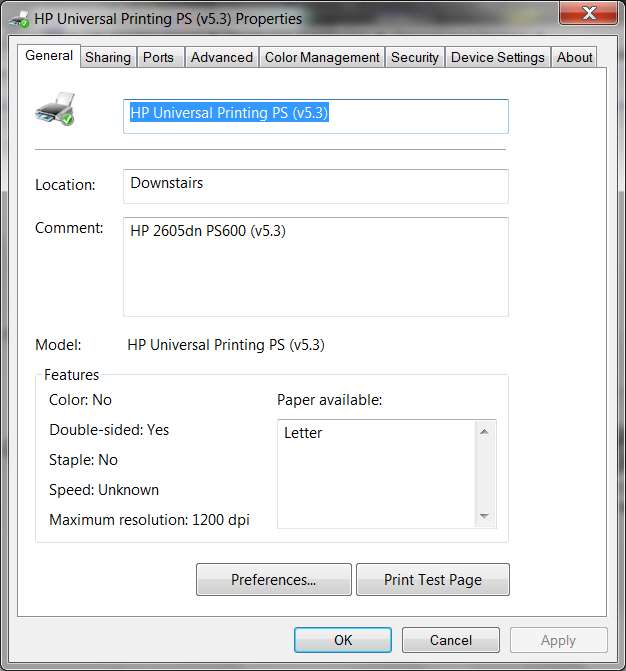
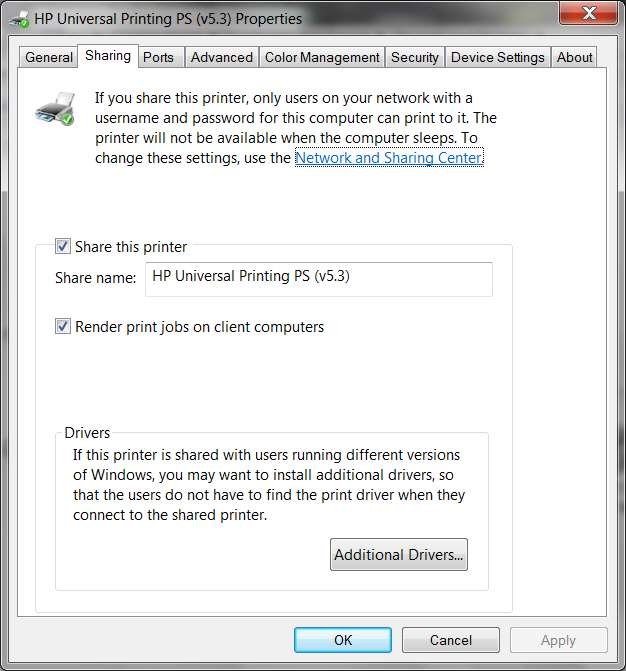
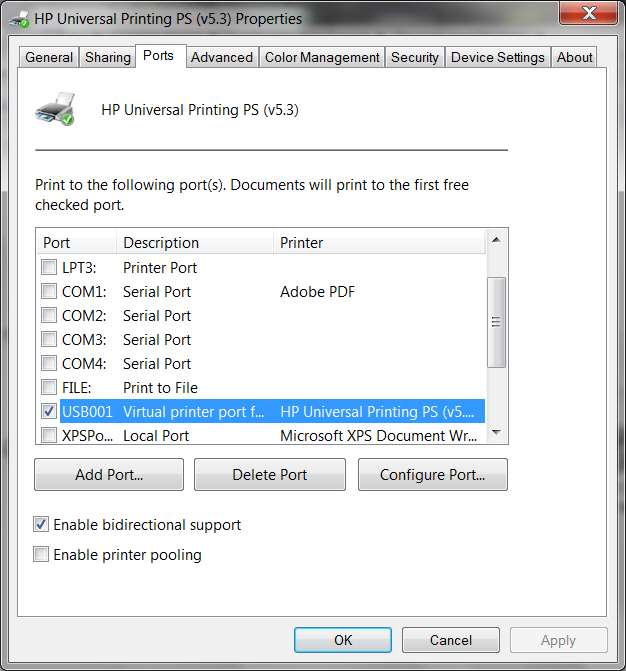
On the Win7 host system, what do your "Printer Properties" items look like on the relevant tabs? Here are mine, from an HP 2605dn that is also "shared" from the host Win7 x64 system making it available to my other home LAN machine (which can be booted either to Win7 x64 or to WinXP x86, and this HP2605dn shared printer is available to either booted Windows on that second machine).

I suspect the crucial setup difference for you will be on the "security" tab, where maybe your Win7 system is denying access for the HP printer to your WinXP system because of a permissions issue. Who knows just yet?

printergeneral.jpg


printersharing.jpg


printerports.jpg


printersecurity.jpg
 

My Computer My Computer

At a glance

Windows 7 Pro x64 (1), Win7 Pro X64 (2)i5-3350p 3.1Ghz/6MB-cache (1); E8400 3.0Ghz/6...8GB PC3-12800 DDR3 (1); 4GB PC3-10600 DDR3 (2)ATI HD7750 (1), (see TV cards); ATI R7 250 (2)
Computer type
PC/Desktop
Computer Manufacturer/Model Number
Home-built, two systems (1) and (2)
OS
Windows 7 Pro x64 (1), Win7 Pro X64 (2)
CPU
i5-3350p 3.1Ghz/6MB-cache (1); E8400 3.0Ghz/6MB-cache (2)
Motherboard
ASUS P8Z77-V Pro (1); ASUS P5Q3 (2)
Memory
8GB PC3-12800 DDR3 (1); 4GB PC3-10600 DDR3 (2)
Graphics Card(s)
ATI HD7750 (1), (see TV cards); ATI R7 250 (2)
Sound Card
Realtek ALC892 HD Audio (1); Realtek ALC1200 HD Audio (2)
Monitor(s) Displays
Eizo HD2441W LCD, Eizo S2433W (1); Eizo 24" S2433W (2)
Screen Resolution
1920x1200, 1920x1200 (1); 1920x1200 (2)
Hard Drives
(1) 1TB SATA-II (7200RPM), 2x2TB SATA-III (7200RPM), 250GB SATA-III (10000RPM) for OS; 2x2TB external USB 3.0

(2) 320GB SATA-II (7200RPM), 750GB SATA-II (7200RPM), 150GB SATA-II (10000RPM) for OS; 2TB external USB 3.0
PSU
Nesteq ECS-6001 600W (1); Nesteq ECS-5001 500W (2)
Case
Acousti-Case 360 (1) and (2)
Cooling
Noctua NH-U12P SE2 for CPU, 2x120mm case fans (1) and (2)
Keyboard
IBM PS/2 (1) and (2)
Mouse
Logitech MX Revolution wireless (1); Microsoft wired (2)
Internet Speed
100mbps down / 10mbps up
Antivirus
Microsoft Security Essentials; Malwarebyte Anti-Malware Pro
Browser
Firefox
Other Info
Ceton InfiniTV 4-tuner cablecard-enabled TV card as well as Hauppauge HVR-2250 OTA/ATSC 2-tuner TV card in (1), running under Win7 WMC
  • Like
Reactions: 2xg
Thanks for your reply. I solved it by restarting the "computer browser service."


Thanks again.
 

My Computer My Computer

At a glance

windows 7 ultimate 32 bit
OS
windows 7 ultimate 32 bit
Back
Top