iPad,iPhone recognized but not showing in Windows Explorer

MiaAccess

New member
Local time
4:15 PM
Messages
22
Everything worked until about a week ago. I could hook up my iPhone or iPad and they would show up as portable device (don't remember the exact wording) in explorer, without a drive letter. I could get data from the device.

Now, I still get the ding sound when I connect the iPhone or iPad, but they are not listed in explorer. iTunes recognizes both, no problem there, Apple mobile device services are running. I downloaded an iphone-pad transfer program and it recognizes the devices. I even uninstalled and reinstalled all Apple programs.

The device manager does not show them as portable devices. How do I get these two item to show up again?:cry: Does anyone have any idea. It must be a windows issue.

Windows 7, 32bit
 

My Computer My Computer

Computer Manufacturer/Model Number
Dell XPS M`730
OS
windows 7

My Computer My Computer

Computer type
PC/Desktop
Computer Manufacturer/Model Number
Self Built
OS
Win 10 Pro x64
CPU
Intel I5-2500K @3.3GHz
Motherboard
Asrock P67 Extreme4
Memory
16GB G.Skill Ripjaws X (4x4GB)
Graphics Card(s)
EVGA GeForce 750 Ti SC 2GB
Sound Card
ASUS Xonar DG 5.1 Channels 24-bit 96KHz PCI Interface Sound
Monitor(s) Displays
auria eq2367
Screen Resolution
1920 x 1080
Hard Drives
250GB Samsung 850 EVO SSD
1TB WD Blue
1TB Hitachi
PSU
SeaSonic X 650W 80 Plus Gold
Case
Corsair Obsidian 750D
Cooling
Corsair H60, Three 140mm case fans
Keyboard
Logitech Wireless Keyboard K520
Mouse
Logitech Wireless Mouse M310
Internet Speed
Wave Broadband ~ 100 dn 5 up
Antivirus
Windows Defender, Malwarebytes Premium
Browser
Edge, IE11, Chrome
Other Info
Laptop specs: HP g7-1365dx /
CPU: AMD A6-3420M APU with Radeon(tm) HD Graphics /
RAM: Crucial 8Gb (2x4Gb) /
SSD: Crucial M4-CT128M4SSD2 ATA Device/ FW 000F /
GFX: AMD Radeon HD 6520G /
OS: Windows 10 Pro x64
I did not have autoplay enabled. I enabled it, but no change.
 

My Computer My Computer

Computer Manufacturer/Model Number
Dell XPS M`730
OS
windows 7
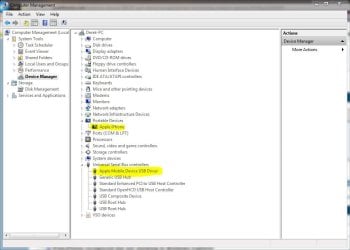
Do you get either of these showing in device manager?

apple.JPG

If you have either of these, try right clicking on them and delete, then let windows install a new driver.

You do have pictures in your camera roll as well don't you?

Windows won't see it as a storage device if you don't have something in your camera roll.
 

My Computer My Computer

Computer type
PC/Desktop
Computer Manufacturer/Model Number
Self Built
OS
Win 10 Pro x64
CPU
Intel I5-2500K @3.3GHz
Motherboard
Asrock P67 Extreme4
Memory
16GB G.Skill Ripjaws X (4x4GB)
Graphics Card(s)
EVGA GeForce 750 Ti SC 2GB
Sound Card
ASUS Xonar DG 5.1 Channels 24-bit 96KHz PCI Interface Sound
Monitor(s) Displays
auria eq2367
Screen Resolution
1920 x 1080
Hard Drives
250GB Samsung 850 EVO SSD
1TB WD Blue
1TB Hitachi
PSU
SeaSonic X 650W 80 Plus Gold
Case
Corsair Obsidian 750D
Cooling
Corsair H60, Three 140mm case fans
Keyboard
Logitech Wireless Keyboard K520
Mouse
Logitech Wireless Mouse M310
Internet Speed
Wave Broadband ~ 100 dn 5 up
Antivirus
Windows Defender, Malwarebytes Premium
Browser
Edge, IE11, Chrome
Other Info
Laptop specs: HP g7-1365dx /
CPU: AMD A6-3420M APU with Radeon(tm) HD Graphics /
RAM: Crucial 8Gb (2x4Gb) /
SSD: Crucial M4-CT128M4SSD2 ATA Device/ FW 000F /
GFX: AMD Radeon HD 6520G /
OS: Windows 10 Pro x64
Today my computer decided to show the iphone again. Makes me happy. If I just understood why it comes and goes, tomorrow or later it may not be there. The Apple usb driver shows up when the iphone or ipad is plugged in. If the iphone shows in portable devices, it than shows also in windows explorer. For the ipad, it shows the Apple Mobile driver, but does not appear in portable devices. I can't remember if it ever did before.

I somehow think that it has something to do with my new USB thumb driver. This morning I plugged in the iphone and it did not show. Then I plugged in the thumb drive and it showed Portable devices. Then I added the iphone on another USB port and it also showed. I will monitor this for a while and advise.
 

My Computer My Computer

Computer Manufacturer/Model Number
Dell XPS M`730
OS
windows 7
OK, let us know how things turn out.
 

My Computer My Computer

Computer type
PC/Desktop
Computer Manufacturer/Model Number
Self Built
OS
Win 10 Pro x64
CPU
Intel I5-2500K @3.3GHz
Motherboard
Asrock P67 Extreme4
Memory
16GB G.Skill Ripjaws X (4x4GB)
Graphics Card(s)
EVGA GeForce 750 Ti SC 2GB
Sound Card
ASUS Xonar DG 5.1 Channels 24-bit 96KHz PCI Interface Sound
Monitor(s) Displays
auria eq2367
Screen Resolution
1920 x 1080
Hard Drives
250GB Samsung 850 EVO SSD
1TB WD Blue
1TB Hitachi
PSU
SeaSonic X 650W 80 Plus Gold
Case
Corsair Obsidian 750D
Cooling
Corsair H60, Three 140mm case fans
Keyboard
Logitech Wireless Keyboard K520
Mouse
Logitech Wireless Mouse M310
Internet Speed
Wave Broadband ~ 100 dn 5 up
Antivirus
Windows Defender, Malwarebytes Premium
Browser
Edge, IE11, Chrome
Other Info
Laptop specs: HP g7-1365dx /
CPU: AMD A6-3420M APU with Radeon(tm) HD Graphics /
RAM: Crucial 8Gb (2x4Gb) /
SSD: Crucial M4-CT128M4SSD2 ATA Device/ FW 000F /
GFX: AMD Radeon HD 6520G /
OS: Windows 10 Pro x64
iPhone not showing: solved

Hi there. Had the same no show issues.

iPhone 4s.

Trick was.. no pics on the Phone: no show in Explorer.

Make a pic.

Reconnect: Voila! Phone shows again.
 

My Computer My Computer

Computer type
Laptop
Computer Manufacturer/Model Number
Acer
OS
Win 7 home premium 64bit
CPU
AMD
Memory
6g
Hello, new member here.

<Windows won't see it as a storage device if you don't have something in your camera roll.>
derekimo and the others, thanks a lot.

That saved me a whole load of time and trouble!
My Camera Roll was empty.
I just took a photo, of my laptop screen.
And there it was, connected in Window Explorer.

Thanks very much.

Swinster
 

My Computer My Computer

Computer type
Laptop
Computer Manufacturer/Model Number
Acer 8943G
OS
Windows 7 Home Premium 64 bit
CPU
Intel Core i7
Antivirus
Kaspersky
Welcome to the forum Swinster,

Glad you got it sorted and you're welcome. :)
 

My Computer My Computer

Computer type
PC/Desktop
Computer Manufacturer/Model Number
Self Built
OS
Win 10 Pro x64
CPU
Intel I5-2500K @3.3GHz
Motherboard
Asrock P67 Extreme4
Memory
16GB G.Skill Ripjaws X (4x4GB)
Graphics Card(s)
EVGA GeForce 750 Ti SC 2GB
Sound Card
ASUS Xonar DG 5.1 Channels 24-bit 96KHz PCI Interface Sound
Monitor(s) Displays
auria eq2367
Screen Resolution
1920 x 1080
Hard Drives
250GB Samsung 850 EVO SSD
1TB WD Blue
1TB Hitachi
PSU
SeaSonic X 650W 80 Plus Gold
Case
Corsair Obsidian 750D
Cooling
Corsair H60, Three 140mm case fans
Keyboard
Logitech Wireless Keyboard K520
Mouse
Logitech Wireless Mouse M310
Internet Speed
Wave Broadband ~ 100 dn 5 up
Antivirus
Windows Defender, Malwarebytes Premium
Browser
Edge, IE11, Chrome
Other Info
Laptop specs: HP g7-1365dx /
CPU: AMD A6-3420M APU with Radeon(tm) HD Graphics /
RAM: Crucial 8Gb (2x4Gb) /
SSD: Crucial M4-CT128M4SSD2 ATA Device/ FW 000F /
GFX: AMD Radeon HD 6520G /
OS: Windows 10 Pro x64
derekimo, thanks for that acknowledgement.

Swinster
 

My Computer My Computer

Computer type
Laptop
Computer Manufacturer/Model Number
Acer 8943G
OS
Windows 7 Home Premium 64 bit
CPU
Intel Core i7
Antivirus
Kaspersky
OMG - The solution was THAT simple!!

Do you get either of these showing in device manager?

View attachment 275080

If you have either of these, try right clicking on them and delete, then let windows install a new driver.

You do have pictures in your camera roll as well don't you?

Windows won't see it as a storage device if you don't have something in your camera roll.


I've spent hours looking for a solution as to why my laptop (Windows 7) was not 'seeing' my iPad within the Explorer window as a device.

The problem was that there were no photos on the camera roll, so when I saw your question above, I took a quick snap of the laptop with the iPad .... then hooked it up to the laptop and BINGO, there it was list as a device.

Thank you for the very simple solution .... almost as simple as turning it off and turning it on a again.

You live and learn eh !!
 

My Computer My Computer

Computer type
Laptop
Computer Manufacturer/Model Number
HP Pavilion g6
OS
Windows 7 Home Premium
Antivirus
Norton
Welcome to the forum Foxykyri,

You're welcome, glad you got it working. :)
 

My Computer My Computer

Computer type
PC/Desktop
Computer Manufacturer/Model Number
Self Built
OS
Win 10 Pro x64
CPU
Intel I5-2500K @3.3GHz
Motherboard
Asrock P67 Extreme4
Memory
16GB G.Skill Ripjaws X (4x4GB)
Graphics Card(s)
EVGA GeForce 750 Ti SC 2GB
Sound Card
ASUS Xonar DG 5.1 Channels 24-bit 96KHz PCI Interface Sound
Monitor(s) Displays
auria eq2367
Screen Resolution
1920 x 1080
Hard Drives
250GB Samsung 850 EVO SSD
1TB WD Blue
1TB Hitachi
PSU
SeaSonic X 650W 80 Plus Gold
Case
Corsair Obsidian 750D
Cooling
Corsair H60, Three 140mm case fans
Keyboard
Logitech Wireless Keyboard K520
Mouse
Logitech Wireless Mouse M310
Internet Speed
Wave Broadband ~ 100 dn 5 up
Antivirus
Windows Defender, Malwarebytes Premium
Browser
Edge, IE11, Chrome
Other Info
Laptop specs: HP g7-1365dx /
CPU: AMD A6-3420M APU with Radeon(tm) HD Graphics /
RAM: Crucial 8Gb (2x4Gb) /
SSD: Crucial M4-CT128M4SSD2 ATA Device/ FW 000F /
GFX: AMD Radeon HD 6520G /
OS: Windows 10 Pro x64
Similar issue - iPad Air 2

I had photos in the iPad Air 2. I moved my usb cable from one usb port to a different usb port, and the iPad showed-up immediately in Windows Explorer. This is a port that I normally use for powering the iPad or an iPhone.

I believe, though am not certain, that some of the ports on my laptop are USB2 and some are USB3 and the particular port I'm using is a constant power port.
 

My Computer My Computer

Computer type
Laptop
Computer Manufacturer/Model Number
Dell Inspiron 5520, 15 inch
OS
Windows 7 64-bit Home Premium, SP1
CPU
Intel Core i5-3210M CPU @ 2.50GHz
Memory
8GB
Antivirus
McAphee
Browser
Chrome
Thanks, derekimo - worked for me

Do you get either of these showing in device manager?

View attachment 275080

If you have either of these, try right clicking on them and delete, then let windows install a new driver.

You do have pictures in your camera roll as well don't you?

Windows won't see it as a storage device if you don't have something in your camera roll.

Computer manager showed the driver in the USB controller section but not as a portable device. I removed the USB controller driver, reattached the phone (iPhone 5) and the driver automatically loaded and not the phone shows up in Windows Explorer.

BTW, I DID have photos in my camera roll; that did not seem to affect the problem. I believe this probably happened during an IOS upgrade, and reloading the driver recognized the differences in the phone, but then, what do I know?

Thanks again,
Rusty
 

My Computer My Computer

Computer Manufacturer/Model Number
Custom Build
OS
Windows 7 Ultimate SP1
CPU
Intel Core-i5-3570K 3.400 GHz
Motherboard
Asus P8Z77-V LK
Memory
8.00 GB
Graphics Card(s)
No augmentation. Onboard Motherboard Intel HD4000
Sound Card
Onboard Intel HD Sound
Monitor(s) Displays
ViewSonic VX2235vw
Hard Drives
C: Seagate ST3750640AS
D: Western Digital WDC WD5000AACS
(both SATA)
PSU
Antec EA500D (500 Watt)
Case
Antec Sonata III
Cooling
Corsair Hydro H55
Antivirus
Norton 360 Suite
Browser
IE9
"it's the gift that keeps on giving", thanks, solved my problem in Win10 today :)

Do you get either of these showing in device manager?

View attachment 275080

If you have either of these, try right clicking on them and delete, then let windows install a new driver.

You do have pictures in your camera roll as well don't you?

Windows won't see it as a storage device if you don't have something in your camera roll.
 

My Computer My Computer

OS
Windows 7 Home Premium 32 bit
Looks like I missed the previous reply, anyway, you're both welcome. Glad you got it sorted. :)
 

My Computer My Computer

Computer type
PC/Desktop
Computer Manufacturer/Model Number
Self Built
OS
Win 10 Pro x64
CPU
Intel I5-2500K @3.3GHz
Motherboard
Asrock P67 Extreme4
Memory
16GB G.Skill Ripjaws X (4x4GB)
Graphics Card(s)
EVGA GeForce 750 Ti SC 2GB
Sound Card
ASUS Xonar DG 5.1 Channels 24-bit 96KHz PCI Interface Sound
Monitor(s) Displays
auria eq2367
Screen Resolution
1920 x 1080
Hard Drives
250GB Samsung 850 EVO SSD
1TB WD Blue
1TB Hitachi
PSU
SeaSonic X 650W 80 Plus Gold
Case
Corsair Obsidian 750D
Cooling
Corsair H60, Three 140mm case fans
Keyboard
Logitech Wireless Keyboard K520
Mouse
Logitech Wireless Mouse M310
Internet Speed
Wave Broadband ~ 100 dn 5 up
Antivirus
Windows Defender, Malwarebytes Premium
Browser
Edge, IE11, Chrome
Other Info
Laptop specs: HP g7-1365dx /
CPU: AMD A6-3420M APU with Radeon(tm) HD Graphics /
RAM: Crucial 8Gb (2x4Gb) /
SSD: Crucial M4-CT128M4SSD2 ATA Device/ FW 000F /
GFX: AMD Radeon HD 6520G /
OS: Windows 10 Pro x64
Back
Top