
Hi all,
I'm having a problem with a 3TB Western Digital Red drive.
It does not show up in My Computer, Disk Management or Device Manager or diskpart >> list volume.
Also a no show in the Western Digital Data LifeGuard Diagnostics tool and CrystalDiskInfo.
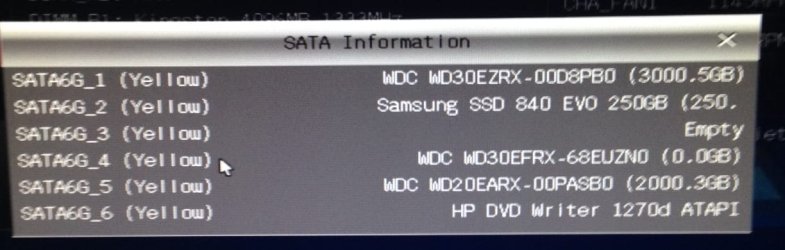
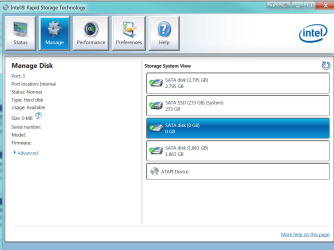
It does show up in BIOS (See screenshot) and also in the Intel Rapid Storage Technology tool (See screenshot)
In both places it is showing as 0GB though.
What I've tried:
Unplugged all other drives except the C Drive and the 3TB WD, same result as above.
Unplugged all other drives except the 3TB WD and launched the installation CD for both Windows 7 and XP to see if either would recognise it. Neither did.
I'm out of ideas (I did see a few things online I didn't try, like uninstall the IDE ATA/ATAPI controllers from the Device Manager, since I don't really know what that means I didn't)
I'm having a problem with a 3TB Western Digital Red drive.
It does not show up in My Computer, Disk Management or Device Manager or diskpart >> list volume.
Also a no show in the Western Digital Data LifeGuard Diagnostics tool and CrystalDiskInfo.
It does show up in BIOS (See screenshot) and also in the Intel Rapid Storage Technology tool (See screenshot)
In both places it is showing as 0GB though.
What I've tried:
Unplugged all other drives except the C Drive and the 3TB WD, same result as above.
Unplugged all other drives except the 3TB WD and launched the installation CD for both Windows 7 and XP to see if either would recognise it. Neither did.
I'm out of ideas (I did see a few things online I didn't try, like uninstall the IDE ATA/ATAPI controllers from the Device Manager, since I don't really know what that means I didn't)
Last edited:
My Computer
At a glance
Windows 7 Home Premium 64 bitIntel(R) Core(TM) i5-4440 CPU @ 3.10GHz8GB Kingston DDR3NVIDIA GeForce GT 430 (2 of these - 3 Displays)
- Computer type
- PC/Desktop
- Computer Manufacturer/Model Number
- Custom
- OS
- Windows 7 Home Premium 64 bit
- CPU
- Intel(R) Core(TM) i5-4440 CPU @ 3.10GHz
- Motherboard
- ASUS, ASUSTeK COMPUTER INC., Z87-K
- Memory
- 8GB Kingston DDR3
- Graphics Card(s)
- NVIDIA GeForce GT 430 (2 of these - 3 Displays)
- Monitor(s) Displays
- 3 X Phillips 244EL
- Hard Drives
- 1 X 250GB Samsung Evo (C: Drive)
1 X 2GB WD
1 X 3GB WD Green
- Antivirus
- Trend Micro Titanium Maximum Security


