Solved Printer Sharing in Workgroup Not Working

Win7rap

New member
Member
VIP
Local time
9:10 AM
Messages
120
Desktop - Win 7, 64 bit ... 'hard-wired' to router
Laptop - Win 7, 32 bit ... connects wirelessly to router
Both have Workgroup Name=DESKPTR
Can't 'see' local printer (attached to desktop via USB) at laptop

Wife (who doesn't like computers) is learning to use laptop and I want her to be able to print emails (etc) w/o joining a group or being required to enter a password. Want her to be connected to workgroup automatically.

Undoubtedly I've messed up the network settings - can access the Internet but that's all.
 

My Computer

OS
Win 7
Did you share the printer on the Desktop? That's the first step.

Read here: Share a printer
 

My Computer

Computer type
PC/Desktop
Computer Manufacturer/Model Number
Lenovo IdeaCenter 450
OS
Windows 10 Pro X64
CPU
Intel Quad Core i7-4770 @ 3.4Ghz
Memory
16.0GB PC3-12800 DDR3 SDRAM 1600 MHz
Graphics Card(s)
Intel Integrated HD Graphics
Sound Card
Realtek HD Audio
Monitor(s) Displays
HP 22" LCD
Screen Resolution
1680 x 1050
Hard Drives
250GB Samsung EVO SATA-3 SSD
2TB Seagate ST2000DM001 SATA-2
1.5TB Seagate ST3150041AS SATA
Keyboard
Dell USB
Mouse
Lenovo USB
Internet Speed
Cable via Road Runner 3MB Upload, 30MB Download
Antivirus
Windows Defender, MBAM Pro, MBAE
Browser
Seamonkey
Other Info
UEFI/GPT
PLDS DVD-RW DH16AERSH
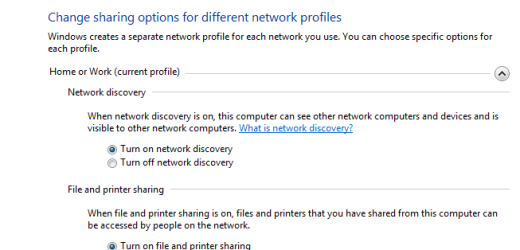
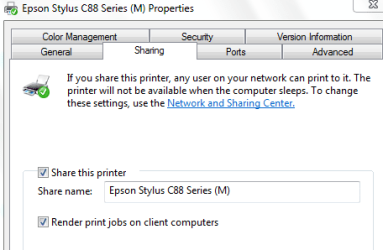
Had gone to 'change advance sharing settings' and set it to 'share printer' and turned 'discovery of network' previously ... however, when checked just now I found that while the printer was still shared, the 'discovery of networks' had been reset to OFF. (Also printer was shared by name in Printer Properties.)

After a little digging I found that the 'DNS Client' service was disabled.

Set it to automatic (Will that affect my desktop or the Internet connection at the laptop?)

Will check laptop tomorrow ... (to be continued)
 

My Computer

OS
Win 7
tired but no joy ... at least having turned on DNS Client doesn't seem to cause a problem.

Attached:
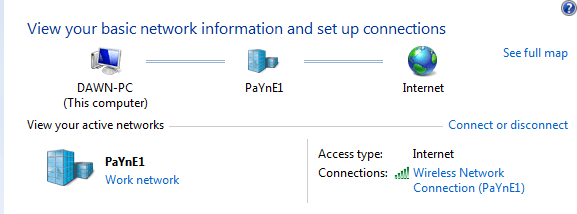
Desktop Network and Sharing
Desktop Advanced Sharing Settings
Desktop Local Printer Properties
Laptop Network and Sharing
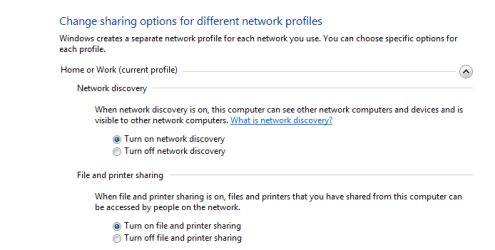
Laptop Advanced Sharing Settings
 

Attachments

  • DesktopNetwork_share.PNG
    DesktopNetwork_share.PNG
    8.4 KB · Views: 35
  • DesktopAdvancedShare.PNG
    DesktopAdvancedShare.PNG
    6.8 KB · Views: 47
  • DesktopPtrProp.PNG
    DesktopPtrProp.PNG
    9 KB · Views: 33
  • LaptopNetwork_share.PNG
    LaptopNetwork_share.PNG
    8.9 KB · Views: 40
  • LaptopAdvancedShare.PNG
    LaptopAdvancedShare.PNG
    7.9 KB · Views: 49

My Computer

OS
Win 7
On the Desktop, open a Command Prompt.

Copy and paste the following into the Run box (see here: http://www.sevenforums.com/tutorials/87750-run-command-enable-disable.html) to enable the Run box if it's not already enabled.

net share > netshare.txt & notepad netshare.txt & del netshare.txt

A notepad window will open with the output of the net share command. Copy and paste that into a reply here then close the notepad window. When you do, netshare.txt will be deleted.
 

My Computer

Computer type
PC/Desktop
Computer Manufacturer/Model Number
Lenovo IdeaCenter 450
OS
Windows 10 Pro X64
CPU
Intel Quad Core i7-4770 @ 3.4Ghz
Memory
16.0GB PC3-12800 DDR3 SDRAM 1600 MHz
Graphics Card(s)
Intel Integrated HD Graphics
Sound Card
Realtek HD Audio
Monitor(s) Displays
HP 22" LCD
Screen Resolution
1680 x 1050
Hard Drives
250GB Samsung EVO SATA-3 SSD
2TB Seagate ST2000DM001 SATA-2
1.5TB Seagate ST3150041AS SATA
Keyboard
Dell USB
Mouse
Lenovo USB
Internet Speed
Cable via Road Runner 3MB Upload, 30MB Download
Antivirus
Windows Defender, MBAM Pro, MBAE
Browser
Seamonkey
Other Info
UEFI/GPT
PLDS DVD-RW DH16AERSH
Done:

Share name Resource Remark

-------------------------------------------------------------------------------
IPC$ Remote IPC
C$ C:\ Default share
D$ D:\ Default share
print$ C:\Windows\system32\spool\drivers
Printer Drivers
F$ F:\ Default share
ADMIN$ C:\Windows Remote Admin
audiobooks C:\XPBooks\BOOKS\audiobooks
Users C:\Users
Epson Stylus C88 Series (M)
USB001 Spooled Epson Stylus C88 Series (M)
The command completed successfully.

=========================================================
Was just thinking - should I install the printer driver on the laptop?
 

My Computer

OS
Win 7
GOOD NEWS
Added a network printer at laptop ... let it search for available printers ... found the local ptr on the desktop ... added that one - then did a 'test print'. Worked !!

Local printer was shared from the start, but suspect that turning 'network discovery' on is what did the trick.
 

My Computer

OS
Win 7
Excellent. Glad to hear you got it working.
 

My Computer

Computer type
PC/Desktop
Computer Manufacturer/Model Number
Lenovo IdeaCenter 450
OS
Windows 10 Pro X64
CPU
Intel Quad Core i7-4770 @ 3.4Ghz
Memory
16.0GB PC3-12800 DDR3 SDRAM 1600 MHz
Graphics Card(s)
Intel Integrated HD Graphics
Sound Card
Realtek HD Audio
Monitor(s) Displays
HP 22" LCD
Screen Resolution
1680 x 1050
Hard Drives
250GB Samsung EVO SATA-3 SSD
2TB Seagate ST2000DM001 SATA-2
1.5TB Seagate ST3150041AS SATA
Keyboard
Dell USB
Mouse
Lenovo USB
Internet Speed
Cable via Road Runner 3MB Upload, 30MB Download
Antivirus
Windows Defender, MBAM Pro, MBAE
Browser
Seamonkey
Other Info
UEFI/GPT
PLDS DVD-RW DH16AERSH
Back
Top