Solved Printer sharing

larrye

New member
Local time
5:46 PM
Messages
44
Location
Fairbury Ne.
my wifes dell with vista 32 bit has a working aio printer I can't print from my windows 7 64 bit computer I have every thing set up both computers sees the printer I get a warning ,Printer can't communicate when I try to print from the windows 7 computer. Thanks for any help.Larry
 

My Computer

OS
Windows 7 Home Premium 64 bit
Generally speaking when you get that error message it pertains to the computer that the printer is physically attached to is turned off. So in order for you to print from your 7 PC the Vista PC must be on as well as the printer. Next thing to check is to make sure that the printer in question is set to default printer on both PC's.
 

My Computer

Computer Manufacturer/Model Number
Custom built
OS
Windows 7 Ultimate 64 bit
CPU
AMD Phenom II X4 965 Black Edition
Motherboard
Gigabyte GA-MA790X-DS4
Memory
GSkill 4 X 2 GB PC 8500
Graphics Card(s)
XFX Radeon HD 6790 D
Sound Card
On board RealTek HD
Monitor(s) Displays
Dual monitors:Samsung SyncMaster S20B300
Screen Resolution
1600 X 900
Hard Drives
Seagate Barracuda 1TB (primary)
Seagate Barracuda 2 X 320 GB
PSU
Ultra X4 750 watt fully modular
Case
Thermaltake Overseer RX 1 full tower
Cooling
Core-Contact 92 mm CPU Cooler
Keyboard
Logitech G510
Mouse
Razor DeathAdder
Internet Speed
50/5 Mbps UL/DL
Other Info
Optical: Super Muliti DVD burner w/lightscribe, Hauppauge WinTV HVR-1800
Your right every thing is on,But I think I need a 64x driver for the the vista computer.
 

My Computer

OS
Windows 7 Home Premium 64 bit
We can help if we have more details about your printer.

I'm assuming AIO means All-in-one so can you please tell us the printer manufacturer and the model details, as you will need a Windows 7 64-bit driver, assuming the printer is compatible with the later operating system.
 

My Computer

Computer Manufacturer/Model Number
HP Pavilion Elite 495UK
OS
Windows 7 Ultimate SP1 64-Bit
CPU
Intel Core i7 870 @ 2.93GHz
Motherboard
MSI 2A9C (CPU1)
Memory
8Gb Dual-Channel DDR3 @ 664MHz
Graphics Card(s)
nVidia GeForce GTX 460 1024MB dedicated RAM
Sound Card
Realtek HD Audio
Monitor(s) Displays
HP2310i
Screen Resolution
1920 x 1080
Hard Drives
1x1954GB Hitachi HDS22020ALA 330 (RAID), 1x1954GB Hitachi External for backup and storage
PSU
460W
Case
HP Elite
Cooling
Air cooled
Keyboard
Logitech K750 solar-powered keyboard
Mouse
Logitech Wireless M180 mouse
Internet Speed
2Mb
Other Info
Pure Avanti Flow Internet Radio with iPod Dock, 64Gb iPod, HP USB Speakers, Sony MDR-V500 Headphones, Sony Vaio F-Series Laptop
Thanks for the reply I have a v310 series Dell AIO working on the Dell vista computer X86 and I can't print from my Dell win.7 x64 computer.Thanks
 

My Computer

OS
Windows 7 Home Premium 64 bit
I'm in the process of trying to track down Windows 7 64-bit drivers for your printer.

In the meantime you might want to check the user manual, for which you'll need a PDF reader such as Adobe Acrobat Reader.

http://support.dell.com/support/edocs/systems/prn_v310/en/ug/en_ug.pdf

The Windows 7 Compatibility Center doesn't appear to have the Dell V310 listed so we may have a problem finding drivers for it.

http://www.microsoft.com/windows/compatibility/windows-7/en-us/Search.aspx?l=en-us&type=Hardware&s=DELL%20V310%20Printer&page=1

I don't know where you live, but even Dell's US site doesn't have the V310 listed, and of the all-in-ones that are listed, they only have Linux (Ubuntu) drivers.

http://search.dell.com/results.aspx?s=gen&c=us&l=en&k=dell+v310+printer&cat=sup&x=5&y=7&p=1

The nearest I could find was the Dell V305 all-in-one printer.

http://search.dell.com/results.aspx...rt=K&~srd=False&ipsys=False&advsrch=False&p=1

I think you may be faced with changing your printer or just use what you've got for the Windows Vista 32-Bit computer, and then buying a Windows 7 64-bit compatible printer, which doesn't have to be a Dell.

If you want to save on ink cartridges, Kodak is your answer.
 

My Computer

Computer Manufacturer/Model Number
HP Pavilion Elite 495UK
OS
Windows 7 Ultimate SP1 64-Bit
CPU
Intel Core i7 870 @ 2.93GHz
Motherboard
MSI 2A9C (CPU1)
Memory
8Gb Dual-Channel DDR3 @ 664MHz
Graphics Card(s)
nVidia GeForce GTX 460 1024MB dedicated RAM
Sound Card
Realtek HD Audio
Monitor(s) Displays
HP2310i
Screen Resolution
1920 x 1080
Hard Drives
1x1954GB Hitachi HDS22020ALA 330 (RAID), 1x1954GB Hitachi External for backup and storage
PSU
460W
Case
HP Elite
Cooling
Air cooled
Keyboard
Logitech K750 solar-powered keyboard
Mouse
Logitech Wireless M180 mouse
Internet Speed
2Mb
Other Info
Pure Avanti Flow Internet Radio with iPod Dock, 64Gb iPod, HP USB Speakers, Sony MDR-V500 Headphones, Sony Vaio F-Series Laptop
Thanks I have the pdf and read it I also am hard wired to the vista computer Thanks
 

My Computer

OS
Windows 7 Home Premium 64 bit
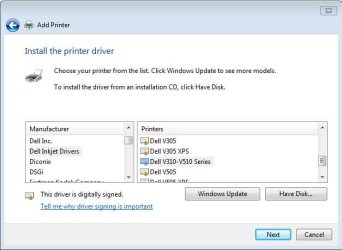
After clicking the "windows update" there seems to be one.
 

Attachments

  • Capture.JPG
    Capture.JPG
    36.3 KB · Views: 8
  • Capture2.JPG
    Capture2.JPG
    55.8 KB · Views: 5

My Computer

Computer Manufacturer/Model Number
Acer Ferrari One/HP Proliant Microserver/Random Monstrosities
OS
Windows 7 Home Premium 64 OEM
Do you have the printer on a network or Windows Home Group?
I have two Win 7 machines home grouped with a printer attached to the 64 bit machine. I can print to it from the 32 bit machine with no 32 bit drivers.
I don't think you would need 64 bit drivers since the printer is install on another machine and have a router(?) which acts as the printer server.
 

My Computer

Computer type
PC/Desktop
Computer Manufacturer/Model Number
Home Built Desktop By DataTech
OS
Windows 7 Ultimate X64 SP1
CPU
Intel i5-2550K, Differing ~4.4-4.8GHz No built in GPU
Motherboard
ASUS P8Z68-V PRO/GEN3
Memory
16GB G.Skill Sniper 1866MHz @ 2133MHz 2x8GB
Graphics Card(s)
ASUS GTX650TIB-DC2OC-2GD5, (650TI Boost)
Sound Card
Onboard Realtek 5-1
Monitor(s) Displays
Samsung P2570HD
Screen Resolution
1920x1080
Hard Drives
Samsung 840 Pro 256GB SSD for OS, 500GB Seagate Constellation (Enterprise drive) for Data
PSU
Corsair HX650W
Case
Inwin Dragon Rider
Cooling
Hyper 212 EVO w/two Noctua fans, push-pull, @1300 RPM
Keyboard
E-Z Eyes, bright yellow keys with large characters
Mouse
steelseries SENSEI Laser Pro Gaming
Internet Speed
48-51Mbs Mbs down, 11 Mbs up Xfinity Cable
Antivirus
Norton Internet Security 2013
Browser
IE 10, Opera, Pale Moon if needed
Other Info
4 case fans, LG BluRay-RE, ASUS DVD-RW, Mr. Fusion power supply, 1.21 gigawatts.
That doesn't show on mine

Hmm..... I guess now I know even the same Windows versions don't get the same printer driver lists when you do the driver list update. :shock:
 

My Computer

Computer Manufacturer/Model Number
Acer Ferrari One/HP Proliant Microserver/Random Monstrosities
OS
Windows 7 Home Premium 64 OEM
Thanks I have the pdf and read it I also am hard wired to the vista computer Thanks

What's the Vista service pack level? Vista before SP1 had problems with networking printers.
 

My Computer

Computer Manufacturer/Model Number
HP Media Center
OS
Windows 7 32 bit
CPU
AMD 5200+ dual core
Memory
2 GB
Graphics Card(s)
NVidia GeForce 6150SE 128 MB
Monitor(s) Displays
CRT
Screen Resolution
1280x1024
Hard Drives
500 GB Sata internal :

SIIG USB 3.0 docking stations w/WD Caviar Black 6 Gb/s drives
Keyboard
PS/2
Mouse
PS/2 Wheel Mouse
Other Info
SIIG USB 3.0 PCIexpress card.
I'm on the home group & vista has all the latest up dates.Whats weird both computers sees the printer & when I print a test page a pop up says sent to printer but nothing happens.Thanks
 

My Computer

OS
Windows 7 Home Premium 64 bit
So do I take it "all the latest updates" means the Vista is at SP2?

Does the Icon for the networked printer look the same on both systems?

I'll tell you what happened with my Epson printer. It only has a Vista driver available. If I plug it into the Vista PC, all is great. If I try to attach it to the Windows 7 machine, the Vista PC will see it over the network, but the icon is not the same. It cannot detect ink levels. It sees it as some generic printer. It doesn't work.

The printer has to be able to serve the driver over the network. The machine that only has network access should be able to do all the stuff like check ink or toner levels, print test page, clean heads or whatever, that the local machine can do. If it can't, it's not getting the driver over the network.

If it can do everything but print over the network, then I'd look on the Vista PC for the problem. If you have any firewall, set all access to everything and disable the firewall service until you get it to work.

 

My Computer

Computer Manufacturer/Model Number
HP Media Center
OS
Windows 7 32 bit
CPU
AMD 5200+ dual core
Memory
2 GB
Graphics Card(s)
NVidia GeForce 6150SE 128 MB
Monitor(s) Displays
CRT
Screen Resolution
1280x1024
Hard Drives
500 GB Sata internal :

SIIG USB 3.0 docking stations w/WD Caviar Black 6 Gb/s drives
Keyboard
PS/2
Mouse
PS/2 Wheel Mouse
Other Info
SIIG USB 3.0 PCIexpress card.
I have tried all of the above and the printer software is for either 32 bit or 64 bit computers and when you install the software only the default installs I can't get the 64 bit driver off the cd.Thanks
 

My Computer

OS
Windows 7 Home Premium 64 bit
Physically uplug the printer power and plug back in, my HP printer "forgets" it's connected sometimes.
 

My Computer

Computer type
PC/Desktop
Computer Manufacturer/Model Number
Home Built Desktop By DataTech
OS
Windows 7 Ultimate X64 SP1
CPU
Intel i5-2550K, Differing ~4.4-4.8GHz No built in GPU
Motherboard
ASUS P8Z68-V PRO/GEN3
Memory
16GB G.Skill Sniper 1866MHz @ 2133MHz 2x8GB
Graphics Card(s)
ASUS GTX650TIB-DC2OC-2GD5, (650TI Boost)
Sound Card
Onboard Realtek 5-1
Monitor(s) Displays
Samsung P2570HD
Screen Resolution
1920x1080
Hard Drives
Samsung 840 Pro 256GB SSD for OS, 500GB Seagate Constellation (Enterprise drive) for Data
PSU
Corsair HX650W
Case
Inwin Dragon Rider
Cooling
Hyper 212 EVO w/two Noctua fans, push-pull, @1300 RPM
Keyboard
E-Z Eyes, bright yellow keys with large characters
Mouse
steelseries SENSEI Laser Pro Gaming
Internet Speed
48-51Mbs Mbs down, 11 Mbs up Xfinity Cable
Antivirus
Norton Internet Security 2013
Browser
IE 10, Opera, Pale Moon if needed
Other Info
4 case fans, LG BluRay-RE, ASUS DVD-RW, Mr. Fusion power supply, 1.21 gigawatts.
Back
Top