Been working on this for 3 days on and off, trying suggestions from many forums and even 2 tech guys on 6ya with no luck. My issue is a little bit different from others I've seen.
I have an older Epson Stylus Photo RX500, still working well, connected to the PC. This past Monday, discovered it wouldn't print a doc. No error messages on computer, doc is in print que, which states in status, "Error- printing". Have tried removing printer and reinstalling several times with no change. Driver built into OS so that's where its coming from; tried installing from Epson cd, but says "This OS not supported", lol!
Then figured I could print from my new Canon Pixma Pro-10, which is on my wi-fi network. Surprise! Same results there, doc is in print que with status of "Error-printing".
I have shut everything down, unplugged all, waited 5 minutes, powered up pc, plugged in printer and powered up, with no change.
Checked print spool setting and its on automatic; have canceled all pending jobs.
Both printers show up in Control Panel, Devices and Printers, and the Epson is selected as the default. I noted that neither is listed under Device Manager; in fact it doesn't even have an Imaging Device category. Don't know if this is important or not; I've seen some posts where printers work fine without being on the Device Manager list.
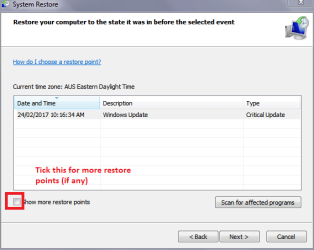
I did consider restoring my pc to an earlier point, but discovered PC Restore only keeps one restore point, even though I allotted plenty of memory, and the restore point was only for updating Microsoft Security Essentials; would appreciate any guidance on fixing that so it would be more useful.
Finally, connected the Epson printer to an old Dell laptop running Win 7 Home Premium; PnP worked smoothly and in 2 minutes was printing from the laptop.
My last recourse would be to upgrade to the latest Win OS which I've been avoiding...not an improvement when you have to relearn everything and I'm certain I won't be anymore efficient or productive with the new OS. Any suggestions that I have yet to try are appreciated; this will be a true challenge for all you tech people out there. Thanks in advance for reading this lengthy account.
I have an older Epson Stylus Photo RX500, still working well, connected to the PC. This past Monday, discovered it wouldn't print a doc. No error messages on computer, doc is in print que, which states in status, "Error- printing". Have tried removing printer and reinstalling several times with no change. Driver built into OS so that's where its coming from; tried installing from Epson cd, but says "This OS not supported", lol!
Then figured I could print from my new Canon Pixma Pro-10, which is on my wi-fi network. Surprise! Same results there, doc is in print que with status of "Error-printing".
I have shut everything down, unplugged all, waited 5 minutes, powered up pc, plugged in printer and powered up, with no change.
Checked print spool setting and its on automatic; have canceled all pending jobs.
Both printers show up in Control Panel, Devices and Printers, and the Epson is selected as the default. I noted that neither is listed under Device Manager; in fact it doesn't even have an Imaging Device category. Don't know if this is important or not; I've seen some posts where printers work fine without being on the Device Manager list.
I did consider restoring my pc to an earlier point, but discovered PC Restore only keeps one restore point, even though I allotted plenty of memory, and the restore point was only for updating Microsoft Security Essentials; would appreciate any guidance on fixing that so it would be more useful.
Finally, connected the Epson printer to an old Dell laptop running Win 7 Home Premium; PnP worked smoothly and in 2 minutes was printing from the laptop.
My last recourse would be to upgrade to the latest Win OS which I've been avoiding...not an improvement when you have to relearn everything and I'm certain I won't be anymore efficient or productive with the new OS. Any suggestions that I have yet to try are appreciated; this will be a true challenge for all you tech people out there. Thanks in advance for reading this lengthy account.
My Computer
At a glance
Windows 7 Home Premium 64 bit Svc Pack 1Intel Core I7-3770 @ 3.4ghz16 gbNvidea
- Computer type
- PC/Desktop
- Computer Manufacturer/Model Number
- custom build
- OS
- Windows 7 Home Premium 64 bit Svc Pack 1
- CPU
- Intel Core I7-3770 @ 3.4ghz
- Memory
- 16 gb
- Graphics Card(s)
- Nvidea
- Hard Drives
- c:= Corsair Force SSD, 167 GB
d:= Western Digital, 931 GB
e:= WD My Book, 3.6 TB
- Antivirus
- Microsoft Security
- Browser
- Internet Explorer