problem ATI AIW 9700 Pro on W7

Flexmens

New member
Local time
6:21 PM
Messages
6
Hi,

Hi, I have a P4PB400 mainboard and ATI All-in-Wonder 9700 Pro. I installed W7, and only get VGA PnP driver for Video. I tried many Catalyst installations, back to v7.1, but none of them really install the driver and CCC. The driver install program does not give any error message, but it just does not install the driver and CCC.

I have searched for 2 days on Internet, tried several other ways, but still no luck. I do not seem to get drivers to work in W7.

Please, any help is appreciated
Thanks!
 

My Computer My Computer

OS
W7
Hi,

Hi, I have a P4PB400 mainboard and ATI All-in-Wonder 9700 Pro. I installed W7, and only get VGA PnP driver for Video. I tried many Catalyst installations, back to v7.1, but none of them really install the driver and CCC. The driver install program does not give any error message, but it just does not install the driver and CCC.

I have searched for 2 days on Internet, tried several other ways, but still no luck. I do not seem to get drivers to work in W7.

Please, any help is appreciated
Thanks!
you 64biit or 32?

Ken J
 

My Computer My Computer

Computer Manufacturer/Model Number
HP Pavillion dv-7 1005 Tx
OS
Win 8 Release candidate 8400
CPU
[email protected]
Memory
4 gigs
Graphics Card(s)
Nvidia 9600M
Sound Card
HD built-in
Monitor(s) Displays
17" Wxga
Screen Resolution
1440x900
Cooling
none
Internet Speed
45Mb down 5Mb up
I have searched for 2 days on Internet, tried several other ways, but still no luck. I do not seem to get drivers to work in W7.
!

Download the Vista driver for it from ATI's site. Extract it to C:\ATI

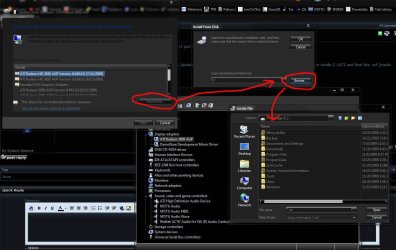
Then install using the device manager. Right click standard vga. Update driver software. Browse. Let me pick. Have disk. Browse. Now go inside C:\ATI and find the .inf (inside driver display folder or something.)

Double click on it and hit ok.

Do the same for the tv part of the card in sound section of device manager. I think it's the inf inside the WDDM folder you want for this. Let me know if you need further help....I used to have an AIW card (9800 Pro) and know them well.
 

My Computer My Computer

Computer Manufacturer/Model Number
self built
OS
7600.20510 x86
CPU
P4 550 3.4 GHz HT running at 3.5 GHz
Motherboard
MSI PM8M3-V (MS-7211 v1.x) Micro-ATX mainboard
Memory
OCZ 2 GB(2x1GB) DDR400mHz running @ 414 mHz
Graphics Card(s)
HIS Radeon HD 3850 IceQ 3 Turbo HDMI Dual DL-DVI AGP
Sound Card
MOTU Traveler firewire studio interface 192 kHz 24 bit
Monitor(s) Displays
22" widescreen Acer X223W LCD, 17" Compaq P75 CRT
Screen Resolution
1680x1050 and 1280x1024
Hard Drives
SATA I x2 WD, 400 GB and 120 GB, SATA 2 WD Caviar Black 1 TB
PSU
350W generic
Case
Cybertronpc, it glows blue
Cooling
stock cpu fan, Ice-Q 3 gpu and system, many case fans
Keyboard
Logitch Classical Keyboard 200
Mouse
Logitech Mediaplay cordless
Internet Speed
1792/448 kbits/sec
Other Info
SATA II PCI fake RAID adapter, 1 GB Readyboost, original ATI Remote Wonder (even works with WMC perfectly), Logitech Rumblepad 2 game controller x2
Hi,
Back from travel. Thanks for feedback. I see 2 files: CL_83742.inf and CW_83742.inf
Which one to take? By the way, if I try to update VGA driver, it does not work so far. Windows keeps on saying "latest driver is installed", even if I browse for the *.inf files.
Thanks for your advice on how to proceed
Flex
 

My Computer My Computer

OS
W7
You want to use the CL one and point specifically to it, instead of just choosing the folder.

Follow this part precisely:

"Then install using the device manager. Right click standard vga. Update driver software. Browse. Let me pick. Have disk. Browse. Now go inside C:\ATI and find the .inf (inside driver display folder or something.)

Double click on it and hit ok."
 

Attachments

  • Capture.JPG
    Capture.JPG
    144.1 KB · Views: 225

My Computer My Computer

Computer Manufacturer/Model Number
self built
OS
7600.20510 x86
CPU
P4 550 3.4 GHz HT running at 3.5 GHz
Motherboard
MSI PM8M3-V (MS-7211 v1.x) Micro-ATX mainboard
Memory
OCZ 2 GB(2x1GB) DDR400mHz running @ 414 mHz
Graphics Card(s)
HIS Radeon HD 3850 IceQ 3 Turbo HDMI Dual DL-DVI AGP
Sound Card
MOTU Traveler firewire studio interface 192 kHz 24 bit
Monitor(s) Displays
22" widescreen Acer X223W LCD, 17" Compaq P75 CRT
Screen Resolution
1680x1050 and 1280x1024
Hard Drives
SATA I x2 WD, 400 GB and 120 GB, SATA 2 WD Caviar Black 1 TB
PSU
350W generic
Case
Cybertronpc, it glows blue
Cooling
stock cpu fan, Ice-Q 3 gpu and system, many case fans
Keyboard
Logitch Classical Keyboard 200
Mouse
Logitech Mediaplay cordless
Internet Speed
1792/448 kbits/sec
Other Info
SATA II PCI fake RAID adapter, 1 GB Readyboost, original ATI Remote Wonder (even works with WMC perfectly), Logitech Rumblepad 2 game controller x2
Hi,

Thanks. I did, when I selected the INF file, I had to choose the Card, so I choose "ATI All in Wonder", which there were 2 of, so I selected the first one. It installed it, and then I rebooted, unfortunately, the Computer crashed during set-up (some memory dumped, etc..), so I restored it to VGA.

May be I need an older version of INF file ?
 

My Computer My Computer

OS
W7
Funny, when I start Windows in "Safe mode", I can see the 9700 Pro driver (under display), but when i start Windows properly, it disappears...
 

My Computer My Computer

OS
W7
Try installing in safe mode. Then boot to normal.
 

My Computer My Computer

Computer Manufacturer/Model Number
self built
OS
7600.20510 x86
CPU
P4 550 3.4 GHz HT running at 3.5 GHz
Motherboard
MSI PM8M3-V (MS-7211 v1.x) Micro-ATX mainboard
Memory
OCZ 2 GB(2x1GB) DDR400mHz running @ 414 mHz
Graphics Card(s)
HIS Radeon HD 3850 IceQ 3 Turbo HDMI Dual DL-DVI AGP
Sound Card
MOTU Traveler firewire studio interface 192 kHz 24 bit
Monitor(s) Displays
22" widescreen Acer X223W LCD, 17" Compaq P75 CRT
Screen Resolution
1680x1050 and 1280x1024
Hard Drives
SATA I x2 WD, 400 GB and 120 GB, SATA 2 WD Caviar Black 1 TB
PSU
350W generic
Case
Cybertronpc, it glows blue
Cooling
stock cpu fan, Ice-Q 3 gpu and system, many case fans
Keyboard
Logitch Classical Keyboard 200
Mouse
Logitech Mediaplay cordless
Internet Speed
1792/448 kbits/sec
Other Info
SATA II PCI fake RAID adapter, 1 GB Readyboost, original ATI Remote Wonder (even works with WMC perfectly), Logitech Rumblepad 2 game controller x2
If you mean running the latest Catalyst install under Safe mode, no, that failed.

Could someone help me to create the right INF file for this AIW 9700 Pro card?
 

My Computer My Computer

OS
W7
No, I mean install as I said before, only in safe mode.

The CL one is the right one.

Which motherboard? If it's an nForce3 or lower, that's not going to work on Windows 7.

If it's not, you want to try to update the chipset to latest possible, like from VIA. Especially the CPU to AGP bridge driver, under system devices in device manager.
 

My Computer My Computer

Computer Manufacturer/Model Number
self built
OS
7600.20510 x86
CPU
P4 550 3.4 GHz HT running at 3.5 GHz
Motherboard
MSI PM8M3-V (MS-7211 v1.x) Micro-ATX mainboard
Memory
OCZ 2 GB(2x1GB) DDR400mHz running @ 414 mHz
Graphics Card(s)
HIS Radeon HD 3850 IceQ 3 Turbo HDMI Dual DL-DVI AGP
Sound Card
MOTU Traveler firewire studio interface 192 kHz 24 bit
Monitor(s) Displays
22" widescreen Acer X223W LCD, 17" Compaq P75 CRT
Screen Resolution
1680x1050 and 1280x1024
Hard Drives
SATA I x2 WD, 400 GB and 120 GB, SATA 2 WD Caviar Black 1 TB
PSU
350W generic
Case
Cybertronpc, it glows blue
Cooling
stock cpu fan, Ice-Q 3 gpu and system, many case fans
Keyboard
Logitch Classical Keyboard 200
Mouse
Logitech Mediaplay cordless
Internet Speed
1792/448 kbits/sec
Other Info
SATA II PCI fake RAID adapter, 1 GB Readyboost, original ATI Remote Wonder (even works with WMC perfectly), Logitech Rumblepad 2 game controller x2
Here. I made a new post so it's less confusing.

Install this in Vista compatibility mode.

Pay special attention to the device manager in system devices. Make sure it updates the CPU to AGP bridge controller. If it doesn't, use the device manager to manually update just that one.

Here's how to do that if needed: Right click on it. Update driver software. Browse my computer. Let me pick. Have disk. Browse. Then double click on the correct .inf. Click ok. Click next and then it will install.

Then, if successfull, install the video driver in the exact way I previously outlined.
 

My Computer My Computer

Computer Manufacturer/Model Number
self built
OS
7600.20510 x86
CPU
P4 550 3.4 GHz HT running at 3.5 GHz
Motherboard
MSI PM8M3-V (MS-7211 v1.x) Micro-ATX mainboard
Memory
OCZ 2 GB(2x1GB) DDR400mHz running @ 414 mHz
Graphics Card(s)
HIS Radeon HD 3850 IceQ 3 Turbo HDMI Dual DL-DVI AGP
Sound Card
MOTU Traveler firewire studio interface 192 kHz 24 bit
Monitor(s) Displays
22" widescreen Acer X223W LCD, 17" Compaq P75 CRT
Screen Resolution
1680x1050 and 1280x1024
Hard Drives
SATA I x2 WD, 400 GB and 120 GB, SATA 2 WD Caviar Black 1 TB
PSU
350W generic
Case
Cybertronpc, it glows blue
Cooling
stock cpu fan, Ice-Q 3 gpu and system, many case fans
Keyboard
Logitch Classical Keyboard 200
Mouse
Logitech Mediaplay cordless
Internet Speed
1792/448 kbits/sec
Other Info
SATA II PCI fake RAID adapter, 1 GB Readyboost, original ATI Remote Wonder (even works with WMC perfectly), Logitech Rumblepad 2 game controller x2
Hi, it failed, I get code 43 after rebooting in normal mode. Problem is that I did not see the right Card (AIW 9700 Pro), so I have chosen Radeon 9700 Pro, but may be that is the problem.

My motherboard is P4PB 400, it has the latest BOIS (from 2003).

The VIA bridge, etc.., driver is from 2006, and seems to be the latest.

Seems I am running out of options...
 

My Computer My Computer

OS
W7
Yeah. Unfortunately, that error code 43 means the CPU to AGP is not working correctly.

The only thing that could help is to update the bios. After doing that, disbale all unused ports in the bios like parallel, serial and floppy etc...

I that still doesn't help, you have to try to get the most up to date driver you can for CPU to AGP.

But it's true that it doesn't look very good from here.
 

My Computer My Computer

Computer Manufacturer/Model Number
self built
OS
7600.20510 x86
CPU
P4 550 3.4 GHz HT running at 3.5 GHz
Motherboard
MSI PM8M3-V (MS-7211 v1.x) Micro-ATX mainboard
Memory
OCZ 2 GB(2x1GB) DDR400mHz running @ 414 mHz
Graphics Card(s)
HIS Radeon HD 3850 IceQ 3 Turbo HDMI Dual DL-DVI AGP
Sound Card
MOTU Traveler firewire studio interface 192 kHz 24 bit
Monitor(s) Displays
22" widescreen Acer X223W LCD, 17" Compaq P75 CRT
Screen Resolution
1680x1050 and 1280x1024
Hard Drives
SATA I x2 WD, 400 GB and 120 GB, SATA 2 WD Caviar Black 1 TB
PSU
350W generic
Case
Cybertronpc, it glows blue
Cooling
stock cpu fan, Ice-Q 3 gpu and system, many case fans
Keyboard
Logitch Classical Keyboard 200
Mouse
Logitech Mediaplay cordless
Internet Speed
1792/448 kbits/sec
Other Info
SATA II PCI fake RAID adapter, 1 GB Readyboost, original ATI Remote Wonder (even works with WMC perfectly), Logitech Rumblepad 2 game controller x2
I'm trying to make a second media computer with my Asus A8V Deluxe motherboard and AMD 3000+ 64-bit cpu along with a 9700 Pro AIW.

When I install the ATI legacy driver package, 9.11, I get a crazy problem. After install it is fine. I can view 3d content and access CCC fine. However after restarting the computer, when Win 7 starts to load the display goes crazy and full of colors. Nothing is discernible.

i don't see drivers anywhere for the via k8t800pro chipset as it seems win7 takes care of it.

Maybe I need to test the cad on an xp machine to make sure it still works.
any help is appreciated.
 

My Computer My Computer

OS
win 7 ultimate 64-bit
That's a nice card and all, I had (still have) one, though not in use. At any rate it sounds like the card may be on it's last legs. Especially if it's artifacting (crazy colors). If you do try it on an XP machine and it does the same thing, it's gone. Time to replace. I saw this with my ATI X800Pro. I had it since 2004 and finally replaced it about 6 months ago as it finally gave out.

The other thing you could do is check the power connector on the card. Could be some loose solder points.

Good luck.
 

My Computer My Computer

Computer type
PC/Desktop
Computer Manufacturer/Model Number
Custom built by me.
OS
Windows 10 Pro
CPU
Intel Core i7-4770K (3.5Ghz)
Motherboard
Gigabyte G1 Sniper 5 (F10 Bios)
Memory
32 gig Corsair Dominator Platinum (4x8Gig)
Graphics Card(s)
Sapphire Tri-X R9 Fury
Sound Card
Soundblaster ZXR
Monitor(s) Displays
NEC PA242W 24" LCD Monitor
Screen Resolution
1920 x 1200
Hard Drives
Primary - Samsung 850 Pro (512gig), Samsung 840 Pro (256gig), 2TB WD Caviar Black.
PSU
EVGA Supernova 1000 G2
Case
Cooler Master HAF X
Cooling
Corsair H100i with Corsair Air Series SP120 Quiet Fans
Keyboard
Logitech Wireless Wave
Mouse
Logitech Performance MX
Internet Speed
High Speed Cable
Antivirus
Norton Security
Browser
IE11
Other Info
Memory Timings - 1866MHz @ 9-9-9-27-1T @ 1.5 volts
Back
Top