IE9 32bit context menu fails on W7 Pro 64bit

UsernameIssues

a.k.a. UNI
Guru
Gold Member
Local time
9:05 AM
Messages
8,138
Forgive me if this has been answered before - I searched a lot before posting.

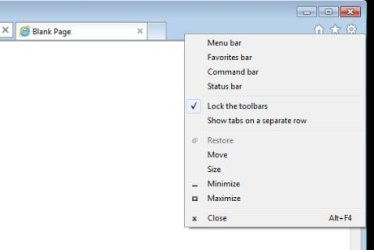
The context menu in question is shown in the attached file named "context menu.JPG". That image was taken from IE9 64bit on the same W7 Pro 64bit computer.

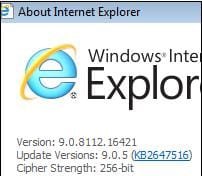
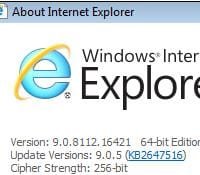
I originally thought that I had a bad profile or that I had messed things up while setting the theme to minimal GUI fading via the OS setting for "Adjust for best performance". It was after I made the two videos for this post that I realized that I was dealing with 32bit vs. 64bit versions of IE9 in the two profiles in question. Hence the different look to IE9 in the "broken" 32bit video.

The first place that the mouse is paused in this first video is where I right-click and where I would expect the context menu of interest to appear:
IE9-32bit-broke - YouTube

As you can see, I tried right-clicking on several "empty" places with no joy.


Here is the context menu working on IE9 64bit on that same system:
IE9-64bit-works - YouTube


These videos were taken during a remote control session - the on screen keyboard is just to show that pressing the Alt key has the desired effect.

So, my question is:
Is there a way to get that context menu to appear for IE9 32bit?

I have used the work around of View > Toolbars to display the toolbars of interest, but that is hardly a convient way to toggle these toolbars off and on.

I have tested one other W7 Pro 64bit and the context menu of interest appears as expected in both the 32bit and 64bit versions of IE9... same version of IE9.

The computer that does not display the context menu as desired is only a few weeks old. It has never had another OS installed. I support this computer for a friend. I removed AVG 2012 free - thinking that there was some BHO issue. For now, AVG has been replaced with MSE. But perhaps there is a BHO remnant??

I've reset the IE9 32bit version - including the "Delete personal settings" option. MSE, Malwarebytes and ESET's online scanner (command line scanner) all show the system to be clean.

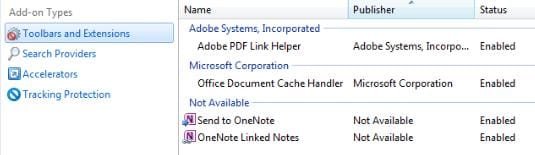
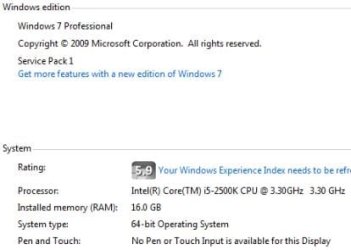
There are no accelerators, Google is the only search provider and no 3rd party toolbars installed. See the attached file named "manage add-ons.JPG". Also attached is a file named "W7 specs.JPG". Since this is not my system, I did not run the systeminfo file against it. Let me know if you need more info about the system.


As an aside - I could not get the youtube videos to play in while previewing this rather long post - hence the link to them above the attempt at embedding them. Is there some trick to getting embedded videos to play back during a post preview?
The embedded video gives the following error:
An error occurred. Please try again later.
while in the post preview mode.
 

Attachments
  • context menu.JPG
    context menu.JPG
    9.9 KB · Views: 24
  • IE9-32bit-version.JPG
    IE9-32bit-version.JPG
    8 KB · Views: 263
  • IE9-64bit-version.JPG
    IE9-64bit-version.JPG
    7.9 KB · Views: 263
  • manage add-ons.JPG
    manage add-ons.JPG
    13.2 KB · Views: 24
  • W7-specs.JPG
    W7-specs.JPG
    13.7 KB · Views: 25
Last edited:

My Computer My Computer

At a glance

W7 Pro SP1 64biti78GBIntel HD Graphics
Computer type
Laptop
Computer Manufacturer/Model Number
Employer provided Dell Latitude
OS
W7 Pro SP1 64bit
CPU
i7
Memory
8GB
Graphics Card(s)
Intel HD Graphics
Hard Drives
crappy SSD
Antivirus
Employer mandated Symantec Endpoint Protection
Browser
Pale Moon 64bit, IE11 64bit & Chrome 64bit

My Computer My Computer

At a glance

Windows 10 Home x64INTEL Core i5-750 Quad-Core 3.37GHzHyperX Fury Black Series 8GB (2 x 4GB) 1866MhzEVGA GeForce GTX 750 Superclocked 1GB 128-Bit...
Computer type
PC/Desktop
OS
Windows 10 Home x64
CPU
INTEL Core i5-750 Quad-Core 3.37GHz
Motherboard
ASUS P7P55D
Memory
HyperX Fury Black Series 8GB (2 x 4GB) 1866Mhz
Graphics Card(s)
EVGA GeForce GTX 750 Superclocked 1GB 128-Bit GDDR5
Monitor(s) Displays
LG 32MA68HY 32" IPS
Screen Resolution
1920 x 1080
Hard Drives
Samsung 840 Evo 120GB, SEAGATE 500GB Barracuda® 7200.12, SATA 3 Gb/s, 7200 RPM, 16MB cache
PSU
ANTEC TruePower New TP-550, 80 PLUS, 550W
Case
ANTEC Three Hundred Illusion
Cooling
COOLER MASTER Hyper 212 Plus, 4 x 120mm 1 x 140mm Noctua's
Internet Speed
85 + Mbps
Antivirus
Avast
Browser
Vivaldi
Thanks for the welcome and for reading my rather long post.

I downloaded/used the tool as you suggested - reregistered the suggested DLLs and tried the reset. The problem persists - even after a restart.

I think that I'll try to uninstall IE9 - which I assume will leave us with IE8.
I'll see if the context menu of interest works in IE8;
then I'll reinstall IE9. Sound sane?


P.S. Doh! I've seen/used that tag method in other forums. Thx.
 

My Computer My Computer

At a glance

W7 Pro SP1 64biti78GBIntel HD Graphics
Computer type
Laptop
Computer Manufacturer/Model Number
Employer provided Dell Latitude
OS
W7 Pro SP1 64bit
CPU
i7
Memory
8GB
Graphics Card(s)
Intel HD Graphics
Hard Drives
crappy SSD
Antivirus
Employer mandated Symantec Endpoint Protection
Browser
Pale Moon 64bit, IE11 64bit & Chrome 64bit
Well, that was fun. IE8 32bit has the same problem, IE8 64bit works.

Reinstalling IE9 did not help. It makes me wonder how many other things are messed up on this OS build.

Maybe SFC /scannow next - any other ideas?
 

My Computer My Computer

At a glance

W7 Pro SP1 64biti78GBIntel HD Graphics
Computer type
Laptop
Computer Manufacturer/Model Number
Employer provided Dell Latitude
OS
W7 Pro SP1 64bit
CPU
i7
Memory
8GB
Graphics Card(s)
Intel HD Graphics
Hard Drives
crappy SSD
Antivirus
Employer mandated Symantec Endpoint Protection
Browser
Pale Moon 64bit, IE11 64bit & Chrome 64bit

My Computer My Computer

At a glance

Windows 10 Home x64INTEL Core i5-750 Quad-Core 3.37GHzHyperX Fury Black Series 8GB (2 x 4GB) 1866MhzEVGA GeForce GTX 750 Superclocked 1GB 128-Bit...
Computer type
PC/Desktop
OS
Windows 10 Home x64
CPU
INTEL Core i5-750 Quad-Core 3.37GHz
Motherboard
ASUS P7P55D
Memory
HyperX Fury Black Series 8GB (2 x 4GB) 1866Mhz
Graphics Card(s)
EVGA GeForce GTX 750 Superclocked 1GB 128-Bit GDDR5
Monitor(s) Displays
LG 32MA68HY 32" IPS
Screen Resolution
1920 x 1080
Hard Drives
Samsung 840 Evo 120GB, SEAGATE 500GB Barracuda® 7200.12, SATA 3 Gb/s, 7200 RPM, 16MB cache
PSU
ANTEC TruePower New TP-550, 80 PLUS, 550W
Case
ANTEC Three Hundred Illusion
Cooling
COOLER MASTER Hyper 212 Plus, 4 x 120mm 1 x 140mm Noctua's
Internet Speed
85 + Mbps
Antivirus
Avast
Browser
Vivaldi
Thx - I'll test those once I'm there in person :-)

SFC scan did not yield anything. :-(
 

My Computer My Computer

At a glance

W7 Pro SP1 64biti78GBIntel HD Graphics
Computer type
Laptop
Computer Manufacturer/Model Number
Employer provided Dell Latitude
OS
W7 Pro SP1 64bit
CPU
i7
Memory
8GB
Graphics Card(s)
Intel HD Graphics
Hard Drives
crappy SSD
Antivirus
Employer mandated Symantec Endpoint Protection
Browser
Pale Moon 64bit, IE11 64bit & Chrome 64bit

My Computer My Computer

At a glance

W7 Pro SP1 64biti78GBIntel HD Graphics
Computer type
Laptop
Computer Manufacturer/Model Number
Employer provided Dell Latitude
OS
W7 Pro SP1 64bit
CPU
i7
Memory
8GB
Graphics Card(s)
Intel HD Graphics
Hard Drives
crappy SSD
Antivirus
Employer mandated Symantec Endpoint Protection
Browser
Pale Moon 64bit, IE11 64bit & Chrome 64bit
On screen keyboard ?
Does it happen with a real keyboard looked up ?

Just as a test I used the weird on screen keyboard and alt and V did operate but nothing more,
In other words If I tried Alt+VT the focus was lost on T so it's just a funky on screen keyboard dysfunction,
Right click was not hampered though. possibly Mouse related ?
 
Last edited:

My Computer My Computer

At a glance

Win-7-Pro64bit 7-H-Prem-64biti7-5930K 2nd i9-9940x both water blocked VRM'...Trident-z 3200C14 2nd Trident-z 3600C16EVGA 1080ti ftw3 2nd Titan Xp both water blocked
Computer type
PC/Desktop
Computer Manufacturer/Model Number
Custom assembled by me :}
OS
Win-7-Pro64bit 7-H-Prem-64bit
CPU
i7-5930K 2nd i9-9940x both water blocked VRM's too
Motherboard
ASUS SABERTOOTH X99 2nd ASUS x299 Apex
Memory
Trident-z 3200C14 2nd Trident-z 3600C16
Graphics Card(s)
EVGA 1080ti ftw3 2nd Titan Xp both water blocked
Sound Card
Built-in Realtek
Monitor(s) Displays
1-AOC G2460PG 24"G-Sync 144Hz/ 2nd 1-ASUS VG248QE 24" 144Hz
Screen Resolution
1920 x 1080 144Hz
Hard Drives
2-Samsung M.2 Evo & Evo Plus
2-Samsung 850 EVO 500GB SSD's/ 3-2.5 W.D. Black 1tb-&3-1tb/3-3.5 WD Black 1tb hdd's
PSU
EVGA SuperNOVA 1000-P2 2nd 1200-P2
Case
2-Corsair Obsidian Series 450D Black ATX Mid Tower
Cooling
Custom water loops
Keyboard
Logitech G710+/ 2nd Logitech G910
Mouse
2-RedDragon M901 Perdition 16400 dpi Gaming mouse = wired
Internet Speed
Comcast Ping 19ms 89.31mbps download speed 6.12mbps upload
Antivirus
Malwarebytes Pro/ Superantispyware Pro
Browser
FireFox & Pale moon
Other Info
2nd ASUS X299 Apex/Intel i9-9940x with Custom water loop/7H-Prem-x64/Corsair 450D case/Ram Trident-z 3600C16 4x8gb / Samsung970Evo plus 500gb SSD/Dual ssd EZ swap evo/PSU EVGA SuperNova 1200w-P2 80+Platinum/GPU Titan Xp /8-ML-140 on push-pull on 2-280GTX rads
Sure Mike, make UsernameIssues relive his 1st posts here :D I'll assume he's long ago done a fresh install, if not, will he want to revisit the issue? A Guy ;)
 

My Computer My Computer

At a glance

Windows 10 Home x64INTEL Core i5-750 Quad-Core 3.37GHzHyperX Fury Black Series 8GB (2 x 4GB) 1866MhzEVGA GeForce GTX 750 Superclocked 1GB 128-Bit...
Computer type
PC/Desktop
OS
Windows 10 Home x64
CPU
INTEL Core i5-750 Quad-Core 3.37GHz
Motherboard
ASUS P7P55D
Memory
HyperX Fury Black Series 8GB (2 x 4GB) 1866Mhz
Graphics Card(s)
EVGA GeForce GTX 750 Superclocked 1GB 128-Bit GDDR5
Monitor(s) Displays
LG 32MA68HY 32" IPS
Screen Resolution
1920 x 1080
Hard Drives
Samsung 840 Evo 120GB, SEAGATE 500GB Barracuda® 7200.12, SATA 3 Gb/s, 7200 RPM, 16MB cache
PSU
ANTEC TruePower New TP-550, 80 PLUS, 550W
Case
ANTEC Three Hundred Illusion
Cooling
COOLER MASTER Hyper 212 Plus, 4 x 120mm 1 x 140mm Noctua's
Internet Speed
85 + Mbps
Antivirus
Avast
Browser
Vivaldi
A real keyboard does the same thing. I first noticed the issue while sitting in front of the computer when it was just hours old. It still has the issue. I was sitting in front of it a few days ago. The right click send via the remote control app fails to make a context menu too. :-(

The videos were taken while I was remotely controlling the system. The on screen keyboard was just to show the Alt key.

Not having that one context menu is a minor annoyance and there is a work around (the menu bar).

A bigger issue with this computer is the root kit mentioned here:
http://www.sevenforums.com/system-security/239064-trojan-win32-fakesysdef.html
(That was my second post and it too is unresolved - but not because of the forum.)

The computer is still infected and MSE happily reports that it is clean. The organization that uses this computer has a backup computer for the task. I asked them to put the backup computer into service before we take this one down for a clean install. They have not done that yet.

The rootkit is blocked from communicating to the internet or network.


Yet another IE issue (this time on a different computer) is mentioned here:
http://www.sevenforums.com/browsers-mail/284485-ie9-flash-youtube.html
This is also unresolved, but the user is fine with Chrome. I've not gone over there in person for a while now. It seems like there was some unrelated issue that I wanted to check on that network setup. I don't want to start remoting into that computer unless I'm invited in to solve another issue. This particular user insists on paying me. I ask the user give to a charity instead, but it is still an out of pocket cost for this user (for an issue that the user has not asked me to revisit).
 

My Computer My Computer

At a glance

W7 Pro SP1 64biti78GBIntel HD Graphics
Computer type
Laptop
Computer Manufacturer/Model Number
Employer provided Dell Latitude
OS
W7 Pro SP1 64bit
CPU
i7
Memory
8GB
Graphics Card(s)
Intel HD Graphics
Hard Drives
crappy SSD
Antivirus
Employer mandated Symantec Endpoint Protection
Browser
Pale Moon 64bit, IE11 64bit & Chrome 64bit
I've seen the majority of informative posts about MSE not acknowledging these bugs,
I'll not defend but just add no one security suite is perfect,
The Pro version of Malwarebytes is mandatory for all security suites no matter which is used IMHO,
All I know is the on screen keyboard is buggy to say the least and if it's buggier after getting a bug then I'm not surprised bugs corrupt everything they can/ even Security suites normal discovery features.
I'm just glad I don't have any bugs with the Security choices I have and haven't in a very long time ;)
 
Last edited:

My Computer My Computer

At a glance

Win-7-Pro64bit 7-H-Prem-64biti7-5930K 2nd i9-9940x both water blocked VRM'...Trident-z 3200C14 2nd Trident-z 3600C16EVGA 1080ti ftw3 2nd Titan Xp both water blocked
Computer type
PC/Desktop
Computer Manufacturer/Model Number
Custom assembled by me :}
OS
Win-7-Pro64bit 7-H-Prem-64bit
CPU
i7-5930K 2nd i9-9940x both water blocked VRM's too
Motherboard
ASUS SABERTOOTH X99 2nd ASUS x299 Apex
Memory
Trident-z 3200C14 2nd Trident-z 3600C16
Graphics Card(s)
EVGA 1080ti ftw3 2nd Titan Xp both water blocked
Sound Card
Built-in Realtek
Monitor(s) Displays
1-AOC G2460PG 24"G-Sync 144Hz/ 2nd 1-ASUS VG248QE 24" 144Hz
Screen Resolution
1920 x 1080 144Hz
Hard Drives
2-Samsung M.2 Evo & Evo Plus
2-Samsung 850 EVO 500GB SSD's/ 3-2.5 W.D. Black 1tb-&3-1tb/3-3.5 WD Black 1tb hdd's
PSU
EVGA SuperNOVA 1000-P2 2nd 1200-P2
Case
2-Corsair Obsidian Series 450D Black ATX Mid Tower
Cooling
Custom water loops
Keyboard
Logitech G710+/ 2nd Logitech G910
Mouse
2-RedDragon M901 Perdition 16400 dpi Gaming mouse = wired
Internet Speed
Comcast Ping 19ms 89.31mbps download speed 6.12mbps upload
Antivirus
Malwarebytes Pro/ Superantispyware Pro
Browser
FireFox & Pale moon
Other Info
2nd ASUS X299 Apex/Intel i9-9940x with Custom water loop/7H-Prem-x64/Corsair 450D case/Ram Trident-z 3600C16 4x8gb / Samsung970Evo plus 500gb SSD/Dual ssd EZ swap evo/PSU EVGA SuperNova 1200w-P2 80+Platinum/GPU Titan Xp /8-ML-140 on push-pull on 2-280GTX rads
Back
Top