problem connecting to wireless in win 7

atisundar

New member
Local time
1:56 AM
Messages
8
Hi

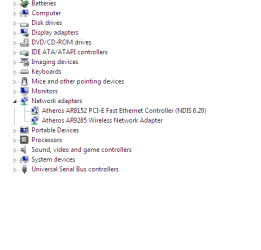
I purchased Toshiba Satellite C650D laptop 2-3 weeks back. I installed windows 7 and can connect to the internet by wire. My brother's laptop is registered with the
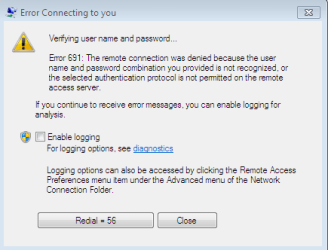
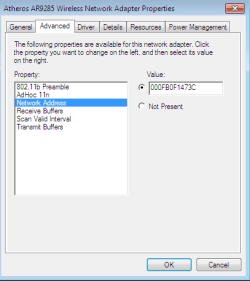
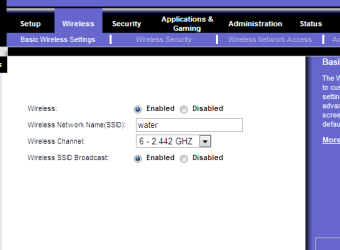
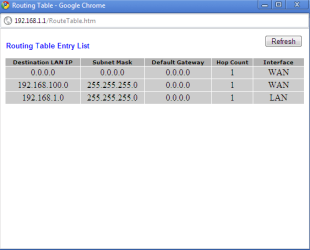
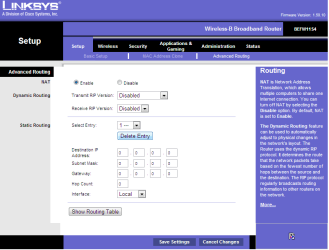
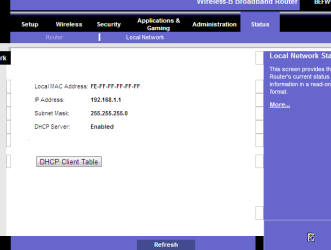
ISP so I have to mask my MAC address. I am posting snapshots of the problem. I get
error 691. I tried resetting the router. We connect through Linksys router.
Please help me.

Thanks
 

Attachments
  • 1.PNG
    1.PNG
    8 KB · Views: 9
  • 2.PNG
    2.PNG
    7.5 KB · Views: 6
  • 3.PNG
    3.PNG
    7.5 KB · Views: 4
  • 4.PNG
    4.PNG
    7.8 KB · Views: 5

My Computer

Computer Manufacturer/Model Number
Toshiba C650D Laptop
OS
Windows 7 Ultimate 32 bit
CPU
AMD Athlon (tm)II P320 Dual-Core Processor 2.1 GHz
Memory
2 GB
Hard Drives
300 GB
I've heard that if you remove the card and power up once and turn off, then insert your card again it works.
 

My Computer

Computer Manufacturer/Model Number
Dell Vostro 220 mini
OS
Windows 7 Pro. 32 bit
CPU
2.93 GHz E7500 Intel Core 2 Duo
Motherboard
Dell
Memory
2 GB
Graphics Card(s)
Intel G45/G43
Sound Card
Realtek High Def.
Monitor(s) Displays
17" acer (I know...its bad)
Screen Resolution
1024x768
Hard Drives
WD 250 GB
Keyboard
Dell L100
Mouse
Dell optical (standard)
Internet Speed
100 Mbps 11.91 dl 12.46 ul
Other Info
Have questions, just ask.
Hi ITgirl,
thanks for replying. I have a Laptop, so how do I do that. This is a brand new laptop but the warranty does not cover software. They only cover the hardware part.
 

My Computer

Computer Manufacturer/Model Number
Toshiba C650D Laptop
OS
Windows 7 Ultimate 32 bit
CPU
AMD Athlon (tm)II P320 Dual-Core Processor 2.1 GHz
Memory
2 GB
Hard Drives
300 GB
Hi, can i ask why you have to mask your mac address, is it because you can only register 1 pc with your isp or something?.
When you have a wired connection do you still mask your MAC address?
Is your brothers laptop connected wirelessly?
What security protocols do you have in place in the router?
You could access the router via your brothers laptop ensure that your wireless is switched on then restart the router, check in the router to see what devices are connected.
Just a few things i would try before delving into the insides of a new machine. Seeing as your device manager seems to indicate that the wireless is on and ok.

Raz
 

My Computer

Computer Manufacturer/Model Number
home built PC. Laptop studio1557
OS
windows 7 64 bit and dual boot Pinguyos
CPU
PC, intel i7 920 2.7ghz, laptop i7 720
Motherboard
PC, Asus P6t .laptop probably rubbish from dell
Memory
PC 6GB, laptop 2GB, me 2 seconds after 6 pints
Graphics Card(s)
PC Asus eah5870,laptop, ati hd 4580
Monitor(s) Displays
Sharp 42" HD TV using HDMI + HDMI to onkyo surround amp
Screen Resolution
1920x1080
Hard Drives
1x ssd OCZ 60GB, 2x250GB raid0, 2x1TB (storage),2TB
PSU
OCZ 700w
Case
antec 902
Cooling
antec khuler h20 920
Keyboard
logitek wave
Mouse
x8 sidewinder
Internet Speed
dog slow
Hi Raz

My ISP allows only one MAC address. Even with my wired connection I mask my address. I just checked that
my laptop is not able to connect to the router itself. After connecting to the router, I will have to use
PPPoE to connect to my ISP. So problem is connecting with my router. I can connect it for wired connection
but it seems I can't connect for wireless. Its linksys router. Any help ?

Thanks
 

My Computer

Computer Manufacturer/Model Number
Toshiba C650D Laptop
OS
Windows 7 Ultimate 32 bit
CPU
AMD Athlon (tm)II P320 Dual-Core Processor 2.1 GHz
Memory
2 GB
Hard Drives
300 GB
Only software solution that may work(that i can think of) is something like hotspot shield,
Hotspot Shield
Other wise you may have to look into a hard ware fix. A second router attached to the first( i used this method as my isp only supplies G class routers and we needed N class to transfer the signal in the house) or connecting via your brothers PC.

Raz
 

My Computer

Computer Manufacturer/Model Number
home built PC. Laptop studio1557
OS
windows 7 64 bit and dual boot Pinguyos
CPU
PC, intel i7 920 2.7ghz, laptop i7 720
Motherboard
PC, Asus P6t .laptop probably rubbish from dell
Memory
PC 6GB, laptop 2GB, me 2 seconds after 6 pints
Graphics Card(s)
PC Asus eah5870,laptop, ati hd 4580
Monitor(s) Displays
Sharp 42" HD TV using HDMI + HDMI to onkyo surround amp
Screen Resolution
1920x1080
Hard Drives
1x ssd OCZ 60GB, 2x250GB raid0, 2x1TB (storage),2TB
PSU
OCZ 700w
Case
antec 902
Cooling
antec khuler h20 920
Keyboard
logitek wave
Mouse
x8 sidewinder
Internet Speed
dog slow
Hi

if its hardware problem, I can take this to Toshiba Service center as its under warranty. I dont think there should be a problem in a brand new laptop. But I will have a trip to the nearest service center anyway. And I will check this HotSpot
thing.

Thanks
 

My Computer

Computer Manufacturer/Model Number
Toshiba C650D Laptop
OS
Windows 7 Ultimate 32 bit
CPU
AMD Athlon (tm)II P320 Dual-Core Processor 2.1 GHz
Memory
2 GB
Hard Drives
300 GB
When i say hardware i mean create a external fix it may be that your laptop is fine but your currant router/modem set up may need looking into.

Raz
 

My Computer

Computer Manufacturer/Model Number
home built PC. Laptop studio1557
OS
windows 7 64 bit and dual boot Pinguyos
CPU
PC, intel i7 920 2.7ghz, laptop i7 720
Motherboard
PC, Asus P6t .laptop probably rubbish from dell
Memory
PC 6GB, laptop 2GB, me 2 seconds after 6 pints
Graphics Card(s)
PC Asus eah5870,laptop, ati hd 4580
Monitor(s) Displays
Sharp 42" HD TV using HDMI + HDMI to onkyo surround amp
Screen Resolution
1920x1080
Hard Drives
1x ssd OCZ 60GB, 2x250GB raid0, 2x1TB (storage),2TB
PSU
OCZ 700w
Case
antec 902
Cooling
antec khuler h20 920
Keyboard
logitek wave
Mouse
x8 sidewinder
Internet Speed
dog slow
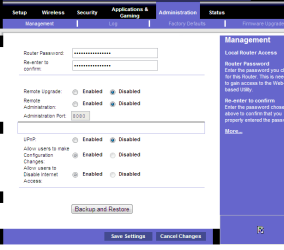
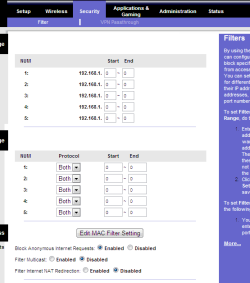
I can post pics of my Linksys router setup here. Tell me what do I need to do ?
I know how to access router settings through browser
 

My Computer

Computer Manufacturer/Model Number
Toshiba C650D Laptop
OS
Windows 7 Ultimate 32 bit
CPU
AMD Athlon (tm)II P320 Dual-Core Processor 2.1 GHz
Memory
2 GB
Hard Drives
300 GB
I am going to post some snapshots from the router setup.
 

Attachments

  • 5.PNG
    5.PNG
    11.8 KB · Views: 5
  • 4.PNG
    4.PNG
    11.4 KB · Views: 5
  • 3.PNG
    3.PNG
    6.8 KB · Views: 4
  • 2.PNG
    2.PNG
    6.4 KB · Views: 5
  • 1.PNG
    1.PNG
    20.1 KB · Views: 8
  • 6.PNG
    6.PNG
    7.3 KB · Views: 4
  • 7.PNG
    7.PNG
    8.1 KB · Views: 5

My Computer

Computer Manufacturer/Model Number
Toshiba C650D Laptop
OS
Windows 7 Ultimate 32 bit
CPU
AMD Athlon (tm)II P320 Dual-Core Processor 2.1 GHz
Memory
2 GB
Hard Drives
300 GB
As you can see , in DHCP Active IP Table, you can see wireless network. But pc didn't show that wireless card was
connected to the router
 

My Computer

Computer Manufacturer/Model Number
Toshiba C650D Laptop
OS
Windows 7 Ultimate 32 bit
CPU
AMD Athlon (tm)II P320 Dual-Core Processor 2.1 GHz
Memory
2 GB
Hard Drives
300 GB

My Computer

Computer Manufacturer/Model Number
home built PC. Laptop studio1557
OS
windows 7 64 bit and dual boot Pinguyos
CPU
PC, intel i7 920 2.7ghz, laptop i7 720
Motherboard
PC, Asus P6t .laptop probably rubbish from dell
Memory
PC 6GB, laptop 2GB, me 2 seconds after 6 pints
Graphics Card(s)
PC Asus eah5870,laptop, ati hd 4580
Monitor(s) Displays
Sharp 42" HD TV using HDMI + HDMI to onkyo surround amp
Screen Resolution
1920x1080
Hard Drives
1x ssd OCZ 60GB, 2x250GB raid0, 2x1TB (storage),2TB
PSU
OCZ 700w
Case
antec 902
Cooling
antec khuler h20 920
Keyboard
logitek wave
Mouse
x8 sidewinder
Internet Speed
dog slow
Thanks I will check that and I will also have trip to the Toshiba Service Center
 

My Computer

Computer Manufacturer/Model Number
Toshiba C650D Laptop
OS
Windows 7 Ultimate 32 bit
CPU
AMD Athlon (tm)II P320 Dual-Core Processor 2.1 GHz
Memory
2 GB
Hard Drives
300 GB
Back
Top