Solved Problem converting two bootable drives to one

jodzeee

New member
Local time
1:15 PM
Messages
4
A few months ago I swapped out one of my drives for a new SSD and installed Windows 7 on it, installed all programs, configured everything, and gradually moved data over while still using the old one to get work done during the transition.

I'm at the point I'd like to wipe out the old drive and just use it for data; however, my PC seems to need that one to boot. I tried removing the drive and booting from a system repair disc, running the repair several times, to no avail.

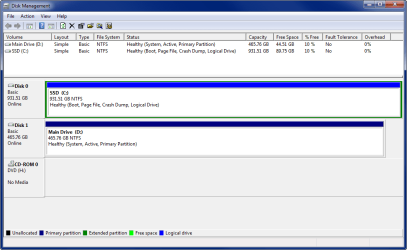
In Disk Management, the one I don't want is showing as Disk 1: System, Active, Primary Partition; and the SSD I want to be booting off of is Disk 0: Boot, Page File, Crash Dump, Logical Drive. There are no partitions.

Is there a way to fix this without having to completely reinstall or lose data/programs?

What would happen if I upgraded to Windows 10, would I still have the same issue (or worse)?
 

My Computer

Computer type
Laptop
Computer Manufacturer/Model Number
Dell XPS
OS
Windows 7 Professional 64-bit
Memory
8 GB
Hard Drives
1TB Samsung EVO 840 SSD
500 GB 7200 RPM
Antivirus
Norton 360
Browser
Chrome

My Computer

Computer type
Laptop
Computer Manufacturer/Model Number
Dell XPS
OS
Windows 7 Professional 64-bit
Memory
8 GB
Hard Drives
1TB Samsung EVO 840 SSD
500 GB 7200 RPM
Antivirus
Norton 360
Browser
Chrome

My Computer

Computer type
PC/Desktop
Computer Manufacturer/Model Number
Self Built
OS
Win 10 Pro x64
CPU
Intel I5-2500K @3.3GHz
Motherboard
Asrock P67 Extreme4
Memory
16GB G.Skill Ripjaws X (4x4GB)
Graphics Card(s)
EVGA GeForce 750 Ti SC 2GB
Sound Card
ASUS Xonar DG 5.1 Channels 24-bit 96KHz PCI Interface Sound
Monitor(s) Displays
auria eq2367
Screen Resolution
1920 x 1080
Hard Drives
250GB Samsung 850 EVO SSD
1TB WD Blue
1TB Hitachi
PSU
SeaSonic X 650W 80 Plus Gold
Case
Corsair Obsidian 750D
Cooling
Corsair H60, Three 140mm case fans
Keyboard
Logitech Wireless Keyboard K520
Mouse
Logitech Wireless Mouse M310
Internet Speed
Wave Broadband ~ 100 dn 5 up
Antivirus
Windows Defender, Malwarebytes Premium
Browser
Edge, IE11, Chrome
Other Info
Laptop specs: HP g7-1365dx /
CPU: AMD A6-3420M APU with Radeon(tm) HD Graphics /
RAM: Crucial 8Gb (2x4Gb) /
SSD: Crucial M4-CT128M4SSD2 ATA Device/ FW 000F /
GFX: AMD Radeon HD 6520G /
OS: Windows 10 Pro x64
Here's the screenshot. I appreciate your help!
 

Attachments

  • 2015-11-14_11-31-33.png
    2015-11-14_11-31-33.png
    54.9 KB · Views: 4

My Computer

Computer type
Laptop
Computer Manufacturer/Model Number
Dell XPS
OS
Windows 7 Professional 64-bit
Memory
8 GB
Hard Drives
1TB Samsung EVO 840 SSD
500 GB 7200 RPM
Antivirus
Norton 360
Browser
Chrome
Ah, that's why you can't get the system and active flags over there, disk 0 is a logical drive.

You need to convert that to primary before you can get it to boot from that drive,

Partition wizard bootable CD will do that,

http://www.sevenforums.com/tutorials/93322-partition-wizard-use-bootable-cd.html

Option one above, and to be safe you should make sure everything is backed up on that drive first.
 

My Computer

Computer type
PC/Desktop
Computer Manufacturer/Model Number
Self Built
OS
Win 10 Pro x64
CPU
Intel I5-2500K @3.3GHz
Motherboard
Asrock P67 Extreme4
Memory
16GB G.Skill Ripjaws X (4x4GB)
Graphics Card(s)
EVGA GeForce 750 Ti SC 2GB
Sound Card
ASUS Xonar DG 5.1 Channels 24-bit 96KHz PCI Interface Sound
Monitor(s) Displays
auria eq2367
Screen Resolution
1920 x 1080
Hard Drives
250GB Samsung 850 EVO SSD
1TB WD Blue
1TB Hitachi
PSU
SeaSonic X 650W 80 Plus Gold
Case
Corsair Obsidian 750D
Cooling
Corsair H60, Three 140mm case fans
Keyboard
Logitech Wireless Keyboard K520
Mouse
Logitech Wireless Mouse M310
Internet Speed
Wave Broadband ~ 100 dn 5 up
Antivirus
Windows Defender, Malwarebytes Premium
Browser
Edge, IE11, Chrome
Other Info
Laptop specs: HP g7-1365dx /
CPU: AMD A6-3420M APU with Radeon(tm) HD Graphics /
RAM: Crucial 8Gb (2x4Gb) /
SSD: Crucial M4-CT128M4SSD2 ATA Device/ FW 000F /
GFX: AMD Radeon HD 6520G /
OS: Windows 10 Pro x64
Thanks for your help! We finally got around to tackling this again, and were able to get C: set to a primary drive with your instructions. However, we couldn't figure out how to set it up as the system drive.

We tried booting from the repair disk 3 times and that didn't work.

Then in the command prompt, we tried bcdboot c:\windows /s c: (then ran the repair again 3 times), to no avail.

Next, we took out the D: drive completely, but couldn't get the repair disc to boot from C: Sometimes the repair would find errors, other times just fail.

Next, with the help of this thread:
http://www.sevenforums.com/installa...t-partition-without-reinstall.html#post517358

We typed

bootsect /nt60 c: /mbr

in the command prompt; then we were able to boot from C: (YAY!)

We inspected Disk Manager to make sure it was set up correctly, then put the other drive back in, checked to make sure it still booted correctly and looked good in Disk Manager.

Then just to be sure, ran this in the command prompt to make D: inactive

diskpart

sel vol d

inact

exi


Then checked everything again and it's working fine!

Thanks again and hope this might help others :)
 

My Computer

Computer type
Laptop
Computer Manufacturer/Model Number
Dell XPS
OS
Windows 7 Professional 64-bit
Memory
8 GB
Hard Drives
1TB Samsung EVO 840 SSD
500 GB 7200 RPM
Antivirus
Norton 360
Browser
Chrome
You never set it Active, that`s why it wouldn`t write the system files to the ssd.

If you had unplugged the hard drive when you installed windows on the ssd, you would not have had any problems.

ALWAYS unplug all other drives when installing windows.
 

My Computer

Computer type
PC/Desktop
Computer Manufacturer/Model Number
Skylake Special #666
OS
Windows 10 Pro x64
CPU
Intel Core i7 6700K
Motherboard
Asus Sabertooth Z170 Mark 1
Memory
GSkill TridentZ RGB 16GB 3600 16-16-16-36
Graphics Card(s)
EVGA GTX 980 Ti SC x2
Sound Card
Realtek High Definition
Monitor(s) Displays
AOC G2460PG
Screen Resolution
1920 x 1080 144Hz
Hard Drives
Samsung 860 Pro 256GB, Seagate Barracuda 4TB x2
PSU
EVGA 1000 P2, EVGA White Custom Braided Cables
Case
Corsair Vengeance C70 Gunmetal Black
Cooling
Corsair H100i v2, Corsair ML120 x2, Thermal Grizzly Kryonaut
Keyboard
Logitech G910 Orion Spectrum
Mouse
Logitech G700s
Internet Speed
Verizon Fios Quantum Gateway 75/75
Antivirus
Windows Defender, Malwarebytes Free 3.8.3
Browser
Chrome
Other Info
Corsair SP120 x4, LG Blu-ray Drive, Durabrand HT-395 100 Watt Dolby Digital Amp, Corsair H2100 Wireless 7.1 Headset
Back
Top