Problem deleting folder in Windows Explorer

Woko

New member
Local time
6:09 PM
Messages
7
Hi there. I have an empty folder titled <Computer & Mobile Phone>. I'd like to delete this folder but, so far at least, am unable to do so. When I delete it the folder disappears but then reappears next time I reboot my computer. I've even renamed the folder & pressed delete but, alas, with the same result.
Can anyone suggest how I might get rid of this pesky critter?
 

My Computer

Computer type
PC/Desktop
Computer Manufacturer/Model Number
Custom
OS
Windows 7 Professional X 64
CPU
Intel Core i5-3570 3.4 GHz
Motherboard
Gigabyte
Memory
16 Gb
Graphics Card(s)
NVidia GForce
Hard Drives
Samsung 850 250 Gb SSD ATA
Western Digital 2 Tb ATA
Antivirus
Norton 360
Browser
Internet Explorer
Hi Woko and welcome to the Forum.
Try "Unlocker". This has solved the problem for others before.
Unlocker Download
 

My Computer

Computer type
PC/Desktop
OS
Microsoft Windows 7 Home Premium 64-bit 7601 Multiprocessor Free Service Pack 1
CPU
Intel(R) Core(TM) i7-3770 CPU @ 3.40GHz
Motherboard
ASUSTeK COMPUTER INC. P8H77-M
Memory
8.00 GB
Graphics Card(s)
Intel(R) HD Graphics 4000
Sound Card
On Board
Monitor(s) Displays
Dell 24"
Screen Resolution
1920 x 1080
Hard Drives
(1) INTEL SSDSC2CT180A3 ATA Device (2) ST500DM002-1BD142 ATA Device (3) WDC WD3200AAKS-75L9A0 ATA Device (4) Generic- Compact Flash USB Device (5) Generic- MS/MS-Pro USB Device (6) Generic- SD/MMC USB Device (7) Generic- SM/xD-Picture USB
PSU
500w Corsair
Case
Cooler Master
Cooling
3 Fans
Keyboard
Logitech MK300
Mouse
Logitech WOM
Internet Speed
75Mb
Antivirus
Norton 360
Browser
Firefox, Opera, IE
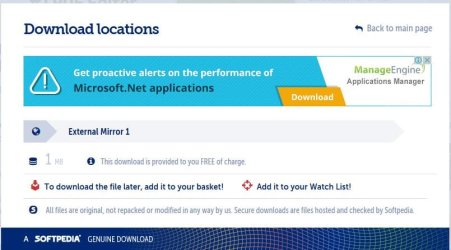
Thanks for that, Mitchell. I'm currently trying Unlocker & have got to but none of the buttons lead me to the Unlocker download. Not that I can see anyway.
 

Attachments

  • Capture.JPG
    Capture.JPG
    65.3 KB · Views: 0
Last edited:

My Computer

Computer type
PC/Desktop
Computer Manufacturer/Model Number
Custom
OS
Windows 7 Professional X 64
CPU
Intel Core i5-3570 3.4 GHz
Motherboard
Gigabyte
Memory
16 Gb
Graphics Card(s)
NVidia GForce
Hard Drives
Samsung 850 250 Gb SSD ATA
Western Digital 2 Tb ATA
Antivirus
Norton 360
Browser
Internet Explorer

My Computer

Computer type
PC/Desktop
OS
Microsoft Windows 7 Home Premium 64-bit 7601 Multiprocessor Free Service Pack 1
CPU
Intel(R) Core(TM) i7-3770 CPU @ 3.40GHz
Motherboard
ASUSTeK COMPUTER INC. P8H77-M
Memory
8.00 GB
Graphics Card(s)
Intel(R) HD Graphics 4000
Sound Card
On Board
Monitor(s) Displays
Dell 24"
Screen Resolution
1920 x 1080
Hard Drives
(1) INTEL SSDSC2CT180A3 ATA Device (2) ST500DM002-1BD142 ATA Device (3) WDC WD3200AAKS-75L9A0 ATA Device (4) Generic- Compact Flash USB Device (5) Generic- MS/MS-Pro USB Device (6) Generic- SD/MMC USB Device (7) Generic- SM/xD-Picture USB
PSU
500w Corsair
Case
Cooler Master
Cooling
3 Fans
Keyboard
Logitech MK300
Mouse
Logitech WOM
Internet Speed
75Mb
Antivirus
Norton 360
Browser
Firefox, Opera, IE
That worked! I rebooted & for the first time the folder was gone. Thanks, Mitchell. No wonder you're a Gold Member!
 

My Computer

Computer type
PC/Desktop
Computer Manufacturer/Model Number
Custom
OS
Windows 7 Professional X 64
CPU
Intel Core i5-3570 3.4 GHz
Motherboard
Gigabyte
Memory
16 Gb
Graphics Card(s)
NVidia GForce
Hard Drives
Samsung 850 250 Gb SSD ATA
Western Digital 2 Tb ATA
Antivirus
Norton 360
Browser
Internet Explorer
Glad it worked for you and thanks for coming back.
 

My Computer

Computer type
PC/Desktop
OS
Microsoft Windows 7 Home Premium 64-bit 7601 Multiprocessor Free Service Pack 1
CPU
Intel(R) Core(TM) i7-3770 CPU @ 3.40GHz
Motherboard
ASUSTeK COMPUTER INC. P8H77-M
Memory
8.00 GB
Graphics Card(s)
Intel(R) HD Graphics 4000
Sound Card
On Board
Monitor(s) Displays
Dell 24"
Screen Resolution
1920 x 1080
Hard Drives
(1) INTEL SSDSC2CT180A3 ATA Device (2) ST500DM002-1BD142 ATA Device (3) WDC WD3200AAKS-75L9A0 ATA Device (4) Generic- Compact Flash USB Device (5) Generic- MS/MS-Pro USB Device (6) Generic- SD/MMC USB Device (7) Generic- SM/xD-Picture USB
PSU
500w Corsair
Case
Cooler Master
Cooling
3 Fans
Keyboard
Logitech MK300
Mouse
Logitech WOM
Internet Speed
75Mb
Antivirus
Norton 360
Browser
Firefox, Opera, IE
Oooooops! When I rebooted my computer today there it was again. The pesky folder seems to have spent most of last night lurking somewhere to the rear of my computer before surreptitiously reinserting itself prior to my rebooting today.

Today I again deleted the folder using Unlocker then rebooted my computer. The folder was again no longer visible in Windows Explorer. I then went into Recycle Bin & used Shift-Delete to, I hope, permanently delete all instances of this folder.

I await tomorrow's dawn to see if this folder's resurrection capability is still intact.
 

My Computer

Computer type
PC/Desktop
Computer Manufacturer/Model Number
Custom
OS
Windows 7 Professional X 64
CPU
Intel Core i5-3570 3.4 GHz
Motherboard
Gigabyte
Memory
16 Gb
Graphics Card(s)
NVidia GForce
Hard Drives
Samsung 850 250 Gb SSD ATA
Western Digital 2 Tb ATA
Antivirus
Norton 360
Browser
Internet Explorer
Out of interest did you create this folder or did it just appear, if it just appeared when did you first notice it? Another point, what A/V have you installed and is it up to date?
 

My Computer

Computer type
PC/Desktop
OS
Microsoft Windows 7 Home Premium 64-bit 7601 Multiprocessor Free Service Pack 1
CPU
Intel(R) Core(TM) i7-3770 CPU @ 3.40GHz
Motherboard
ASUSTeK COMPUTER INC. P8H77-M
Memory
8.00 GB
Graphics Card(s)
Intel(R) HD Graphics 4000
Sound Card
On Board
Monitor(s) Displays
Dell 24"
Screen Resolution
1920 x 1080
Hard Drives
(1) INTEL SSDSC2CT180A3 ATA Device (2) ST500DM002-1BD142 ATA Device (3) WDC WD3200AAKS-75L9A0 ATA Device (4) Generic- Compact Flash USB Device (5) Generic- MS/MS-Pro USB Device (6) Generic- SD/MMC USB Device (7) Generic- SM/xD-Picture USB
PSU
500w Corsair
Case
Cooler Master
Cooling
3 Fans
Keyboard
Logitech MK300
Mouse
Logitech WOM
Internet Speed
75Mb
Antivirus
Norton 360
Browser
Firefox, Opera, IE

My Computer

Computer type
Laptop
Computer Manufacturer/Model Number
ASUS
OS
Microsoft Windows 7 Home Premium 64-bit 7601 Multiprocessor Free Service Pack 1
CPU
AMD C-60 APU with Radeon(tm) HD Graphics
Motherboard
ASUSTeK COMPUTER INC. X501U
Memory
4.00 GB
Graphics Card(s)
AMD Radeon HD 6290 Graphics
Sound Card
(1) AMD High Definition Audio Device (2) Realtek High Defi
Screen Resolution
1366 x 768 x 32 bits (4294967296 colors) @ 60 Hz
Hard Drives
Hitachi HTS545050A7E380 SATA Disk Device
Antivirus
Comodo CIS & FW, SecureAplus App Whitelisting, Threatfire
Browser
Cyberfox 64bit, Opera 64bit, Airfox
Other Info
Spy-The-Spy, HitmanPro.Alert, Norton Connect Safe, MJRegWatcher, BitDefender TrafficLight, Voodoo Shield, Zemana AntiMalware
Hi Mitchell. I created the folder in 2013 using Microsoft Word 10. On 3/7/13 I moved all the files from the folder to a folder with a slightly different name & deleted the original folder. It was some months later that I noted that the original folder had reappeared. Since then I've made various desultory attempts to permanently delete the original folder but each time the original folder reappeared. Recently I made an all out assault on it which led me to the Windows 7 Forum.

I have Norton 360 & I updated 2 days ago. It's still up to date.

Callender, it was interesting to read about folders which were designated in certain applications as locations to which files are saved. I'm confident, however, that this isn't the case in my situation. The offending folder is called Computer & Mobile Phone (& the folder meant to replace it is called Computers & Mobile Phones). I can't for the life of me think why I would have made either of them the save location for some programme. (Still, my memory has been known to fail me at times! ). Nevertheless, this explanation for the rerereappearance of the original folder seems reasonable so I'll tuck it away in my hump.

Thank you both for your responses.

Oh, by the way, the original folder had returned when I booted my computer today. My latest attempt to outwit the folder is to cut it from My Documents & paste it into my Temp folder in My Documents. I'll see how that goes.
 

My Computer

Computer type
PC/Desktop
Computer Manufacturer/Model Number
Custom
OS
Windows 7 Professional X 64
CPU
Intel Core i5-3570 3.4 GHz
Motherboard
Gigabyte
Memory
16 Gb
Graphics Card(s)
NVidia GForce
Hard Drives
Samsung 850 250 Gb SSD ATA
Western Digital 2 Tb ATA
Antivirus
Norton 360
Browser
Internet Explorer
How about trying the Ubuntu approach. Try this. Download Linux Ubutu from here. Burn the iso to a disc. Set your BIOS to boot from the disc and choose to trial Ubuntu not install. You can then run Ubuntu from the disc without installing anything on your PC. It takes a bit of time to load up from the disc but when you get the Ubuntu desktop you can navigate to your hard drive and locate the the offending folder. Delete it in Ubuntu the shut down completely; again it takes a little while. Re boot to Windows and check!
 

My Computer

Computer type
PC/Desktop
OS
Microsoft Windows 7 Home Premium 64-bit 7601 Multiprocessor Free Service Pack 1
CPU
Intel(R) Core(TM) i7-3770 CPU @ 3.40GHz
Motherboard
ASUSTeK COMPUTER INC. P8H77-M
Memory
8.00 GB
Graphics Card(s)
Intel(R) HD Graphics 4000
Sound Card
On Board
Monitor(s) Displays
Dell 24"
Screen Resolution
1920 x 1080
Hard Drives
(1) INTEL SSDSC2CT180A3 ATA Device (2) ST500DM002-1BD142 ATA Device (3) WDC WD3200AAKS-75L9A0 ATA Device (4) Generic- Compact Flash USB Device (5) Generic- MS/MS-Pro USB Device (6) Generic- SD/MMC USB Device (7) Generic- SM/xD-Picture USB
PSU
500w Corsair
Case
Cooler Master
Cooling
3 Fans
Keyboard
Logitech MK300
Mouse
Logitech WOM
Internet Speed
75Mb
Antivirus
Norton 360
Browser
Firefox, Opera, IE
Yesterday I
  • moved the folder to my Temp folder which is in D:\My Documents
  • went into the folder's properties & removed the Read Only Attribute & indexing of contents
  • permanently deleted the folder from Temp
  • cold booted my computer
The result was that the folder was no longer in Temp but this morning it was back in My Documents. My admiration for this folder's persistence increases daily.

I also noticed that the Read Only Attribute & indexing of contents are on.
 

My Computer

Computer type
PC/Desktop
Computer Manufacturer/Model Number
Custom
OS
Windows 7 Professional X 64
CPU
Intel Core i5-3570 3.4 GHz
Motherboard
Gigabyte
Memory
16 Gb
Graphics Card(s)
NVidia GForce
Hard Drives
Samsung 850 250 Gb SSD ATA
Western Digital 2 Tb ATA
Antivirus
Norton 360
Browser
Internet Explorer
Thanks for that idea, Mitchell. I'll give it some thought while I'm doing something else that's come up.
 

My Computer

Computer type
PC/Desktop
Computer Manufacturer/Model Number
Custom
OS
Windows 7 Professional X 64
CPU
Intel Core i5-3570 3.4 GHz
Motherboard
Gigabyte
Memory
16 Gb
Graphics Card(s)
NVidia GForce
Hard Drives
Samsung 850 250 Gb SSD ATA
Western Digital 2 Tb ATA
Antivirus
Norton 360
Browser
Internet Explorer
Deleting the folder does not seem to be a problem. Unlocker can delete the folder.

The problem is...
...finding what app is creating the folder again and again.

Does Unlocker tell you what app or apps have the folder locked?
 

My Computer

Computer type
Laptop
Computer Manufacturer/Model Number
Employer provided Dell Latitude
OS
W7 Pro SP1 64bit
CPU
i7
Memory
8GB
Graphics Card(s)
Intel HD Graphics
Hard Drives
crappy SSD
Antivirus
Employer mandated Symantec Endpoint Protection
Browser
Pale Moon 64bit, IE11 64bit & Chrome 64bit
Back
Top