Solved Problem displaying webpage

Pedro147

New member
Local time
5:25 AM
Messages
31
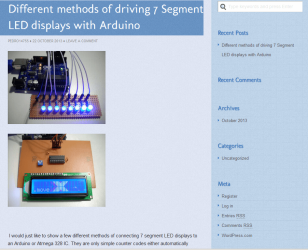
[FONT=&quot][FONT=&quot]Sometimes when I go to view a webpage I get a different view to what I would normally expect. It seems to be what I would call a minimalist view of what is normally there. I have put photos of both different views up on my SkyDrive to illustrate what this problem appears as so hopefully someone might be able to tell me why it does this. The funny thing is that when this occurs it might happen to one or two websites but all the others that I browse to will appear normally. Thank you for having a look at my problem and hopefully telling me what is happening, Pedro.


[/FONT][/FONT]Webpage problem_1.png[FONT=&quot][FONT=&quot][/FONT]
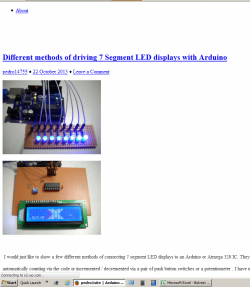
[/FONT]Webpage problem_2.png
 

My Computer

Computer type
PC/Desktop
Computer Manufacturer/Model Number
custom build,
OS
Windows 7 home 32 bit
CPU
Processer2.20 gigahertz AMD Athlon 64
Motherboard
Gigabyte GA-MA78LM-S2
Memory
2 GB
Graphics Card(s)
NVIDIA GeForce 7300 GS
Hard Drives
2 - ST3250820AS Hard drive 250 GB
1 - Seagate Desktop USB Hard drive 1 TB
1 - Seagate Desktop USB Hard drive 250 GB
Antivirus
Norton Internet Security 2013
Browser
Mozilla Firefox 20.0.1
It looks like the page did not fully load, or the pages CSS file did not load. Does refreshing the page when it displays wrong correct the problem?

A Guy
 

My Computer

Computer type
PC/Desktop
OS
Windows 10 Home x64
CPU
INTEL Core i5-750 Quad-Core 3.37GHz
Motherboard
ASUS P7P55D
Memory
HyperX Fury Black Series 8GB (2 x 4GB) 1866Mhz
Graphics Card(s)
EVGA GeForce GTX 750 Superclocked 1GB 128-Bit GDDR5
Monitor(s) Displays
LG 32MA68HY 32" IPS
Screen Resolution
1920 x 1080
Hard Drives
Samsung 840 Evo 120GB, SEAGATE 500GB Barracuda® 7200.12, SATA 3 Gb/s, 7200 RPM, 16MB cache
PSU
ANTEC TruePower New TP-550, 80 PLUS, 550W
Case
ANTEC Three Hundred Illusion
Cooling
COOLER MASTER Hyper 212 Plus, 4 x 120mm 1 x 140mm Noctua's
Internet Speed
85 + Mbps
Antivirus
Avast
Browser
Vivaldi
It does not happen all that often but the next time it does I will refresh the page and see if it fully loads then. Thanks for taking the time to reply to my question Pedro. :cool:
 

My Computer

Computer type
PC/Desktop
Computer Manufacturer/Model Number
custom build,
OS
Windows 7 home 32 bit
CPU
Processer2.20 gigahertz AMD Athlon 64
Motherboard
Gigabyte GA-MA78LM-S2
Memory
2 GB
Graphics Card(s)
NVIDIA GeForce 7300 GS
Hard Drives
2 - ST3250820AS Hard drive 250 GB
1 - Seagate Desktop USB Hard drive 1 TB
1 - Seagate Desktop USB Hard drive 250 GB
Antivirus
Norton Internet Security 2013
Browser
Mozilla Firefox 20.0.1
I have seen the problem you have before. It's random, and usually has to do with page load times. It's usually not a problem on your end. A Guy
 

My Computer

Computer type
PC/Desktop
OS
Windows 10 Home x64
CPU
INTEL Core i5-750 Quad-Core 3.37GHz
Motherboard
ASUS P7P55D
Memory
HyperX Fury Black Series 8GB (2 x 4GB) 1866Mhz
Graphics Card(s)
EVGA GeForce GTX 750 Superclocked 1GB 128-Bit GDDR5
Monitor(s) Displays
LG 32MA68HY 32" IPS
Screen Resolution
1920 x 1080
Hard Drives
Samsung 840 Evo 120GB, SEAGATE 500GB Barracuda® 7200.12, SATA 3 Gb/s, 7200 RPM, 16MB cache
PSU
ANTEC TruePower New TP-550, 80 PLUS, 550W
Case
ANTEC Three Hundred Illusion
Cooling
COOLER MASTER Hyper 212 Plus, 4 x 120mm 1 x 140mm Noctua's
Internet Speed
85 + Mbps
Antivirus
Avast
Browser
Vivaldi
Back
Top