J jacatone New member Member Local time 4:25 AM Messages 84 Jan 21, 2014 #1 I'm using Win7 Pro. Some programs I normally use won't install even though they're the latest versions. Keep getting "appcrash" in the view details window. Anyone know how to resolve this? Thanks. My Computer OSWindows 7 Home Premium
I'm using Win7 Pro. Some programs I normally use won't install even though they're the latest versions. Keep getting "appcrash" in the view details window. Anyone know how to resolve this? Thanks.
DustSailor Capt. Cruncher Guru Gold Member VIP Local time 2:25 AM Messages 2,587 Location Southern California, USA Jan 22, 2014 #2 Hey mate, Try running it in compatibility mode: http://www.sevenforums.com/tutorials/316-compatibility-mode.html It will even check if it needs to be run in Administrative mode, which sometimes is the case. Also, check your event logs to see if any reoccurring problems seem to be cropping up: http://www.sevenforums.com/tutorials/226084-event-viewer-open-use-windows-7-a.html My Computer Computer typePC/DesktopComputer Manufacturer/Model NumberCustom Asus BuildOSMicrosoft Windows 8.1 Pro 64-bitCPUIntel(R) Core(TM) i3-4130 CPU @ 3.40GHzMotherboardB85M-EMemory8.00 GBGraphics Card(s)NoneSound CardRealtek High Definition AudioMonitor(s) DisplaysAsus 23.6" MonitorScreen Resolution1920 x 1080 x 32 bits (4294967296 colors) @ 60 HzHard DrivesINTEL SSDSC2BW180A4 Samsung SSD 840 PRO SeriesPSUSeasonic S12II-380BronzeCaseLian LiCoolingFan, PassiveKeyboardLogitech K120MouseMicrosoft Touch MouseInternet Speed4ms Ping, 19.0 Mbps Download, 19.0 Mbps UploadAntivirusEset EndpointBrowserInternet Explorer, Chrome
Hey mate, Try running it in compatibility mode: http://www.sevenforums.com/tutorials/316-compatibility-mode.html It will even check if it needs to be run in Administrative mode, which sometimes is the case. Also, check your event logs to see if any reoccurring problems seem to be cropping up: http://www.sevenforums.com/tutorials/226084-event-viewer-open-use-windows-7-a.html
J jacatone New member Member Thread Starter Local time 4:25 AM Messages 84 Jan 22, 2014 #3 I'm confused. Doesn't this Compatibility Mode require the program to be installed first. Win7 won't even install it. My Computer OSWindows 7 Home Premium
I'm confused. Doesn't this Compatibility Mode require the program to be installed first. Win7 won't even install it.
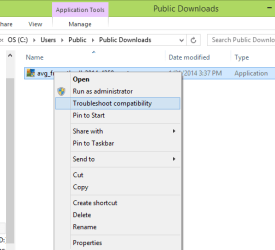
DustSailor Capt. Cruncher Guru Gold Member VIP Local time 2:25 AM Messages 2,587 Location Southern California, USA Jan 22, 2014 #4 No, just right-click the application .exe (launch) file, and select troubleshoot compatibility. Here is a picture example of AVG, which has not been installed yet: Did it work? Last edited: Jan 22, 2014 My Computer Computer typePC/DesktopComputer Manufacturer/Model NumberCustom Asus BuildOSMicrosoft Windows 8.1 Pro 64-bitCPUIntel(R) Core(TM) i3-4130 CPU @ 3.40GHzMotherboardB85M-EMemory8.00 GBGraphics Card(s)NoneSound CardRealtek High Definition AudioMonitor(s) DisplaysAsus 23.6" MonitorScreen Resolution1920 x 1080 x 32 bits (4294967296 colors) @ 60 HzHard DrivesINTEL SSDSC2BW180A4 Samsung SSD 840 PRO SeriesPSUSeasonic S12II-380BronzeCaseLian LiCoolingFan, PassiveKeyboardLogitech K120MouseMicrosoft Touch MouseInternet Speed4ms Ping, 19.0 Mbps Download, 19.0 Mbps UploadAntivirusEset EndpointBrowserInternet Explorer, Chrome
No, just right-click the application .exe (launch) file, and select troubleshoot compatibility. Here is a picture example of AVG, which has not been installed yet: Did it work?