Solved problem of creating extended partition

xyania

New member
Local time
11:57 AM
Messages
5
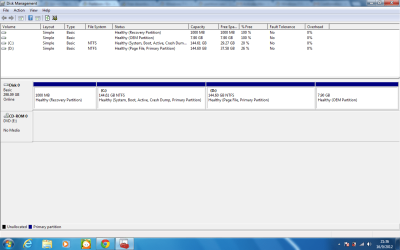
Hi, my laptop already has 4 partitions (please refer to the attached screenshot) and I want to dual boot ubuntu. I was planning to create an extended partition of 20gb in D:

I read this tutorial's method two (http://www.sevenforums.com/tutorials/146694-partition-extended-logical-drives.html).
But I'm not sure if it will work for my situation because it wrote :
"If you do not have the Windows System Reserved or a System Primary partition completely separate from the Windows 7 partition present that is marked as the "System" partition in disk management do not attempt this, if you do Windows will not boot as Windows will not/is not able to boot / start independently from an Extended partition Logical drive, the system boot files must be stored on a Primary partition to execute."

The windows system is not completely separate, and my D drive is also primary. So I'm a bit confused and I'm not sure if my laptop can follow this method or not. Can anyone please help?

Thanks in advance :)
 

Attachments

  • Untitled.png
    Untitled.png
    37.1 KB · Views: 41

My Computer My Computer

At a glance

windows 7 home premium 32 bit
OS
windows 7 home premium 32 bit
Is there a Utility to create a system restore DVD or ISO image from the OEM partition? Check in the start menu for one.
If there is you could get rid of that OEM partition. But then that is not big enough to install any Linux version.

Why not try VMware Player and install Linux in a virtual machine?

you really do have a small hard drive in that system, with todays standards, and it seems that you are using most of the space. Only 20-26% left on each drive. I would put anymore files on either of those drives as Windows needs free space on the drive to function correctly.

Maybe it's time you upgrade the drive to a bigger one.
 

My Computer My Computer

At a glance

7 x64
OS
7 x64
Thanks edwar~

I found something called Fujitsu MyRecovery that "creates a recovery disc with factory image". Does this create image of OEM partition or other partitions?

Yea I bought this laptop 3 years ago. It still runs pretty smooth, I was gonna transfer those files on D drive to external portable hard disk. Is it because I also installed some programs on D drive, that makes it become a primary partition? If I remove them, will I be able to change it into an extended partition?

=edit= Or can I convert the D drive to logical and create one more logical partition?
 

My Computer My Computer

At a glance

windows 7 home premium 32 bit
OS
windows 7 home premium 32 bit
According to Disk Management, the OEM and System Partitions are empty. The C: drive has the Boot and Active files on it. You can delete the OEM and System partitions. That would leave only two Primary Partitions. You would need to take part of D: drive and make a new primary partition for Ubundi. The snag here is that there is only 37 GB free. That is not enough. You actually need a bigger drive. Putting the files on an external is just a stop gap. You are better off to get a bigger hard drive.
 

My Computer My Computer

At a glance

Windows 7 Home Premium 32-Bit - Build 7600 SP1Intel Core i3-2120 3.30GhzKingston 4 GB DDR3 1333 mhzAMD Radeon HD6670
Computer type
PC/Desktop
Computer Manufacturer/Model Number
Custom Build
OS
Windows 7 Home Premium 32-Bit - Build 7600 SP1
CPU
Intel Core i3-2120 3.30Ghz
Motherboard
Asus P8Z68-V LX Intel Z68 Socket H2 ATX
Memory
Kingston 4 GB DDR3 1333 mhz
Graphics Card(s)
AMD Radeon HD6670
Sound Card
Sound Blaster Audigy SE 24-Bit
Monitor(s) Displays
Asus VE228
Screen Resolution
1440 X 900
Hard Drives
OCZ Vertex 3 120 GB Sata 3 SSD ==
Kingston SH103/S3 120 G Hyper X 120 GB SSD ==
Western Digital 500 GB Caviar Green 7200 RPM ==
PSU
Corsair CX600M == 600 Watt
Case
NZXT Apollo - Silver with Clear Side Panel
Cooling
Three 120 mm Fans
Keyboard
Microsoft Natural 4000
Mouse
Microsoft Custom Optical 3000
Internet Speed
AT&T Fiber Optic Wireless Network
Antivirus
Microsoft Security Essentials
Browser
Chrome
Other Info
120 mm Blue LED Fan -- Three Blue LED Lazer Light Sticks
According to Disk Management, the OEM and System Partitions are empty. The C: drive has the Boot and Active files on it. You can delete the OEM and System partitions. That would leave only two Primary Partitions. You would need to take part of D: drive and make a new primary partition for Ubundi. The snag here is that there is only 37 GB free. That is not enough. You actually need a bigger drive. Putting the files on an external is just a stop gap. You are better off to get a bigger hard drive.
Those 2 partitions look empty but most likely aren't!
 

My Computer My Computer

At a glance

Microsoft Windows 7 Home Premium 64-bits 7601...Intel(R) Core(TM) i3 CPU M 370 @ 2.40GHz4,00 GBATI Mobility Radeon HD 5400 Series
Computer type
Laptop
Computer Manufacturer/Model Number
ACER ASPIRE 5742G
OS
Microsoft Windows 7 Home Premium 64-bits 7601 Multiprocessor Free Service Pack 1
CPU
Intel(R) Core(TM) i3 CPU M 370 @ 2.40GHz
Motherboard
Acer Aspire 5742G
Memory
4,00 GB
Graphics Card(s)
ATI Mobility Radeon HD 5400 Series
Sound Card
(1) AMD High Definition Audio Device (2) Realtek High Defi
Screen Resolution
1366 x 768 x 32 bits (4294967296 colors) @ 60 Hz
Hard Drives
WDC WD5000BEVT-22ZAT0
According to Disk Management, the OEM and System Partitions are empty. The C: drive has the Boot and Active files on it. You can delete the OEM and System partitions. That would leave only two Primary Partitions. You would need to take part of D: drive and make a new primary partition for Ubundi. The snag here is that there is only 37 GB free. That is not enough. You actually need a bigger drive. Putting the files on an external is just a stop gap. You are better off to get a bigger hard drive.
Third partition (called D in screenshot) is for DATA. Convert it to type logical using partition wizard. Then shrink it a bit using partitition wizard.

Now create an "unformatted" partition in the free space (type logical)
Now you can install ubuntu in that partition

http://www.partitionwizard.com/download.html
home edition is free!
 

My Computer My Computer

At a glance

Microsoft Windows 7 Home Premium 64-bits 7601...Intel(R) Core(TM) i3 CPU M 370 @ 2.40GHz4,00 GBATI Mobility Radeon HD 5400 Series
Computer type
Laptop
Computer Manufacturer/Model Number
ACER ASPIRE 5742G
OS
Microsoft Windows 7 Home Premium 64-bits 7601 Multiprocessor Free Service Pack 1
CPU
Intel(R) Core(TM) i3 CPU M 370 @ 2.40GHz
Motherboard
Acer Aspire 5742G
Memory
4,00 GB
Graphics Card(s)
ATI Mobility Radeon HD 5400 Series
Sound Card
(1) AMD High Definition Audio Device (2) Realtek High Defi
Screen Resolution
1366 x 768 x 32 bits (4294967296 colors) @ 60 Hz
Hard Drives
WDC WD5000BEVT-22ZAT0
That Factory image should be the system As It Was Shipped from the Factory. So when using it to Reinstall the OS it will also reinstall all things that originally came on your system when New and removing all other things in the process. So do not use it unless you want or need to take the system back to the state it was when you first took the system out of the box it came in. I suggested you make it just in case of problems. It is always good to have that disc.

Could you please explain why you want to Dual boot Windows and Ubuntu? What is your purpose for installing Ubuntu.
Sorry to say this but you do not seem to computer savvy, nothing wrong with that most people aren't. So I question your intentions for installing Ubuntu especially as a Dual Boot system. All Linux operating systems are more for the computer enthusiast that is looking for an alternative operating system.

So I still suggest you get VMware Player, which is free, and install Ubuntu into a virtual machine for testing and playing with before you go through the whole Re-Partitioning of your drive and installing Ubuntu as a Dual boot system, possibly screwing up your Windows install.
With most installs of any second OS as a Dual boot it can sometimes be hard to get rid of the second OS and return your system back to one of the operating systems without first wiping the whole drive. Yes it can and is done by many but those people are more then often very computer literate.

Just sayin.

Thanks edwar~

I found something called Fujitsu MyRecovery that "creates a recovery disc with factory image". Does this create image of OEM partition or other partitions?

Yea I bought this laptop 3 years ago. It still runs pretty smooth, I was gonna transfer those files on D drive to external portable hard disk. Is it because I also installed some programs on D drive, that makes it become a primary partition? If I remove them, will I be able to change it into an extended partition?

=edit= Or can I convert the D drive to logical and create one more logical partition?
 

My Computer My Computer

At a glance

7 x64
OS
7 x64
Thank you everyone! Actually I'm quite certain that I want to install ubuntu on this computer because I have already tried and install in another Samsung laptop and I love it (haha :p). But this time with the Fujitsu laptop it looks a bit different in disk management, and getting a bigger drive is not an option for me right now (sadly... ), so I came here to get advice from you guys :)

For this laptop, the windows 7 installed was an upgrade so it has a separate recovery disk.

I was thinking of changing the D drive to logical drive too, I can just do it right? (like will it affect the boot system?)

Thanks! :)
 

My Computer My Computer

At a glance

windows 7 home premium 32 bit
OS
windows 7 home premium 32 bit
Thank you everyone! Actually I'm quite certain that I want to install ubuntu on this computer because I have already tried and install in another Samsung laptop and I love it (haha :p). But this time with the Fujitsu laptop it looks a bit different in disk management, and getting a bigger drive is not an option for me right now (sadly... ), so I came here to get advice from you guys :)

For this laptop, the windows 7 installed was an upgrade so it has a separate recovery disk.

I was thinking of changing the D drive to logical drive too, I can just do it right? (like will it affect the boot system?)

Thanks! :)

Then I don't see why you don't just Wipe the drive completely and start fresh with the install of Win 7, that is if you even plan on using Windows, and then your Ubuntu install. Making the HDD partitions whatever you like in the process.
 

My Computer My Computer

At a glance

7 x64
OS
7 x64
Sorry I was out at work.

Now I tried the partition wizard method and it worked!!! Thanks!!

(I still need windows because I don't want to reinstall all my games...)
 

My Computer My Computer

At a glance

windows 7 home premium 32 bit
OS
windows 7 home premium 32 bit
Sorry I was out at work.

Now I tried the partition wizard method and it worked!!! Thanks!!

(I still need windows because I don't want to reinstall all my games...)
Problem solved?
 

My Computer My Computer

At a glance

Microsoft Windows 7 Home Premium 64-bits 7601...Intel(R) Core(TM) i3 CPU M 370 @ 2.40GHz4,00 GBATI Mobility Radeon HD 5400 Series
Computer type
Laptop
Computer Manufacturer/Model Number
ACER ASPIRE 5742G
OS
Microsoft Windows 7 Home Premium 64-bits 7601 Multiprocessor Free Service Pack 1
CPU
Intel(R) Core(TM) i3 CPU M 370 @ 2.40GHz
Motherboard
Acer Aspire 5742G
Memory
4,00 GB
Graphics Card(s)
ATI Mobility Radeon HD 5400 Series
Sound Card
(1) AMD High Definition Audio Device (2) Realtek High Defi
Screen Resolution
1366 x 768 x 32 bits (4294967296 colors) @ 60 Hz
Hard Drives
WDC WD5000BEVT-22ZAT0
Yup! Thanks :)
 

My Computer My Computer

At a glance

windows 7 home premium 32 bit
OS
windows 7 home premium 32 bit
Back
Top