
You are using an out of date browser. It may not display this or other websites correctly.
You should upgrade or use an alternative browser.
You should upgrade or use an alternative browser.
Whats the difference between primary partition and extended partition?
- Thread starter partogi
- Start date
As I understand things, a primary partition is needed if you're going to boot an operating system. In Windows 7 you can have a maximum of 4 primary partitions. If you need more than 4 partitions on a hard drive, you'd make one of those partitions an extended partition which could support up to (I think) a maximum of 60 logical partitions (drives). For your purposes, having two partitions (a C: for the operating system and perhaps a D: for data) wouldn't be a problem if both were primary.
What is the Difference Between Primary and Logical Partition?
What is the Difference Between Primary and Logical Partition?
My Computer
- Computer type
- Laptop
- Computer Manufacturer/Model Number
- Sony Vaio VPCEB47GM Laptop
- OS
- Win 7 Pro 64-bit
- CPU
- Intel i5 2.4 Ghz
- Memory
- 8GB DDR3
- Graphics Card(s)
- Intel HD 3000
- Sound Card
- IDT High Definition
- Monitor(s) Displays
- 15.6 WGXA Anti-Glare LED
- Screen Resolution
- 1280x800
- Hard Drives
- 640Gb 7200rpm
- Antivirus
- MSE
- Browser
- Opera (primary) with IE9 backup

- Local time
- 8:57 PM
- Messages
- 50,634
Please post back a screenshot of your maximized Disk Management drive map and listings:
1. Type Disk Management in Start Search box.
2. Open Disk Mgmt. window and maximize it.
3. Type Snipping Tool in Start Search box.
4. Open Snipping Tool, choose Rectangular Snip, draw a box around full map and all listings.
5, Save Snip, attach using paper clip in Reply Box.
Tell us what is on each partition and what you want to do and we will give you the steps.
1. Type Disk Management in Start Search box.
2. Open Disk Mgmt. window and maximize it.
3. Type Snipping Tool in Start Search box.
4. Open Snipping Tool, choose Rectangular Snip, draw a box around full map and all listings.
5, Save Snip, attach using paper clip in Reply Box.
Tell us what is on each partition and what you want to do and we will give you the steps.
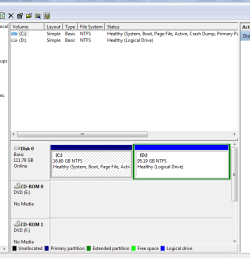

The way yours is setup is fine for what you are going to do.
My Computer
- Computer type
- PC/Desktop
- Computer Manufacturer/Model Number
- Custom Build
- OS
- Windows 7 Home Premium 32-Bit - Build 7600 SP1
- CPU
- Intel Core i3-2120 3.30Ghz
- Motherboard
- Asus P8Z68-V LX Intel Z68 Socket H2 ATX
- Memory
- Kingston 4 GB DDR3 1333 mhz
- Graphics Card(s)
- AMD Radeon HD6670
- Sound Card
- Sound Blaster Audigy SE 24-Bit
- Monitor(s) Displays
- Asus VE228
- Screen Resolution
- 1440 X 900
- Hard Drives
- OCZ Vertex 3 120 GB Sata 3 SSD ==
Kingston SH103/S3 120 G Hyper X 120 GB SSD ==
Western Digital 500 GB Caviar Green 7200 RPM ==
- PSU
- Corsair CX600M == 600 Watt
- Case
- NZXT Apollo - Silver with Clear Side Panel
- Cooling
- Three 120 mm Fans
- Keyboard
- Microsoft Natural 4000
- Mouse
- Microsoft Custom Optical 3000
- Internet Speed
- AT&T Fiber Optic Wireless Network
- Antivirus
- Microsoft Security Essentials
- Browser
- Chrome
- Other Info
- 120 mm Blue LED Fan -- Three Blue LED Lazer Light Sticks

C: is way to small, you will soon run out of space on it.
My Computer
- Computer type
- PC/Desktop
- Computer Manufacturer/Model Number
- Skylake Special #666
- OS
- Windows 10 Pro x64
- CPU
- Intel Core i7 6700K
- Motherboard
- Asus Sabertooth Z170 Mark 1
- Memory
- GSkill TridentZ RGB 16GB 3600 16-16-16-36
- Graphics Card(s)
- EVGA GTX 980 Ti SC x2
- Sound Card
- Realtek High Definition
- Monitor(s) Displays
- AOC G2460PG
- Screen Resolution
- 1920 x 1080 144Hz
- Hard Drives
- Samsung 860 Pro 256GB, Seagate Barracuda 4TB x2
- PSU
- EVGA 1000 P2, EVGA White Custom Braided Cables
- Case
- Corsair Vengeance C70 Gunmetal Black
- Cooling
- Corsair H100i v2, Corsair ML120 x2, Thermal Grizzly Kryonaut
- Keyboard
- Logitech G910 Orion Spectrum
- Mouse
- Logitech G700s
- Internet Speed
- Verizon Fios Quantum Gateway 75/75
- Antivirus
- Windows Defender, Malwarebytes Free 3.8.3
- Browser
- Chrome
- Other Info
- Corsair SP120 x4, LG Blu-ray Drive, Durabrand HT-395 100 Watt Dolby Digital Amp, Corsair H2100 Wireless 7.1 Headset
Whats the difference between primary partition and extended partition?
I want to use two partitions on one drive. One for OS and the other for data. Which partition is better for data?
Thank you.
Neither a Primary or a Logical drive in an Extended Partition is Better or Worse for storing data. They will both work exactly the same.
May I add that if that is the only drive in your system, and you are running Windows 7, you are going to run out of space Real Fast. The C drive, Windows OS drive, is so small I'm surprised Windows even installed on it. I take it that is an SSD, right? The Windows partition should be somewhere around 40+/-GB at least as Windows by itself is going to take up about 12GBs before you install any programs. You should always have at least 15-20 Percent free space on the OS partition/drive. Otherwise Windows, or even Mac OS X, will Choke once you start to go below that percentage. It is even more important to have a good amount of free space on a SSD as otherwise the SSD can't do proper Wear Leveling.
My Computer
- OS
- 7 x64
- Local time
- 8:57 PM
- Messages
- 50,634
I agree with AddRAM.
You need an OS partition large enough to install your programs and contain your paging file, possibly hiberfile if you want modern hibernate feature.
So I'd start with 50gb. Then copy your User folders to data drive, link them back to the related Library - Include a Folder - Windows 7 Forums.
This keeps your backup image lean so that if you need to reimage C the data is intact, current and waiting on D.
To extend C now, boot into free Partition Wizard bootable CD, rightclick D to Resize, slide left border to the right to add enough space to C, click OK.
Then rightclick C to Resize, slide right border to the right to take up the space you made, OK, Apply both steps. Partition Wizard Resize Partition Video Help.
You need an OS partition large enough to install your programs and contain your paging file, possibly hiberfile if you want modern hibernate feature.
So I'd start with 50gb. Then copy your User folders to data drive, link them back to the related Library - Include a Folder - Windows 7 Forums.
This keeps your backup image lean so that if you need to reimage C the data is intact, current and waiting on D.
To extend C now, boot into free Partition Wizard bootable CD, rightclick D to Resize, slide left border to the right to add enough space to C, click OK.
Then rightclick C to Resize, slide right border to the right to take up the space you made, OK, Apply both steps. Partition Wizard Resize Partition Video Help.

Too Small
I agree with AddRAM.
My previous W7 Ultimate (64 bit) install (I re-installed W7 during September) only had OS files (and programs that auto-installed ) on it.
I also disabled Hibernation and moved the Page File to a separate HDD.
It used ~20 GB of HDD space.
If you plan to use the Windows default locations (Program Files, Program Files (x86) and User), you'll need to work out:
You'll also need to leave some extra free space so that the "Disk Defragmenter" can work efficiently (HDD only).
In XP that used to be 15% (I'm not sure what W7 "demands").
Using my PC as an example:
Given those numbers I made my Windows partition 40 GB.
# I don't have any games installed in W7. #
# I store my Documents, Music, Pictures and Videos on separate HDDs/partitions. #
I agree with AddRAM.
My previous W7 Ultimate (64 bit) install (I re-installed W7 during September) only had OS files (and programs that auto-installed
) on it.I also disabled Hibernation and moved the Page File to a separate HDD.
It used ~20 GB of HDD space.
If you plan to use the Windows default locations (Program Files, Program Files (x86) and User), you'll need to work out:
- How many programs you want to install and their combined size
- How many games you want to install and their combined size #
- How much space you'll need for your personal files (documents, music, pictures & videos) plus room for future expansion #
You'll also need to leave some extra free space so that the "Disk Defragmenter" can work efficiently (HDD only).
In XP that used to be 15% (I'm not sure what W7 "demands").
Using my PC as an example:
20 GB - Windows
04 GB - Program Files
04 GB - Program Files (x86)
00 GB - Games #
00 GB - User #
--------
28 GB - Sub-total
04 GB - Extra for defrag (HDD Only!)
--------
32 GB - minimum
You can get away with less if you are using W7 (32 bit).04 GB - Program Files
04 GB - Program Files (x86)
00 GB - Games #
00 GB - User #
--------
28 GB - Sub-total
04 GB - Extra for defrag (HDD Only!)
--------
32 GB - minimum
Given those numbers I made my Windows partition 40 GB.
# I don't have any games installed in W7. #
# I store my Documents, Music, Pictures and Videos on separate HDDs/partitions. #
My Computer
- Computer type
- PC/Desktop
- Computer Manufacturer/Model Number
- n/a
- OS
- W7 Ultimate SP1, LM19.2 MATE, W10 Home 1703, W10 Pro 1703 VM, #All 64 bit
- CPU
- AMD Phenom II x6 1100T, 3.3 GHz
- Motherboard
- ASUS M4A88T-M/USB3 (AM3)
- Memory
- 12GB DDR3 1333 G-Skill (4GB x 2), G-Skill (2GB x 2)
- Graphics Card(s)
- NVIDIA GeForce GTX 660
- Sound Card
- Realtek?
- Monitor(s) Displays
- Samsung S23B350
- Screen Resolution
- 1920x1080
- Hard Drives
- WD Green 2TB (SATA), WD Green 3TB (SATA), WD Blue 4TB (SATA), WD Blue 6TB (SATA)
- PSU
- Cooler Master
- Case
- Antec GX300 Tower
- Cooling
- 3x Antec TRICOOL 120mm Fans
- Mouse
- Wired Optical
- Internet Speed
- DSL
- Antivirus
- Avast
- Browser
- Pale Moon (64 bit)
- Other Info
- 2018-12-27 Upgraded HDDs
2015-12-10 Upgraded case, graphics card, storage
2015-08-15 Upgraded motherboard & RAM
2015-07-15 Upgraded LM17.1 to LM17.2
Thanks for the reply guys.
I only use my PC to watch movies and play some old games which is stored on D drive.
I'm planning to dual boot with XP but I think I read somewhere says we can't install OS on Logical drive. Is this correct?
I only use my PC to watch movies and play some old games which is stored on D drive.
I'm planning to dual boot with XP but I think I read somewhere says we can't install OS on Logical drive. Is this correct?
My Computer
- OS
- Windows 7 Ultimate x86
You should have no problems ...
I'm not sure about Windows OS (I have installed Linux distros in a Logical partition in the past).
You can have 3 Primary partitions and an Extended partition (containing multiple Logical partitions) so you can easily install XP and W7 on a single HDD.
Make sure that:
I'm planning to dual boot with XP but I think I read somewhere says we can't install OS on Logical drive. Is this correct?
I'm not sure about Windows OS (I have installed Linux distros in a Logical partition in the past).
You can have 3 Primary partitions and an Extended partition (containing multiple Logical partitions) so you can easily install XP and W7 on a single HDD.
Make sure that:
- You pre-partition your drive
- You install XP before W7
- 1 - Primary - W7 SP1
- 2 - Primary - XP SP3
- 3 - Primary - Ubuntu 10.04
- 4 - Logical - Documents
- 5 - Logical - Pictures
- 6 - Logical - Downloads
Last edited:
My Computer
- Computer type
- PC/Desktop
- Computer Manufacturer/Model Number
- n/a
- OS
- W7 Ultimate SP1, LM19.2 MATE, W10 Home 1703, W10 Pro 1703 VM, #All 64 bit
- CPU
- AMD Phenom II x6 1100T, 3.3 GHz
- Motherboard
- ASUS M4A88T-M/USB3 (AM3)
- Memory
- 12GB DDR3 1333 G-Skill (4GB x 2), G-Skill (2GB x 2)
- Graphics Card(s)
- NVIDIA GeForce GTX 660
- Sound Card
- Realtek?
- Monitor(s) Displays
- Samsung S23B350
- Screen Resolution
- 1920x1080
- Hard Drives
- WD Green 2TB (SATA), WD Green 3TB (SATA), WD Blue 4TB (SATA), WD Blue 6TB (SATA)
- PSU
- Cooler Master
- Case
- Antec GX300 Tower
- Cooling
- 3x Antec TRICOOL 120mm Fans
- Mouse
- Wired Optical
- Internet Speed
- DSL
- Antivirus
- Avast
- Browser
- Pale Moon (64 bit)
- Other Info
- 2018-12-27 Upgraded HDDs
2015-12-10 Upgraded case, graphics card, storage
2015-08-15 Upgraded motherboard & RAM
2015-07-15 Upgraded LM17.1 to LM17.2

My thought. We can install XP to logical drive as long as we have one active primary partition. But must take a note that XP will put its boot files onto the available active primary drive. Means XP will run on logical drive with boot files on the primary, but be cautious that if someday something happen to the primary drive (accidentally deleted/erased) then XP won't be able to start when it's unable to find the required boot files on the other drive (primary drive).I'm planning to dual boot with XP but I think I read somewhere says we can't install OS on Logical drive. Is this correct?
Kevin
My Computers
System One System Two
-
- Computer type
- PC/Desktop
- Computer Manufacturer/Model Number
- MSI
- OS
- Windows 11 Prerelease
- CPU
- CORE i5 10400
- Motherboard
- MSI H510M Pro
- Memory
- 16GB
- Graphics Card(s)
- GTX 750Ti
- Sound Card
- Realtek HD Integrated
- Monitor(s) Displays
- Samsung Curved 24"; Samsung TV 50"
- Screen Resolution
- 1920 x 1080
- Hard Drives
- Vi-Gen NVMe 256GB
WD 3 TB
Seagate 2 TB
Seagate 4TB
- PSU
- Power Striker
- Case
- VBR
- Cooling
- Conventional
- Keyboard
- Logitech Wireless
- Mouse
- Logitech Wireless
- Internet Speed
- 2MBPs
-
- Computer type
- Laptop
- System Manufacturer/Model Number
- Apple MacBook
- OS
- BigSur
- CPU
- Core i5
- Memory
- 8 GB
- Monitor(s) Displays
- 13 "
- Screen Resolution
- 1366 x 768
- Hard Drives
- SSD 256 GB
- Local time
- 8:57 PM
- Messages
- 50,634
Rightclick on D using Partition Wizard to Modify>Set to Primary, OK, Apply step.
Now you have no worries about installing XP, however if you do it last it will steal the boot from Win7 without the ability to configure a Dual Boot, so you need to restart Win7 by Marking C Partition Active then run Startup Repair - Run 3 Separate Times.
Once you've started up Win7 install EasyBCD (free Download at bottom of page - no name or email required) to add XP on the Add OS Entry tab.
Now you have no worries about installing XP, however if you do it last it will steal the boot from Win7 without the ability to configure a Dual Boot, so you need to restart Win7 by Marking C Partition Active then run Startup Repair - Run 3 Separate Times.
Once you've started up Win7 install EasyBCD (free Download at bottom of page - no name or email required) to add XP on the Add OS Entry tab.
Thanks for the reply guys.
I only use my PC to watch movies and play some old games which is stored on D drive.
I'm planning to dual boot with XP but I think I read somewhere says we can't install OS on Logical drive. Is this correct?
Yes, you are correct. An OS must be on a Primary Partition. You would need to have two Primary Partitions for the OS and the third for your Data could be either Logical or Primary. You really need a bigger HDD if you are going to be storing movies on there.
My Computer
- Computer type
- PC/Desktop
- Computer Manufacturer/Model Number
- Custom Build
- OS
- Windows 7 Home Premium 32-Bit - Build 7600 SP1
- CPU
- Intel Core i3-2120 3.30Ghz
- Motherboard
- Asus P8Z68-V LX Intel Z68 Socket H2 ATX
- Memory
- Kingston 4 GB DDR3 1333 mhz
- Graphics Card(s)
- AMD Radeon HD6670
- Sound Card
- Sound Blaster Audigy SE 24-Bit
- Monitor(s) Displays
- Asus VE228
- Screen Resolution
- 1440 X 900
- Hard Drives
- OCZ Vertex 3 120 GB Sata 3 SSD ==
Kingston SH103/S3 120 G Hyper X 120 GB SSD ==
Western Digital 500 GB Caviar Green 7200 RPM ==
- PSU
- Corsair CX600M == 600 Watt
- Case
- NZXT Apollo - Silver with Clear Side Panel
- Cooling
- Three 120 mm Fans
- Keyboard
- Microsoft Natural 4000
- Mouse
- Microsoft Custom Optical 3000
- Internet Speed
- AT&T Fiber Optic Wireless Network
- Antivirus
- Microsoft Security Essentials
- Browser
- Chrome
- Other Info
- 120 mm Blue LED Fan -- Three Blue LED Lazer Light Sticks
Similar threads
- Replies
- 9
- Views
- 3K

- Replies
- 1
- Views
- 2K
- Replies
- 41
- Views
- 28K