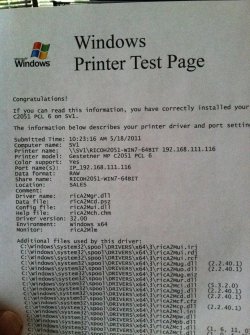
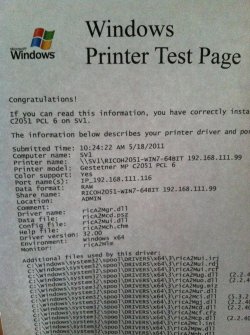
Hi guys, I have a problem that I can't seem to figure out. I have an office and in my test group I have two windows xp machines and two windows 7. I also have two printers on the network that have IP's of .99 and .116.
The two XP machines will print to both without any problems. However, both Windows 7 machines will only print to the .116 printer, even when told specifically to print to the .99. I'm lost as to where to even begin troubleshooting this problem. Any suggestions?
Let me get this straight...
You have an office network (or workgroup) that has two WinXP machines and two Win7 machines in it, and you have two true "network printers" .116 and .99. The two printers are not hosted by any PC, but rather are "self-sufficient network printers" and are simply connected by Ethernet cable directly to the router.
Thus all six devices are connected to your router and all six devices have their own IP addresses.
You can print to either of the .99 or .116 network printers from either of the two WinXP machines, but you can only print to the .116 printer from both Win7 machines. I don't see how you could actually specify printing to .99 and it goes to .116, so that's something you should clarify with a better description of how you're "specifying to print on .99, from what application, etc." and what happens next. Screenshots of the dialog process would be helpful, if relevant and informative.
First, what do you see on your Win7 machines when you do Start -> Devices and Printers? What printers do you have installed, and which one has a green check next to it (showing "default printer")? Again, screenshot would be helpful.
And, for contrast, what do you see on your WinXP machines when you do the same thing?
Do you see BOTH the .99 and .116 printers? If not, then you haven't installed the missing printer properly into Win7, and that's one issue and needs to be addressed.
If you do see BOTH printers, when you right-click on either one, and select "Printing Properties" and then the ABOUT tab, do you see drivers installed? Are they right?
Again, what do you see in WinXP for the equivalent information display? I think WinXP only has "Properties" and "Printing Preferences", whereas Win7 adds a third subset named "Printing Properties"... but you can see pretty much the same information in both environments. Certainly network printers MUST be installed (using TCPIP ports) into both WinXP and Win7, in order to make them available for use. If they're recognized and built-in supported printers in Win7, the drivers should be instantly obtained from the "Driver Store" folder, otherwise you may need to get them from the manufacturer's web site.
I'm still just asking for a bit more information here, since I don't understand how it is possible for you to specify the .99 printer in a printing function (say from WORD) and have it go to a different printer like .116. I'm trying to get a better understanding of what PRINTERS looks like in your Win7 setup right now.
Again, screenshots are worth 1000 words. Comparing the WinXP setup to the Win7 setup