Problem selecting Macrium image files

Bumpkin

New member
Guru
Local time
12:48 PM
Messages
290
Location
Dahlonega, GA
I've been using the imaging built into W7 and it looks like it will restore an image. I have gone as far in the restore process as the last screen before it starts the restore, but I have not actually restored the image.

After seeing the recommendations for Macrium Reflect I started using it also. You can't be too safe! When I boot with the Macrium disk, and I click on my external USB drive, the folder with the W7 files does not show up. The folder is named "Reflect-HP".

I was having a similar problem with my images on XP machines, but I could see the folders containing the Macrium images. When I click on the folder, I get the message "Please select a location containing a valid backup image". But I could put the image I wanted in the root of the external drive and the restore looks like it is ready to work. But that method is not working with W7.

I have updated Macrium free to the latest version and made another boot disk. I saved the .iso file and burned the new boot disk with Imgburn at 4X speed. Still no joy!

Any ideas on what I'm doing wrong?
 

My Computer

Computer Manufacturer/Model Number
HP p6370t
OS
Windows 7 Home Premium 64bit
CPU
i3-530
Motherboard
MSI - IONA
Memory
8 Gb
Graphics Card(s)
onboard
Sound Card
onboard
Monitor(s) Displays
Dell ST2400
Screen Resolution
1920x1080
Hard Drives
Intell 520 SSD 120Gb, WD6400AAKS, 640Gb & WD USB MyBook 1Tb
Internet Speed
1.5 Mmbps, Hughes Satellite
You should have no problems manually browsing to the Macrium image.

Try finding and mounting the images with Windows 7 running. Simply browse to the macrium image and double click on it. You can use explorer to look around the contents of the image. Unmount when finished.

If you cannot mount the image from Windows, start Macrium Reflect and use the image verify tool.
 

My Computer

Computer type
PC/Desktop
Computer Manufacturer/Model Number
Own build
OS
Windows 7x64 Home Premium SP1
CPU
Intel i7 2600k
Motherboard
ASUS P8Z68 Deluxe
Memory
G.Skill Ripjaws (DDR3-1600) 2x4GB
Graphics Card(s)
Nvidia GeForce GTS 450; Intel HD Graphics 3000(GT2+)
Monitor(s) Displays
Dell Ultrasharp IPS panel U2311H, Samsung SyncMaster P2350
Screen Resolution
1920x1080
Hard Drives
Samsung 850 Pro SSD 256GB, Samsung SSD 840 120GB, Seagates 1TB Barracuda ST31000528AS x2
PSU
Seasonic M12II 520W
Case
Lian Li Lancool PC-K60
Cooling
Case: 1x120mm, 3x140mm CPU: Hyper 212+
Keyboard
Logitech MK520 (wireless)
Mouse
Logitech MK520
Internet Speed
6-7 Mbps
Antivirus
Norton Security Premium, Malwarebytes on 2 (MSE on 3rd PC)
Browser
FireFox
Other Info
Audio: Logitech Z523 2.1
Thanks for the reply mjf. There is no problem mounting the image with Windows 7 running, I can select from a list of images in the folder.
But if I replace my hard drive, I can't even find the image files using the boot disk. I have 4 Macrium Linux boot disks, the last one I went to Advanced / Compatibility Mode and still can't find the image. Bummer.
 

My Computer

Computer Manufacturer/Model Number
HP p6370t
OS
Windows 7 Home Premium 64bit
CPU
i3-530
Motherboard
MSI - IONA
Memory
8 Gb
Graphics Card(s)
onboard
Sound Card
onboard
Monitor(s) Displays
Dell ST2400
Screen Resolution
1920x1080
Hard Drives
Intell 520 SSD 120Gb, WD6400AAKS, 640Gb & WD USB MyBook 1Tb
Internet Speed
1.5 Mmbps, Hughes Satellite
Strange. I have had problems myself with the Linux boot CD but those were actually locating the backup drive. Once the backup drive was recognized I had no problems. One thing to remember the drive letters will be different in the Linux environment. Are you sure you are looking in the correct drive?
 

My Computer

Computer type
Laptop
Computer Manufacturer/Model Number
Hewlett-Packard/G62-107SA Notebook
OS
Microsoft Windows 7 Home Premium 64-bit Service Pack 1
CPU
Intel(R) Core(TM) i3 CPU M 330 @ 2.13GHz
Motherboard
Hewlett-Packard 1425
Memory
8 GB DDR3
Graphics Card(s)
Intel(R) HD Graphics
Sound Card
Realtek High Definition Audio
Monitor(s) Displays
Builtin
Screen Resolution
1366 x 768 x 32 bits (4294967296 colors) @ 60 Hz
Hard Drives
250 GB SATA Hard Disk Drive 7200 rpm
2TB Seagate GoFlex USB 2 Drive
1TB Iomega Prestige USB 2 Drive
1.5TB Iomega Prestige USB 2 Drive (Samsung)
2TB WD MyBook Live NAS.
Mouse
Logitech Anywhere MX
Internet Speed
152 Mbs download 10 Mbs upload
Antivirus
Norton 360
Browser
Chrome
Yeah, it's strange, I always see the drive, but sometimes it shows up as E: and other times E:Fords Book. The name of the drive is Fords Book. There are 4 folders on the drive with Macrium images, the boot disk will not let me select or open any of them. Do you think they should be named like a DOS folder, 8 characters and no spaces for Linux to work?
 

My Computer

Computer Manufacturer/Model Number
HP p6370t
OS
Windows 7 Home Premium 64bit
CPU
i3-530
Motherboard
MSI - IONA
Memory
8 Gb
Graphics Card(s)
onboard
Sound Card
onboard
Monitor(s) Displays
Dell ST2400
Screen Resolution
1920x1080
Hard Drives
Intell 520 SSD 120Gb, WD6400AAKS, 640Gb & WD USB MyBook 1Tb
Internet Speed
1.5 Mmbps, Hughes Satellite
Yeah, it's strange, I always see the drive, but sometimes it shows up as E: and other times E:Fords Book. The name of the drive is Fords Book. There are 4 folders on the drive with Macrium images, the boot disk will not let me select or open any of them. Do you think they should be named like a DOS folder, 8 characters and no spaces for Linux to work?

I'm not sure what the Linux naming limitations are but I have had problems with spaces in names. It may be worth a try.
 

My Computer

Computer type
Laptop
Computer Manufacturer/Model Number
Hewlett-Packard/G62-107SA Notebook
OS
Microsoft Windows 7 Home Premium 64-bit Service Pack 1
CPU
Intel(R) Core(TM) i3 CPU M 330 @ 2.13GHz
Motherboard
Hewlett-Packard 1425
Memory
8 GB DDR3
Graphics Card(s)
Intel(R) HD Graphics
Sound Card
Realtek High Definition Audio
Monitor(s) Displays
Builtin
Screen Resolution
1366 x 768 x 32 bits (4294967296 colors) @ 60 Hz
Hard Drives
250 GB SATA Hard Disk Drive 7200 rpm
2TB Seagate GoFlex USB 2 Drive
1TB Iomega Prestige USB 2 Drive
1.5TB Iomega Prestige USB 2 Drive (Samsung)
2TB WD MyBook Live NAS.
Mouse
Logitech Anywhere MX
Internet Speed
152 Mbs download 10 Mbs upload
Antivirus
Norton 360
Browser
Chrome
Hey kado!

I'll give it a try and see what happens.
 

My Computer

Computer Manufacturer/Model Number
HP p6370t
OS
Windows 7 Home Premium 64bit
CPU
i3-530
Motherboard
MSI - IONA
Memory
8 Gb
Graphics Card(s)
onboard
Sound Card
onboard
Monitor(s) Displays
Dell ST2400
Screen Resolution
1920x1080
Hard Drives
Intell 520 SSD 120Gb, WD6400AAKS, 640Gb & WD USB MyBook 1Tb
Internet Speed
1.5 Mmbps, Hughes Satellite
This is beginning to get me down!

I renamed the folder with Macrium images for Windows 7 to 8 characters, that did not work. I copied a image file to a new folder, same result.

It seems Macrium boot disk does not even see the folders created in Windows 7, and it won't open the folders made on three other XP machines.

I think I will look for another free imaging program to use with Windows 7.
 

My Computer

Computer Manufacturer/Model Number
HP p6370t
OS
Windows 7 Home Premium 64bit
CPU
i3-530
Motherboard
MSI - IONA
Memory
8 Gb
Graphics Card(s)
onboard
Sound Card
onboard
Monitor(s) Displays
Dell ST2400
Screen Resolution
1920x1080
Hard Drives
Intell 520 SSD 120Gb, WD6400AAKS, 640Gb & WD USB MyBook 1Tb
Internet Speed
1.5 Mmbps, Hughes Satellite
I'm out of ideas. I'll see if anyone else has any.
 

My Computer

Computer type
Laptop
Computer Manufacturer/Model Number
Hewlett-Packard/G62-107SA Notebook
OS
Microsoft Windows 7 Home Premium 64-bit Service Pack 1
CPU
Intel(R) Core(TM) i3 CPU M 330 @ 2.13GHz
Motherboard
Hewlett-Packard 1425
Memory
8 GB DDR3
Graphics Card(s)
Intel(R) HD Graphics
Sound Card
Realtek High Definition Audio
Monitor(s) Displays
Builtin
Screen Resolution
1366 x 768 x 32 bits (4294967296 colors) @ 60 Hz
Hard Drives
250 GB SATA Hard Disk Drive 7200 rpm
2TB Seagate GoFlex USB 2 Drive
1TB Iomega Prestige USB 2 Drive
1.5TB Iomega Prestige USB 2 Drive (Samsung)
2TB WD MyBook Live NAS.
Mouse
Logitech Anywhere MX
Internet Speed
152 Mbs download 10 Mbs upload
Antivirus
Norton 360
Browser
Chrome
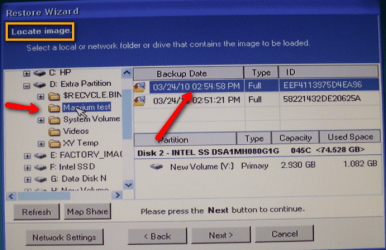
Did you click on the + sign in front of the Disk and then on the + sign in front of the folder as shown in the picture.

Note1: this is a picture of a test I made - yours may look slightly different
Note2: The lettering for the disks during recovery does not always match the original lettering in Win7. E.g. your "F" disk may end up as "D".
 

Attachments

  • 2010-03-25_1803.png
    2010-03-25_1803.png
    640.6 KB · Views: 7

My Computer

Computer Manufacturer/Model Number
HP, Dell, Gateway, Toshiba - 4 laptops and 2 desktops
OS
Vista, Windows7, Mint Mate, Zorin, Windows 8
CPU
from 1.6GHz Duo to i7
Monitor(s) Displays
2x HP w2207
Hard Drives
5x HDD, 7x SSD, 12x Externals
Keyboard
with trackball - no mices
Mouse
Trackball mice
Internet Speed
DSL 6000
Did you click on the + sign in front of the Disk and then on the + sign in front of the folder as shown in the picture.

Note1: this is a picture of a test I made - yours may look slightly different
Note2: The lettering for the disks during recovery does not always match the original lettering in Win7. E.g. your "F" disk may end up as "D".

Thank's for jumping in Wolfgang. It's a while since I used the Linux disk.
 

My Computer

Computer type
Laptop
Computer Manufacturer/Model Number
Hewlett-Packard/G62-107SA Notebook
OS
Microsoft Windows 7 Home Premium 64-bit Service Pack 1
CPU
Intel(R) Core(TM) i3 CPU M 330 @ 2.13GHz
Motherboard
Hewlett-Packard 1425
Memory
8 GB DDR3
Graphics Card(s)
Intel(R) HD Graphics
Sound Card
Realtek High Definition Audio
Monitor(s) Displays
Builtin
Screen Resolution
1366 x 768 x 32 bits (4294967296 colors) @ 60 Hz
Hard Drives
250 GB SATA Hard Disk Drive 7200 rpm
2TB Seagate GoFlex USB 2 Drive
1TB Iomega Prestige USB 2 Drive
1.5TB Iomega Prestige USB 2 Drive (Samsung)
2TB WD MyBook Live NAS.
Mouse
Logitech Anywhere MX
Internet Speed
152 Mbs download 10 Mbs upload
Antivirus
Norton 360
Browser
Chrome
No problem Keith - I just saw the thread a little while ago.
 

My Computer

Computer Manufacturer/Model Number
HP, Dell, Gateway, Toshiba - 4 laptops and 2 desktops
OS
Vista, Windows7, Mint Mate, Zorin, Windows 8
CPU
from 1.6GHz Duo to i7
Monitor(s) Displays
2x HP w2207
Hard Drives
5x HDD, 7x SSD, 12x Externals
Keyboard
with trackball - no mices
Mouse
Trackball mice
Internet Speed
DSL 6000
Thanks for jumping in whs. I understand how Macrium is supposed to work.
I can find the external drive, but no folders created in Windows 7 show up. There are 3 folders created by Macrium on XP machines, but when clicking on the + icon or double clicking they don't open. The XP machines can't open the folders either. I had to put the image file in the root of the drive to restore with XP, but that does not work with Windows 7.

I took a look at the security permissions on the folders but didn't really know what I was looking for. Would they carry over to a Linux disk?
 

My Computer

Computer Manufacturer/Model Number
HP p6370t
OS
Windows 7 Home Premium 64bit
CPU
i3-530
Motherboard
MSI - IONA
Memory
8 Gb
Graphics Card(s)
onboard
Sound Card
onboard
Monitor(s) Displays
Dell ST2400
Screen Resolution
1920x1080
Hard Drives
Intell 520 SSD 120Gb, WD6400AAKS, 640Gb & WD USB MyBook 1Tb
Internet Speed
1.5 Mmbps, Hughes Satellite
Puzzling - so the images are there and you can mount them by double clicking - right. But how did this folder in which they are get created. Did you make this folder?

If not, create a folder on the external disk yourself and copy one of the images into it. Then see what happens.
 

My Computer

Computer Manufacturer/Model Number
HP, Dell, Gateway, Toshiba - 4 laptops and 2 desktops
OS
Vista, Windows7, Mint Mate, Zorin, Windows 8
CPU
from 1.6GHz Duo to i7
Monitor(s) Displays
2x HP w2207
Hard Drives
5x HDD, 7x SSD, 12x Externals
Keyboard
with trackball - no mices
Mouse
Trackball mice
Internet Speed
DSL 6000
Puzzling - so the images are there and you can mount them by double clicking - right.
No. The folders made with Windows 7 don't appear in the tree on the boot disk. Folders made with XP are visible, but will not open.

But how did this folder in which they are get created. Did you make this folder?

I made the folder before starting the backup image.

If not, create a folder on the external disk yourself and copy one of the images into it. Then see what happens.
I already tried making a new folder and moved a image file into it.

When I get a chance, I will create a new folder with Macrium and make a new image in that folder.
 

My Computer

Computer Manufacturer/Model Number
HP p6370t
OS
Windows 7 Home Premium 64bit
CPU
i3-530
Motherboard
MSI - IONA
Memory
8 Gb
Graphics Card(s)
onboard
Sound Card
onboard
Monitor(s) Displays
Dell ST2400
Screen Resolution
1920x1080
Hard Drives
Intell 520 SSD 120Gb, WD6400AAKS, 640Gb & WD USB MyBook 1Tb
Internet Speed
1.5 Mmbps, Hughes Satellite
so the images are there and you can mount them by double clicking - right.
No. The folders made with Windows 7 don't appear in the tree on the boot disk. Folders made with XP are visible, but will not open.

My question was a bit different. When you open the folder from withing Win7, the images are there or not. And if you double click on one of the images, does it mount (is the a VHD in My Computer).
 

My Computer

Computer Manufacturer/Model Number
HP, Dell, Gateway, Toshiba - 4 laptops and 2 desktops
OS
Vista, Windows7, Mint Mate, Zorin, Windows 8
CPU
from 1.6GHz Duo to i7
Monitor(s) Displays
2x HP w2207
Hard Drives
5x HDD, 7x SSD, 12x Externals
Keyboard
with trackball - no mices
Mouse
Trackball mice
Internet Speed
DSL 6000
Based on my earlier question it was my understanding that you could browse to your images from within Windows 7 but not the linux boot disk. Is this correct?

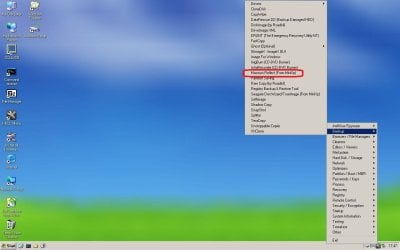
If so then we can test potential linux boot disk issues by accessing the images through Hirens Boot CD. Download and burn a DVD which will boot
Download Hiren
Then start up the inbuilt Macrium like shown here
Clipboard01.jpg
Clipboard02.jpg
You should be able to browse to and mount the images just like in windows.
More importantly you should be able to restore them.

Edit: The Macrium Relect included should be viewed as a fully functioning utility not simply some diagnostic program. It's far more capable than the simple linux boot disk.
 
Last edited:

My Computer

Computer type
PC/Desktop
Computer Manufacturer/Model Number
Own build
OS
Windows 7x64 Home Premium SP1
CPU
Intel i7 2600k
Motherboard
ASUS P8Z68 Deluxe
Memory
G.Skill Ripjaws (DDR3-1600) 2x4GB
Graphics Card(s)
Nvidia GeForce GTS 450; Intel HD Graphics 3000(GT2+)
Monitor(s) Displays
Dell Ultrasharp IPS panel U2311H, Samsung SyncMaster P2350
Screen Resolution
1920x1080
Hard Drives
Samsung 850 Pro SSD 256GB, Samsung SSD 840 120GB, Seagates 1TB Barracuda ST31000528AS x2
PSU
Seasonic M12II 520W
Case
Lian Li Lancool PC-K60
Cooling
Case: 1x120mm, 3x140mm CPU: Hyper 212+
Keyboard
Logitech MK520 (wireless)
Mouse
Logitech MK520
Internet Speed
6-7 Mbps
Antivirus
Norton Security Premium, Malwarebytes on 2 (MSE on 3rd PC)
Browser
FireFox
Other Info
Audio: Logitech Z523 2.1
whs, sorry I misunderstood what you wanted. If I click on the image file while in Windows 7, it opens and I can explore the contents.

mjf, I'll try downloading Hiren tomorrow and see what happens.

Thanks guys for the help, I'm about done for today!
 

My Computer

Computer Manufacturer/Model Number
HP p6370t
OS
Windows 7 Home Premium 64bit
CPU
i3-530
Motherboard
MSI - IONA
Memory
8 Gb
Graphics Card(s)
onboard
Sound Card
onboard
Monitor(s) Displays
Dell ST2400
Screen Resolution
1920x1080
Hard Drives
Intell 520 SSD 120Gb, WD6400AAKS, 640Gb & WD USB MyBook 1Tb
Internet Speed
1.5 Mmbps, Hughes Satellite
Back
Top