
Problem Steps Recorder

How to Use Problem Steps Recorder in Windows 7

   Information
You can use Problem Steps Recorder to automatically capture the steps you take in Windows 7, including a text description of where you clicked and a screen shot during each click. Once you capture these steps, you can save them to a .zip file containing a .mht (MHTML) file of them. This file can then be used by a support professional or someone else helping you with a computer problem. If you like you can use it as a sort of Slide Show type demo to.
   Note
When you record steps on your computer, anything you type will not be recorded. If what you type is an important part of recreating the problem you're trying to solve, use the Add Comment button (step 6) while recording to add text to highlight where the problem is occurring.
   Warning
Some programs, like a full-screen game, might not be captured accurately.


Here's How:
1. Open the Start Menu.

2. In the search line, type psr.exe and press Enter. (See screenshot below)
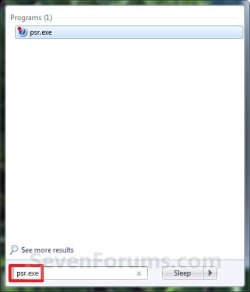
Start_Menu.jpg
3. To Adjust the Settings
A) Click the help down arrow, and then click on Settings. (See screenshot below)
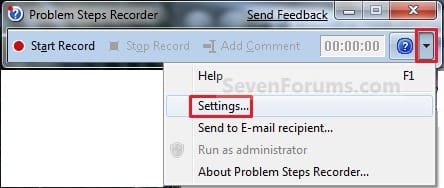
Settings1.jpg

B) You can change the following settings for Problem Steps Recorder: (See screenshot below)
  • Output Location - To make it easier to find the files you save, click the Browse button to set a default location for the Problem Steps Recorder files.
  • Enable screen capture - If you don't want to capture the screen shots along with the click information, select No. This might be a consideration if you are taking screen shots of a program that contains personal information, such as bank statements, and you are sharing the screen shots with someone else.
  • Number of recent screen captures to store - While the default is 25 screens, you can increase or decrease the number of screen shots. Problem Steps Recorder only records the default number of screen shots. For example, if you took 30 screen shots during a recording but only had 25 screen shots as the default, you would be missing the first five screen shots. In this case, you would want to increase the number of default screen shots.
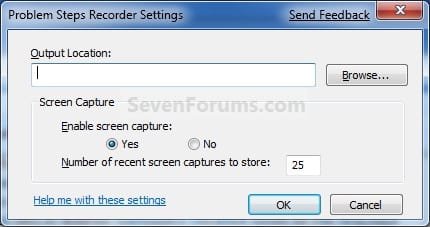
C) When done, click on OK. (See screenshot below)
Settings.jpg
4. To Start Recording Screenshots
A) When ready to record, click on the Start Record button. (See screenshot below)

2742d1231923168-problem-steps-recorder-recorder.jpg

5. On your computer, go through the steps to reproduce the problem. You can pause the recording at any time, and then resume it later.
NOTE: As you click screenshots are being recorded. You will see a red dot while you click to indicate this.

6. To Add a Comment
A) Click on the Add Comment button. (See screenshot below)
2743d1231923168-problem-steps-recorder-recorder2.jpg

B) Use your mouse to highlight the part of the screen that you want to comment on, type your text in the Highlight Problem and Comment box, and then click OK. (See screenshot below)
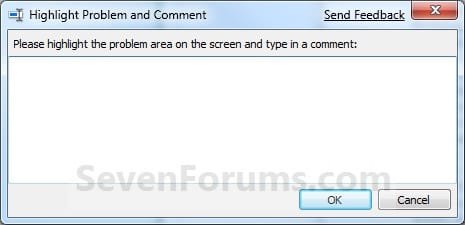
Add_Comment.jpg
7. To Stop Recording
A) When you are done recording, click on the Stop Record button. (See screenshot below)
2743d1231923168-problem-steps-recorder-recorder2.jpg

8. To Save the Recording
A) In the Save As dialog box, navigate to where you want to save the .zip file containing the .mht (MHTML) file of your recording. Type in a name for the file, and then click on Save. (See screenshot below)
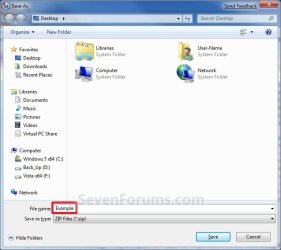
Save.jpg
9. When done close the Problem Steps Recorder window. (See screenshot below)
2742d1231923168-problem-steps-recorder-recorder.jpg

That's it,
Shawn


Attachments

  • Recorder.jpg
    Recorder.jpg
    7.7 KB · Views: 9,497
  • Recorder2.jpg
    Recorder2.jpg
    8.7 KB · Views: 9,419
Last edited:
You're welcome Nizaradil, and welcome to Seven Forums. :)

Shawn
 

My Computer

Computer type
PC/Desktop
Computer Manufacturer/Model Number
Self built custom
OS
64-bit Windows 11 Pro for Workstations
CPU
Intel i7-8700K OC'd to 5 GHz
Motherboard
ASUS ROG Maximus XI Formula Z390
Memory
64 GB (4x16GB) G.SKILL TridentZ RGB DDR4 3600 MHz
Graphics Card(s)
ASUS ROG-STRIX-GTX1080TI-O11G-GAMING
Sound Card
Integrated
Monitor(s) Displays
2 x Samsung Odyssey G7 27"
Screen Resolution
2560x1440
Hard Drives
1TB Samsung 990 PRO M.2,
4TB Samsung 990 PRO PRO M.2,
TerraMaster F8 SSD Plus NAS
PSU
Seasonic Prime Titanium 850W
Case
Thermaltake Core P3
Cooling
Corsair Hydro H115i
Keyboard
Logitech wireless K800
Mouse
Logitech MX Master 4
Internet Speed
2 Gb/s Download and 100 Mb/s Upload
Antivirus
Malwarebyte Anti-Malware Premium
Browser
Google Chrome
Other Info
Logitech Z625 speaker system,
Logitech BRIO 4K Pro webcam,
HP Color LaserJet Pro MFP M477fdn,
APC SMART-UPS RT 1000 XL - SURT1000XLI,
Galaxy S23 Plus phone
Wow! Thanks for sharing Brink! This thing could also be used to make great PC Guides or tutorials! The thing PWNS!
 

My Computer

Computer type
PC/Desktop
Computer Manufacturer/Model Number
Multirama PC Expert [Bulgaria]
OS
Windows 7 Home Premium [64-Bit]
CPU
Intel Core 2 Quad CPU Q8200 @ 2.33 GHz
Motherboard
GIGABYTE GA-G31M-S2C
Memory
4094 MB DDR2
Graphics Card(s)
SAPPHIRE Radeon HD 6970 (2 GB VRAM)
Sound Card
Realtek ALC883 @ Intel 82801GB ICH7 - High Definition Audio
Monitor(s) Displays
Samsung SyncMaster BX2235 [21.5" LCD with LED Backlight]
Screen Resolution
1920x1080
Hard Drives
Hitachi HDT721075SLA360 - 750 GB
PSU
Cooler Master GX750 - 750W
Case
Multirama (Black / 2010 Revision)
Cooling
Stock + Cooler Master
Keyboard
Logitech G510 (Gaming Keyboard)
Mouse
Razer Lachesis (4000 DPI, Blue Version)
Internet Speed
Vivacom Optical [100 Mbps]
Browser
Chrome [Windows]
You're welcome DW. :)
 

My Computer

Computer type
PC/Desktop
Computer Manufacturer/Model Number
Self built custom
OS
64-bit Windows 11 Pro for Workstations
CPU
Intel i7-8700K OC'd to 5 GHz
Motherboard
ASUS ROG Maximus XI Formula Z390
Memory
64 GB (4x16GB) G.SKILL TridentZ RGB DDR4 3600 MHz
Graphics Card(s)
ASUS ROG-STRIX-GTX1080TI-O11G-GAMING
Sound Card
Integrated
Monitor(s) Displays
2 x Samsung Odyssey G7 27"
Screen Resolution
2560x1440
Hard Drives
1TB Samsung 990 PRO M.2,
4TB Samsung 990 PRO PRO M.2,
TerraMaster F8 SSD Plus NAS
PSU
Seasonic Prime Titanium 850W
Case
Thermaltake Core P3
Cooling
Corsair Hydro H115i
Keyboard
Logitech wireless K800
Mouse
Logitech MX Master 4
Internet Speed
2 Gb/s Download and 100 Mb/s Upload
Antivirus
Malwarebyte Anti-Malware Premium
Browser
Google Chrome
Other Info
Logitech Z625 speaker system,
Logitech BRIO 4K Pro webcam,
HP Color LaserJet Pro MFP M477fdn,
APC SMART-UPS RT 1000 XL - SURT1000XLI,
Galaxy S23 Plus phone
Thanks Brink for this one.
I used the recorder for the first time yesterday. I am having problems with one of my many fantasy football games. I struggled to use it but got it done and sent it as feedback to said fantasy site. Got a email back last night saying thanks costumer service is looking at this. Today I logged in and big sign says, site down due to maintenance. I think my feedback worked. Came here to find out if you had a tut for the recorder and next time I will be able to refine my recording. One question, is this available in all editions of Seven? :) Larry
 
Last edited:

My Computer

Computer Manufacturer/Model Number
Gateway GT5692
OS
Windows 7 Ulti. x64
CPU
AMD Phenom 8450 triple-core 2.10 ghz
Memory
4GB
Graphics Card(s)
ATI Radion HD 3200
Monitor(s) Displays
Gateway FPD1775W
Screen Resolution
1280x720
Hard Drives
465.6613 Gibibytes
Hello Larry,

I'm happy to hear that it helped you out. Yes, it's available in all editions of Windows 7. :)
 

My Computer

Computer type
PC/Desktop
Computer Manufacturer/Model Number
Self built custom
OS
64-bit Windows 11 Pro for Workstations
CPU
Intel i7-8700K OC'd to 5 GHz
Motherboard
ASUS ROG Maximus XI Formula Z390
Memory
64 GB (4x16GB) G.SKILL TridentZ RGB DDR4 3600 MHz
Graphics Card(s)
ASUS ROG-STRIX-GTX1080TI-O11G-GAMING
Sound Card
Integrated
Monitor(s) Displays
2 x Samsung Odyssey G7 27"
Screen Resolution
2560x1440
Hard Drives
1TB Samsung 990 PRO M.2,
4TB Samsung 990 PRO PRO M.2,
TerraMaster F8 SSD Plus NAS
PSU
Seasonic Prime Titanium 850W
Case
Thermaltake Core P3
Cooling
Corsair Hydro H115i
Keyboard
Logitech wireless K800
Mouse
Logitech MX Master 4
Internet Speed
2 Gb/s Download and 100 Mb/s Upload
Antivirus
Malwarebyte Anti-Malware Premium
Browser
Google Chrome
Other Info
Logitech Z625 speaker system,
Logitech BRIO 4K Pro webcam,
HP Color LaserJet Pro MFP M477fdn,
APC SMART-UPS RT 1000 XL - SURT1000XLI,
Galaxy S23 Plus phone

My Computer

Computer Manufacturer/Model Number
ASUS
OS
windows 7 ULTIMATE 64 BITS
CPU
AMD ATHLON II 620X4 QUAD CORE 2,60 GHZ
Motherboard
ASUS M4A78 PRO
Memory
MUSHKIN ESSENTIAL DDR2 8 GB
Graphics Card(s)
ATI RADEON HD 4650 1 GB
Sound Card
REALTEK HD
Monitor(s) Displays
SAMSUNG SYNCMASTER 2032 BW
Screen Resolution
1680X1050
Hard Drives
Seagate Barracuda 7.200 750 GB
Cooling
SCYTHE KATANA III
Keyboard
LOGITECH G15 GAMMING
Mouse
LOGITECH G9
Internet Speed
20 MB
Thought I'd stop by to say "Thanks for another excellent tutorial!"
I'll be sure to link some future posts to here :)
 

My Computer

OS
XP Pro/Vista Ultimate (64)/Windows 7 Ultimate Signature Edition(64)
CPU
Core 2 Duo E8500 @ stock
Motherboard
Gigabyte EP45-UD3R
Memory
8Gb (4 X 2Gb) Corsair Dominator 1066Mhz DDR2
Graphics Card(s)
XFX ATI Radeon 4870 1Gb
Sound Card
Onboard 7.1
Monitor(s) Displays
BenQ E2200Hd, Asus VW161D, HP L1506
Screen Resolution
1920 X 1080
Hard Drives
Seagate 7200.12 500Gb
2 X Hitachi 1Tb
PSU
CoolerMaster 650 EPD
Case
Thermaltake
Cooling
2 X Noctua 120mm's, Stock Intel
Keyboard
Logitech
Mouse
Logitech
You're most welcome Orpheous. Thank you. :)
 

My Computer

Computer type
PC/Desktop
Computer Manufacturer/Model Number
Self built custom
OS
64-bit Windows 11 Pro for Workstations
CPU
Intel i7-8700K OC'd to 5 GHz
Motherboard
ASUS ROG Maximus XI Formula Z390
Memory
64 GB (4x16GB) G.SKILL TridentZ RGB DDR4 3600 MHz
Graphics Card(s)
ASUS ROG-STRIX-GTX1080TI-O11G-GAMING
Sound Card
Integrated
Monitor(s) Displays
2 x Samsung Odyssey G7 27"
Screen Resolution
2560x1440
Hard Drives
1TB Samsung 990 PRO M.2,
4TB Samsung 990 PRO PRO M.2,
TerraMaster F8 SSD Plus NAS
PSU
Seasonic Prime Titanium 850W
Case
Thermaltake Core P3
Cooling
Corsair Hydro H115i
Keyboard
Logitech wireless K800
Mouse
Logitech MX Master 4
Internet Speed
2 Gb/s Download and 100 Mb/s Upload
Antivirus
Malwarebyte Anti-Malware Premium
Browser
Google Chrome
Other Info
Logitech Z625 speaker system,
Logitech BRIO 4K Pro webcam,
HP Color LaserJet Pro MFP M477fdn,
APC SMART-UPS RT 1000 XL - SURT1000XLI,
Galaxy S23 Plus phone
Thanks for the explanation of what it is for and does.

Tried to rep on your Post #1 typed in a message but then I a got message Rep not allowed on this post. :(

Mike
 

Attachments

  • Rep denied..PNG
    Rep denied..PNG
    1.2 KB · Views: 262

My Computer

Computer Manufacturer/Model Number
Hopalong/ Godzilla
OS
Windows7 Pro 64bit SP-1; Windows XP Pro 32bit
CPU
Intel Core i7-870 Lynnfield 2.93GHz LGA 1156 95W Quad-Core
Motherboard
ASUS P7P55D-E PRO
Memory
8GB@1400MHz Crucial Ballistix DDR3-1600 4x2GB
Graphics Card(s)
ASUS ENGTX460 DirectCU/2DI/1GD5 1GB 256-bit GDDR5
Sound Card
VIA Onboard
Monitor(s) Displays
Asus VS248H-P 24"; Samsung SyncMaster 941BW 19"ws
Screen Resolution
1920x1080; 1440x900
Hard Drives
Samsung 830 120GB SSD
Intel 320 120GB SSD
Western Digital Caviar Black WD7501AALS 750GB 7200 RPM SATA 3.0Gb/s
Western Digital Caviar Black WD6401AALS 640GB 7200 RPM SATA 3.0Gb/s
PSU
COOLER MASTER Silent Pro RS850-AMBAJ3-US 850W Modular
Case
COOLER MASTER HAF 932 RC-932-KKN5-GP Black
Cooling
Scythe "Mugen-2 Rev.B" (2 ScytheKaze-Jyuni PWM fans)
Keyboard
Logitech K-320
Mouse
Kensington
Antivirus
Avast Inernet Suite
Browser
IE 9 ; Chrome
Thank you Mike. That's ok. No rep needed. :)
 

My Computer

Computer type
PC/Desktop
Computer Manufacturer/Model Number
Self built custom
OS
64-bit Windows 11 Pro for Workstations
CPU
Intel i7-8700K OC'd to 5 GHz
Motherboard
ASUS ROG Maximus XI Formula Z390
Memory
64 GB (4x16GB) G.SKILL TridentZ RGB DDR4 3600 MHz
Graphics Card(s)
ASUS ROG-STRIX-GTX1080TI-O11G-GAMING
Sound Card
Integrated
Monitor(s) Displays
2 x Samsung Odyssey G7 27"
Screen Resolution
2560x1440
Hard Drives
1TB Samsung 990 PRO M.2,
4TB Samsung 990 PRO PRO M.2,
TerraMaster F8 SSD Plus NAS
PSU
Seasonic Prime Titanium 850W
Case
Thermaltake Core P3
Cooling
Corsair Hydro H115i
Keyboard
Logitech wireless K800
Mouse
Logitech MX Master 4
Internet Speed
2 Gb/s Download and 100 Mb/s Upload
Antivirus
Malwarebyte Anti-Malware Premium
Browser
Google Chrome
Other Info
Logitech Z625 speaker system,
Logitech BRIO 4K Pro webcam,
HP Color LaserJet Pro MFP M477fdn,
APC SMART-UPS RT 1000 XL - SURT1000XLI,
Galaxy S23 Plus phone
Does anyone know how to change my settings to only record one of my three screens in PSR?
 

My Computer

Computer type
Laptop
Computer Manufacturer/Model Number
Dell
OS
Windows7
Back
Top

